
In today’s dynamic business landscape, effective financial management is not merely a task but a strategic imperative. For small to medium-sized businesses, sole proprietors, and even individuals looking to organize personal finances with a professional touch, QuickBooks has emerged as an industry-standard solution. Its robust features streamline complex accounting processes, offer real-time financial insights, and empower users to make informed decisions that drive growth and stability. The question, “How can I learn QuickBooks?”, therefore, transcends a simple query about software proficiency; it represents a commitment to financial empowerment and operational excellence. This guide will delve into the multifaceted journey of mastering QuickBooks, framing it firmly within the context of robust financial management and strategic business acumen.
The Indispensable Role of QuickBooks in Modern Business Finance
QuickBooks isn’t just an accounting program; it’s a comprehensive financial ecosystem designed to simplify, automate, and centralize an array of critical financial tasks. Understanding its pivotal role is the first step toward appreciating the value of learning it. For any entity striving for financial health and sustainable growth, QuickBooks offers unparalleled capabilities that transform tedious manual processes into efficient, insightful operations.
Streamlining Core Accounting Processes
At its heart, QuickBooks excels at automating fundamental accounting functions. This includes recording transactions, categorizing expenses, reconciling bank accounts, and managing general ledger entries. By bringing these disparate tasks under one digital roof, businesses can significantly reduce human error, save valuable time, and ensure consistency in their financial records. The software’s intuitive interface, even in its most advanced versions, is designed to demystify double-entry bookkeeping, making sophisticated accounting principles accessible to non-accountants. This streamlined approach frees up resources that can be redirected towards revenue-generating activities or strategic planning, directly impacting the bottom line.
Gaining Real-time Financial Clarity
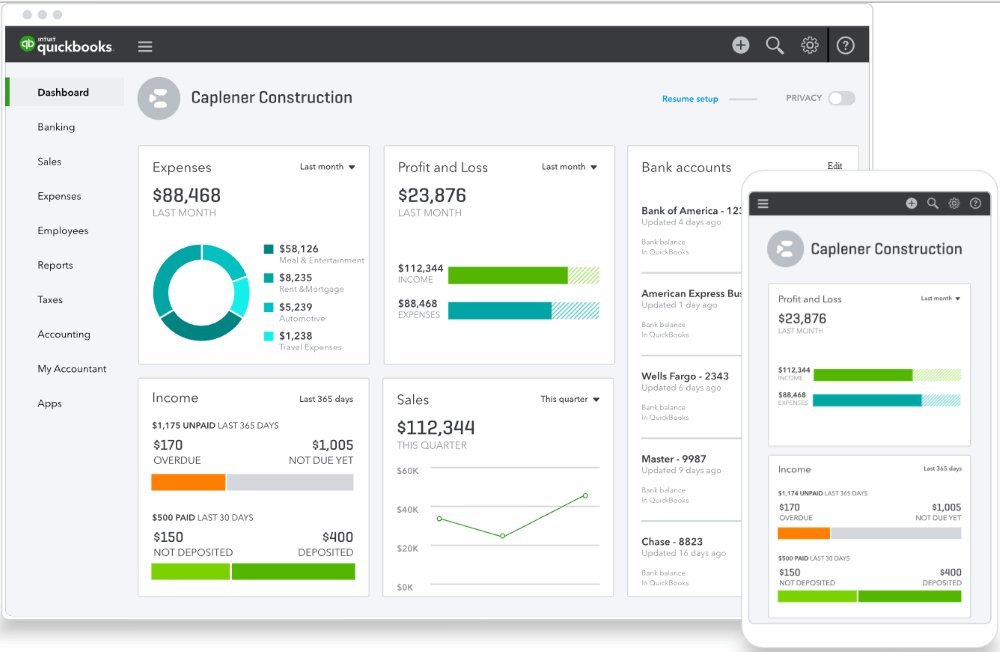
One of QuickBooks’ most powerful attributes is its ability to provide instant access to up-to-the-minute financial data. Imagine knowing your current cash flow, outstanding invoices, or monthly expenses at a glance, rather than waiting for an accountant to compile quarterly reports. This real-time visibility is invaluable for proactive financial management. It allows business owners to quickly identify trends, spot potential issues like declining sales or rising costs, and react promptly. This immediate clarity is crucial for managing working capital, making purchasing decisions, and ensuring that the business remains agile in response to market changes or unforeseen challenges.
Empowering Strategic Business Decisions
Beyond mere record-keeping, learning QuickBooks equips you with the tools to transform raw financial data into actionable insights. The software’s reporting features are extensive, offering customized Profit & Loss statements, Balance Sheets, Cash Flow statements, and more. By understanding how to generate and interpret these reports, users can analyze performance, assess profitability by product or service, monitor departmental expenses, and evaluate the overall financial health of their enterprise. This analytical capability is not just about understanding the past; it’s about forecasting the future, setting realistic budgets, identifying opportunities for expansion or cost reduction, and ultimately, making strategic decisions grounded in solid financial data.
Navigating Your Learning Path: Diverse Avenues to QuickBooks Mastery
The journey to QuickBooks proficiency is flexible, offering multiple pathways to accommodate different learning styles, budgets, and schedules. The key is to select a method, or combination of methods, that best aligns with your goals and existing knowledge base.
Structured Online Courses and Certifications
For those who prefer a guided, comprehensive approach, structured online courses are an excellent starting point. Platforms like Udemy, Coursera, LinkedIn Learning, and even QuickBooks’ own training portals offer courses ranging from beginner basics to advanced features. Many of these courses are taught by certified QuickBooks ProAdvisors or experienced accountants, providing a professional and thorough curriculum. Completing a certification program, such as the QuickBooks Certified User (QBCU) or Intuit’s ProAdvisor certification, not only validates your skills but can also enhance your professional credibility, opening doors to new career opportunities in bookkeeping and financial services. These programs often include practical exercises, quizzes, and even simulated environments to ensure hands-on experience.
Hands-on Practice with the Software Itself
The most effective way to learn any software is through direct interaction. QuickBooks offers free trial versions of its desktop and online products, which provide an invaluable sandbox for experimentation. Set up a dummy company, input fictitious transactions, generate reports, and explore every menu option. Don’t be afraid to make mistakes; that’s part of the learning process. The more time you spend navigating the interface, creating invoices, entering bills, and reconciling accounts, the more comfortable and confident you will become. Consider using your own personal finances or a mock business scenario to make the practice more relevant and engaging.
Leveraging Official Intuit Resources and Communities
Intuit, the creator of QuickBooks, provides a wealth of free resources designed to support users. Their official website features extensive knowledge bases, FAQs, and step-by-step tutorials for various features and common tasks. The QuickBooks Community Forum is another vital resource, offering a platform where users can ask questions, share tips, and learn from the collective experience of a vast user base. Engaging with these official channels ensures you are receiving accurate and up-to-date information directly from the source. Additionally, subscribing to Intuit’s newsletters or following their social media channels can keep you informed about new features, updates, and best practices.
Mentorship and Professional Guidance
For more personalized learning, consider seeking guidance from a QuickBooks ProAdvisor or an experienced accountant. A mentor can provide tailored advice, clarify complex concepts, and help you navigate specific financial scenarios relevant to your business. This one-on-one support can be particularly beneficial when dealing with advanced features, industry-specific customizations, or troubleshooting tricky financial discrepancies. While this option may involve an investment, the value of personalized insight and accelerated learning can be significant, potentially saving you from costly errors down the line.
Essential QuickBooks Features for Robust Financial Health
Mastering QuickBooks involves understanding and effectively utilizing its core functionalities. Each feature is designed to address a specific aspect of financial management, collectively contributing to a holistic view of your financial standing.
Efficient Income and Expense Tracking
At the foundation of sound financial management is meticulous income and expense tracking. QuickBooks allows you to record all incoming revenue and outgoing expenditures with precision. This includes connecting bank accounts and credit cards for automatic transaction downloads, categorizing expenses to align with tax requirements (e.g., office supplies, travel, utilities), and tracking income from various sources. Proper categorization is paramount for accurate financial reporting and maximizing tax deductions, directly impacting your business’s profitability.
Seamless Invoicing and Accounts Receivable Management
Cash flow is the lifeblood of any business, and timely collection of receivables is critical. QuickBooks simplifies the invoicing process, allowing you to create professional, customized invoices quickly. You can track unpaid invoices, send automated payment reminders, and even accept online payments directly through the platform. This not only improves cash flow but also reduces administrative overhead and enhances customer experience by offering convenient payment options. Understanding your Accounts Receivable aging report helps identify overdue payments and prioritize collection efforts, safeguarding your liquidity.
Simplified Payroll and Contractor Payments
Managing payroll can be one of the most complex and compliance-heavy aspects of business finance. QuickBooks offers integrated payroll solutions that automate calculations for wages, taxes, and deductions, ensuring accuracy and compliance with tax regulations. For businesses working with contractors, it streamlines 1099 reporting. This feature significantly reduces the administrative burden of payroll, minimizes the risk of penalties due to errors, and ensures employees and contractors are paid accurately and on time, contributing to employee satisfaction and legal compliance.
Comprehensive Financial Reporting and Analysis
The ability to generate insightful financial reports is where QuickBooks truly shines as a financial management tool. Beyond basic Profit & Loss and Balance Sheet reports, it offers customizable reports for sales by customer, expense by vendor, inventory valuation, and more. Learning to customize and interpret these reports allows you to identify key performance indicators (KPIs), assess business profitability, analyze spending patterns, and make data-driven decisions. This analytical capability is indispensable for strategic planning, budgeting, and forecasting future financial performance.
Inventory Management and Purchase Orders
For product-based businesses, effective inventory management is crucial for controlling costs and optimizing sales. QuickBooks helps track inventory levels, manage stock adjustments, and generate purchase orders when stock runs low. It can also calculate the cost of goods sold (COGS) and track profitability per item. Accurate inventory management prevents stockouts that lead to lost sales, avoids overstocking that ties up capital, and provides a clear picture of your most profitable products, directly impacting your bottom line.
Maximizing Your Investment: Beyond Basic Bookkeeping
Learning QuickBooks is an ongoing process. As your financial understanding deepens and your business evolves, exploring its more advanced functionalities can unlock even greater value and sophistication in your financial management practices.
Integrating with Other Financial Tools
QuickBooks is designed to integrate seamlessly with a vast ecosystem of third-party applications, ranging from payment processors and e-commerce platforms to CRM systems and time-tracking software. Leveraging these integrations can create a fully synchronized financial workflow, eliminating redundant data entry, improving accuracy, and providing a holistic view of your business operations. For example, connecting your e-commerce store means sales data automatically flows into QuickBooks, simplifying sales tax calculations and inventory updates. Understanding how to select and implement these integrations can significantly enhance efficiency and streamline your overall financial operations.
Preparing for Tax Season with Confidence
One of the most appreciated benefits of using QuickBooks is its ability to simplify tax preparation. By meticulously categorizing income and expenses throughout the year, generating accurate financial reports at tax time becomes straightforward. The software can produce reports like the Profit & Loss statement, which is essential for filing business taxes, and can also help compile information for Schedule C for sole proprietors or specific tax forms for other business structures. Learning how to properly set up tax categories and run relevant reports will significantly reduce the stress and cost associated with tax season, allowing for more precise filings and potential tax savings.
Scaling Your Business with Advanced Features
As businesses grow, their financial complexities increase. QuickBooks offers advanced features tailored for scaling. This includes capabilities for managing multiple currencies, tracking projects with job costing, creating budgets and forecasts, and managing classes for different departments or locations. Mastering these advanced functionalities enables businesses to maintain granular financial control even as they expand, providing the insights needed to manage complex operations, allocate resources effectively, and sustain profitable growth. This foresight is invaluable for strategic expansion, new product launches, or entering new markets.
Common Pitfalls and Best Practices for Learning QuickBooks
While the journey to QuickBooks mastery is rewarding, it’s not without potential challenges. Being aware of common pitfalls and adopting best practices can significantly enhance your learning experience and long-term proficiency.
Avoiding Information Overload
QuickBooks is a powerful tool with numerous features, which can initially feel overwhelming. A common mistake is trying to learn everything at once. Instead, adopt a phased approach. Start with the core functionalities relevant to your immediate needs—setting up your chart of accounts, entering transactions, and running basic reports. Once you’re comfortable with these fundamentals, gradually explore more advanced features like payroll, inventory, or project costing. This incremental learning strategy prevents burnout and allows for deeper understanding of each component before moving on.
The Importance of Consistent Practice
Learning QuickBooks is akin to learning a new language or musical instrument; consistent practice is non-negotiable. Regular engagement with the software, even if it’s just for 15-30 minutes a few times a week, will solidify your understanding and build muscle memory. Continuously inputting transactions, reconciling accounts, and generating reports will make the processes feel natural and intuitive. Leverage the trial versions or a sandbox environment for ongoing experimentation and to practice new skills without impacting live financial data.
Seeking Professional Support When Needed
While self-learning is commendable, there’s no shame in seeking professional help when you encounter complex issues or reach a roadblock. QuickBooks ProAdvisors, accountants, and bookkeepers specialize in the software and can offer invaluable insights, troubleshoot problems, and ensure your financial records are accurate and compliant. Investing in professional support, whether for initial setup, periodic reviews, or specific problem-solving, can prevent costly errors and free up your time to focus on core business operations. It’s a strategic decision that contributes to the overall financial health and integrity of your business.
Conclusion
Learning QuickBooks is a transformative step towards achieving greater financial control and strategic insight, whether for personal finances, a burgeoning startup, or an established small business. It’s an investment not just in a software skill, but in your financial literacy and operational efficiency. By leveraging structured courses, engaging in hands-on practice, utilizing official resources, and embracing continuous learning, you can unlock the full potential of this powerful financial management toolkit. The journey from “How can I learn QuickBooks?” to “I’ve mastered my financial management with QuickBooks!” is an empowering one, paving the way for more informed decisions, sustained growth, and enduring financial stability. Embrace the process, and empower your financial future.
aViewFromTheCave is a participant in the Amazon Services LLC Associates Program, an affiliate advertising program designed to provide a means for sites to earn advertising fees by advertising and linking to Amazon.com. Amazon, the Amazon logo, AmazonSupply, and the AmazonSupply logo are trademarks of Amazon.com, Inc. or its affiliates. As an Amazon Associate we earn affiliate commissions from qualifying purchases.