
In the rapidly evolving landscape of digital entertainment, convenience and seamless access are paramount. Streaming services have fragmented content across myriad platforms, often leading to subscription fatigue and a cluttered user experience. However, innovative integrations are emerging to simplify this, allowing users to consolidate their entertainment hubs. One such powerful integration enables subscribers to access Paramount Plus content directly through their Amazon Prime Video interface. This guide will meticulously detail the technical pathways, user experience, and practical benefits of watching Paramount Plus as an Amazon Prime Video Channel, offering a comprehensive tutorial for tech-savvy viewers seeking to streamline their digital consumption.

Understanding the Integration: Paramount Plus on Amazon Prime Video Channels
The ability to watch Paramount Plus via Amazon Prime isn’t merely a convenience; it’s a testament to the strategic evolution of streaming technology. This integration allows Amazon Prime Video, a platform in its own right, to act as an aggregator for other subscription services, fundamentally altering how users interact with their digital content subscriptions.
The Ecosystem of Streaming Services
Before delving into the specifics, it’s crucial to understand the broader ecosystem. On one side, we have standalone streaming services like Paramount Plus, owned by Paramount Global, offering an extensive library of original series, movies, live sports, and news. On the other, we have super-aggregators like Amazon Prime Video, which started as a bundled perk for Prime members, offering its own vast catalog. The challenge for consumers has been managing multiple apps, billing cycles, and user interfaces. The Prime Video Channels model addresses this by acting as a central point of access.
What are Prime Video Channels?
Prime Video Channels are a feature within Amazon Prime Video that allows Prime members to add third-party streaming subscriptions to their existing Amazon account. Instead of subscribing to and accessing Paramount Plus through its dedicated app or website, users can subscribe to the “Paramount Plus Channel” directly through Amazon. This means the content becomes accessible within the Prime Video app or website, alongside all other Prime Video content. From a technical standpoint, Amazon handles the billing, and the user interface for content discovery and playback is consistent with the familiar Prime Video experience. This is a crucial distinction: you’re not logging into your standalone Paramount Plus account through Amazon; you’re subscribing to a different instance of Paramount Plus content delivered by Amazon.
The Benefits of Bundling and Centralized Access
The primary technical and user-experience benefit is consolidation. Instead of switching between applications, all your subscribed content—whether it’s Amazon Originals, rented movies, or channel subscriptions like Paramount Plus—resides under one digital roof. This offers a unified watch history, watchlist, and personalized recommendations across a broader spectrum of content. From a technical perspective, this reduces app clutter on devices, simplifies password management, and centralizes billing, making subscription management significantly easier. It also leverages Amazon’s robust streaming infrastructure, potentially offering a consistent playback experience across various devices supported by the Prime Video app, from smart TVs to gaming consoles and mobile devices.
Step-by-Step Guide to Subscribing and Accessing Paramount Plus
Gaining access to Paramount Plus through Amazon Prime Video is a straightforward process, designed for user convenience. However, it requires adherence to specific steps to ensure successful integration and optimal viewing.
Prerequisites: An Active Amazon Prime Membership
The foundational requirement for subscribing to any Prime Video Channel, including Paramount Plus, is an active Amazon Prime membership. This is because Prime Video Channels are an add-on service exclusively available to Prime members. If you do not have an active Prime membership, you will need to sign up for one first. This membership provides access to Amazon’s core Prime Video library, along with shipping and other benefits, before you can layer on additional channels. Ensure your Amazon account details, including payment information, are up-to-date to facilitate a smooth subscription process.
Subscribing to the Paramount Plus Channel
Once your Amazon Prime membership is active, you can proceed with subscribing to the Paramount Plus channel.
- Navigate to Amazon Prime Video: Open the Amazon Prime Video app on your preferred device (Smart TV, streaming stick, mobile, tablet) or visit the Prime Video website (primevideo.com) in your web browser.
- Search for Paramount Plus: Use the search bar to look for “Paramount Plus” or navigate to the “Channels” section, which is typically found in the main menu or navigation bar.
- Select the Paramount Plus Channel: You will see an option to subscribe to Paramount Plus. There might be different subscription tiers (e.g., “Essential” with ads or “Premium” without ads, depending on current offerings) presented by Amazon. Choose the one that suits your preferences.
- Initiate Free Trial (Optional) / Subscribe: Amazon typically offers a free trial period for most Prime Video Channels. If available and desired, select the free trial option. Otherwise, proceed to subscribe.
- Confirm Subscription Details: Review the subscription details, including the monthly cost, and confirm your purchase. Amazon will use your default payment method on file. You will receive a confirmation email from Amazon detailing your new subscription.
Crucially, if you already have a standalone Paramount Plus subscription, subscribing via Prime Video Channels creates a separate subscription. You will need to manage and potentially cancel your original Paramount Plus subscription directly to avoid double billing. The Amazon Prime Video Channel subscription does not link to or replace your existing standalone Paramount Plus account.
Navigating to Paramount Plus Content
With the subscription active, accessing the content is seamless:
- Open Prime Video: Launch the Prime Video app or visit the website.
- Explore Channels Section: Navigate to the “Channels” section within Prime Video. Here, you will see Paramount Plus listed among your active channels.
- Browse or Search: You can either browse the dedicated Paramount Plus section within Prime Video, which will showcase its featured content, or use the general Prime Video search bar. When you search for a specific show or movie, if it’s available on Paramount Plus via your channel subscription, it will appear with a “Paramount Plus” badge, indicating its source.
- Start Watching: Select your desired content, and it will begin streaming directly within the Prime Video player, leveraging Amazon’s robust playback technology.
Managing Your Subscription
Managing your Paramount Plus channel subscription is done entirely through Amazon, not through the Paramount Plus website or app.
- Go to Amazon Account: Log in to your Amazon account on the web.
- Access “Accounts & Lists”: Hover over “Accounts & Lists” in the top right and select “Memberships & Subscriptions.”
- Find Prime Video Channels: Locate the “Prime Video Channels” section. Here, you will see your Paramount Plus subscription listed.
- Modify or Cancel: From this page, you can review your billing date, change your subscription tier (if applicable), or cancel your subscription. Cancellations are usually effective at the end of the current billing cycle, ensuring you retain access for the paid period.
Exploring the Content Library and User Experience
Subscribing to Paramount Plus through Amazon Prime Video opens up a vast world of content, all presented within a familiar and intuitive user interface. Understanding the scope of this content and the nuances of the viewing experience is key to maximizing your subscription.
What to Expect from Paramount Plus Content
Paramount Plus offers a rich and diverse content library, and almost all of this content is made available through the Prime Video Channel. This includes:
- Original Series: Critically acclaimed originals like Yellowstone (available after its linear broadcast), 1883, Star Trek: Discovery, Mayor of Kingstown, and Halo.
- Movies: A rotating selection of new blockbuster films from Paramount Pictures shortly after their theatrical release, alongside a deep library of classic movies.
- Live Sports: Access to live sporting events, including NFL on CBS, UEFA Champions League, and SEC football, depending on regional availability and subscription tier.
- News and Entertainment: Live news from CBSN and a selection of shows from CBS, Comedy Central, MTV, Nickelodeon, and other Paramount Global brands.
- Kids & Family: A wide array of programming suitable for children of all ages.
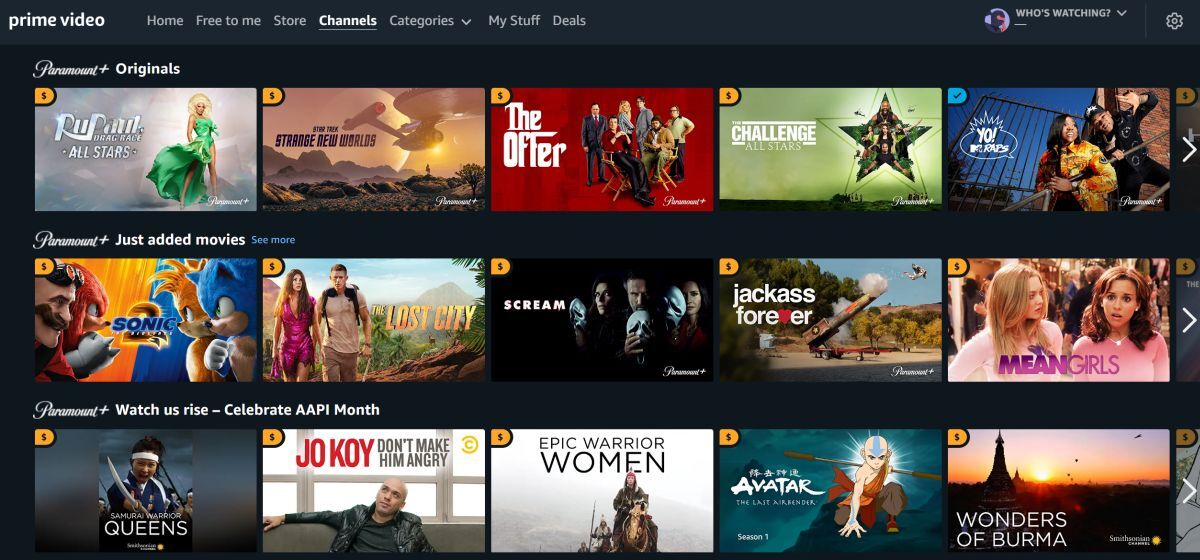
The specific content available might vary slightly based on licensing agreements and geographic region, but the vast majority of Paramount Plus’s library is accessible via the Prime Video Channel, ensuring a comprehensive content offering.
Seamless Viewing Across Devices
One of the significant advantages of this integration is the leveraging of Amazon’s multi-device ecosystem. Once subscribed, Paramount Plus content can be viewed on any device that supports the Amazon Prime Video app. This includes:
- Smart TVs: Samsung, LG, Sony, Vizio, and more.
- Streaming Media Players: Amazon Fire TV devices, Roku, Apple TV, Google Chromecast.
- Gaming Consoles: PlayStation, Xbox.
- Mobile Devices: iOS and Android smartphones and tablets.
- Web Browsers: Accessable via primevideo.com on desktop and laptop computers.
This broad compatibility ensures a consistent and high-quality viewing experience across all your preferred screens, without the need to download or manage a separate Paramount Plus application on each device. The Prime Video app typically offers features like adaptive bitrate streaming, ensuring optimal video quality based on your internet connection.
Features and Functionality within Prime Video
When watching Paramount Plus content through Prime Video, you benefit from Amazon’s robust feature set:
- User Profiles: If you use Prime Video profiles, your Paramount Plus watch history and progress will be tracked within your specific profile, maintaining personalized recommendations.
- Watchlist: Add Paramount Plus shows and movies to your Prime Video watchlist, consolidating all your desired content in one place.
- Parental Controls: Amazon’s comprehensive parental control settings apply to all content viewed through Prime Video, including channels, allowing you to restrict access based on ratings.
- Download for Offline Viewing: Many Prime Video titles, and often channel content, can be downloaded to mobile devices for offline viewing, perfect for travel. This functionality extends to Paramount Plus content available through the channel.
- X-Ray Feature: While primarily associated with Amazon’s own content, the X-Ray feature, which provides IMDb information about actors, music, and trivia, can sometimes be available for channel content, enhancing the viewing experience.
These integrated features elevate the viewing experience beyond what a standalone Paramount Plus app might offer on some platforms, providing a truly unified and enriched entertainment hub.
Troubleshooting Common Issues and Optimizing Your Viewing Experience
While subscribing to and watching Paramount Plus on Amazon Prime is generally smooth, users may occasionally encounter technical hitches. Addressing these proactively and understanding how to optimize settings can significantly enhance the overall experience.
Resolving Playback and Access Problems
Should you face issues like buffering, error messages, or inability to access content, consider these troubleshooting steps:
- Verify Active Subscription: First, confirm your Paramount Plus channel subscription is active through your Amazon “Memberships & Subscriptions” page. Ensure there are no pending payment issues or expiration notices.
- Check Amazon Prime Membership: Confirm your underlying Amazon Prime membership is active and in good standing. Without it, channel access is revoked.
- Log Out and Back In: A simple yet effective fix. Log out of your Amazon Prime Video app/website and then log back in. This often refreshes authentication tokens and resolves temporary glitches.
- Clear App Cache/Data: On smart devices, clearing the cache or data for the Prime Video app can resolve corrupted data that might be causing issues. (Be aware that clearing data might require you to log in again.)
- Restart Device: Power cycling your streaming device (Smart TV, Fire Stick, Roku, etc.) or computer can clear system errors and refresh network connections.
- Update Prime Video App: Ensure your Amazon Prime Video app is updated to the latest version. Developers frequently release updates to fix bugs and improve performance.
- Check for Service Outages: Occasionally, Amazon Prime Video or Paramount Plus (the content provider) might experience temporary service outages. Check social media or official status pages for any widespread reports.
Internet Connection and Device Compatibility
A stable and sufficiently fast internet connection is paramount for high-quality streaming.
- Internet Speed: For HD streaming, a minimum speed of 5-8 Mbps is recommended, with 20+ Mbps for 4K UHD content. Test your internet speed using an online speed checker.
- Wi-Fi Signal Strength: If using Wi-Fi, ensure your device has a strong signal to your router. Move closer to the router or consider a Wi-Fi extender if coverage is poor. For critical streaming devices, a wired Ethernet connection is always superior.
- Router Reboot: Rebooting your internet router and modem can resolve many network-related issues by refreshing IP addresses and clearing temporary network errors.
- Device Compatibility: While Prime Video is widely compatible, ensure your specific device model and its operating system meet Amazon’s minimum requirements for the Prime Video app. Older devices might struggle with newer video codecs or higher resolutions.
Optimizing Streaming Quality
To ensure the best possible picture and sound quality:
- Video Quality Settings: Prime Video usually defaults to “Auto” quality, adjusting based on your connection. However, on some devices or web browsers, you might be able to manually select a higher quality (e.g., HD or UHD) in the playback settings, assuming your internet speed can support it.
- HDR/Dolby Vision: If your TV and streaming device support HDR10 or Dolby Vision, and the Paramount Plus content offers it, ensure these features are enabled on your TV and within the Prime Video app settings for enhanced color and contrast.
- Audio Settings: Check your device’s audio output settings to ensure it’s configured for your home theater system (e.g., Dolby Digital Plus, DTS, or surround sound settings) if applicable.
By systematically addressing these potential issues and optimizing your setup, you can ensure a consistently smooth and enjoyable viewing experience for Paramount Plus content via Amazon Prime Video.
The Future of Streaming: Convenience and Consolidation
The integration of Paramount Plus into Amazon Prime Video Channels is more than just a technological feature; it represents a significant trend in the broader streaming industry. This move towards aggregation and centralized access is a direct response to consumer demand and the evolving economic realities of digital entertainment.
The Appeal of Centralized Streaming
For consumers, the allure of centralized streaming is undeniable. It promises a simplified digital life—one less app to manage, one consolidated bill, and a unified interface for content discovery. From a technical perspective, this means fewer system resources consumed by multiple background apps, potentially faster loading times, and a more consistent user experience across various platforms. Amazon’s role as a super-aggregator leverages its existing massive user base and robust infrastructure to provide this convenience. This model is particularly appealing to users who subscribe to several services but prefer a “one-stop shop” for their entertainment needs. It reduces the cognitive load associated with remembering which show is on which platform, as all content is searchable within the Prime Video environment.
The Evolving Landscape of Digital Entertainment
This trend hints at the potential future of streaming. As more studios launch their own direct-to-consumer services, the market becomes increasingly saturated. Aggregators like Amazon Prime Video (and similar offerings from platforms like Apple TV Channels, Roku, or even cable providers’ app integrations) offer a valuable solution. They allow content owners like Paramount Global to reach a wider audience that might not download another standalone app, while simultaneously providing consumers with a streamlined, high-quality gateway to a diverse range of content.
This ecosystem also presents opportunities for innovative bundling and flexible subscription models. It allows consumers greater control over their channel lineup, enabling them to add and remove subscriptions with ease based on their viewing habits, without being locked into long-term contracts or complex billing systems. The technical architecture behind Prime Video Channels facilitates this dynamic model, allowing for rapid deployment and integration of new services, making the platform highly adaptable to future shifts in content availability and consumer preferences.
In conclusion, watching Paramount Plus on Amazon Prime Video is a prime example of technological innovation enhancing user convenience. By understanding the integration model, following the subscription steps, exploring the rich content, and knowing how to troubleshoot, users can unlock a powerful and streamlined entertainment experience. This convenience is not just a feature but a glimpse into the future of digital content consumption, where intelligent aggregation plays a pivotal role in simplifying the complex world of streaming.
aViewFromTheCave is a participant in the Amazon Services LLC Associates Program, an affiliate advertising program designed to provide a means for sites to earn advertising fees by advertising and linking to Amazon.com. Amazon, the Amazon logo, AmazonSupply, and the AmazonSupply logo are trademarks of Amazon.com, Inc. or its affiliates. As an Amazon Associate we earn affiliate commissions from qualifying purchases.