
In today’s interconnected digital economy, the ability to seamlessly transfer funds and conduct transactions online is not merely a convenience but often a necessity. PayPal stands as a vanguard in this financial landscape, offering a robust, globally recognized platform that facilitates everything from splitting a dinner bill with a friend to purchasing goods from an international vendor. Understanding how to leverage this powerful tool effectively is crucial for anyone managing their personal finances in the 21st century. This guide delves deep into the mechanics of making PayPal payments, ensuring you can navigate its functionalities with confidence, security, and financial acumen.

Understanding PayPal Payments: Beyond the Basics
PayPal revolutionized how individuals and businesses interact with money digitally. At its core, PayPal acts as a digital intermediary, allowing users to send and receive funds without directly sharing sensitive financial information like bank account or credit card numbers with every transaction partner. This fundamental layer of abstraction provides both convenience and a critical security buffer, which is paramount in today’s online financial ecosystem.
The Ubiquity and Utility of PayPal
From small online businesses to major e-commerce giants, PayPal’s logo is a ubiquitous symbol of trust and ease at checkout. Its widespread adoption stems from its ability to bridge disparate financial systems, allowing users in different countries and with varying banking setups to transact effortlessly. For individuals, it simplifies personal remittances, online shopping, and even contributing to crowdfunding campaigns. For businesses, it opens doors to global markets, offering a versatile payment gateway that caters to a broad customer base. Its utility extends beyond simple transfers, encompassing subscription payments, invoice management, and detailed transaction histories that are invaluable for personal budgeting and financial tracking.
Essential Prerequisites for Seamless Transactions
Before you can initiate a PayPal payment, a few fundamental steps must be in place to ensure a smooth and secure experience. These prerequisites are designed to protect both the user and the integrity of the financial system, aligning with best practices for online financial tools.
Firstly, you must have an active PayPal account. Creating an account is a straightforward process, typically requiring an email address, a secure password, and agreement to PayPal’s terms of service. For full functionality, including the ability to send and receive significant sums, you will likely need to verify your account. This usually involves confirming your email address and linking a financial instrument.
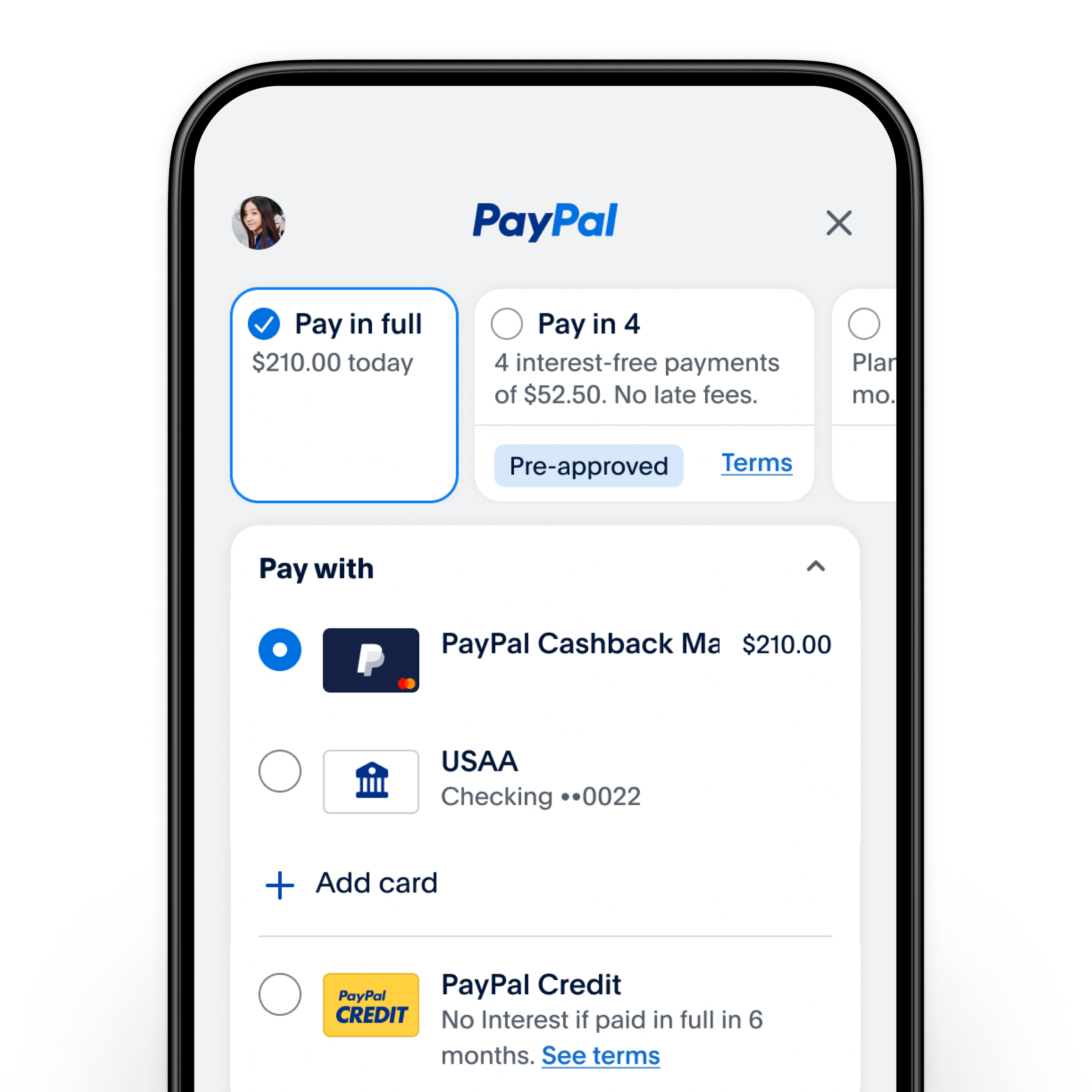
Secondly, and critically, your PayPal account needs a funding source. This can be a linked bank account, a debit card, a credit card, or even a pre-existing balance within your PayPal account. PayPal prioritizes using your PayPal balance first, then your bank account, and finally debit/credit cards, though you can often specify your preferred funding source during a transaction. Linking these accounts involves providing your banking details or card information, which PayPal encrypts and secures. It’s a one-time setup that enables seamless future transactions, allowing PayPal to draw funds when your balance is insufficient or when you opt for a direct draw. Without a verified funding source, your ability to make payments will be severely restricted, highlighting the importance of this foundational step for effective financial management through the platform.
Step-by-Step Guide to Sending Money via PayPal
Making a payment through PayPal is designed to be intuitive, yet the process can vary slightly depending on the recipient and the nature of the transaction. Understanding these nuances is key to selecting the correct payment method and avoiding potential fees or misunderstandings.
Paying Friends and Family: Personal Transfers
When you need to send money to a friend, family member, or anyone you know personally, PayPal offers a “Friends and Family” option. This is typically used for personal gifts, splitting costs (like rent or a dinner bill), or sending money to someone without an underlying commercial transaction.
- Log In: Access your PayPal account via the website or mobile app.
- Navigate to Send & Request: Look for the “Send & Request” tab or button.
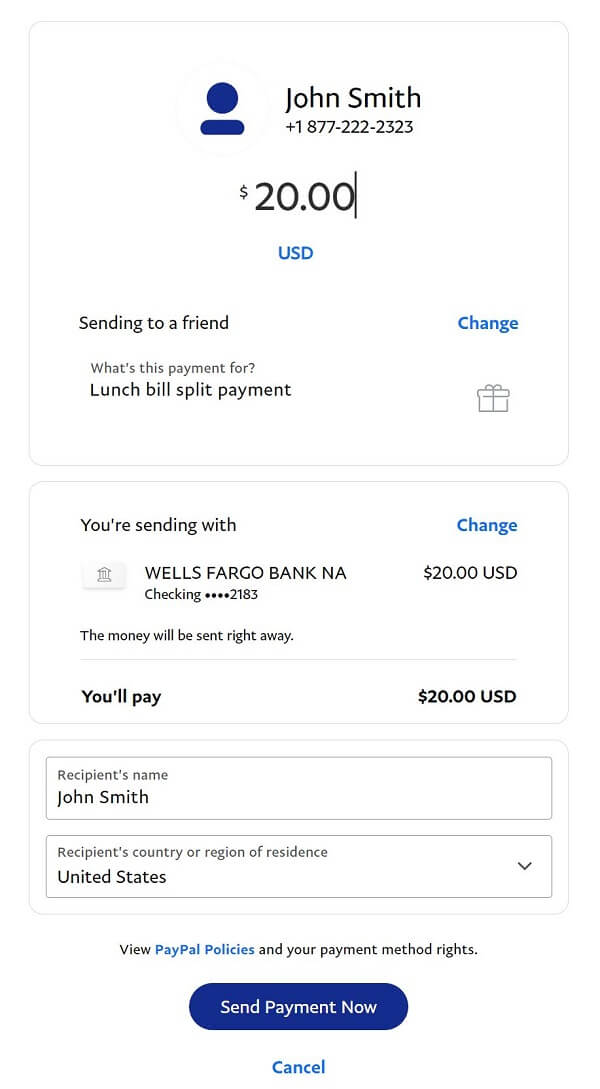
- Enter Recipient Details: Input the recipient’s email address or mobile number associated with their PayPal account. Ensure accuracy to avoid sending money to the wrong person.
- Enter Amount & Currency: Specify the amount you wish to send and select the appropriate currency.
- Select “Sending to a friend”: This crucial step designates the payment as a personal transfer.
- Choose Funding Source: Select your preferred funding source (PayPal balance, bank account, card). For “Friends and Family” payments within the same country, if funded by your PayPal balance or bank account, there are typically no fees. If funded by a credit card or debit card, a fee usually applies. International “Friends and Family” payments may incur fees regardless of the funding source.
- Review and Send: Double-check all details, including the recipient, amount, and funding source, then confirm the payment. The recipient will typically receive the funds instantly.
Paying for Goods and Services: Secure Online Purchases
When purchasing items from a merchant, paying for a service, or sending money to someone you don’t know personally for a commercial reason, the “Goods and Services” option is paramount. This option provides buyer protection, a critical feature that safeguards your purchases.
- Log In: Access your PayPal account.
- Navigate to Send & Request: Go to the “Send & Request” section.
- Enter Recipient Details: Input the seller’s email address or mobile number.
- Enter Amount & Currency: Specify the payment amount and currency.
- Select “Paying for an item or service”: This activates buyer protection for eligible purchases.
- Add a Note (Optional): You can add a note detailing the purchase, which can be useful for your records and the seller’s.
- Choose Funding Source: Select your preferred method. For “Goods and Services” payments, the seller typically pays the transaction fee, which is deducted from the amount they receive. As a buyer, you generally don’t pay a fee when funding with your PayPal balance, bank account, or debit card. Credit card payments might incur a fee if the merchant doesn’t cover it, though this is less common with direct PayPal payments than with “Friends and Family” options.
- Review and Send: Carefully review all transaction details before confirming. Once sent, the payment is usually processed immediately, and the seller receives notification. In cases of eligible disputes, PayPal’s Buyer Protection policy allows you to potentially recover your funds if the item is not received or is significantly not as described.
Responding to Invoices and Payment Requests
Beyond initiating payments, PayPal also facilitates responding to payment requests and invoices sent by others. This is common for freelancers, small businesses, or when someone is collecting money for an event.
- Receive Notification: You’ll typically receive an email from PayPal notifying you of a new invoice or payment request. You might also see it directly in your PayPal account dashboard under “Activity” or “Invoices.”
- Review Details: Click on the link in the email or navigate to the request within your PayPal account. Carefully review the details of the invoice or request, including the amount, sender, and any attached notes or itemized lists.
- Click “Pay Now”: If the details are correct and you agree to the payment, click the “Pay Now” or equivalent button.
- Select Funding Source: Choose how you wish to pay (PayPal balance, bank account, debit/credit card).
- Confirm Payment: Review the final payment summary and confirm the transaction. The sender will be notified of your payment. This method typically falls under the “Goods and Services” category, offering buyer protection if the invoice is for a commercial transaction.
Navigating Fees and Security Best Practices
Understanding the fee structure and adhering to security best practices are paramount for responsible financial management with PayPal. Ignorance of these aspects can lead to unexpected costs or, worse, compromise your financial data.
Deciphering PayPal Fees: What You Need to Know
PayPal’s fee structure can seem complex, but it’s designed to differentiate between personal transfers and commercial transactions, and between domestic and international payments.
- Personal Payments (Friends & Family):
- Domestic: Free when funded by PayPal balance or linked bank account. A fee (typically a percentage) is charged if funded by a credit card or debit card.
- International: Fees usually apply, regardless of funding source, and can vary by country and currency conversion rates.
- Commercial Payments (Goods & Services):
- Buyers: Generally no fee when funding with PayPal balance, bank account, or debit card. Credit card payments for goods and services may incur a fee, though often the seller absorbs these.
- Sellers: PayPal charges the seller a transaction fee (a percentage plus a fixed amount) for receiving “Goods and Services” payments. This is PayPal’s primary revenue source from commercial transactions and is what enables buyer protection.
- Currency Conversion: When sending money in a different currency, PayPal applies an exchange rate spread, which is an additional cost on top of any transfer fees.
- Withdrawal Fees: While adding money to PayPal is usually free, withdrawing funds to a linked bank account is typically free, but instant transfers to debit cards may incur a small fee.
Always review the “Total Amount” and “Fees” breakdown on the payment confirmation page before finalizing any transaction to avoid surprises.
Safeguarding Your Financial Information
Security is paramount when dealing with online financial platforms. PayPal employs advanced encryption and fraud prevention measures, but users also bear a significant responsibility in protecting their accounts.
- Strong, Unique Passwords: Use a complex password unique to your PayPal account. Avoid using easily guessable information.
- Two-Factor Authentication (2FA): Enable 2FA for an added layer of security. This requires a second verification step (like a code sent to your phone) in addition to your password, making it much harder for unauthorized users to access your account.
- Beware of Phishing: Be highly suspicious of unsolicited emails or messages claiming to be from PayPal, especially those asking for your login credentials or personal information. PayPal will never ask for your password via email. Always check the sender’s email address and hover over links before clicking.
- Secure Wi-Fi: Avoid accessing your PayPal account on public, unsecured Wi-Fi networks where your data could be intercepted.
- Regular Monitoring: Periodically review your PayPal activity log for any unauthorized transactions. Report any suspicious activity immediately to PayPal.
- Keep Software Updated: Ensure your operating system, web browser, and antivirus software are up-to-date to protect against known vulnerabilities.
By adopting these practices, you significantly enhance the security of your PayPal account and your overall financial well-being online.
Advanced Tips, Troubleshooting, and Maximizing Your PayPal Experience
Beyond the basic mechanics, a deeper understanding of PayPal’s features and common issues can significantly enhance your experience and financial control. This section aims to equip you with the knowledge to troubleshoot problems and leverage PayPal more effectively for your personal finance goals.
Common Issues and Quick Solutions
Even with a user-friendly platform, occasional hiccups can occur. Knowing how to quickly address common PayPal payment issues can save time and frustration.
- Payment Not Going Through:
- Insufficient Funds: Check your PayPal balance or linked funding source. Ensure the card or bank account has sufficient funds.
- Expired Card/Account Issues: Verify that your linked credit/debit cards are not expired and your bank account is active and in good standing.
- Daily/Transaction Limits: PayPal has limits on how much you can send in a single transaction or over a period, especially for unverified accounts. Check your account limits.
- Security Holds: For unusual transactions or new recipients, PayPal’s security system might place a temporary hold. Check your account notifications for any required actions.
- Recipient Claims Not Receiving Payment:
- Typo in Email/Number: The most common reason. Double-check the recipient’s email address or phone number used for the payment. If incorrect, you might need to try to cancel the payment (if it’s pending and unclaimed) or contact PayPal support.
- Recipient’s Account Status: Ensure the recipient’s PayPal account is active and verified to receive funds.
- Payment Pending: Sometimes payments, especially to new recipients or those with unverified accounts, might show as “pending.” Instruct the recipient to check their PayPal activity and claim the payment if required.
- Disputes and Resolutions: If you’ve made a “Goods and Services” payment and there’s an issue (item not received, not as described), utilize PayPal’s Resolution Center. You typically have 180 days from the transaction date to open a dispute. This initiates communication with the seller, and if unresolved, PayPal can step in to mediate.
For persistent issues, PayPal’s customer support (via phone, chat, or message center) is your best resource. Providing transaction IDs and detailed explanations will expedite the resolution process.
Optimizing Your PayPal Account for Financial Management
PayPal isn’t just a payment gateway; it can be a valuable tool for personal financial management when used strategically.
- Transaction History for Budgeting: Regularly review your “Activity” tab. PayPal provides detailed records of all your inflows and outflows, which can be exported. This data is invaluable for tracking spending, categorizing expenses, and adhering to your budget. Identifying patterns in your PayPal usage can highlight areas for financial optimization.
- Managing Recurring Payments: Many subscriptions and online services allow you to pay via PayPal. Manage these recurring payments directly within your PayPal settings. You can view, pause, or cancel subscriptions, giving you granular control over your ongoing expenses and preventing unwanted charges.
- Linked Accounts for Flexibility: While PayPal balance is convenient, linking multiple bank accounts or cards provides flexibility. This allows you to choose the most appropriate funding source for different types of transactions (e.g., a specific credit card for rewards on purchases, a bank account for larger transfers).
- Leveraging PayPal for Online Income: If you engage in side hustles, freelancing, or selling items online, PayPal can be your primary method for receiving payments. Ensure your account is verified for business use if applicable, and understand the seller protection policies. This can streamline your income tracking and tax preparation.
- Currency Management: For those dealing with international transactions, PayPal allows you to hold balances in multiple currencies. While currency conversion fees exist, understanding how to manage different currency balances can be beneficial for those with frequent international financial interactions.
By actively engaging with these features, PayPal transforms from a simple payment tool into an integral part of your personal finance toolkit, offering insights and control over your digital transactions.
Conclusion: Empowering Your Digital Transactions
In an increasingly cashless and digitally driven world, mastering the nuances of platforms like PayPal is an essential component of sound personal finance. From initiating a simple peer-to-peer transfer to making secure online purchases, and from managing invoices to understanding fee structures and bolstering your account’s security, PayPal offers a comprehensive ecosystem for digital monetary exchange.
By understanding the distinct categories of payments – “Friends and Family” versus “Goods and Services” – and their respective implications for fees and buyer protection, users can make informed decisions that align with their financial goals. Coupled with diligent security practices like strong passwords and two-factor authentication, and the proactive monitoring of transaction history, PayPal becomes more than just a convenience; it becomes a secure and efficient extension of your financial control.
Ultimately, the power of PayPal lies in its ability to empower individuals and businesses to transact globally with ease and confidence. By following the guidelines outlined in this comprehensive guide, you can ensure that your experience with PayPal is not only seamless but also financially astute, contributing positively to your overall digital financial health. Embrace the convenience, understand the mechanisms, and confidently navigate the world of online payments with PayPal.
aViewFromTheCave is a participant in the Amazon Services LLC Associates Program, an affiliate advertising program designed to provide a means for sites to earn advertising fees by advertising and linking to Amazon.com. Amazon, the Amazon logo, AmazonSupply, and the AmazonSupply logo are trademarks of Amazon.com, Inc. or its affiliates. As an Amazon Associate we earn affiliate commissions from qualifying purchases.