
In an increasingly digital world, the ability to send and receive money effortlessly across borders and platforms has become a cornerstone of modern commerce and personal finance. At the forefront of this digital revolution stands PayPal, a pioneering technology platform that has redefined online transactions. Setting up a PayPal account is a fundamental step for anyone looking to engage with the digital economy, whether for online shopping, freelancing, or managing personal funds. This comprehensive tutorial will guide you through the intricate technological steps of establishing your PayPal presence, ensuring a secure, efficient, and fully functional digital payment gateway.

Understanding PayPal’s Digital Ecosystem
Before diving into the setup process, it’s crucial to grasp the technological underpinnings and functionalities that make PayPal an indispensable tool in the digital age. PayPal is more than just a payment processor; it’s a vast digital ecosystem designed to facilitate secure financial interactions between individuals and businesses globally.
The Evolution of Online Payments: PayPal’s Role
PayPal emerged at a critical juncture in the internet’s development, offering a secure alternative to traditional banking methods for online transactions. Its innovation lay in abstracting the complexity of banking infrastructure, providing a user-friendly interface that allowed anyone with an email address to send and receive money. Over the years, PayPal has evolved, integrating advanced encryption, fraud detection algorithms, and mobile compatibility, solidifying its position as a global leader in payment technology. It’s a testament to robust software development and continuous innovation, adapting to new threats and user demands while maintaining ease of use.
Personal vs. Business Accounts: Choosing Your Digital Gateway
PayPal offers two primary account types, each tailored to specific technological needs and use cases. Understanding the distinctions is the first critical decision in your setup journey. A Personal Account is designed for individual users to send and receive money from friends and family, shop online, and manage personal expenses. It’s streamlined for simplicity, offering essential features. In contrast, a Business Account caters to merchants, freelancers, and organizations. It unlocks advanced functionalities such as invoicing tools, multi-user access, dedicated customer service, and integration with e-commerce platforms. Choosing the right account type at the outset ensures that the technological infrastructure you build through PayPal aligns with your objectives, whether personal convenience or commercial scalability.
Security Architecture: Protecting Your Digital Transactions
At the core of PayPal’s value proposition is its robust security architecture. From multi-layered encryption protocols that protect data in transit and at rest to sophisticated fraud detection systems powered by machine learning, PayPal employs a suite of technologies to safeguard user information and transactions. Two-factor authentication (2FA), buyer and seller protection policies, and continuous monitoring are standard features designed to mitigate risks. Understanding these underlying security mechanisms instills confidence and highlights the importance of adhering to best practices during setup and daily use, such as strong password creation and prompt identity verification. This technological commitment to security is what allows millions to trust PayPal with their digital finances.
Step-by-Step Account Creation: Your Digital Foundation
The journey to setting up PayPal begins with the foundational step of creating your account. This process involves a series of technical inputs and confirmations that establish your digital identity within the PayPal system.
Navigating the Signup Process: Initial Details
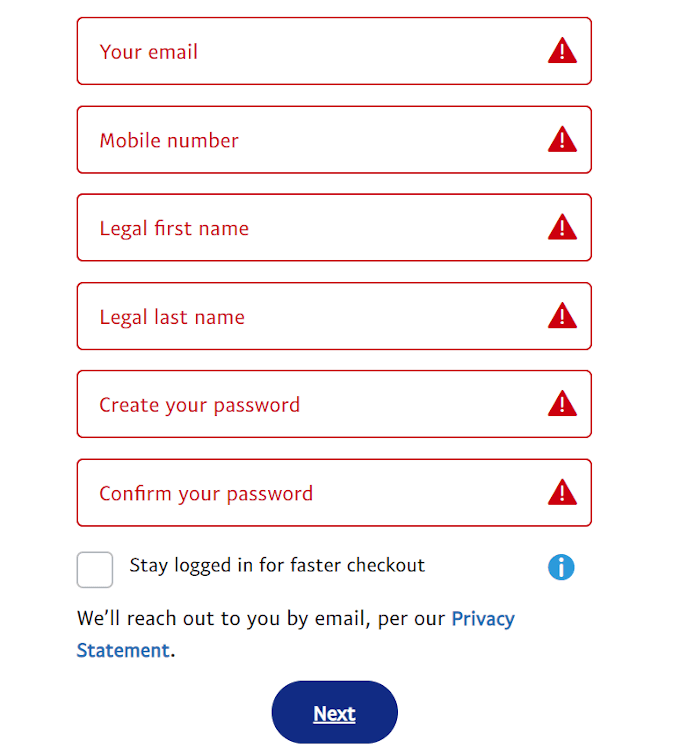
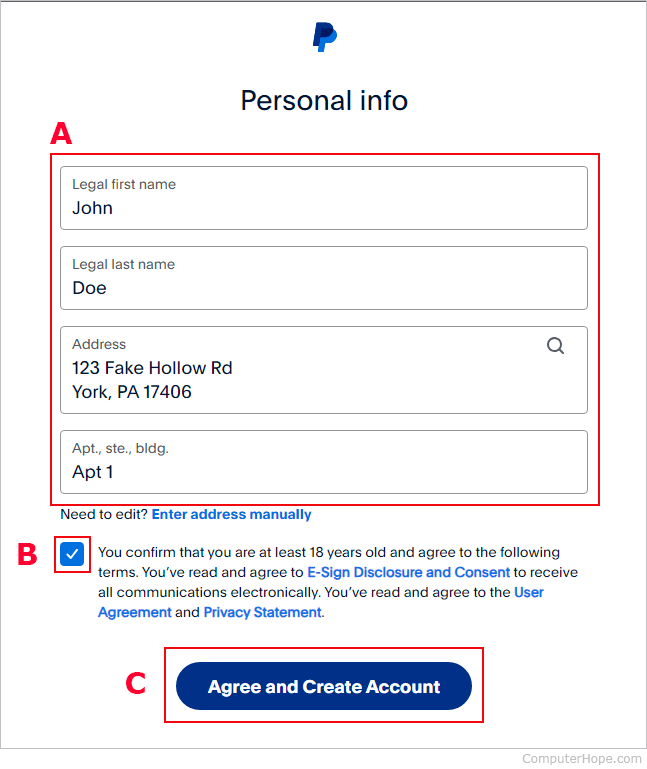
Accessing the PayPal platform, either through its website or mobile application, initiates the signup flow. The first prompts require basic personal information: your full name, email address, and a mobile phone number. These details are critical for establishing your primary digital contact points and verifying your identity. The system cross-references these details, often in real-time, to prevent duplicate accounts and initiate security protocols. Providing accurate information is paramount, as discrepancies can lead to delays in account activation or future verification challenges. The user interface is designed for intuitive navigation, guiding you through each field with clear instructions, a hallmark of well-designed software.
Crafting Your Digital Identity: Usernames and Passwords
A secure PayPal account hinges on a strong digital identity, primarily defined by your email address (which serves as your unique identifier) and a robust password. PayPal’s system often enforces password complexity requirements, demanding a mix of uppercase and lowercase letters, numbers, and special characters. This technical requirement is a fundamental layer of digital security, protecting your account from unauthorized access. Beyond the initial password, PayPal may suggest or require a security question/answer pair, adding another layer of authentication. The platform’s backend then encrypts and stores these credentials, ensuring that even PayPal employees cannot directly access your password, reinforcing the principle of zero-knowledge security.
Verifying Your Account: The Digital Trust Protocol
Upon initial registration, PayPal typically sends a verification link to your provided email address. Clicking this link confirms that the email belongs to you, acting as a digital handshake between your identity and the PayPal system. Simultaneously, a mobile number verification often takes place via an SMS code, further cementing your claim to the account. These initial verification steps are crucial for establishing a baseline of trust and activating basic functionalities. Without email and phone verification, many features remain locked, underscoring the platform’s commitment to securing user access and preventing fraudulent account creation. This multi-factor approach to initial verification is a standard and effective security protocol in modern digital services.
Integrating Financial Instruments: Connecting Your Digital Wallet
Once your basic PayPal account is established and verified, the next critical phase involves linking external financial instruments. This technological integration transforms your PayPal account into a truly functional digital wallet, capable of funding transactions and receiving payouts.
Linking Bank Accounts: Establishing Your Primary Funding Source
Connecting a bank account is a pivotal step, as it often serves as the primary funding source for PayPal transactions and the destination for withdrawing funds. The process typically involves providing your bank’s routing number and your account number. PayPal then employs a secure, encrypted process to verify ownership. This often includes a micro-deposit method, where PayPal deposits two small, random amounts (e.g., $0.12 and $0.23) into your bank account. You then return to PayPal and input these amounts, confirming your identity and linking the accounts. This technical verification ensures that only the legitimate owner can connect a bank account, preventing unauthorized access and bolstering financial security within the digital ecosystem. Modern integrations may also offer instant verification through third-party services that securely connect to your online banking portal, streamlining the process while maintaining high security standards.
Adding Credit/Debit Cards: Alternative Payment Pathways
In addition to bank accounts, PayPal allows you to link credit and debit cards, offering flexibility and alternative funding sources for your transactions. The process is straightforward: you input the card number, expiration date, and the CVV security code. Similar to bank account linking, PayPal may initiate a small, temporary authorization charge (e.g., $1.00) to verify the card’s validity and ownership. This charge appears on your card statement with a unique code, which you then enter into PayPal to confirm the link. Once verified, these cards become readily available funding options, providing redundancy and choice when making payments. This technological integration allows PayPal to act as an intermediary, processing card transactions without exposing your sensitive card details directly to merchants, a key security benefit.
Confirming Your Financial Connections: The Verification Dance
The verification of linked bank accounts and cards is not merely a formality; it’s a critical security protocol. By requiring users to confirm micro-deposits or authorization codes, PayPal ensures that the financial instruments truly belong to the account holder. This “verification dance” prevents fraudsters from linking stolen financial information to their accounts. Once confirmed, these financial tools are securely tokenized within PayPal’s system, meaning your actual bank account or card numbers are not stored in plaintext or exposed during transactions. Instead, a unique digital token represents your funding source, adding a layer of obfuscation that significantly enhances digital transaction security.
Optimizing Your PayPal Profile: Enhancing Digital Utility
Beyond basic setup, optimizing your PayPal profile unlocks its full potential, allowing you to tailor the platform to your specific needs and enhance its digital utility and security.
Personalizing Settings: Tailoring Your Digital Experience
PayPal’s “Settings” menu is a technological control panel where you can customize various aspects of your account. This includes updating personal information, managing notifications (email, SMS, push), and setting preferred payment methods. For example, you can designate a default bank account or card for purchases, streamlining future transactions. Users can also configure automatic payments for subscriptions or bills, leveraging PayPal’s recurring payment technology. Furthermore, managing permissions for connected apps and websites ensures you maintain control over your data and who can access your PayPal account for payments. Thoughtful personalization of these settings enhances user experience and aligns the platform’s behavior with your digital habits.
Setting Up Two-Factor Authentication: Bolstering Digital Security
Perhaps the most crucial optimization for any PayPal user is enabling Two-Factor Authentication (2FA), also known as two-step verification. This advanced security feature adds an extra layer of protection beyond your password. With 2FA enabled, every time you log in or perform a sensitive action, PayPal will send a unique code to your registered mobile device (via SMS or an authenticator app). You must then enter this code in addition to your password. This technological safeguard significantly reduces the risk of unauthorized access, even if your password is compromised. Implementing 2FA is a simple yet powerful step that transforms your account’s security posture, making it substantially more resistant to hacking attempts.
Exploring Advanced Features: Invoicing, Requesting Payments, and Digital Wallets
PayPal’s robust technological suite extends far beyond simple payments. For business accounts or even personal accounts with entrepreneurial leanings, features like invoicing tools allow you to professionally bill clients directly through the platform. Requesting payments simplifies collecting money from others, offering a digital alternative to IOUs. Moreover, PayPal integrates with various digital wallets (like Apple Pay or Google Pay) and third-party applications, expanding its reach and utility across the digital landscape. Exploring these advanced features allows users to leverage PayPal’s full technological potential, transforming it from a mere payment processor into a comprehensive digital financial management tool.
Troubleshooting Common Setup Hurdles: Navigating the Digital Landscape
Even with a user-friendly interface, technological setups can sometimes present challenges. Understanding common hurdles and their solutions is key to a smooth PayPal experience.
Addressing Verification Issues: Common Roadblocks
One of the most frequent setup roadblocks involves verification issues. This could range from not receiving verification emails or SMS codes to challenges with linking bank accounts or cards. Often, these issues stem from simple technical glitches: incorrect email addresses or phone numbers entered, spam filters catching verification emails, or temporary network delays. Troubleshooting involves double-checking all entered information, reviewing spam folders, and ensuring your mobile device has signal. For persistent issues with bank or card linking, ensure the name on your PayPal account exactly matches the name on your financial instrument, as discrepancies can trigger security flags in the system’s automated checks.
Resolving Linking Failures: Tips and Tricks
If a bank account or credit card fails to link, several technical factors could be at play. Incorrect routing or account numbers, expired card details, or even temporary issues with your bank’s API (Application Programming Interface) can prevent successful integration. When troubleshooting, ensure all details are precisely as they appear on your bank statements or card. If using instant verification, temporary browser issues or ad-blockers can sometimes interfere with the secure pop-up window needed to connect to your bank. Trying a different browser, clearing cache, or temporarily disabling extensions can resolve these. For micro-deposit verification, be patient; it can take a few business days for the small deposits to appear.
Contacting Support: When Digital Assistance is Needed
When self-troubleshooting doesn’t yield results, PayPal’s customer support is your next recourse. The platform offers various channels for assistance, including extensive help articles and FAQs, live chat, phone support, and community forums. When contacting support, be prepared to provide relevant details such as your registered email, any error messages you received, and the steps you’ve already taken. PayPal’s support team is equipped to delve into the technical backend, diagnosing issues that are not user-facing and guiding you through advanced troubleshooting steps. Leveraging these resources ensures that even complex technical challenges can be overcome, leading to a fully functional PayPal account.
Setting up PayPal is a foundational step in navigating the contemporary digital landscape. By understanding its technological architecture, meticulously following the setup steps, and proactively optimizing your profile for security and utility, you unlock a powerful tool that simplifies online transactions, empowers e-commerce, and enhances your overall digital financial management. The journey from initial registration to a fully functional PayPal account is a testament to the robust and accessible technology that underpins our modern online world.
aViewFromTheCave is a participant in the Amazon Services LLC Associates Program, an affiliate advertising program designed to provide a means for sites to earn advertising fees by advertising and linking to Amazon.com. Amazon, the Amazon logo, AmazonSupply, and the AmazonSupply logo are trademarks of Amazon.com, Inc. or its affiliates. As an Amazon Associate we earn affiliate commissions from qualifying purchases.