
In an increasingly digital world, access to online marketplaces is fundamental for everything from daily necessities to cutting-edge electronics. Among these, Amazon stands as a titan, offering an unparalleled range of products and services. Creating an Amazon account is the essential first step to tapping into this vast ecosystem, serving as your digital passport to a universe of e-commerce, digital content, and smart home integration. This guide delves into the technical process of establishing your Amazon presence, exploring not just the ‘how-to’ but also the underlying technological considerations that ensure a secure, personalized, and efficient user experience.

The Gateway to the Digital Marketplace: Why an Amazon Account Matters
An Amazon account is far more than just a login credential; it’s a personalized portal built on sophisticated technological infrastructure designed to streamline your online interactions. From enabling one-click purchases to personalizing recommendations, the account serves as the central hub for all your activities on the platform. Understanding its significance from a technological perspective reveals its deep integration into modern digital living.
Unlocking a Universe of Products and Services
At its core, an Amazon account provides access to millions of products spanning virtually every category imaginable. This vast inventory is managed by complex database systems and advanced search algorithms, ensuring that users can quickly locate specific items or discover new ones. Beyond physical goods, the account unlocks Amazon’s extensive digital services: Prime Video for streaming entertainment, Kindle for e-books, Audible for audiobooks, and Amazon Music for audio content. Each of these services operates on distinct technological platforms, all centrally managed and accessed via your single Amazon account, providing a unified user experience across diverse digital offerings. This technological integration simplifies user management, allowing a single identity to traverse multiple, often distinct, digital environments.
Seamless Digital Experience Across Devices
One of Amazon’s key technological strengths lies in its ability to provide a consistent and seamless experience across various devices. Whether you’re browsing on a desktop computer, shopping via the mobile app on your smartphone, or interacting through a Kindle tablet or an Alexa-enabled smart speaker, your Amazon account maintains your preferences, order history, payment methods, and wish lists. This cross-device synchronization is powered by robust cloud computing infrastructure and APIs (Application Programming Interfaces) that ensure data consistency and real-time updates. For the user, this means starting a shopping cart on their PC and completing the purchase on their phone is effortless, highlighting the advanced backend engineering designed for user convenience and accessibility.
Personalization and Convenience through Technology
The Amazon account is the engine behind the platform’s renowned personalization features. Every interaction—from searches and purchases to product views and reviews—feeds into sophisticated machine learning algorithms. These algorithms then generate tailored product recommendations, personalize homepage layouts, and even refine search results, making the shopping experience incredibly efficient and relevant. This level of personalization is a direct result of advanced data analytics and AI, transforming a generic marketplace into a custom-tailored store for each individual user. Furthermore, features like “Buy Now with 1-Click” and stored payment methods leverage secure tokenization and encryption technologies to offer unparalleled convenience while maintaining high standards of digital security.
Step-by-Step Guide: Creating Your Amazon Account
The process of creating an Amazon account is designed to be straightforward, leveraging intuitive user interfaces to guide you through each stage. While seemingly simple, each step involves critical data input and security protocols that underpin your digital identity on the platform.
Initiating the Registration Process (Website vs. App)
The first decision is where to begin: via a web browser or the Amazon mobile app.
Using a Web Browser:
- Navigate to
amazon.com(or your country-specific Amazon domain, e.g.,amazon.co.uk,amazon.de). - Hover over “Hello, Sign in” in the top right corner.
- Click on “Start here” next to “New customer?”. This will redirect you to the “Create account” page.
Using the Amazon Mobile App:
- Download the Amazon Shopping app from your device’s app store (Google Play Store for Android, Apple App Store for iOS).
- Open the app.
- Tap “Create account” or “New to Amazon? Create an account”.
Both methods lead to the same data input process, but the app often integrates better with device-specific features like biometric authentication for future logins.
Providing Essential Information: Name, Email, Password
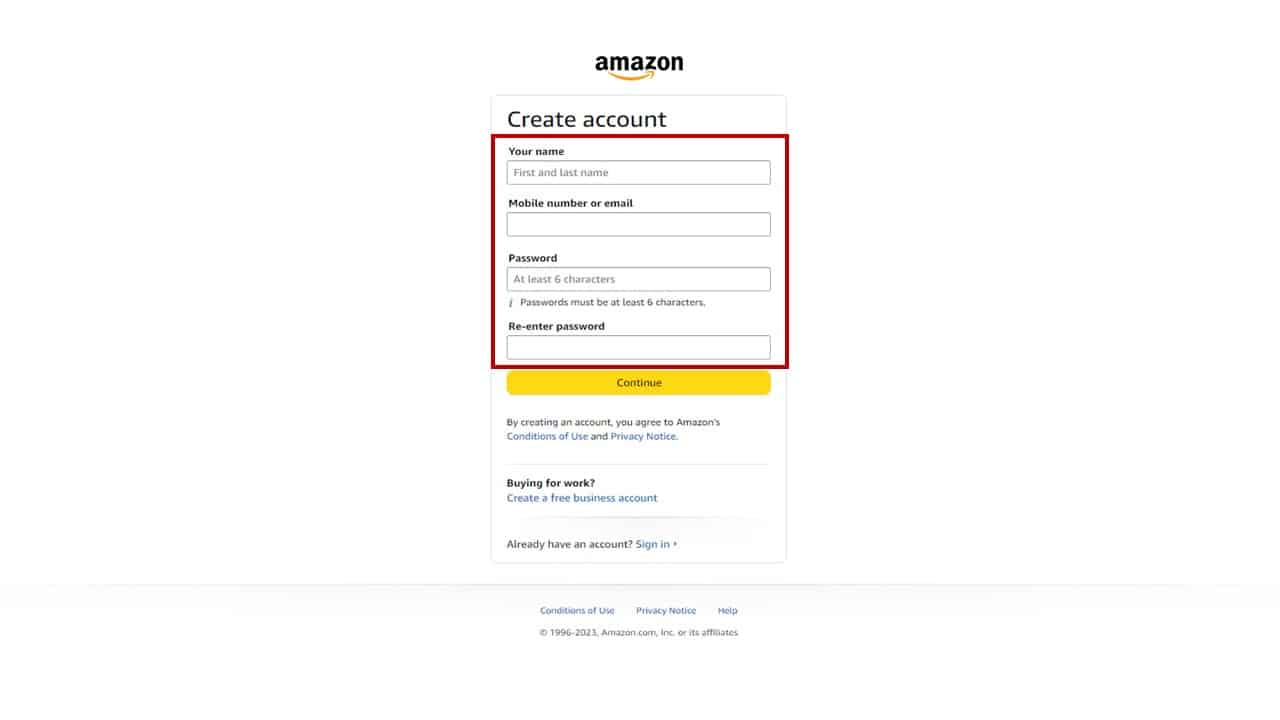
The “Create account” page will prompt you for a few key pieces of information:
- Your name: This is used for personalization and shipping purposes.
- Mobile number or email: This will be your primary login identifier. It’s crucial for account verification and password recovery. Using an email is generally recommended for broader access and management.
- Password: This is arguably the most critical piece of information. Amazon requires a password of at least 6 characters. Best practice dictates using a strong, unique password that combines uppercase and lowercase letters, numbers, and symbols. Avoid using easily guessable information or passwords you’ve used on other sites. Consider using a password manager for generating and storing complex passwords securely.
Verifying Your Account: The Digital Security Layer
Once you’ve entered your details and clicked “Verify mobile number” or “Continue” (depending on whether you used phone or email), Amazon implements a crucial security step: verification.
If you provided a mobile number, a one-time password (OTP) or verification code will be sent via SMS. Enter this code into the designated field on the Amazon page/app.
If you provided an email, an email containing a verification code will be sent to that address. You’ll need to retrieve this code from your inbox and enter it into Amazon’s verification page.
This step, known as two-step verification (even before 2FA is formally enabled), ensures that the email or phone number you provided truly belongs to you, significantly reducing the risk of unauthorized account creation. This is a fundamental security protocol in modern digital account management.
Setting Up Payment Methods and Shipping Addresses (Initial Configuration)
While not strictly part of account creation, setting up payment and shipping information is the next logical step to make your account fully functional.
- Payment Method: Navigate to “Account & Lists” (web) or “Your Account” (app) and select “Your Payments.” Here, you can add credit/debit cards, bank accounts, or gift card balances. Amazon uses encryption (like SSL/TLS protocols) to protect your financial data during transmission and storage.
- Shipping Address: Go to “Your Addresses” and add your primary delivery locations. This includes your full name, street address, city, state/province, zip/postal code, and a contact phone number. This information is stored securely and can be easily selected during checkout.
These initial configurations lay the groundwork for a seamless shopping experience, ensuring that when you’re ready to make a purchase, all necessary logistical data is already in place, leveraging Amazon’s robust backend systems for order fulfillment.
Optimizing Your Amazon Account for Enhanced User Experience
Creating the account is just the beginning. To truly harness the power of Amazon’s technological platform, it’s vital to optimize your account settings. This enhances security, personalizes your interactions, and leverages the full suite of features Amazon offers.
Leveraging Amazon’s Mobile App for On-the-Go Access
The Amazon Shopping app is a sophisticated piece of software designed for mobile convenience. It offers features often superior to the web browser experience, including:
- Barcode Scanner: Instantly compare prices by scanning product barcodes in physical stores.
- Voice Search (Alexa Integration): Use voice commands to search for products or even make purchases.
- Visual Search (StyleSnap): Upload a photo of an item and find similar products on Amazon.
- Push Notifications: Receive real-time updates on order status, deals, and personalized recommendations.
The app leverages device hardware (camera, microphone, biometrics) and network capabilities to provide a rich, interactive shopping experience that aligns with modern mobile computing paradigms.
Managing Security Settings and Two-Factor Authentication (2FA)
Digital security is paramount. Your Amazon account offers robust security features you should actively manage:
- Two-Factor Authentication (2FA): This is a critical security layer. Go to “Account & Lists” -> “Login & security” -> “Two-Step Verification”. Enable 2FA, which requires a second verification code (sent to your phone or generated by an authenticator app) in addition to your password during login. This significantly protects your account even if your password is compromised.
- Reviewing Authorized Devices: Regularly check “Manage Your Content and Devices” (for digital content) or “Login & security” to see which devices are signed into your account and revoke access for any unfamiliar ones.
These measures are built upon industry-standard encryption and authentication protocols, empowering users to take an active role in safeguarding their digital assets.
Personalizing Your Profile: Wishlists, Preferences, and Notifications
Beyond security, personalizing your account enhances convenience and relevancy:
- Wishlists: Create multiple wishlists for different occasions or groups of items. These are dynamic lists that can be shared, leveraging Amazon’s data infrastructure to track price changes and availability.
- Communication Preferences: Control the types of emails and notifications you receive (e.g., promotional offers, shipping updates, recommendations). This involves interacting with Amazon’s sophisticated notification management system.
- Browsing History: Manage or clear your browsing history to refine recommendations. This directly impacts the machine learning models that generate personalized content for you.
By actively managing these settings, you fine-tune the algorithms that serve you content, creating a more efficient and enjoyable user journey.
Understanding Data Privacy and Account Controls
Amazon provides tools to understand and manage your data privacy. Under “Your Account,” you can access sections like “Privacy Notice” and “Request Your Data” to view what information Amazon collects and how it’s used. This transparency, facilitated by technical dashboards and accessible data requests, is part of modern data governance compliance (like GDPR and CCPA), allowing users a degree of control over their digital footprint. Understanding these controls is crucial for maintaining digital privacy in an interconnected world.
Advanced Features and Tech Integrations with Your Amazon Account
The Amazon account is not just for shopping; it’s a central identity for a sprawling ecosystem of advanced technological services and devices.
Exploring Prime Membership Benefits: Streaming, Faster Shipping, etc.
An Amazon Prime membership, tied directly to your account, unlocks a suite of enhanced services:
- Prime Video: Access to a vast library of movies and TV shows, streamed through Amazon’s robust content delivery networks.
- Prime Music: Ad-free access to millions of songs, demonstrating Amazon’s venture into digital audio streaming.
- Faster Shipping: Often free next-day or two-day shipping, powered by Amazon’s advanced logistics and fulfillment centers.
- Prime Gaming: Free games and in-game content, integrating with Twitch, another Amazon acquisition.
These benefits are automatically applied when you’re logged into your Prime-enabled account, showcasing sophisticated backend integration that recognizes and applies membership privileges across diverse digital properties.
Connecting Smart Home Devices (Alexa, Ring)
Your Amazon account is the lynchpin for integrating many smart home devices. Registering an Alexa-enabled device (like an Echo speaker) or a Ring doorbell directly links it to your Amazon account. This allows you to:
- Voice Control: Use Alexa to order products, control smart home devices, and access Amazon services hands-free.
- Unified Control: Manage all linked devices through the Alexa app, which leverages cloud services to orchestrate device interactions.
- Security Integration: Ring devices send notifications and stream video directly to your app, secured via your Amazon account credentials.
This interoperability highlights Amazon’s strategic push into the Internet of Things (IoT), making your Amazon account a central hub for connected living.
Utilizing Digital Content Libraries (Kindle, Audible)
For readers and listeners, the Amazon account manages your entire digital library:
- Kindle Library: All purchased e-books are stored in the cloud and accessible across any Kindle device or Kindle app, synchronized to the last page read.
- Audible Library: Similarly, audiobooks are managed and streamed/downloaded via the Audible app, which authenticates through your Amazon login.
This cloud-based content management ensures that your digital media is always available and seamlessly accessible, showcasing sophisticated digital rights management (DRM) and content delivery technologies.
Troubleshooting Common Account Creation Issues
While Amazon strives for a smooth registration process, users may encounter minor technical hurdles:
- Verification Code Not Received: Check spam folders, ensure correct email/phone number input, or request a resend. This often relates to transient network issues or email server delays.
- Password Requirements: Ensure your password meets the minimum length and complexity. Error messages usually guide you.
- Technical Glitches: If the page isn’t loading or buttons are unresponsive, try clearing your browser cache/cookies, using a different browser, or restarting the app. These are common troubleshooting steps for web-based applications.
Amazon’s customer service channels (chat, phone) are also equipped to assist with more persistent technical issues, demonstrating a comprehensive support infrastructure.
Beyond Creation: Maintaining and Securing Your Digital Amazon Identity
Creating an account is the initial step; maintaining its security and relevance over time is an ongoing process crucial for safeguarding your digital identity and maximizing your experience.
Best Practices for Password Management
Your password is the first line of defense.
- Strong, Unique Passwords: As mentioned, use a complex, unique password for Amazon.
- Password Managers: Utilize reputable password managers (e.g., LastPass, 1Password, Bitwarden) to securely generate, store, and auto-fill strong passwords, mitigating the risk of human error or weak password choices.
- Regular Updates: While not strictly necessary with unique passwords, changing your Amazon password periodically, especially after security alerts, is a good habit.
These practices are fundamental to digital hygiene and protect against common cyber threats like brute-force attacks and credential stuffing.
Recognizing and Avoiding Phishing Scams
Phishing attempts, often disguised as legitimate Amazon communications, are a pervasive threat.
- Email Verification: Always scrutinize the sender’s email address. Legitimate Amazon emails typically come from addresses ending in
@amazon.comor similar official domains. - Link Hovering: Before clicking, hover over links to see the actual URL. If it doesn’t lead to an
amazon.comdomain, it’s likely a scam. - Urgency & Threats: Be suspicious of emails demanding immediate action due to “account suspension” or “unauthorized charges.” Amazon rarely communicates critical account issues this way.
- Report Suspicious Activity: Amazon provides channels to report suspicious emails or activities, contributing to collective digital security efforts.
Educating yourself about these social engineering tactics is vital for protecting your account from unauthorized access.
Updating Personal Information and Payment Methods Regularly
Keeping your account details current is essential for a smooth experience and robust security.
- Addresses: Update shipping addresses promptly after moving.
- Payment Methods: Expired cards or outdated billing information can lead to failed orders. Regularly check and update your “Your Payments” section.
- Contact Information: Ensure your email and phone number are current for verification purposes and important notifications.
This proactive management ensures that Amazon’s systems can accurately process your orders and communicate with you effectively, preventing technical disruptions.

The Future of Your Amazon Account: Evolving Features and Services
Amazon’s ecosystem is constantly evolving, driven by continuous technological innovation. Your account will continue to be the hub for new services, from advanced AI-driven shopping assistants to more sophisticated logistics solutions and deeper smart home integrations. Staying informed about new features and understanding how to leverage them will be key to maximizing your Amazon experience. The digital identity represented by your Amazon account is a dynamic entity, growing and adapting with the pace of technological advancement, cementing its role as an indispensable tool in the modern digital landscape.
aViewFromTheCave is a participant in the Amazon Services LLC Associates Program, an affiliate advertising program designed to provide a means for sites to earn advertising fees by advertising and linking to Amazon.com. Amazon, the Amazon logo, AmazonSupply, and the AmazonSupply logo are trademarks of Amazon.com, Inc. or its affiliates. As an Amazon Associate we earn affiliate commissions from qualifying purchases.