
In an increasingly digital economy, managing your financial resources efficiently is paramount. American Express gift cards offer a convenient and secure way to control spending, make gifts, or utilize promotional rewards. For many, the ultimate destination for these versatile financial tools is Amazon, the world’s largest online marketplace. This guide delves into the practicalities and financial wisdom behind integrating your American Express gift card into your Amazon payment methods, transforming a simple “how-to” into a lesson in prudent personal finance.
While the process itself is straightforward, understanding the nuances of how these cards interact with online retailers like Amazon can help you avoid common pitfalls and maximize your card’s value. This isn’t just about making a purchase; it’s about leveraging a financial instrument to enhance your budgeting, security, and overall online shopping experience.
The Step-by-Step Guide to Integrating Your Amex Gift Card on Amazon
Integrating an American Express gift card into your Amazon account is a simple process, but it requires careful attention to detail to ensure a smooth transaction. This section breaks down the essential steps, ensuring your gift card is ready for immediate use, contributing to your personal financial management strategy.
Activating Your Gift Card: A Crucial First Step for Financial Readiness
Before attempting any online purchase, the most critical preliminary step is to activate your American Express gift card. Unlike traditional credit cards that are often pre-activated upon receipt, many gift cards require a specific activation process. This measure is primarily for your financial security, preventing unauthorized use should the card fall into the wrong hands before it reaches you.
Typically, activation involves visiting the website printed on the back of the card (often amexgiftcard.com) or calling a toll-free number. You will usually need to enter the card number, security code (CVV), and sometimes the expiration date. Failing to activate your card can lead to frustrating declines at checkout, regardless of the available balance. Treat this activation as the first financial transaction: verifying your asset is ready for deployment. This initial step is non-negotiable for anyone looking to seamlessly add and use their gift card on Amazon, preventing unnecessary payment processing headaches and ensuring your funds are accessible when needed.
Navigating Amazon’s Payment Methods: Where to Input Your Card
Once your Amex gift card is activated, the next step involves adding it to your Amazon account. Amazon provides a dedicated section within your account settings to manage payment methods, allowing for flexibility and control over how you spend.
- Log In to Your Amazon Account: Start by logging into your Amazon account from a web browser or the Amazon app.
- Access Account & Lists: Hover over “Account & Lists” in the top right corner (web) or tap the menu icon (app) and select “Account.”
- Navigate to Payment Options: Under the “Your Payments” section, click on “Payment Options.” This page displays all your saved payment methods and allows you to add new ones.
- Add a New Payment Method: Click the “Add a payment method” button.
- Enter Card Details: You will be prompted to enter the 15-digit American Express gift card number, the expiration date, and the 4-digit security code (CID) found on the front of the card, usually above the card number.
- Assign a Billing Address: This is a crucial, yet often overlooked, step for gift cards. While gift cards don’t typically have a traditional billing address associated with them, online merchants often require one for verification purposes to prevent fraud. For American Express gift cards, you should use your own billing address. This matches the security protocols that many online systems expect. Amazon will verify this against general security criteria, not against a specific address tied to the gift card itself. Using your personal billing address simplifies the verification process and prevents potential transaction declines.
By meticulously following these steps, you effectively integrate your gift card as a usable financial instrument within Amazon’s ecosystem, ready for your next purchase.
Verifying Your Card Information for Smooth Transactions
After entering your card details and a billing address, Amazon will save the card. However, a final verification step, often subconscious, occurs during your first transaction. When you proceed to checkout, select your Amex gift card as the payment method. If all details are correct, the transaction should go through smoothly.
It’s vital to ensure that the card number, expiration date, and security code are entered precisely as they appear on the physical card. Even a single digit error can lead to a declined payment. Treating the input process with the same diligence as you would entering a bank account number reinforces financial discipline and prevents payment issues, ensuring your gift card functions as intended.
Maximizing Your Amex Gift Card’s Value on Amazon
Utilizing an American Express gift card for Amazon purchases goes beyond mere transaction processing; it’s an opportunity for strategic financial planning. Understanding the nuances of gift card balances and payment splitting can help you extract the maximum value from your card.
Understanding the Gift Card Balance: A Key to Budgeting
Unlike credit cards that offer a revolving line of credit, gift cards hold a fixed, finite balance. This characteristic makes them excellent tools for budgeting and controlled spending. Before making any purchase on Amazon, it’s prudent to know your exact gift card balance. You can typically check this balance on the American Express gift card website by entering the card details.
Knowing your balance empowers you to make informed purchasing decisions. If an item costs less than your balance, you can proceed confidently. If it costs more, you can plan to either combine it with another payment method (as discussed next) or select a different item that fits within your allocated gift card funds. This proactive approach to balance management is a cornerstone of effective personal finance, preventing overspending and unexpected payment issues.
Strategies for Purchases Exceeding Your Gift Card’s Value
One of the most common challenges with gift cards is purchasing an item that costs more than the card’s remaining balance. Fortunately, Amazon’s payment system is designed to accommodate this scenario, allowing you to split payments. This feature is invaluable for maximizing every dollar on your gift card.
When your cart total exceeds your Amex gift card balance:
- Add Your Gift Card: First, add the American Express gift card as a payment method and apply its full available balance to your order.
- Add a Secondary Payment Method: Amazon will then prompt you to add a secondary payment method (e.g., a credit card, debit card, or another Amazon gift card) to cover the remaining balance.
- Confirm the Transaction: Once both payment methods are applied, Amazon will deduct the full amount from your Amex gift card and charge the remainder to your secondary payment option.
This split payment functionality ensures that even small remaining balances on a gift card are not wasted. It’s a practical application of financial resource allocation, allowing you to fully utilize a limited asset without being restricted by its cap.
Utilizing Remaining Balances: Avoiding Wasted Funds
After a purchase, you might be left with a small, awkward balance on your gift card – perhaps a few dollars or cents. While seemingly insignificant, these small amounts can add up or simply go unused, representing wasted financial potential.
Here’s how to ensure every cent is utilized:
- Small Purchases: Use the remaining balance for small, everyday items on Amazon, such as digital content, e-books, snacks, or even contributing to a larger purchase with the split payment method.
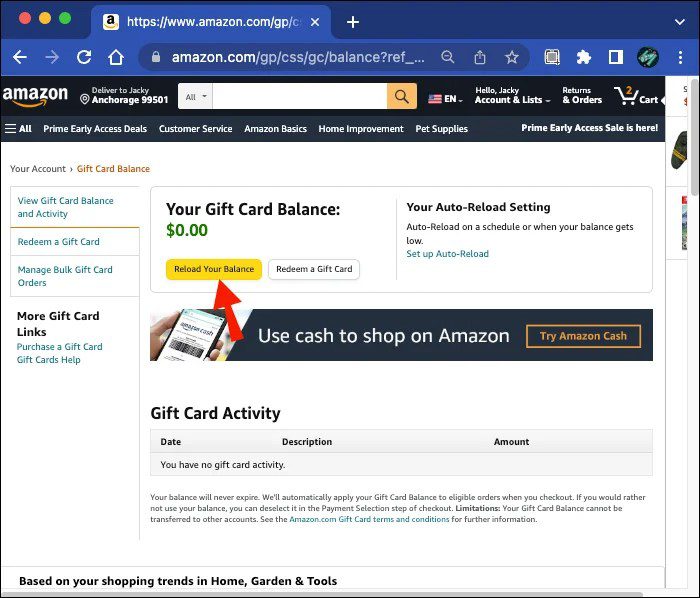
- Amazon Gift Card Reload: A highly effective strategy is to purchase an Amazon.com Gift Card with your remaining Amex gift card balance. You can buy an Amazon.com Gift Card for as little as $0.50. This moves the remaining balance from the Amex card directly into your Amazon account’s gift card balance, which never expires and can be combined with other Amazon gift cards, ensuring no money is left behind. This converts a potentially expiring or forgotten balance into a permanent, flexible credit on Amazon, embodying smart financial management.
By actively managing and utilizing remaining balances, you demonstrate financial acumen and ensure that every dollar of your gift card is put to good use, preventing the common trap of residual, unused funds.
Common Pitfalls and Troubleshooting for Amex Gift Card Users
Even with careful preparation, issues can arise when using gift cards online. Understanding common problems and their solutions is a key aspect of managing your financial tools effectively. This section addresses frequent challenges encountered when using American Express gift cards on Amazon.
Addressing Card Declines: Common Reasons and Solutions
A declined transaction can be frustrating, especially when you know there are funds on your card. Most declines stem from a few common issues:
- Card Not Activated: As mentioned earlier, this is the most frequent cause. Always double-check that your card has been activated via the Amex gift card website or phone number before attempting to use it.
- Incorrect Card Information: Misentered card numbers, incorrect expiration dates, or a wrong security code (CID) will invariably lead to a decline. Carefully re-enter the details, paying close attention to each digit.
- Billing Address Mismatch: Although gift cards don’t have a traditional billing address, online retailers require one for AVS (Address Verification System) checks. If you used an address other than your personal one (which you should use for Amex gift cards), or if there’s a typo, it can cause a decline. Ensure the billing address entered on Amazon matches the address you used during the setup (your own address).
- Insufficient Funds: If the purchase amount exceeds the gift card balance and you haven’t correctly set up a split payment with a secondary payment method, the transaction will be declined. Always know your balance and plan accordingly.
- Small Authorization Holds: Sometimes, initial small authorization holds (e.g., $1) can momentarily reduce the available balance, leading to a decline on a larger purchase if the balance is close to the total. These usually drop off quickly.
- Expired Card: While most Amex gift cards have long expiration dates, it’s wise to check. An expired card is unusable.
When facing a decline, systematically review these points. This analytical approach to troubleshooting is a valuable financial skill, preventing panic and enabling efficient problem resolution.
The Importance of Accurate Card Information and Billing Details
The digital world demands precision. For financial transactions, this means every piece of information must be exact. An incorrect card number is obvious, but often subtle errors in the expiration date or the security code (CID) are overlooked. The CID on an Amex gift card is typically a 4-digit number on the front, distinct from the 3-digit CVV found on the back of most other card types.
The billing address, while seemingly arbitrary for a gift card, plays a critical role in fraud prevention systems. By consistently using your personal, verified billing address for all Amex gift card registrations on Amazon, you establish a consistent profile that security systems can easily authenticate, minimizing friction in your transactions. This attention to detail isn’t just about convenience; it’s a fundamental aspect of digital financial security and seamless online spending.
Distinguishing Between Gift Cards and Credit Cards for Online Shopping
It’s important to remember that an American Express gift card, despite bearing the Amex logo, functions differently from a standard American Express credit card. Gift cards are prepaid, meaning you can only spend the amount loaded onto them. They do not build credit, offer credit lines, or typically come with the same level of fraud protection or rewards programs as credit cards.
Understanding this distinction influences how you approach online shopping:
- No Overdraft: You cannot spend beyond the loaded amount. This is a benefit for budgeting but a limitation if you expect credit functionality.
- Limited Protections: While Amex gift cards offer some security, they generally don’t carry the extensive consumer protections (e.g., chargeback rights for unauthorized transactions) associated with traditional credit cards.
- No Credit Building: They are not reported to credit bureaus, so they don’t impact your credit score.
Treating your Amex gift card as a fixed asset rather than a credit instrument helps align your expectations and spending habits, fostering a more responsible approach to your personal finances.
The Financial Prudence of Using Gift Cards on Amazon
Beyond the mechanics of adding a card, the strategic use of American Express gift cards on Amazon offers significant advantages for personal financial management. They are more than just payment methods; they are tools for budgeting, security, and smart expense tracking.
Budgeting and Spending Control: A Gift Card Advantage
One of the most compelling reasons to use a gift card is its inherent ability to enforce spending limits. Unlike credit cards, which can tempt overspending, a gift card confines your expenditures to a predetermined amount. This makes them an excellent budgeting tool, particularly for discretionary spending categories.
For example, you can allocate a specific Amex gift card for entertainment, hobbies, or holiday shopping on Amazon. Once the funds are exhausted, your spending in that category stops, or requires a conscious decision to dip into other funds. This “envelope system” approach to digital spending promotes fiscal discipline and helps prevent impulse purchases from derailing your financial goals. It’s a tangible way to practice conscious spending and maintain control over your budget.
Security Benefits: Limiting Exposure Compared to Credit Cards
In an age of data breaches and online fraud, security is a paramount concern for online shoppers. Using an American Express gift card on Amazon offers a layer of security that traditional credit or debit cards may not.
Should your Amex gift card details be compromised, the potential financial loss is limited to the balance on that specific card. Unlike a credit card linked to your bank account or a larger line of credit, a gift card breach does not directly expose your primary financial accounts or your entire credit limit. This significantly reduces your risk exposure when shopping online, especially from new or less familiar vendors (though Amazon is highly secure, this principle applies broadly). It’s a form of financial self-defense, offering peace of mind while still enjoying the convenience of online shopping.
Practical Applications: Gifting, Rewards, and Expense Management
American Express gift cards serve various practical financial purposes:
- Thoughtful Gifting: They are ideal gifts, offering recipients the flexibility to choose exactly what they want on Amazon, effectively giving them a financial allocation for their desires.
- Rewards Redemption: Many reward programs, credit card points, or promotional offers are disbursed as American Express gift cards. Using them on Amazon provides a direct way to convert these rewards into tangible goods or services. This transforms indirect benefits into direct purchasing power.
- Expense Management: For small business owners or individuals managing specific project budgets, using gift cards can simplify expense tracking for particular purchases. By allocating a gift card for certain supplies or operational costs, you create a clear ledger for that specific spending, aiding in financial oversight.
Each of these applications underscores the versatility and financial utility of Amex gift cards, making them more than just payment instruments but integral components of a robust personal finance toolkit.
By understanding how to effectively add and manage your American Express gift card on Amazon, you unlock a powerful combination of convenience, security, and disciplined spending. This detailed approach ensures that your online shopping experiences are not only seamless but also aligned with sound financial principles, ultimately empowering you to make smarter choices with your money.
aViewFromTheCave is a participant in the Amazon Services LLC Associates Program, an affiliate advertising program designed to provide a means for sites to earn advertising fees by advertising and linking to Amazon.com. Amazon, the Amazon logo, AmazonSupply, and the AmazonSupply logo are trademarks of Amazon.com, Inc. or its affiliates. As an Amazon Associate we earn affiliate commissions from qualifying purchases.