
The way we consume media has undergone a profound transformation. Gone are the days when television viewing was dictated solely by linear broadcast schedules and physical media. Today, streaming has emerged as the dominant paradigm, offering an unprecedented level of choice, convenience, and personalization. But for many, especially those new to the digital landscape, the concept of “streaming on television” might still seem a bit nebulous. It’s not just about watching Netflix; it’s an ecosystem of devices, platforms, internet connectivity, and content strategies. This comprehensive guide will demystify the process, exploring the technological underpinnings, the various methods available, and how to optimize your experience, ensuring you can harness the full potential of modern home entertainment.
Understanding the Fundamentals of Streaming
At its core, streaming is a method of transmitting data, typically audio and video, continuously over the internet. Instead of downloading an entire file before watching it, streaming allows you to play content as it arrives, piece by piece. This real-time delivery system is what makes on-demand entertainment possible, revolutionizing how we interact with media.
Defining “Streaming” in the Modern Context
When we talk about streaming on television, we’re referring to the process of delivering digital video and audio content from a remote server directly to your TV screen via an internet connection. This content can range from movies and TV shows to live sports, news, and user-generated content. The magic lies in the continuous data flow, which buffers a small portion of the content ahead of time, ensuring smooth playback without interruptions, provided your internet connection is robust enough. This “buffer” is why you might sometimes see a loading spinner if your connection temporarily falters. The advent of high-speed internet and sophisticated compression technologies has made this seamless experience a reality, transforming the television from a passive receiver into an active portal to a vast digital library.
The Evolution of Television Consumption
For decades, television viewing was a scheduled affair. Viewers tuned in at specific times to watch their favorite shows, dictated by broadcasters. The VCR introduced a degree of time-shifting, allowing recording for later viewing, followed by DVD and Blu-ray for physical media ownership. However, these still involved a commitment to a physical format or a broadcast schedule. Streaming shattered these limitations, ushering in an era of true on-demand entertainment. It offered an unparalleled level of freedom: watch what you want, when you want, where you want, and on practically any device. This shift has not only changed consumer habits but has also spurred immense innovation in content creation, distribution models, and the underlying technology that powers it all, making the television experience more dynamic and interactive than ever before.
Essential Components for a Seamless Streaming Experience
To unlock the full potential of streaming on your television, several key technological components must be in place. These elements work in concert to deliver high-quality content directly to your living room, ensuring a smooth and enjoyable viewing session.
High-Speed Internet: The Unsung Hero
Without a reliable and fast internet connection, your streaming experience will be severely hampered. Streaming, especially in high definition (HD), 4K Ultra HD (UHD), or with HDR (High Dynamic Range), consumes significant bandwidth. For basic HD streaming, most services recommend at least 5-10 Mbps (megabits per second). For 4K UHD content, this recommendation jumps to 25 Mbps or higher per stream. If multiple devices in your household are streaming simultaneously, or engaging in other bandwidth-intensive activities like online gaming or large downloads, your overall internet speed needs to be considerably higher. Fiber optic connections are ideal for their speed and stability, but cable internet often suffices. It’s crucial to check your internet service provider’s (ISP) offerings and ensure your plan can comfortably support your household’s streaming demands. A strong Wi-Fi signal, or even better, an Ethernet connection directly to your streaming device, can further enhance stability and speed.
Choosing the Right Television Display
While virtually any modern television can display streamed content, the quality of your display significantly impacts the visual experience.
- Resolution: Older TVs might be limited to standard definition (SD), while most contemporary models offer HD (720p or 1080p). For the best picture quality available from today’s streaming services, a 4K UHD television is highly recommended. These TVs offer four times the pixel count of 1080p, resulting in incredibly sharp and detailed images, especially when paired with 4K-enabled content.
- HDR (High Dynamic Range): Beyond resolution, HDR is a technology that greatly enhances contrast and color accuracy, producing brighter whites, deeper blacks, and a wider spectrum of colors. HDR10, Dolby Vision, and HLG are common HDR formats. A TV with HDR capabilities, coupled with HDR-enabled content and a compatible streaming device, delivers a more lifelike and immersive viewing experience.
- Smart TV Capabilities: Many modern televisions come with built-in “smart” features, meaning they have an operating system, Wi-Fi connectivity, and pre-installed streaming apps. This eliminates the need for an external streaming device, offering a streamlined experience.
Subscription Services: Your Gateway to Content
To access the vast libraries of movies, TV shows, and live programming, you’ll need subscriptions to one or more streaming services. The landscape is rich and diverse:
- Subscription Video On Demand (SVOD): Services like Netflix, Hulu (ad-free tier), Disney+, HBO Max, and Amazon Prime Video offer extensive catalogs for a recurring monthly fee. Each service often features exclusive original content, making a multi-subscription strategy common for diverse tastes.
- Ad-Supported Video On Demand (AVOD) and Free Streaming: Platforms like Peacock (free tier), Tubi, Pluto TV, and Crackle offer a selection of content for free, supported by advertisements. This is an excellent way to access a variety of shows and movies without additional cost.
- Live TV Streaming Services: For those looking to cut the cord from traditional cable or satellite, services like YouTube TV, Sling TV, Hulu + Live TV, and FuboTV offer bundles of live television channels, often including local broadcasts, sports, and news, delivered over the internet for a monthly fee.
Careful consideration of your viewing habits and budget will guide your selection of these content providers.
Exploring Diverse Methods for Streaming to Your TV
The beauty of streaming lies in its versatility. There are multiple technological pathways to get streamed content onto your television screen, each with its own advantages and setup process.
Smart TVs: The Integrated Solution
Modern Smart TVs come equipped with internet connectivity (Wi-Fi and/or Ethernet) and an integrated operating system (like Roku TV, webOS, Tizen, Android TV, or Google TV). These TVs have app stores that allow you to download and install popular streaming services directly onto the television itself.
- Setup: Simply connect your Smart TV to your home network, navigate to the app store, download your desired streaming apps (e.g., Netflix, YouTube, Disney+), log in with your credentials, and start watching.
- Pros: Minimal setup, single remote control for TV functions and streaming, clean aesthetic without extra boxes or cables.
- Cons: Interface speed and app updates can vary by manufacturer and model year; older Smart TVs might not support newer apps or features, and their processors might feel sluggish compared to dedicated devices.
Dedicated Streaming Devices: Power and Versatility
For older “dumb” TVs, or if you desire a more powerful, feature-rich, or updated streaming experience than your Smart TV offers, dedicated streaming devices are an excellent choice. These small boxes or dongles plug into your TV’s HDMI port.
- Roku Devices (e.g., Roku Streaming Stick, Roku Ultra): Known for their user-friendly interface, vast channel selection, and broad app support. They offer a simple, cohesive experience.
- Amazon Fire TV Devices (e.g., Fire TV Stick, Fire TV Cube): Integrate deeply with Amazon’s ecosystem, featuring Alexa voice control and a focus on Amazon Prime Video and other Amazon services, while also supporting a wide range of third-party apps.
- Apple TV (e.g., Apple TV 4K): Offers a premium experience, seamless integration with Apple services (Apple Arcade, Apple Music, Apple TV+), robust performance, and excellent picture/sound quality. It often serves as a central hub for smart home devices as well.
- Google Chromecast (e.g., Chromecast with Google TV): Traditional Chromecasts are “casting” devices, meaning you initiate playback from a mobile device or computer and “cast” it to your TV. Newer models like Chromecast with Google TV combine this functionality with a full-fledged interface and remote control, similar to other streaming boxes.
These devices often boast faster processors, more frequent software updates, and advanced features like Dolby Vision and Dolby Atmos passthrough, making them a popular choice for serious streamers.
Gaming Consoles: Beyond Just Gaming
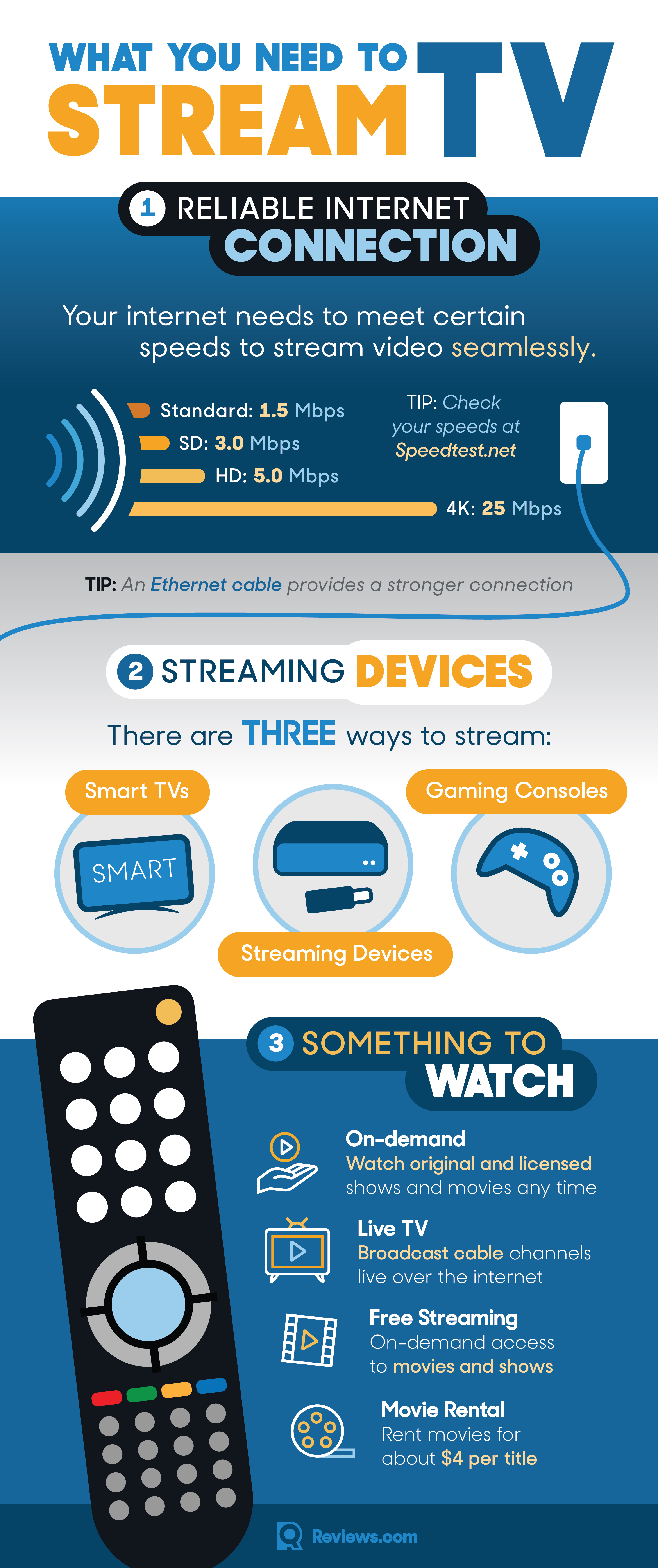
Modern gaming consoles—such as Sony PlayStation (PS4, PS5) and Microsoft Xbox (Xbox One, Xbox Series X/S)—are powerful entertainment hubs. They include app stores where you can download almost all major streaming services.
- Setup: Connect your console to your TV, ensure it’s connected to the internet, and download the desired streaming apps from the console’s store.
- Pros: Multi-functional device, often high processing power for smooth streaming, integrated into an existing home entertainment setup.
- Cons: Can be power-intensive, potentially less user-friendly for non-gamers compared to dedicated streaming devices, and some consoles might lack certain advanced video/audio features found in top-tier streaming boxes.
Casting and Mirroring from Mobile Devices and Computers
Even without a dedicated streaming device or Smart TV, you can often project content from your smartphone, tablet, or computer directly onto your television.
- Casting: This typically involves technologies like Google Cast (built into many apps like YouTube, Netflix) or Apple AirPlay (for Apple devices). You open an app on your phone, select the “cast” or “AirPlay” icon, and choose your compatible TV or device. The content then plays directly on your TV, while your phone acts as a remote.
- Screen Mirroring: This method duplicates your mobile device’s or computer’s entire screen onto your TV. Many Smart TVs and some streaming devices support this natively. While functional, it can sometimes result in lower quality or lag compared to direct casting, as it continuously transmits the display data.
- HDMI Cable: For the most basic method, you can connect your laptop or computer directly to your TV using an HDMI cable. Your TV then acts as an external monitor, allowing you to play content from any website or desktop app. This is a reliable, no-frills option, but it tethers your computer to the TV.
Navigating the Landscape of Streaming Services
The sheer volume of streaming services can be overwhelming. Understanding their distinct models and offerings is key to building a personalized and cost-effective entertainment portfolio.
Subscription Video On Demand (SVOD)
This is the most common model, where you pay a monthly or annual fee for unlimited access to a library of content. Netflix, Hulu, Disney+, Max, Apple TV+, Paramount+, and Peacock Premium are prime examples. Each has carved out its niche with exclusive original programming, vast movie libraries, or specific genres (e.g., Disney+ for family content). The decision often comes down to which platforms host the shows and movies you are most interested in watching. Many households subscribe to multiple SVOD services to ensure a broad selection.
Ad-Supported Video On Demand (AVOD) and Free Streaming
For budget-conscious viewers, AVOD services provide a wealth of free content supported by commercials. Tubi, Pluto TV, Crackle, and the free tiers of Peacock and Roku Channel offer thousands of movies and TV shows, often including classic films, syndicated series, and curated live channels. While ads are present, they are typically less frequent than traditional broadcast television. This model is excellent for supplementing paid subscriptions or for casual viewing without commitment.
Live TV Streaming Services
These services aim to replace traditional cable or satellite subscriptions, offering live broadcasts of popular channels over the internet. YouTube TV, Sling TV, Hulu + Live TV, and FuboTV are leading contenders. They typically include local channels, sports networks, news channels, and popular entertainment channels. Most also offer cloud DVR functionality, allowing you to record live broadcasts and watch them later. They usually come with a higher monthly fee than SVOD services but offer the convenience and breadth of live television without the contracts and equipment rentals often associated with traditional providers.
Hybrid Models and Niche Platforms
The streaming market is dynamic, with many services evolving. Some SVOD platforms offer ad-supported tiers at a lower price point (e.g., Netflix Basic with Ads, Hulu with Ads). Additionally, niche streaming services cater to very specific interests, such as Shudder for horror fans, Crunchyroll for anime enthusiasts, or curiosityStream for documentaries. These specialized platforms allow viewers to delve deep into their passions, often for a relatively low subscription fee, demonstrating the increasing fragmentation and specialization within the streaming ecosystem.
Optimizing Your Streaming Setup and Troubleshooting Common Issues
Even with the right devices and subscriptions, minor adjustments and awareness of common pitfalls can significantly enhance your streaming experience.
Maximizing Video and Audio Quality
- Ethernet Over Wi-Fi: Whenever possible, connect your streaming device directly to your router with an Ethernet cable. This provides the most stable and fastest connection, reducing buffering and improving overall quality, especially for 4K content.
- Router Placement: If using Wi-Fi, place your router in a central location, away from obstructions, and consider upgrading to a newer Wi-Fi 6 or Wi-Fi 6E router for better performance and range.
- Device Settings: Check your streaming device’s display settings to ensure it’s outputting the correct resolution (e.g., 4K) and enabling HDR if your TV supports it. Similarly, configure audio settings for surround sound formats like Dolby Atmos or DTS:X if your sound system is capable.
- Service Settings: Some streaming services allow you to adjust video quality settings within their apps. Ensure these are set to “High” or “Auto” for the best experience.
Ensuring Network Stability
- Reduce Congestion: Minimize other bandwidth-intensive activities (large downloads, online gaming) on your home network while streaming, especially during peak hours.
- Router Reboot: A simple router reboot can often resolve intermittent connectivity issues.
- ISP Speed Test: Regularly test your internet speed using online tools (e.g., Speedtest.net) to ensure you’re getting the speeds you pay for. If not, contact your ISP.
Common Streaming Problems and Quick Fixes
- Buffering/Lag: Often due to slow internet. Try reducing video quality in the app, connecting via Ethernet, or moving closer to your Wi-Fi router. Close other apps or devices using bandwidth.
- Poor Picture Quality: Check your TV and device display settings. Ensure you’re subscribed to the appropriate tier for 4K content and that your internet speed meets the requirements.
- App Crashes/Freezes: Try force-closing and restarting the app. If the issue persists, clear the app’s cache or reinstall it.
- No Sound/Audio Sync Issues: Check TV, sound system, and device volume levels. Restart the app or device. Some devices have settings to adjust audio delay.

Keeping Your Devices and Apps Updated
Manufacturers and app developers frequently release software updates that bring new features, performance improvements, and crucial security patches. Ensure your Smart TV, streaming devices, and individual streaming apps are always running the latest software version. Most devices allow automatic updates, which is the recommended setting. Regularly checking for and installing updates can prevent many common technical glitches and ensure you have access to the best possible streaming experience.
In conclusion, streaming on television has democratized entertainment, placing an unimaginable array of content at our fingertips. By understanding the technological requirements, exploring the diverse methods of delivery, and optimizing your setup, you can transform your television into a powerful, personalized, and seamless gateway to the world of digital media. The future of television is here, and it’s streaming.
aViewFromTheCave is a participant in the Amazon Services LLC Associates Program, an affiliate advertising program designed to provide a means for sites to earn advertising fees by advertising and linking to Amazon.com. Amazon, the Amazon logo, AmazonSupply, and the AmazonSupply logo are trademarks of Amazon.com, Inc. or its affiliates. As an Amazon Associate we earn affiliate commissions from qualifying purchases.