
In the rapidly evolving landscape of digital assets, understanding how to manage your cryptocurrency effectively is paramount. For many, Coinbase serves as a primary entry point into the world of crypto, offering a user-friendly platform for buying, selling, and holding various digital currencies. However, as users delve deeper into the crypto ecosystem, they often encounter Coinbase Wallet – a distinct application that offers a different level of control and functionality. This guide will meticulously walk you through the process of transferring your assets from your Coinbase exchange account to your Coinbase Wallet, illuminating the technical nuances, strategic advantages, and best practices involved in this crucial operation. We will focus strictly on the technological implementation, security features, and practical steps of utilizing these digital tools.
Demystifying the Coinbase Ecosystem: Exchange vs. Wallet
Before embarking on a transfer, it’s crucial to understand the fundamental distinctions between Coinbase (the exchange) and Coinbase Wallet (the self-custody wallet). While both are products from the same company, they serve different, albeit complementary, purposes within the broader cryptocurrency ecosystem. Grasping these differences is key to appreciating the benefits of transferring your assets.
Coinbase: Your Gateway to Cryptocurrency Trading
Coinbase, often referred to as the Coinbase exchange, functions much like a traditional online brokerage for digital assets. When you buy cryptocurrency on Coinbase, your assets are held in a “custodial” arrangement. This means Coinbase manages the private keys associated with your cryptocurrency, much like a bank manages your funds. This model offers convenience, ease of use, and a sense of security for newcomers, as Coinbase is responsible for protecting your assets and providing customer support for account recovery. Its platform is designed for straightforward trading, portfolio tracking, and simplified entry into the crypto market, abstracting away much of the underlying blockchain complexity for the end-user. The security infrastructure is centralized, relying on Coinbase’s robust cybersecurity measures to safeguard user funds.
Coinbase Wallet: Unlocking True Decentralized Control
Coinbase Wallet, in contrast, is a “non-custodial” or “self-custody” wallet. This distinction is critical from a technological standpoint: you are in sole control of your private keys. The wallet application itself is merely an interface for interacting with various blockchains. It allows you to store a wide array of cryptocurrencies and NFTs, access decentralized applications (dApps), participate in DeFi protocols, and interact directly with smart contracts without an intermediary. This shift means greater autonomy and privacy, but it also places the full responsibility of key management and security squarely on your shoulders. Losing your recovery phrase (seed phrase) for Coinbase Wallet means irreversible loss of your assets, as there’s no central authority to recover them. From a technology perspective, it’s a direct interface to the blockchain, offering a higher degree of technical sovereignty.
The Fundamental Reasons for Transferring
The decision to transfer assets from the Coinbase exchange to Coinbase Wallet stems from several technical and strategic advantages. Firstly, it moves your digital assets from a centralized, custodial platform to a decentralized, self-custodial one. This enhances security by removing the single point of failure inherent in exchanges, mitigating risks associated with potential exchange hacks or regulatory interventions that could freeze assets. Secondly, Coinbase Wallet provides direct access to the burgeoning world of Web3 – dApps, NFTs, and DeFi protocols – which are generally inaccessible directly from the Coinbase exchange. For users looking to explore beyond basic trading, engaging with smart contracts and decentralized services requires a self-custody wallet that supports direct blockchain interaction. This transfer is not just moving funds; it’s upgrading your interaction model with the blockchain ecosystem.
Essential Preparations Before Initiating Your Transfer
A successful and secure transfer requires careful preparation. Skipping these preliminary steps can lead to delays, complications, or even irreversible loss of assets. Think of this as setting up your digital security parameters and verifying network compatibility before any data transfer.
Ensuring Account Verification and Security
Before initiating any significant transfer, ensure both your Coinbase exchange account and your Coinbase Wallet are fully set up and secured. For Coinbase exchange, this means having completed all necessary KYC (Know Your Customer) verification steps. For Coinbase Wallet, ensure you have securely backed up your 12-word recovery phrase (seed phrase) and stored it offline in a safe location. This phrase is the ultimate key to your funds; without it, recovery is impossible. Implement two-factor authentication (2FA) on your Coinbase exchange account using an authenticator app (like Google Authenticator or Authy) for an additional layer of security. This is a fundamental digital security best practice for any sensitive online account.
Understanding Network Fees and Transaction Speeds
Cryptocurrency transfers are processed on their respective blockchains, incurring network fees (often called “gas fees” on Ethereum). These fees compensate validators/miners for processing and securing your transaction. The fee amount and transaction speed can vary significantly based on network congestion, the specific cryptocurrency being transferred (e.g., Bitcoin, Ethereum, Solana), and the current demand for network resources. While Coinbase typically handles the complexity of these fees for exchange withdrawals, it’s wise to be aware that once transferred to your self-custody wallet, subsequent transactions from that wallet will require you to manage and pay these network fees directly. Different blockchains have different fee structures and confirmation times. For instance, an Ethereum transfer might take minutes with a certain gas fee, while a Bitcoin transfer could take longer for multiple confirmations, even with lower fees.
Confirming Asset Compatibility
Crucially, ensure that Coinbase Wallet supports the specific cryptocurrency you intend to transfer. While Coinbase Wallet supports a vast array of tokens across multiple blockchains (Ethereum, Polygon, Solana, Avalanche, etc.), not every token listed on the Coinbase exchange is necessarily supported or available on the same network within Coinbase Wallet. For instance, if you hold an ERC-20 token on the Ethereum network on Coinbase, ensure Coinbase Wallet supports that token on the Ethereum network. Attempting to send an asset to an unsupported network address (e.g., sending an ERC-20 token to a Bitcoin address) will result in irreversible loss of funds. Always double-check the asset type and the receiving network address format.
A Step-by-Step Walkthrough: From Exchange to Wallet
With preparations complete, we can now proceed with the actual transfer process. This sequence of actions ensures that your digital assets move securely from Coinbase’s custodial environment to your self-custody wallet.
Initiating the Withdrawal from Coinbase Exchange
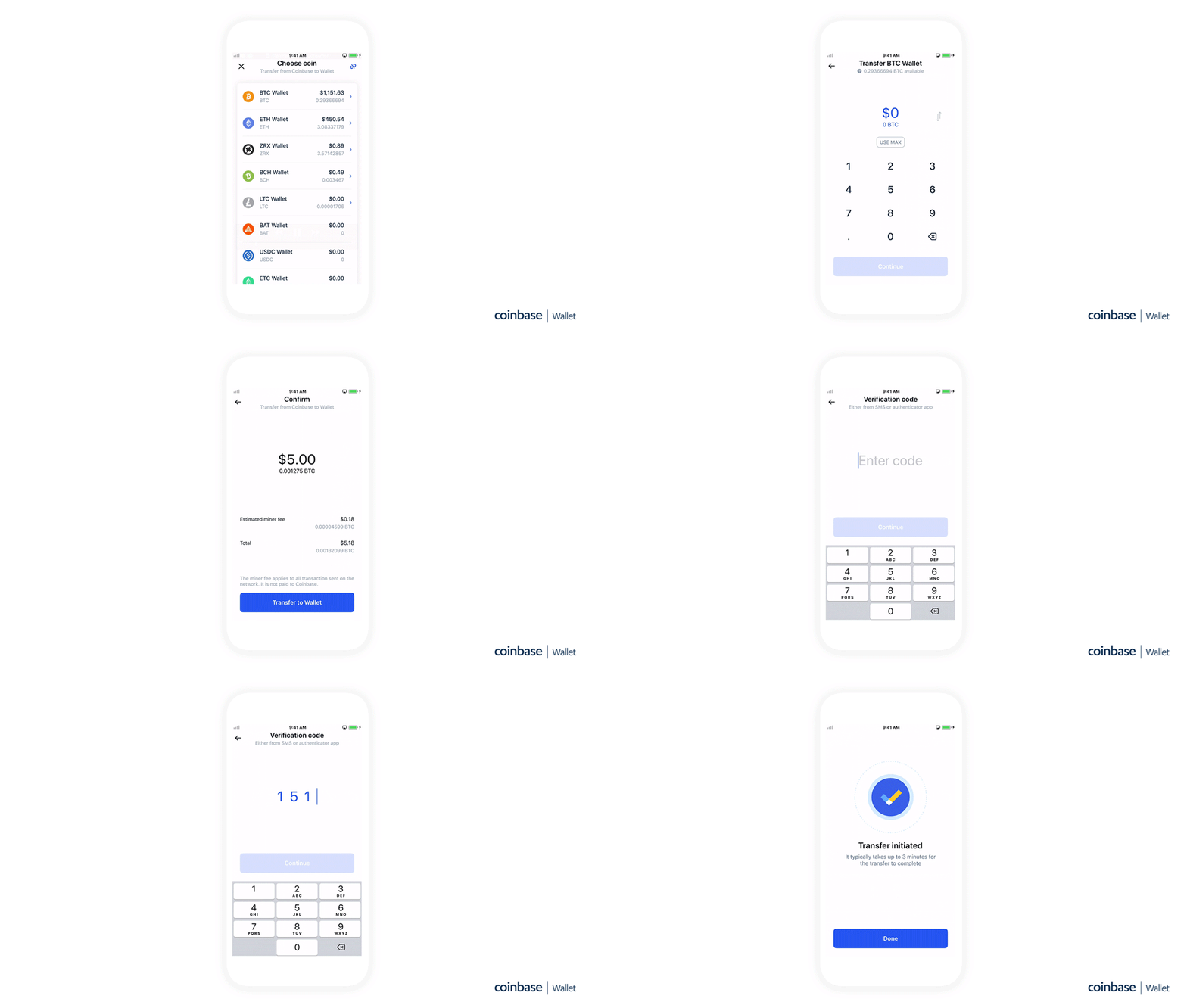
- Log in to your Coinbase account: Access the Coinbase website or mobile application and log in using your credentials.
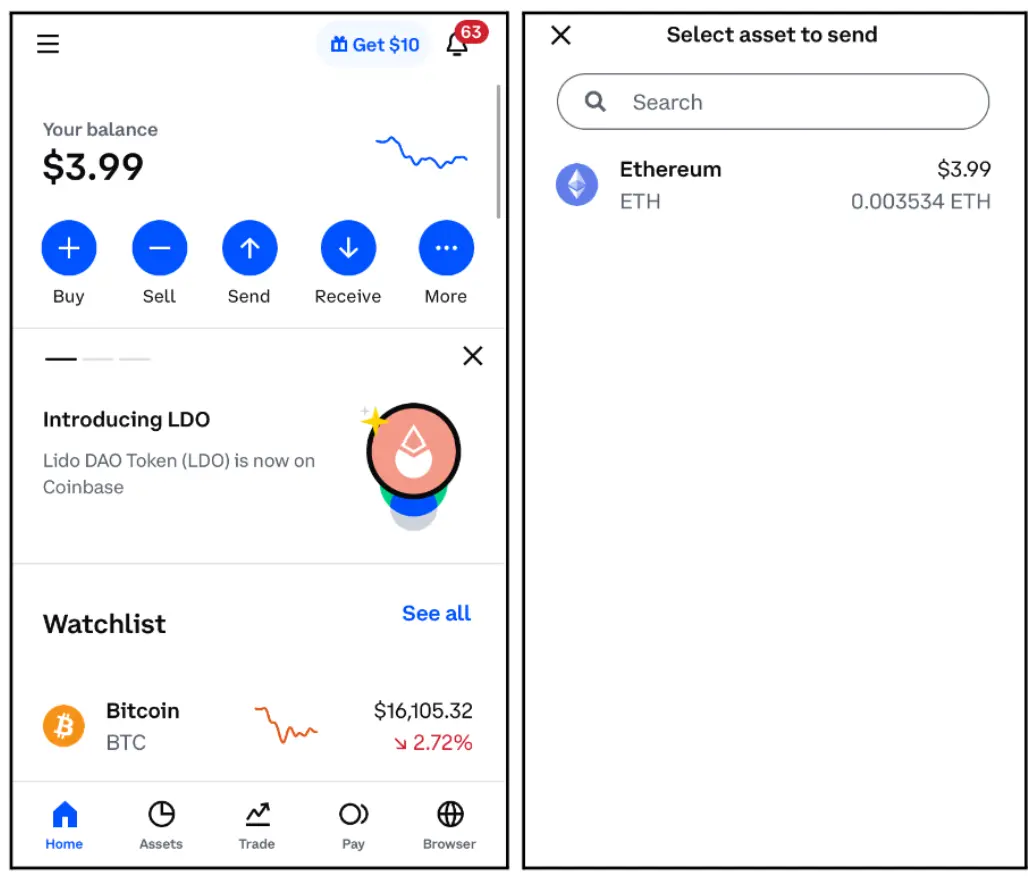
- Navigate to the “Send/Receive” section: On the desktop interface, this is usually found on the main dashboard. On the mobile app, look for the ‘send’ or ‘transfer’ icon.
- Select the cryptocurrency: Choose the specific cryptocurrency you wish to transfer to your Coinbase Wallet. Ensure it’s the correct asset.
- Enter the amount: Specify the quantity of crypto you want to send. Double-check this amount for accuracy.
- Click “Send” or “Withdraw”: This will usually prompt you to enter a recipient address.
Specifying Your Coinbase Wallet Destination
- Open your Coinbase Wallet: Access your Coinbase Wallet application on your mobile device.
- Locate the “Receive” function: On the main screen, you’ll typically see a “Receive” button or option. Tap this.
- Select the correct cryptocurrency: Choose the exact same cryptocurrency you selected in step 3 above (e.g., if you are sending ETH, select ETH to receive). This will display your unique public wallet address for that specific asset and network.
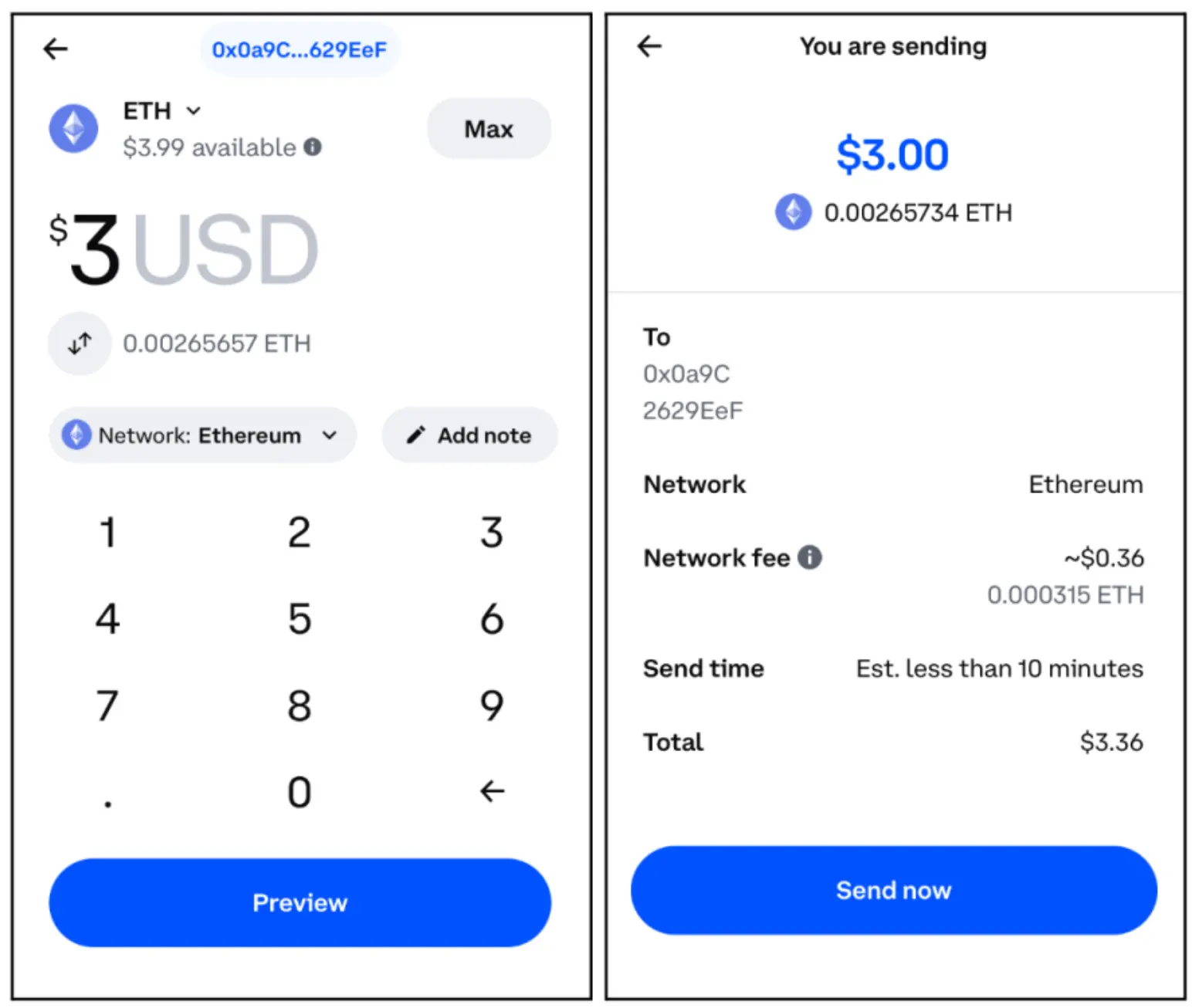
- Copy the wallet address: Carefully copy this address. It’s a long string of alphanumeric characters. For Ethereum-based tokens, the address typically starts with “0x”. Using the “copy” button is highly recommended to avoid manual transcription errors.
- Paste into Coinbase exchange: Return to the Coinbase exchange withdrawal screen and paste the copied Coinbase Wallet address into the “Recipient” or “To” field.
- Verify the address: This is perhaps the most critical step. Visually compare the first few and last few characters of the pasted address in Coinbase with the address displayed in your Coinbase Wallet. Even a single character mismatch can send your funds to an irretrievable address. Some advanced users even read the address character by character or use QR code scanning for maximum accuracy.
Reviewing and Confirming the Transaction
- Review transaction details: Before finalizing, carefully review all the transaction details displayed on Coinbase: the amount, the destination address, and any estimated network fees.
- Confirm with 2FA: You will likely be prompted to enter your 2FA code (from your authenticator app) to authorize the transaction. This is a crucial security layer to prevent unauthorized withdrawals.
- Initiate the transfer: Once confirmed, the transaction will be broadcast to the blockchain network. You will usually receive an email confirmation from Coinbase, indicating that your withdrawal request has been submitted.
Post-Transfer Verification and Troubleshooting
After initiating the transfer, a period of waiting is normal as the transaction is processed on the blockchain. Knowing how to monitor and what to do in case of issues is part of managing your digital assets effectively.
Monitoring Transaction Status and Confirmation Times
Once the transfer is initiated, it enters the blockchain’s queue.
- Coinbase transaction history: You can usually view the status of your withdrawal in your Coinbase transaction history, which often provides a link to the transaction on a blockchain explorer (e.g., Etherscan for Ethereum, Blockchain.com for Bitcoin).
- Blockchain explorers: A blockchain explorer is a powerful tool to directly verify your transaction status. By entering the transaction ID (TxID), which Coinbase usually provides, you can see if the transaction has been broadcast, how many confirmations it has received, and its current status.
- Coinbase Wallet: Within your Coinbase Wallet, you can usually check the “Activity” or “Transactions” tab. Once the transaction receives sufficient network confirmations, your funds will appear in your Coinbase Wallet balance. Confirmation times vary depending on the blockchain’s activity and the network fees paid.
What to Do if Your Transfer is Delayed or Unconfirmed
Delays can occur due to network congestion, incorrect fee estimations (though Coinbase usually handles this for withdrawals), or other technical hiccups.
- Check blockchain explorer first: The first step is always to check the TxID on the relevant blockchain explorer. If the transaction appears as “pending” or “unconfirmed,” it simply means the network is processing it. Be patient.
- Verify the address again: Double-check that the address you sent to matches your Coinbase Wallet address. If it doesn’t match and the transaction has confirmed, the funds are likely irretrievably lost to an incorrect address.
- Contact Coinbase Support: If the transaction has been pending for an unusually long time (e.g., several hours for Ethereum, or a day for Bitcoin, depending on network conditions) and the blockchain explorer shows no progress, or if Coinbase indicates the transfer failed but the funds haven’t returned to your account, contact Coinbase support with your TxID and all relevant details. Provide screenshots if possible. Note that Coinbase support can only assist with the withdrawal side from their platform; they cannot recover funds sent to an incorrect address on the blockchain.
Best Practices for Secure Wallet Management
Moving assets to Coinbase Wallet places greater responsibility on you.
- Secure your recovery phrase: This cannot be stressed enough. Never share it, store it offline, consider multiple secure locations. It is the only way to recover your funds if you lose your device or forget your password.
- Use strong passwords: Protect your Coinbase Wallet application with a strong, unique password and biometrics (fingerprint/Face ID) where available.
- Be wary of phishing attempts: Only interact with official Coinbase Wallet applications and websites. Never click suspicious links or enter your recovery phrase or private keys on unverified sites.
- Understand smart contract interactions: When interacting with dApps, always review the permissions you grant to smart contracts. Granting unlimited spending approval can expose your assets to risks if the contract is compromised. This is a critical aspect of decentralized security.
The Strategic Advantages of Self-Custody
Transferring your assets to Coinbase Wallet is more than just moving crypto; it’s a strategic move towards greater financial and technological autonomy within the digital asset space.
Enhanced Security and Ownership
By holding your private keys in Coinbase Wallet, you move away from the “not your keys, not your crypto” paradigm often associated with custodial exchanges. This means your assets are no longer subject to the operational risks of a centralized exchange, such as hacking incidents, insolvency, or regulatory confiscation. You become the sole guardian of your digital wealth, employing encryption and secure storage practices on your device. This self-custody model represents a fundamental shift in control, aligning with the core principles of decentralization that underpin much of the crypto movement. It’s a technical empowerment, giving you direct, unmediated access to your assets on the blockchain.
Accessing Decentralized Applications (dApps)
Coinbase Wallet acts as your portal to the expansive world of decentralized applications (dApps). These applications run on blockchain networks and offer a wide range of services, including decentralized finance (DeFi) platforms for lending, borrowing, and swapping assets, NFT marketplaces for digital collectibles, blockchain-based gaming, and decentralized autonomous organizations (DAOs). By connecting your Coinbase Wallet to these dApps, you can engage directly with these protocols, leveraging their unique functionalities without needing to trust a central intermediary. This opens up entirely new avenues for interacting with and leveraging your cryptocurrency beyond simple buying and selling. It’s the technical bridge to the Web3 internet.
Future-Proofing Your Crypto Holdings
As the blockchain ecosystem continues to innovate, holding assets in a self-custody wallet like Coinbase Wallet positions you to adapt and participate in future developments. Whether it’s participating in new DeFi protocols, staking opportunities, governance votes for decentralized projects, or exploring emerging blockchain technologies, having direct control over your assets provides the flexibility to engage without waiting for an exchange to integrate new features. This self-sovereignty is invaluable in a rapidly evolving technological landscape, ensuring that your digital assets remain liquid and accessible for any emerging opportunity or technological shift. It’s about maintaining technical readiness and flexibility in your crypto strategy.
In conclusion, transferring assets from Coinbase to Coinbase Wallet is a crucial step for any cryptocurrency holder seeking greater control, enhanced security, and broader participation in the decentralized web. By understanding the technological distinctions, following meticulous preparation and transfer steps, and adhering to robust security practices, you can confidently navigate this process and unlock the full potential of your digital assets within the dynamic blockchain ecosystem. This move empowers you to become a more informed and sovereign participant in the digital economy.
aViewFromTheCave is a participant in the Amazon Services LLC Associates Program, an affiliate advertising program designed to provide a means for sites to earn advertising fees by advertising and linking to Amazon.com. Amazon, the Amazon logo, AmazonSupply, and the AmazonSupply logo are trademarks of Amazon.com, Inc. or its affiliates. As an Amazon Associate we earn affiliate commissions from qualifying purchases.