
In the rapidly evolving landscape of digital payments, Venmo stands out as a ubiquitous platform, simplifying peer-to-peer (P2P) money transfers and even enabling payments to businesses. Its user-friendly interface and social features have made it a go-to app for splitting bills, sending gifts, or settling debts with friends and family. However, beyond the casual ‘request’ and ‘pay’ functions, understanding the intricate mechanisms and best practices for transferring money on Venmo is crucial for a secure and efficient experience. This guide delves into the technical aspects and step-by-step processes to ensure you master every facet of Venmo transfers, enhancing your digital financial interactions.

Understanding Venmo’s Core Functionality for Transfers
At its heart, Venmo is a mobile payment service designed for convenience. To effectively transfer money, users must first grasp the foundational components that govern how funds move within the ecosystem. This involves understanding the platform itself, the various types of transfers it supports, and how it interfaces with your existing financial institutions.
What is Venmo and How Does it Work?
Venmo, owned by PayPal, operates as a digital wallet that facilitates electronic transfers between users. Upon creating an account, users link a bank account, debit card, or credit card to their Venmo profile. When you send money, Venmo debits the specified amount from your chosen funding source or your existing Venmo balance. When you receive money, it typically lands in your Venmo balance, from where you can choose to keep it for future Venmo payments or transfer it out to a linked bank account. The magic lies in its instant notification system and often near-instant transfer capabilities between Venmo accounts, making it a highly responsive tool for managing small to medium-sized transactions. Its underlying architecture leverages secure data encryption and robust server infrastructure to process millions of transactions daily, reflecting a sophisticated blend of convenience and technical reliability.
Types of Transfers: Person-to-Person vs. Business Payments
Initially conceived as a P2P service, Venmo has expanded its capabilities. The most common transfer type is Person-to-Person (P2P), where individuals send money to each other, often accompanied by a note describing the payment (e.g., “for dinner,” “rent”). These are typically free when funded by a linked bank account, debit card, or Venmo balance. However, using a credit card for P2P payments usually incurs a standard 3% fee, a crucial detail for users to remember when selecting their funding source.
Beyond P2P, Venmo now supports Business Payments. Many small businesses, freelancers, and even larger retailers accept Venmo payments, often displayed via a QR code or an in-app business profile. When you pay a business, the transaction details and fees might differ, and it often functions more like a traditional online purchase, offering buyer protection in some cases. Understanding the distinction is vital, as the fee structure and recipient’s account type can influence your experience and costs. The technical infrastructure supporting business payments includes more robust API integrations and enhanced merchant tools, ensuring seamless reconciliation for businesses.
Venmo Balance vs. Linked Accounts
Your Venmo balance acts as a digital reservoir for funds received or retained within the app. Money sent to you by other Venmo users automatically accrues here. You can use this balance to make future payments, eliminating the need to draw from a linked bank account or card. This system enhances transactional speed, as funds are already within Venmo’s immediate control.
Alternatively, you can fund payments directly from linked bank accounts, debit cards, or credit cards. Linking these accounts involves a secure authentication process, often requiring micro-deposits or instant bank verification. While convenient, it’s essential to manage these linked accounts carefully, ensuring they are current and secure. The system prioritizes using your Venmo balance first if sufficient, before defaulting to a linked debit card or bank account for payments, optimizing for user convenience and minimizing potential fees.
Step-by-Step Guide to Sending Money on Venmo
Sending money on Venmo is designed to be intuitive, but a clear understanding of each step ensures accuracy and security. Following these guidelines will help you navigate the process flawlessly.
Initiating a Payment: Finding Your Recipient
To begin, open the Venmo app and tap the “Pay or Request” button, typically represented by a pencil and paper icon or a dollar sign, usually located at the bottom of the screen. The next step is to select your recipient. Venmo offers several methods for this:
- Search by Username, Name, Phone, or Email: Use the search bar to find an existing contact.
- Scan QR Code: If the recipient is nearby, you can use Venmo’s built-in QR scanner to quickly pull up their profile.
- From Contacts: Venmo can sync with your phone’s contacts, making it easy to find friends already using the app.
Once you’ve selected the recipient, their profile picture and username will appear, confirming you’re sending money to the right person. Double-checking this step is crucial to prevent sending funds to unintended recipients, a common technical misstep that can lead to significant inconvenience.
Entering Payment Details: Amount, Notes, and Privacy Settings
After selecting the recipient, you’ll be prompted to enter the payment details:
- Amount: Input the exact amount you wish to send.
- Note: This is a crucial Venmo feature. You must add a note describing the payment. While seemingly casual, this serves as a digital record for both parties. Make it clear and concise (e.g., “Dinner last night,” “Share of rent for August”).
- Privacy Settings: Venmo payments have a social feed. Before sending, you can choose the privacy setting for your transaction:
- Public: Visible to everyone on Venmo’s public feed (including the note).
- Friends: Visible only to you and your recipient’s Venmo friends.
- Private: Visible only to you and your recipient.
This feature is a core part of Venmo’s social appeal but also requires user awareness regarding data sharing. For sensitive transactions, “Private” is always the recommended option, emphasizing user control over their digital footprint.
Confirming and Sending: The Final Steps
Before the final send, Venmo presents a review screen. This is your last chance to verify all the details: recipient, amount, note, and privacy setting. Crucially, you’ll also select your funding source here. Venmo will typically default to your Venmo balance if sufficient, then a linked debit card or bank account. If you intend to use a specific source, ensure it’s selected correctly. Remember the 3% fee for credit card payments if you opt for that method. Once satisfied, tap the “Pay” button. The payment will process, and both you and the recipient will receive an in-app notification confirming the transfer. This final confirmation step is a critical technical safeguard, preventing accidental or erroneous dispatches of funds.
Receiving Money and Cashing Out Your Venmo Balance
Receiving money on Venmo is straightforward, but transferring those funds to your bank account requires understanding the different withdrawal options and their associated technical implications.
Automatic Deposit vs. Manual Transfer
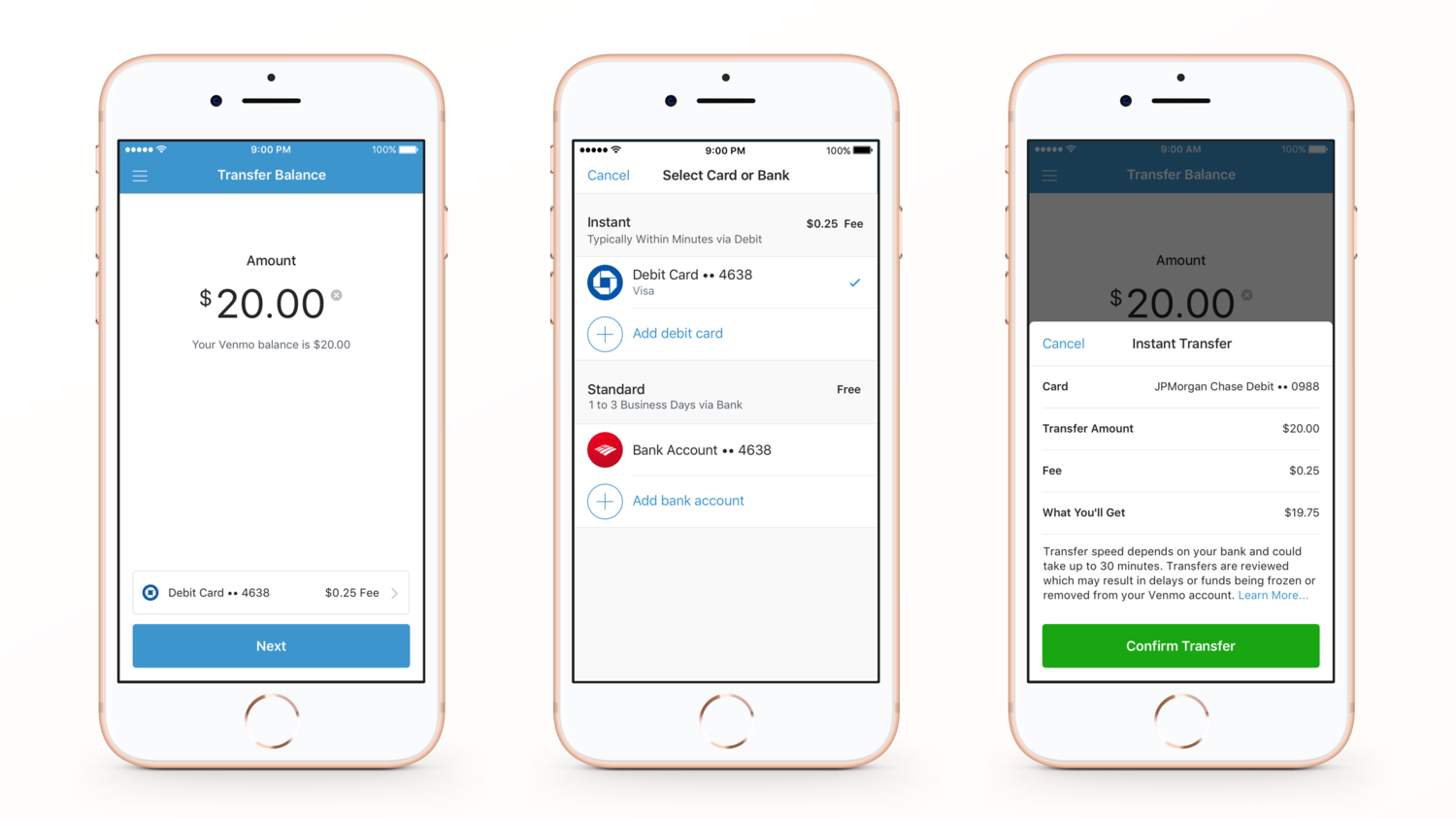
When someone sends you money on Venmo, it automatically deposits into your Venmo balance. From there, you have two primary options for getting the money into your traditional bank account:
- Standard Transfer: This is Venmo’s default option. Funds are typically transferred to your linked bank account within 1-3 business days. This service is usually free of charge. The underlying process involves standard ACH (Automated Clearing House) transfers, which are batched and processed by banks, accounting for the multi-day transfer window.
- Instant Transfer: For a small fee (typically 1.75% with a minimum fee of $0.25 and a maximum fee of $25.00), Venmo offers instant transfers. These funds typically arrive in your linked debit card account within minutes. This service leverages faster payment rails, often through networks like Visa Direct or Mastercard Send, which allow for near real-time settlement, making it a valuable feature for urgent access to funds.
Choosing between these options depends on your urgency and willingness to incur a fee. The technical difference lies in the payment processing networks utilized by Venmo, offering varying speeds and cost structures.
Instant vs. Standard Transfers: Speed and Fees
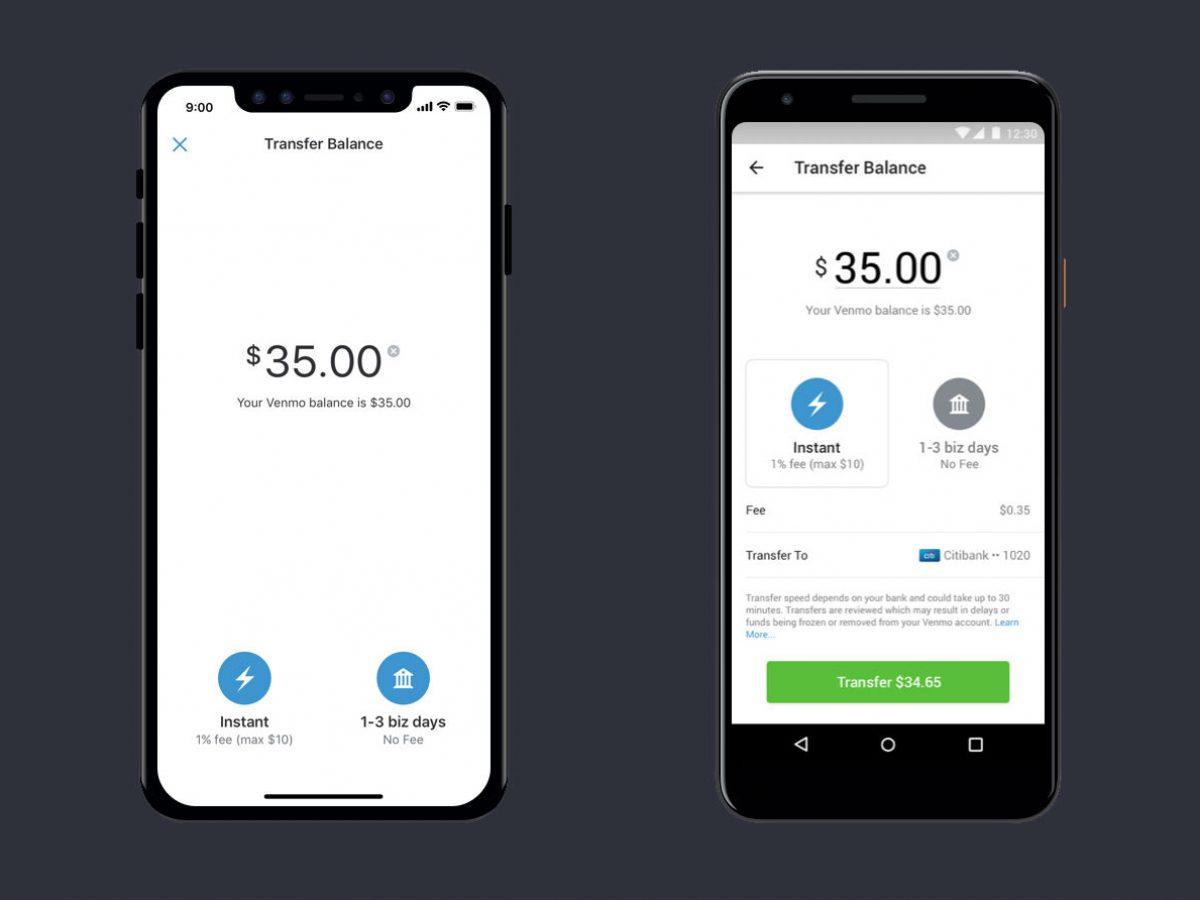
The primary differentiator between instant and standard transfers is speed and cost.
- Standard Transfers (1-3 business days, free): Ideal for non-urgent withdrawals. Funds are processed through conventional banking channels, meaning they are subject to bank processing times, weekends, and public holidays.
- Instant Transfers (within minutes, 1.75% fee): Perfect for immediate access to funds. However, remember the associated fee, which is deducted from the transfer amount. It’s crucial to have a linked debit card for this feature, as instant transfers generally do not support transfers directly to bank accounts (unless specified by Venmo for certain banks, which is less common). The technical infrastructure for instant transfers requires real-time validation and settlement capabilities with partner banks, a more complex operation than standard ACH.
Linking and Managing Your Bank Account
To cash out your Venmo balance, you must have a verified bank account linked to your profile. This linking process is a critical security measure.
- Initial Linkage: You can link your bank account either by logging into your online banking portal through Venmo’s secure interface (instant verification) or by manually entering your bank’s routing and account numbers, followed by a micro-deposit verification (Venmo sends two small deposits to your account, which you then verify in the app).
- Management: Regularly review your linked accounts. If a bank account is closed or changed, update it promptly in the Venmo app to avoid transfer failures. Venmo employs encryption and multi-factor authentication to protect your banking information, but users share responsibility by keeping their login details secure and monitoring their connected accounts. The ability to manage multiple linked accounts provides flexibility but also necessitates vigilant digital hygiene.
Enhancing Security and Troubleshooting Common Issues
While Venmo prioritizes user experience, digital transactions always carry inherent risks. Understanding security features and knowing how to troubleshoot common issues are vital for a safe and seamless experience.
Venmo’s Security Features and Best Practices
Venmo implements robust security protocols, including data encryption, fraud monitoring, and multi-factor authentication (MFA). However, users are the first line of defense.
- Strong, Unique Passwords: Use a complex password distinct from other online accounts.
- Multi-Factor Authentication (MFA): Enable MFA for an added layer of security, typically involving a code sent to your phone or email during login.
- Privacy Settings: Use “Private” for sensitive transactions to limit visibility on the social feed.
- Beware of Phishing: Be suspicious of unsolicited emails or messages asking for your Venmo login or personal details. Venmo will never ask for your password via email.
- Verify Recipients: Always double-check the username and profile picture of the person you’re paying.
- Link Securely: Ensure your linked bank account has strong security itself.
These practices are not merely suggestions but critical components of a secure digital transaction framework.
Dealing with Incorrect Transfers or Scams
Mistakes happen, but acting quickly is key. If you send money to the wrong person:
- Immediately Contact the Recipient: Use Venmo’s in-app chat to politely request the money back.
- Contact Venmo Support: If the recipient is unresponsive or refuses, contact Venmo support directly. They may be able to mediate or reverse the transaction in certain circumstances, though success is not guaranteed, especially if the funds have already been moved.
For scams, such as receiving fake payment notifications or being tricked into sending money for non-existent goods, report the issue to Venmo support immediately. Venmo’s dispute resolution processes, while comprehensive, rely on prompt reporting and clear evidence to initiate investigations and potential reversals.
Resolving Payment Failures and Account Holds
Payment failures can occur due to insufficient funds in your chosen source, incorrect card details, or issues with your bank.
- Check Funding Source: Verify your bank account or card has sufficient funds and is active.
- Review Card Details: Ensure the expiration date and CVV are correct for linked cards.
- Contact Your Bank: Sometimes, your bank may block a Venmo transaction as a security measure.
Account holds might occur due to suspicious activity, large transaction volumes, or a need for further identity verification. If your account is put on hold, Venmo will usually notify you and provide instructions for resolution, which often involves submitting identity documents or clarifying recent transaction patterns. Adhering to these requests promptly can expedite the release of your account. These technical hurdles are designed to protect both the user and the platform from fraudulent activities, despite the temporary inconvenience.
Beyond Basic Transfers: Advanced Venmo Features
Venmo isn’t just for simple P2P transfers; it continually evolves, integrating features that enhance its utility in various daily financial scenarios, leveraging its technological foundation for broader application.
Group Payments and Split Bills
One of Venmo’s most celebrated features is its ability to simplify group payments. If you’re out to dinner with friends, one person can pay the total bill, and then easily “request” specific amounts from others in the group. The app allows you to select multiple friends and input their respective shares, making splitting bills after a meal, vacation, or shared expense incredibly convenient. This feature streamlines social finance by automating the often-awkward process of calculating and collecting individual contributions, showcasing the app’s powerful social integration capabilities.
QR Code Payments
Venmo has embraced QR code technology to facilitate seamless in-person transactions. Users can generate a unique QR code within the app, which others can scan to quickly send money. This eliminates the need to manually search for usernames, making quick payments at farmer’s markets, small pop-up shops, or even between friends at an event much faster and more efficient. The technology behind QR codes allows for rapid data exchange and secure linking directly to a user’s profile, bypassing potential search errors and accelerating the payment flow.
Venmo Debit Card and Credit Card
Extending its functionality beyond the app, Venmo offers physical cards that integrate directly with your Venmo balance.
- Venmo Debit Card: This Mastercard debit card is directly linked to your Venmo balance, allowing you to spend funds held in your Venmo account anywhere Mastercard is accepted, withdraw cash from ATMs, and even earn cashback on eligible purchases. It effectively transforms your digital Venmo balance into a tangible spending tool.
- Venmo Credit Card: Introduced in partnership with Synchrony Bank, the Venmo Credit Card offers customized cash back rewards in top spending categories, paid directly into your Venmo balance. It provides a more traditional credit product while maintaining integration with the Venmo app for statement viewing and reward management.
These card offerings demonstrate Venmo’s expansion into traditional banking services, leveraging its established digital infrastructure to provide comprehensive financial tools that bridge the gap between digital and physical transactions, further solidifying its position in the fintech landscape.
By understanding these features and adhering to best practices, users can confidently navigate the Venmo ecosystem, transforming how they manage and transfer money in an increasingly digital world. The app’s technological design prioritizes user experience while implementing robust security measures, making it a reliable tool for everyday financial interactions.
aViewFromTheCave is a participant in the Amazon Services LLC Associates Program, an affiliate advertising program designed to provide a means for sites to earn advertising fees by advertising and linking to Amazon.com. Amazon, the Amazon logo, AmazonSupply, and the AmazonSupply logo are trademarks of Amazon.com, Inc. or its affiliates. As an Amazon Associate we earn affiliate commissions from qualifying purchases.