
In an increasingly digital world, the way we manage our personal finances has undergone a profound transformation. Gone are the days when cash and checks were the sole arbiters of everyday transactions between individuals. Today, mobile payment applications have democratized peer-to-peer (P2P) transfers, making it faster, more convenient, and often more secure to share costs, pay friends back, or send money to family. Among these innovative platforms, Venmo stands out as a dominant force, renowned for its user-friendly interface and social feed integration.
For anyone navigating the landscape of modern personal finance, understanding how to effectively use tools like Venmo is no longer a luxury but a fundamental skill. This guide will walk you through the intricacies of sending money via Venmo, equipping you with the knowledge to leverage this financial tool efficiently and securely, ultimately enhancing your personal financial management.

Understanding Venmo: Your Digital Wallet for Everyday Finances
At its core, Venmo is a mobile payment service owned by PayPal, designed to facilitate quick and easy money transfers between individuals. It bridges the gap between traditional banking and the immediate needs of today’s consumers, allowing users to send and receive money with just a few taps on their smartphone. But Venmo is more than just a payment app; it has cultivated a unique social dimension that sets it apart.
What is Venmo and Why It’s Popular
Venmo functions like a digital wallet where users can store funds, link bank accounts, and connect debit or credit cards. Its primary appeal lies in its simplicity and speed. Need to split the dinner bill? Pay your roommate for rent? Or send your cousin money for their birthday? Venmo makes these transactions almost instantaneous, eliminating the need for cash exchanges or cumbersome bank transfers. The app’s popularity also stems from its integrated social feed, which displays anonymized or public transactions, often accompanied by emojis and brief notes. While this social aspect is optional and controllable via privacy settings, it adds a layer of engagement that traditional banking apps lack. For many, Venmo has become an indispensable part of their personal financial toolkit, simplifying the often-complex dynamics of shared expenses.
The Ecosystem of Peer-to-Peer Payments
Venmo operates within a broader ecosystem of P2P payment services, including competitors like Zelle, Cash App, and PayPal itself. Each platform offers similar core functionalities but often differs in terms of features, fee structures, and target user bases. Venmo distinguishes itself with its strong focus on social interactions and a younger demographic, although its reach has broadened significantly. Understanding Venmo’s place in this ecosystem helps users choose the right tool for their specific financial needs, recognizing its strengths in casual, social transactions versus, say, larger, more formal transfers often handled by traditional banking apps or wire services. For personal finance, having a diverse set of tools allows for greater flexibility and efficiency in managing cash flow.
Getting Started: Setting Up Your Venmo Account
Before you can begin sending money, you’ll need a fully functional Venmo account. The setup process is designed to be straightforward, but it involves crucial steps to ensure the security of your financial data and compliance with regulatory standards.
Downloading the App and Initial Registration
The first step is to download the Venmo app from your smartphone’s app store (iOS App Store or Google Play Store). Once installed, open the app and you’ll be prompted to sign up. You can typically register using your Facebook account, Google account, or simply with your email address and phone number. During registration, you’ll create a secure password and agree to Venmo’s user agreement and privacy policy. This initial phase establishes your digital identity within the Venmo ecosystem. Ensure you use strong, unique passwords and consider enabling two-factor authentication from the outset for an added layer of security.
Linking Your Financial Instruments: Bank Accounts and Debit Cards
To send or receive money, you need a way to fund transactions and withdraw received funds. Venmo requires you to link a valid U.S. bank account or a debit card. This is a critical step for seamlessly integrating Venmo into your personal financial management.
- Linking a Bank Account: You can link your checking account by securely logging into your online banking portal through Venmo’s app or by manually entering your bank’s routing number and account number. Linking a bank account allows you to transfer money from your bank to your Venmo balance (though often unnecessary for direct payments, as it can pull directly from your bank) and, crucially, to cash out your Venmo balance to your bank account without fees.
- Linking a Debit Card: Linking a debit card provides another convenient funding source. Payments funded directly from a linked debit card typically process without fees.
- Adding a Credit Card: While you can also link a credit card, Venmo charges a 3% fee for sending money using a credit card. This is an important financial consideration for budget-conscious users; using a debit card or bank account is generally more cost-effective for P2P transactions on Venmo.
Verifying Your Identity for Enhanced Security and Features
For full functionality and to adhere to financial regulations, Venmo will often require you to verify your identity. This typically involves providing your legal name, date of birth, mailing address, and the last four digits of your Social Security Number (SSN). Identity verification increases your transaction limits and unlocks certain features, such as direct deposit or accessing the Venmo Debit Card. This process is a standard security measure designed to prevent fraud and comply with Know Your Customer (KYC) regulations, protecting both users and the platform. From a personal finance perspective, completing verification allows you to fully utilize Venmo without unexpected restrictions, ensuring your money movements are unhindered.
The Core Functionality: Sending Money Step-by-Step
Once your account is set up and linked to your financial instruments, sending money through Venmo is remarkably intuitive. The process is designed for speed and clarity, making it easy even for first-time users.
Initiating a Payment: Finding Your Recipient
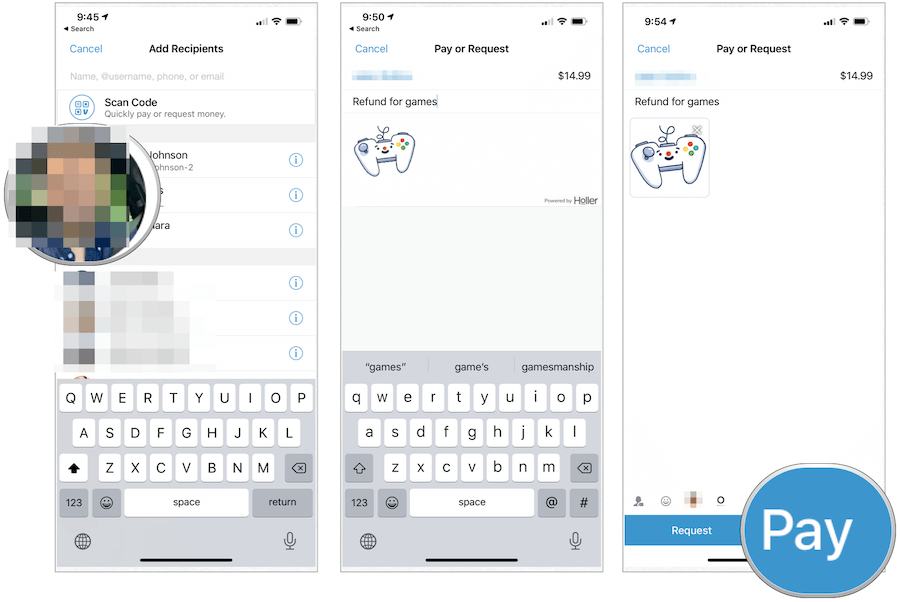
To send money, tap the “Pay & Request” button (often represented by a pencil and paper icon or a dollar sign with a plus) usually located at the bottom of the app screen. You’ll then need to identify your recipient. Venmo offers several ways to do this:
- Search by Username: If you know their Venmo username (e.g., @JaneDoe), simply type it into the search bar.
- Search by Name or Phone Number: You can also search for friends using their registered name or phone number.
- Scan QR Code: Venmo provides personal QR codes. If you’re physically with someone, you can scan their code to initiate a payment quickly.
- Select from Friends List: If you’ve previously transacted with someone or are connected as friends, they will appear in your contacts list.
Specifying Amount and Adding a Transaction Note
After selecting your recipient, you’ll enter the amount you wish to send. This is a crucial step – double-check the amount before proceeding. Below the amount, there’s a field for adding a note. This note can be anything from a simple emoji to a detailed description of the transaction (e.g., “Dinner last night ,” “Rent for May,” “Birthday gift “). The note is public by default but can be changed to private or visible only to friends, depending on your privacy settings and personal preference. From a personal finance perspective, clear notes can be incredibly helpful for tracking expenses later, especially if you’re using budgeting software that integrates with Venmo transactions.
Choosing Your Funding Source
Before confirming, Venmo will display the funding source it intends to use. By default, it will first attempt to use your Venmo balance (if you have funds available). If your Venmo balance is insufficient, it will then default to a linked bank account or debit card. You can tap on the displayed funding source to change it to another linked bank account, debit card, or credit card. Remember the 3% fee for credit card payments – a key financial detail to consider. Always ensure you’re using the most cost-effective funding method for your transaction.
Reviewing and Confirming Your Transfer

Once you’ve entered the amount, added a note, and selected your funding source, carefully review all the details on the payment confirmation screen. Verify the recipient’s name/username, the amount, and the funding source. If everything looks correct, tap the “Pay” button (usually in green) to complete the transaction. The money will then be sent to the recipient’s Venmo account almost instantly.
The Option to Split Payments
One of Venmo’s particularly useful features for personal finance is the ability to split payments. If you and several friends shared a bill, you can initiate a payment and then select the “Split” option. You’ll be able to choose who to split with and Venmo will automatically calculate each person’s share and send individual requests to them. This streamlines the process of settling group expenses, avoiding awkward conversations or manual calculations.
Navigating Venmo’s Financial Landscape: Fees, Limits, and Security
While Venmo offers unparalleled convenience, a savvy approach to personal finance requires understanding the financial nuances of its operations, including potential costs, transaction limits, and essential security measures.
Understanding Transaction Fees and Their Impact on Your Budget
For most personal P2P transactions, Venmo is free when funded by a linked bank account, debit card, or your Venmo balance. However, there are instances where fees apply:
- Credit Card Payments: As mentioned, sending money using a linked credit card incurs a 3% fee. This is a significant cost if you frequently use credit cards for Venmo payments and can quickly erode your budget.
- Instant Transfers: While standard transfers from your Venmo balance to your bank account are free but take 1-3 business days, Venmo offers “Instant Transfers” for a fee (typically 1.75%, with a minimum fee of $0.25 and a maximum of $25.00). This allows funds to arrive in your bank account within minutes. While convenient, assess whether the urgency justifies the cost for your personal financial planning.
- Business Transactions: Using Venmo for business payments (e.g., receiving payments as a seller) typically incurs a standard seller transaction fee. This distinction is crucial for those who use Venmo for both personal and professional financial activities.
Being aware of these fees helps you make informed decisions about how you use Venmo, preventing unexpected charges from impacting your personal budget.
Daily and Weekly Sending Limits: Planning Your Transfers
Venmo implements transaction limits for both security and regulatory compliance. These limits vary depending on whether your identity is verified:
- Unverified Accounts: Typically have lower weekly sending limits (e.g., $299.99 for all transactions combined).
- Verified Accounts: Enjoy significantly higher limits, with a general weekly rolling limit of around $4,999.99 for P2P payments. Specific limits may vary for merchant payments or other transaction types.
It’s important to be aware of these limits, especially if you plan to send larger sums of money. If you anticipate exceeding your current limit, ensure your account is fully verified well in advance to avoid any disruption to your financial transactions.
Best Practices for Account Security and Fraud Prevention
Protecting your financial information is paramount when using any digital payment platform. Venmo employs robust security measures, but user vigilance is equally important:
- Strong, Unique Passwords: Always use a complex, unique password for your Venmo account.
- Two-Factor Authentication (2FA): Enable 2FA for an extra layer of security. This requires a code from your phone in addition to your password for login.
- Be Wary of Scams: Never send money to strangers, respond to unsolicited payment requests, or click on suspicious links claiming to be from Venmo. Venmo transactions are generally irreversible, so once money is sent, it’s difficult to recover if you’ve been scammed.
- Use Trusted Wi-Fi: Avoid accessing your Venmo account over unsecured public Wi-Fi networks.
- Monitor Transactions: Regularly check your Venmo transaction history for any unauthorized activity.
- Link Verified Accounts: Only link bank accounts and cards that you own and are legitimate.
Privacy Settings: Managing Your Financial Visibility
Venmo’s social feed is a defining feature, but it’s not for everyone. Fortunately, Venmo provides granular control over your transaction privacy:
- Public: Your transaction note (excluding the amount) is visible to anyone on the internet.
- Friends: Your transaction note is visible only to your Venmo friends.
- Private: Your transaction note is visible only to you and the recipient.
By default, transactions are often set to “Public.” For most personal finance transactions, especially those involving sensitive information or just general spending, it’s advisable to change the default privacy setting to “Friends” or “Private.” This allows you to maintain control over your financial footprint and privacy.
Beyond Sending: Receiving Money, Cashing Out, and Advanced Features
Venmo’s utility extends beyond just sending money. It’s a comprehensive tool for managing various aspects of your everyday finances.
Receiving Funds and Managing Your Venmo Balance
When someone sends you money on Venmo, the funds are instantly credited to your Venmo balance. You’ll receive a notification and can see the transaction in your feed and statement. Funds in your Venmo balance can be used directly to make payments to others, keeping your linked bank account or debit card untouched. This can be a useful way to manage small pockets of cash for specific purposes, much like a digital envelope system within your personal finance strategy.
Cashing Out: Transferring Funds to Your Bank Account
If you want to move money from your Venmo balance to your traditional bank account, you can “cash out.”
- Standard Transfer: This is free and typically takes 1-3 business days to arrive in your linked bank account. This is the recommended option for routine transfers to avoid fees.
- Instant Transfer: For a fee (as discussed earlier), funds can be transferred to your bank account within minutes, often available 24/7. This option is useful if you need immediate access to your funds.
Knowing how to efficiently cash out is key to integrating Venmo into your broader financial planning, ensuring that funds are accessible when and where you need them.
Exploring Venmo’s Business Profiles and QR Codes
While primarily a P2P app, Venmo has expanded to allow small businesses and freelancers to accept payments. Users can create business profiles, which come with specific tools and fee structures. Additionally, Venmo’s personal QR codes have made in-person payments seamless, allowing for quick scanning to pay or request money. For individuals with side hustles or those who occasionally sell items, understanding these features can integrate Venmo into their micro-business financial operations.
Utilizing Venmo Credit Card and Debit Card
Venmo has also introduced its own financial products, including the Venmo Credit Card and the Venmo Debit Card. The Venmo Debit Card allows you to spend funds directly from your Venmo balance anywhere Mastercard is accepted, effectively turning your Venmo account into a checking-like account. The Venmo Credit Card offers cash back on purchases in your top spending categories. These products further integrate Venmo into a user’s everyday spending habits, offering rewards and convenience, aligning with more advanced personal finance strategies.
In conclusion, Venmo has cemented its place as a pivotal tool in the modern personal finance landscape. Its intuitive design, combined with features that simplify P2P transactions and expense management, makes it an invaluable asset. By understanding its core functionalities, fee structures, security protocols, and additional features, users can harness Venmo’s full potential, ensuring their digital money movements are not only convenient but also financially prudent and secure.
aViewFromTheCave is a participant in the Amazon Services LLC Associates Program, an affiliate advertising program designed to provide a means for sites to earn advertising fees by advertising and linking to Amazon.com. Amazon, the Amazon logo, AmazonSupply, and the AmazonSupply logo are trademarks of Amazon.com, Inc. or its affiliates. As an Amazon Associate we earn affiliate commissions from qualifying purchases.