
In the rapidly evolving landscape of digital finance, mobile payment applications have become indispensable tools for managing transactions, sending money to friends, and even receiving paychecks. Among these, Cash App stands out as a popular platform, known for its user-friendly interface and comprehensive features. However, to unlock its full potential, including direct deposits, seamless money transfers, and convenient cash-outs, linking a bank account is not just recommended—it’s essential.
This guide will walk you through the precise steps to connect your bank account to Cash App, delve into the technical implications of this linkage, offer troubleshooting advice, and provide best practices for secure and efficient use. By understanding the underlying mechanics and adhering to these guidelines, users can transform Cash App from a simple peer-to-peer payment tool into a powerful personal finance hub, all within the robust framework of modern mobile technology.
The Essential Steps to Linking Your Bank Account to Cash App
Integrating your traditional banking institution with a cutting-edge financial application like Cash App bridges the gap between your physical funds and your digital wallet. This process is designed to be straightforward, leveraging intuitive app design to guide users through each stage. Understanding these steps ensures a smooth and secure connection, paving the way for a richer Cash App experience.
Initial Setup and Navigation
Before you can link your bank account, ensure you have the Cash App installed on your smartphone and that you’ve completed the basic account setup, including verifying your phone number or email address. This initial setup is a crucial security layer that establishes your identity within the app’s ecosystem.
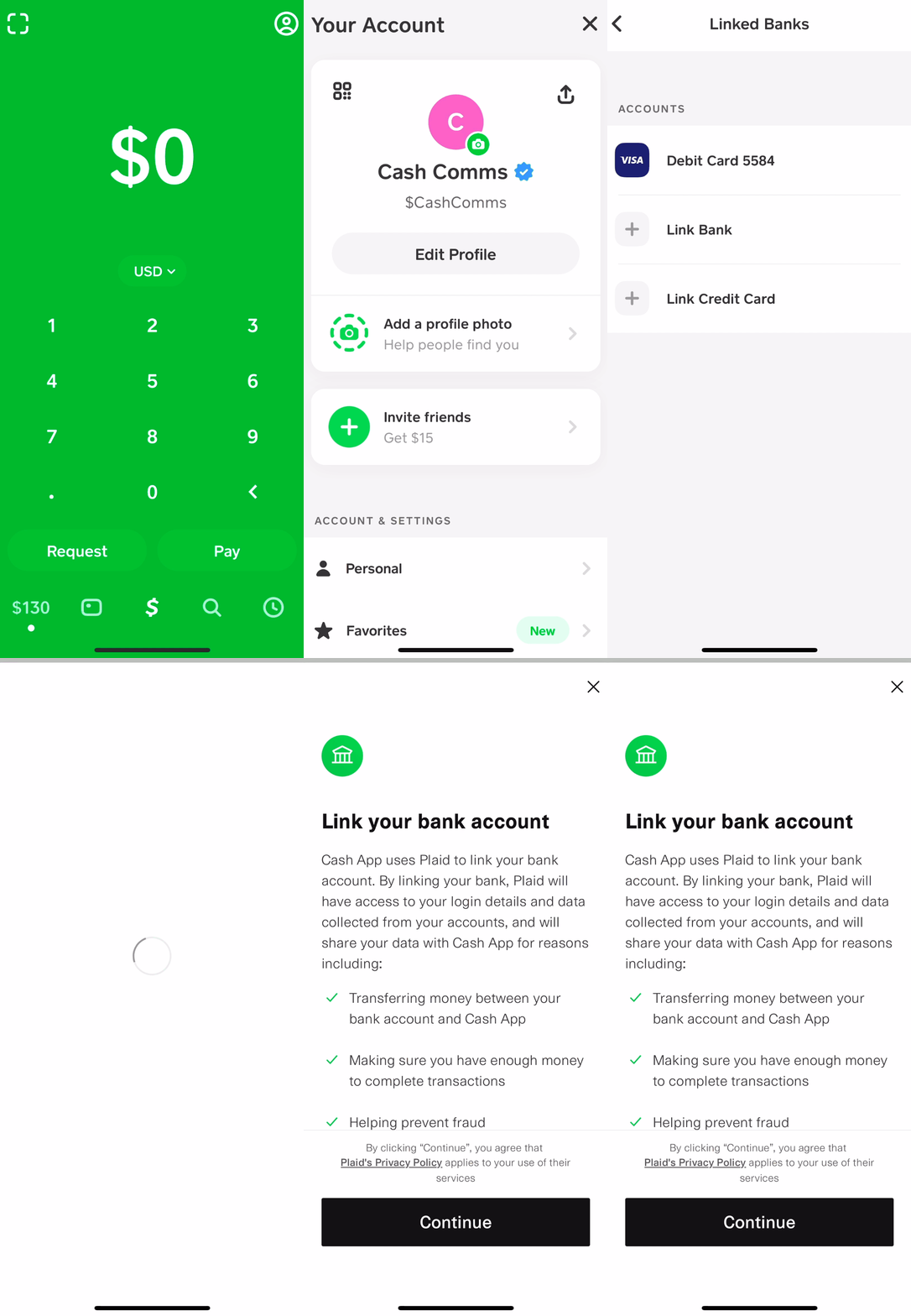
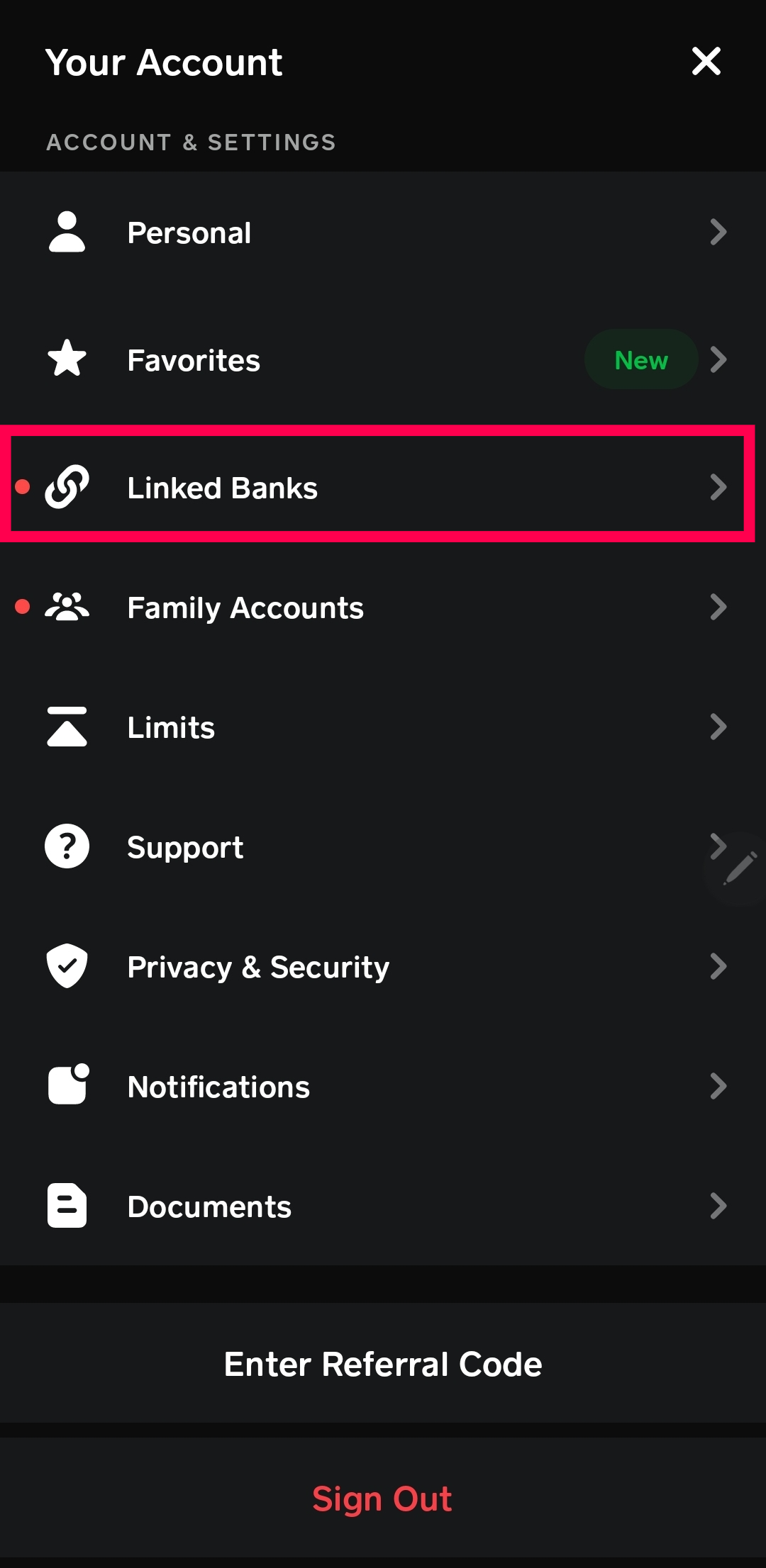
Once your basic account is ready, navigate to the main screen. The Cash App interface is typically minimalistic, designed for quick access to core functionalities. To access the banking and linked accounts section, you’ll usually tap on your profile icon (often a circle with your picture or initials) located in the upper right or left corner of the screen. This action will open a menu or sidebar, which serves as your gateway to account settings, privacy options, and, most importantly, linked banks.
Within this menu, look for an option that explicitly mentions “Linked Banks” or “Bank & Cards.” Tapping on this will take you to a dedicated screen where you can manage all your payment methods, including debit cards, credit cards, and, of course, your bank account. This organization is a testament to thoughtful app design, centralizing all financial connections for user convenience and security.
The Linking Process: Step-by-Step
With the navigation complete, you’re now ready to initiate the bank account linkage. The process relies on secure third-party integration, often through services like Plaid, which acts as a secure intermediary between your bank and Cash App. This approach minimizes the direct sharing of sensitive banking credentials with Cash App itself, enhancing security.
- Select “Link Bank”: On the “Linked Banks” or “Bank & Cards” screen, you’ll find an option to “Link Bank” or “Add Bank.” Tap this to begin.
- Choose Your Bank: Cash App will present a list of popular banks. If your bank is listed, tap on it. If not, there’s usually a search bar or an option to “Search for your bank.” Enter your bank’s name, and it should appear.
- Secure Login via Plaid: This is where the secure intermediary comes into play. Cash App will redirect you to a secure portal, powered by a service like Plaid. This portal will prompt you to log in to your online banking account using your bank’s username and password. Important: You are entering your credentials directly into a secure portal provided by your bank’s trusted partner, not Cash App itself. This method is an industry standard for securely linking financial accounts across different applications.
- Account Selection: After successfully logging in, you may be asked to select which account you wish to link if you have multiple accounts (e.g., checking, savings) with that bank. Choose the primary account you intend to use with Cash App for transactions.
- Authorization: You will be asked to authorize Cash App to access certain information from your bank account (e.g., account balance, transaction history, routing and account numbers). This authorization is necessary for Cash App to function correctly, allowing it to initiate deposits, withdrawals, and verify funds. Review the permissions carefully and confirm.
- Confirmation: Once authorization is granted, you will be redirected back to the Cash App. A confirmation message will usually appear, indicating that your bank account has been successfully linked. You should now see your bank account listed among your linked payment methods.
This multi-step process, while seemingly intricate, is meticulously designed to ensure both user control and robust security, a hallmark of modern fintech application development.
Verifying Your Bank Account
While the initial linking process often includes an immediate verification through the secure login, some banks or specific linking scenarios might require an additional step to fully verify the account. This typically involves Cash App sending one or two small, temporary deposits (often less than $1.00) to your bank account.
- Monitor Your Bank Statement: After linking, keep an eye on your online bank statement or transaction history. Within 1-2 business days, you should see these small deposits appear.
- Enter Deposit Amounts in Cash App: Once you identify these deposits, return to the Cash App, navigate to the “Linked Banks” section, and there should be a prompt to verify your bank account by entering the exact amounts of these deposits.
- Final Confirmation: After entering the correct amounts, your bank account will be fully verified, removing any restrictions that might have been in place during the provisional linking period.
This micro-deposit verification method is a common industry practice, providing an additional layer of security to confirm ownership of the linked bank account.
Understanding the Benefits and Implications of a Linked Account
Linking a bank account to Cash App is more than just a technical configuration; it fundamentally transforms how you interact with the application, unlocking a suite of powerful financial functionalities. From simplifying daily transactions to enabling more sophisticated financial management, the implications are far-reaching within the digital economy.
Seamless Transactions: Sending and Receiving Funds
The most immediate benefit of a linked bank account is the ability to send and receive money effortlessly. While Cash App allows you to link a debit card for transactions, a bank account connection often provides greater flexibility and higher transaction limits.
- Sending Money: When you send money through Cash App, if your Cash App balance is insufficient, the app will seamlessly draw funds directly from your linked bank account. This eliminates the need to manually transfer money to your Cash App balance first, streamlining the process for larger payments or when your Cash App balance is low.
- Receiving Money: Funds received into your Cash App can be instantly accessible within the app for spending or transferring. However, for users who prefer to hold their primary funds in a traditional bank, the linked account facilitates quick and free transfers of received money from Cash App back to their bank. This ensures that the digital balance can be converted back into traditional banking funds with minimal friction.
This seamless integration underscores the utility of fintech apps: bridging the gap between digital convenience and established financial infrastructure.
Direct Deposits and Cash Outs
Beyond everyday peer-to-peer transfers, a linked bank account significantly enhances Cash App’s capabilities for more formal financial activities.
- Direct Deposits: With a linked bank account, Cash App can provide you with a unique routing and account number. These details, derived from your linked bank, allow employers or government agencies to directly deposit paychecks, benefits, or tax refunds into your Cash App account. This feature positions Cash App as a viable alternative for managing your primary income, offering quicker access to funds (sometimes up to two days earlier than traditional banks) and the convenience of managing everything within a single app. This is a significant technological leap, enabling mobile apps to serve functions traditionally exclusive to brick-and-mortar banks.
- Cash Outs: Equally important is the ability to “cash out” your Cash App balance. This refers to transferring money from your Cash App account back to your linked bank account. Cash App typically offers two options:
- Standard Deposit: This is usually free and takes 1-3 business days for the funds to appear in your bank account.
- Instant Deposit: For a small fee (typically 0.5% to 1.75% of the transfer amount), funds can be transferred instantly to your bank account, often within minutes.
These cash-out options provide users with flexibility, allowing them to choose between cost-effectiveness and speed, depending on their immediate financial needs.
Financial Management Within the App Ecosystem
The integration of a bank account extends Cash App’s utility beyond mere transaction processing into a realm of basic financial management. By centralizing funds from both digital and traditional sources, users gain a more holistic view of their financial liquidity.
- Budgeting Insights: While Cash App isn’t a full-fledged budgeting tool, the ability to see inflows from direct deposits and outflows to various expenses (including debit card usage if you have a Cash Card) provides a consolidated view of spending patterns.
- Fund Allocation: Users can strategically use their linked bank account to move funds between their traditional savings/checking and their Cash App balance, optimizing for immediate spending needs or long-term financial goals. For instance, funds for specific online purchases or recurring bills can be moved to Cash App, while larger savings remain in the bank.
- Error Prevention: The seamless integration reduces the chances of failed transactions due to insufficient funds, as Cash App can automatically draw from the linked bank account when the in-app balance is low. This intelligent feature enhances the reliability of the app as a payment method.
Essentially, a linked bank account transforms Cash App from a simple transactional tool into a foundational layer for personal digital finance, showcasing how technology empowers users with greater control and convenience over their money.
Troubleshooting Common Issues and Best Practices
While linking a bank account to Cash App is generally a smooth process, technical glitches or user errors can occasionally arise. Understanding how to troubleshoot these issues, coupled with adopting best practices for security, is crucial for maintaining an uninterrupted and secure digital financial experience.
Dealing with Linkage Errors
Encountering an error message during the bank linking process can be frustrating. Here are some common issues and their resolutions:
- Incorrect Bank Credentials: The most frequent issue is entering the wrong username or password for your online banking portal via the secure Plaid interface.
- Solution: Double-check your login details. If you’re unsure, try logging directly into your bank’s website to confirm your credentials. If necessary, reset your online banking password. Remember, Cash App itself does not store or see these credentials; the error is with your bank’s system.
- Bank Not Supported: Although Cash App supports most major banks, some smaller credit unions or online-only banks might not be directly compatible with the automatic linking process via Plaid.
- Solution: Check if your bank has specific instructions for third-party connections. In rare cases, you might need to contact Cash App support or your bank to explore alternative linking methods, though this is less common now.
- Temporary Technical Glitches: Sometimes, the issue might be on Cash App’s side, Plaid’s side, or your bank’s server.
- Solution: Wait a few minutes and try again. Ensure both your Cash App and your phone’s operating system are updated to the latest versions. A quick restart of your phone can also resolve minor software conflicts.
- Security Lockouts: Repeated failed login attempts at your bank’s portal (via Plaid) can sometimes trigger a security lockout from your bank.
- Solution: If you suspect a lockout, log directly into your bank’s website to unlock your account or contact your bank’s customer service.
Persistent issues should prompt you to first consult Cash App’s help center within the app, which often has specific troubleshooting guides, or contact their customer support directly.
Security Measures and Account Protection
Linking a bank account inherently involves sharing sensitive financial information. Adhering to robust security practices is paramount to protect your funds and personal data within the Cash App ecosystem.
- Enable Two-Factor Authentication (2FA): This is perhaps the most critical security feature. 2FA requires a second verification step (e.g., a code sent to your phone) in addition to your password to log in or authorize transactions. This significantly reduces the risk of unauthorized access even if your password is compromised.
- Use a Strong, Unique Password: Never reuse passwords across different services. Create a complex password for your Cash App account that includes a mix of uppercase and lowercase letters, numbers, and symbols.
- Be Wary of Phishing Scams: Cash App will never ask for your PIN, login code, or other sensitive information outside of the app. Be extremely cautious of emails, texts, or calls claiming to be from Cash App that ask for this information or prompt you to click suspicious links. Always verify the sender and access Cash App directly through the official app.
- Monitor Your Bank and Cash App Statements: Regularly review your bank transactions and Cash App activity for any unauthorized or suspicious transactions. Report discrepancies immediately to Cash App support and your bank.
- Secure Your Device: Ensure your smartphone is protected with a strong passcode, fingerprint, or facial recognition. Do not use Cash App on public Wi-Fi networks without a VPN, as these networks can be vulnerable to eavesdropping.
These best practices are not exclusive to Cash App; they are fundamental principles of digital security that apply to all online financial interactions.
When to Contact Support
Knowing when to escalate an issue to customer support can save time and prevent further complications.
- Unresolved Linking Errors: If you’ve tried all troubleshooting steps and still cannot link your bank account, it’s time to contact Cash App support. Provide them with details of the error message, your bank’s name, and the steps you’ve already taken.
- Suspicious Activity: If you notice any unauthorized transactions on your Cash App or linked bank account that you believe are related to Cash App, contact their support immediately and also notify your bank.
- Account Access Issues: If you’re locked out of your Cash App account or suspect it has been compromised, reaching out to support is crucial for regaining control and securing your funds.
- Questions About Fees or Policies: For clarification on transaction limits, fees, or specific policies related to your linked bank account, Cash App support is the authoritative source.
Cash App typically offers support via the app’s help section, email, or sometimes phone, though in-app messaging is often the most direct route. Being prepared with account details and a clear description of your issue will help them assist you more efficiently.
Advanced Tips for Managing Your Linked Bank Account
Once your bank account is successfully linked and you’re comfortable with basic transactions, exploring advanced management features can further optimize your Cash App experience. These functionalities offer greater control and flexibility over your financial connections.
Updating or Removing Bank Accounts
Life circumstances change, and you might need to update or remove a linked bank account from Cash App. This process is designed to be as straightforward as linking one.
- Removing an Account: If you wish to stop using a particular bank account with Cash App, navigate to the “Linked Banks” or “Bank & Cards” section through your profile icon. Select the bank account you wish to remove. There will typically be an option to “Remove Bank” or “Unlink Account.” Confirm your decision, and the account will be disconnected. This is useful if you close an old bank account or simply wish to streamline your linked payment methods.
- Updating Account Information: If your bank account details change (e.g., you get a new account number with the same bank, though this is rare without opening a new account), you would typically remove the old account and then re-add the new one following the standard linking process. Cash App itself does not “update” bank account details directly; it links to specific accounts.
Always ensure you have at least one valid funding source linked if you intend to continue using Cash App for transactions.
Connecting Multiple Accounts
For users who manage funds across different banking institutions or maintain separate checking and savings accounts for specific purposes, Cash App allows for the linkage of multiple bank accounts.
- Increased Flexibility: Linking multiple accounts provides unparalleled flexibility. You can choose which bank account to draw funds from when sending money, or which account to transfer funds to when cashing out, based on your current financial strategy. For instance, you might link a primary checking account for everyday transactions and a separate savings account for occasional large transfers.
- Enhanced Fund Management: This feature supports more nuanced financial planning, allowing you to easily shift funds between various traditional bank accounts via the Cash App interface. While Cash App isn’t a replacement for a full-fledged financial aggregator, it simplifies the movement of money across different institutions.
- Step-by-Step for Multiple Accounts: The process for adding additional bank accounts is identical to adding the first one. Simply return to the “Linked Banks” section and tap “Add Bank” again, repeating the secure login and authorization steps for each new account.
Managing multiple linked accounts through Cash App consolidates your financial connectivity, making it a more versatile tool for diverse banking needs.
Monitoring Transaction History and Alerts
Effective financial management, especially with linked digital tools, relies on diligent monitoring. Cash App provides features to help you stay on top of your transactions.
- In-App Transaction History: Cash App maintains a detailed transaction history accessible from the main screen (often via a clock or activity icon). This log shows all money sent, received, added, or cashed out, providing a clear audit trail of your financial movements through the app. This transparency is a key benefit of digital platforms.
- Customizable Alerts: While Cash App doesn’t offer extensive customization for alerts related to bank account activity directly (as that’s usually managed by your bank), it does send notifications for successful transactions, direct deposits, and cash-outs initiated within the app. Ensure your phone’s notification settings are configured to receive these alerts.
- Bank Alerts: Complementary to Cash App’s notifications, it’s highly recommended to enable transaction alerts directly from your linked bank. Most banks offer options to receive notifications via email or text for deposits, withdrawals, or any activity exceeding a certain amount. This dual-layer monitoring provides comprehensive oversight of your funds, regardless of where the transaction originates.
By actively monitoring your transaction history in Cash App and leveraging bank alerts, you ensure financial vigilance and can quickly identify and address any unauthorized or erroneous activity, thereby maintaining the security and integrity of your digital finance ecosystem.

Conclusion
Linking your bank account to Cash App is a foundational step toward maximizing the utility of this popular fintech application. It transforms Cash App from a basic peer-to-peer payment tool into a robust platform capable of handling direct deposits, seamless fund transfers, and efficient cash-outs, effectively bridging your traditional banking with the agility of digital finance.
The process, guided by intuitive app design and bolstered by secure third-party integrations like Plaid, is remarkably straightforward. However, a deep understanding of each step, from initial navigation to secure login and potential verification, empowers users to confidently establish this crucial connection. Moreover, recognizing the profound implications—from enhancing transaction fluidity to enabling sophisticated financial management—highlights the technological advancements that make such convenience possible.
Crucially, maintaining vigilance through security best practices, such as enabling two-factor authentication and staying alert to phishing attempts, is paramount. Digital security is a shared responsibility, and proactive measures safeguard your financial interests in an increasingly interconnected world. By embracing these technical insights and adhering to diligent usage, Cash App users can leverage the full spectrum of its features, making it an indispensable component of their modern digital financial toolkit.
aViewFromTheCave is a participant in the Amazon Services LLC Associates Program, an affiliate advertising program designed to provide a means for sites to earn advertising fees by advertising and linking to Amazon.com. Amazon, the Amazon logo, AmazonSupply, and the AmazonSupply logo are trademarks of Amazon.com, Inc. or its affiliates. As an Amazon Associate we earn affiliate commissions from qualifying purchases.