
In today’s fast-paced digital economy, managing personal finances often involves navigating a diverse ecosystem of financial technology (fintech) tools. Among these, Cash App has emerged as a powerhouse for peer-to-peer payments, investing, and even basic banking functionalities. While its primary appeal lies in instant money transfers between users, a fundamental aspect of its utility for sound personal finance is the ability to seamlessly move funds from your Cash App balance to your traditional bank account. This guide will delve into the mechanics, best practices, and strategic considerations for efficiently sending money from Cash App to your bank, empowering you to better integrate this versatile tool into your overall financial strategy.

Understanding Cash App as a Modern Financial Tool
Cash App, developed by Block, Inc., has revolutionized how millions of people manage their daily finances, offering a simplified approach to sending, receiving, and even investing money. For anyone looking to streamline their personal finance management, understanding its core functionalities and how it interfaces with traditional banking is crucial.
What is Cash App and its Role in Personal Finance?
At its heart, Cash App is a mobile payment service that allows users to transfer money to one another using a unique identifier called a “$Cashtag.” Beyond peer-to-peer transfers, it provides a range of features that position it as a significant player in personal finance. Users can receive direct deposits of paychecks, file taxes through the app, invest in stocks and Bitcoin, and, critically for this discussion, link external bank accounts for deposits and withdrawals.
For many, Cash App acts as a digital wallet, a temporary holding place for funds received from friends, family, or even work. However, for these funds to be fully liquid and accessible for broader financial obligations—like paying bills not supported by Cash App, making large purchases, or contributing to savings goals—transferring them to a linked bank account becomes essential. This integration bridges the gap between the agile world of digital payments and the established infrastructure of traditional banking, offering users the best of both worlds.
Key Features for Managing Your Money
Beyond its core transfer capabilities, Cash App provides several features that contribute to its utility as a financial management tool:
- Cash Card: A customizable, free debit card linked to your Cash App balance, allowing you to spend funds directly from the app at any merchant that accepts Visa.
- Direct Deposit: The ability to receive paychecks, tax refunds, and other government benefits directly into your Cash App account, often sooner than traditional banks. This can be a convenience for managing immediate funds.
- Investing: A simplified platform for buying fractional shares of stocks and Bitcoin, making investment accessible even with small amounts.
- Boosts: Instant discounts at various retailers when using your Cash Card, offering practical savings on everyday spending.
- ATM Access: With the Cash Card, users can withdraw funds from ATMs, providing another avenue to access their Cash App balance.
Understanding these features provides context for why seamlessly moving money to a bank account is a critical part of leveraging Cash App effectively, allowing users to consolidate funds or move them to accounts better suited for specific financial goals like long-term savings or bill payments.
The Essential First Step: Linking Your Bank Account Securely
Before you can initiate a transfer from your Cash App balance to your bank, the fundamental prerequisite is to securely link an eligible bank account. This process is designed to be straightforward but requires careful attention to detail to ensure both accuracy and security.
Connecting a Debit Card for Seamless Transfers
The most common and often quickest method for linking an external financial institution to your Cash App account is through your debit card. Your debit card is already associated with your checking account, and by adding it, you authorize Cash App to facilitate transfers to and from that account.
Steps to link a debit card:
- Open the Cash App on your mobile device.
- Tap the banking icon (looks like a house or a bank building) on the bottom left of the home screen.
- Under the “Cash Out” section, select “Linked Banks.”
- Choose “Link Bank” if you haven’t linked one before, or “Replace Bank” if you’re changing it.
- You’ll be prompted to enter your debit card number, CVV (the 3-digit security code on the back), and expiration date.
- Once entered, Cash App will verify the card. This often involves a small, temporary authorization charge or asking you to confirm information with your bank.
Linking a debit card simplifies the process, as most transfers initiated to your bank account via Cash App will default to depositing into the checking account associated with that debit card.
Manually Linking with Routing and Account Numbers
While linking a debit card is convenient, there are situations where you might need to manually link a bank account using its routing and account numbers. This is particularly useful if you want to link a savings account, a business account, or a checking account that doesn’t have an associated debit card you wish to use with Cash App.
Steps to manually link a bank account:
- Navigate to the banking icon (house/bank building) on the Cash App home screen.
- Select “Linked Banks.”
- Choose “Link Bank” or “Replace Bank.”
- Instead of entering debit card details, look for an option that says “No Card?” or “Link Bank Manually.”
- You will then be prompted to enter your bank’s routing number and your specific bank account number. These can typically be found on your checks, through your online banking portal, or by contacting your bank directly.
- Cash App will usually perform a micro-deposit verification (sending a tiny amount, like a few cents, to your account which you then confirm within the app) to ensure the account belongs to you. This process can take a day or two.
Ensuring Financial Security During Linking
Security is paramount when connecting financial accounts. Cash App employs encryption and security protocols to protect your information, but users also have a role to play.
- Use Strong Passwords: Ensure your Cash App account is protected by a strong, unique password.
- Enable Two-Factor Authentication (2FA): This adds an extra layer of security, requiring a code from your phone in addition to your password for login.
- Verify Information: Double-check all entered numbers (debit card, routing, account numbers) to prevent errors that could lead to delayed or misdirected funds.
- Beware of Phishing: Only access Cash App through its official application or website. Be wary of suspicious emails or messages asking for your financial details.
- Keep Software Updated: Ensure your Cash App is always running the latest version, which includes the most recent security patches.
By diligently following these steps, you establish a secure and reliable channel for transferring funds between your Cash App balance and your bank account.
Executing the Transfer: Moving Funds from Cash App to Your Bank
Once your bank account is securely linked, transferring funds from your Cash App balance is a straightforward process. Cash App offers two primary methods for cashing out, each with its own advantages and associated costs.
Step-by-Step Guide to Standard Deposits
The standard deposit method is the default and free option for transferring money from your Cash App to your linked bank account. While it doesn’t incur any fees, it does take longer for the funds to become available in your bank account.
How to initiate a standard deposit:
- Open the Cash App on your mobile device.
- Tap the banking icon (house/bank building) on the bottom left.
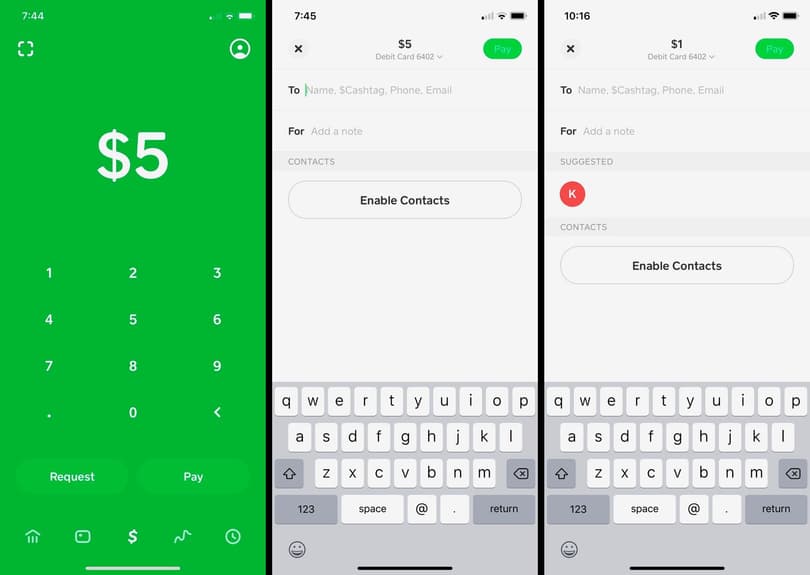
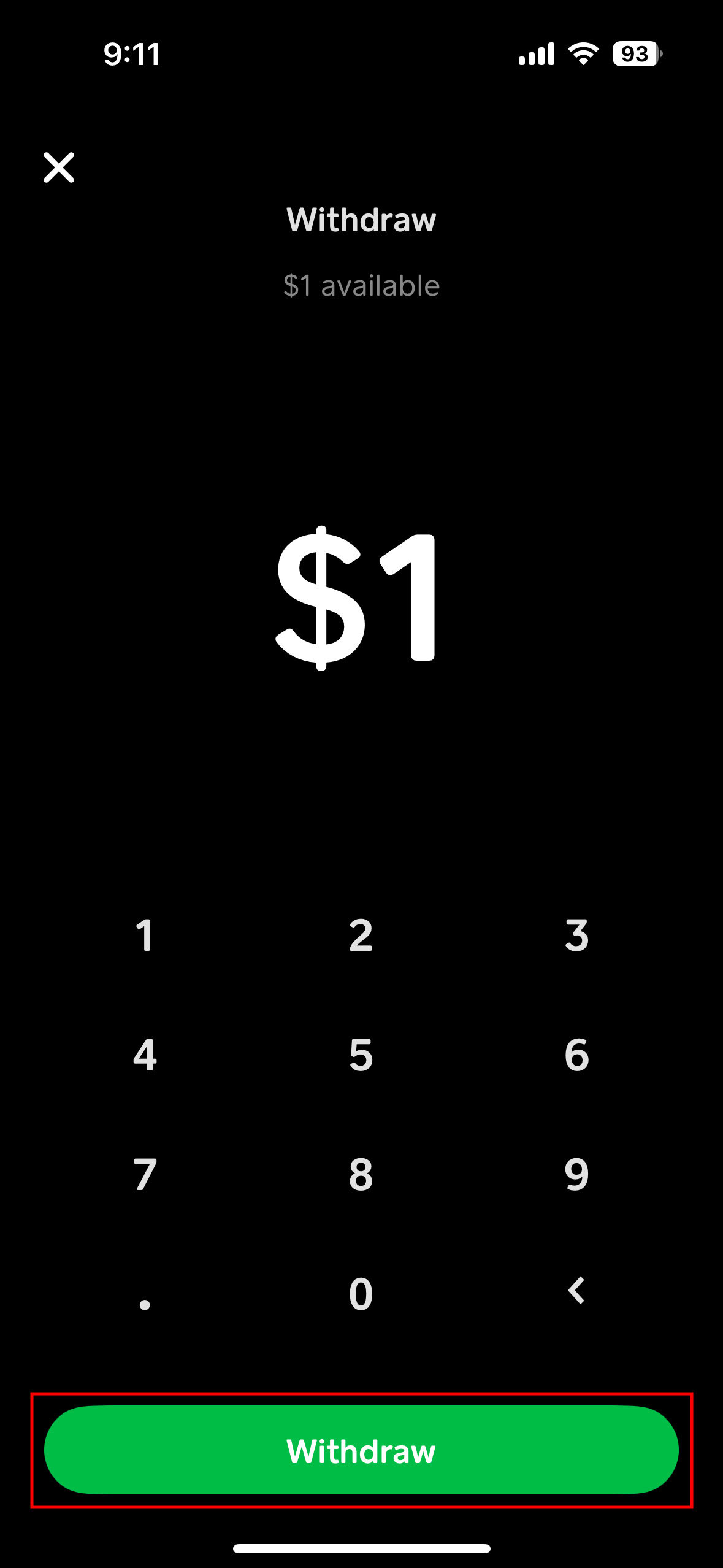
- Tap the “Cash Out” button.
- Enter the amount you wish to transfer. You can choose to transfer your full balance or a specific amount.
- Select “Standard” (if it’s not already selected). You will see an estimated arrival time, typically 1-3 business days.
- Confirm the transfer.
Key considerations for standard deposits:
- Timing: Transfers typically process within 1-3 business days. This excludes weekends and bank holidays. If you initiate a transfer late on a Friday, it might not appear in your account until the following Tuesday or Wednesday.
- No Fees: This method is entirely free, making it ideal for non-urgent transfers where you’re not in a hurry to access the funds.
- Bank Processing Times: While Cash App processes the transfer quickly, the actual availability of funds in your account depends on your bank’s processing times.
The Expedited Option: Instant Deposits and Associated Costs
For times when you need immediate access to your funds, Cash App offers an “Instant Deposit” option. This significantly speeds up the transfer process, but it comes with a small fee.
How to initiate an instant deposit:
- Follow steps 1-4 as you would for a standard deposit (Open Cash App > Banking icon > Cash Out > Enter amount).
- This time, select “Instant.”
- You will be clearly shown the fee associated with the instant transfer, which is typically 0.5% to 1.75% of the transferred amount (the exact percentage can vary and is always displayed before confirmation).
- Confirm the transfer. The funds should appear in your linked bank account within minutes.
Key considerations for instant deposits:
- Speed: Funds are usually available in your bank account almost immediately, often within seconds to a few minutes. This makes it invaluable for urgent financial needs.
- Fees: A percentage-based fee is applied. While small for minor transfers, it can add up for larger amounts. Always review the fee displayed before confirming.
- Availability: Instant deposits rely on the speed of both Cash App and your linked bank. While generally reliable, occasional delays can occur due to bank system issues or high transaction volumes.
Tracking Your Transfer and Confirmation
After initiating either a standard or instant transfer, it’s good practice to monitor its status.
- Cash App Activity Feed: All transactions, including cash-outs, are recorded in your Cash App activity feed. You can tap on a specific transfer to see its current status (e.g., “Pending,” “Completed”).
- Bank Account Statement: For standard deposits, check your bank account statement or online banking portal after the estimated arrival time. For instant deposits, verify that the funds have appeared within minutes.
- Notifications: Cash App typically sends push notifications and/or email confirmations once a transfer is successfully completed.
Understanding these options allows you to choose the most financially prudent method based on your urgency and willingness to incur a fee, further enhancing your control over your personal finances.
Optimizing Your Cash App Experience for Financial Control
Leveraging Cash App effectively goes beyond simply knowing how to transfer money. It involves understanding the nuances of transfer limits, troubleshooting potential issues, and exploring how the app integrates with your broader financial management strategy.
Understanding Transfer Limits and Planning Your Finances
Cash App, like most financial platforms, imposes limits on how much money you can send, receive, and transfer to your bank. These limits are in place for security and regulatory compliance.
- Sending Limits: Initially, users might have limits on how much they can send per week.
- Receiving Limits: Similar limits may apply to receiving funds.
- Cash Out Limits: There are also daily and weekly limits on how much you can cash out to your bank account.
Verifying Your Account: To increase these limits, Cash App typically requires users to verify their identity. This involves providing your full legal name, date of birth, and the last four digits of your Social Security Number (SSN). Full verification can significantly raise your limits, allowing for greater financial flexibility.
Financial Planning: Awareness of these limits is crucial for planning your finances. If you anticipate needing to transfer a large sum, verify your account beforehand. For recurring transfers, budgeting around weekly or daily limits can prevent unexpected delays.
Troubleshooting Common Transfer Issues
While Cash App transfers are generally smooth, issues can occasionally arise. Knowing how to troubleshoot them can save time and frustration.
- “Pending” Status for Too Long: For standard deposits, if it’s been more than 3 business days, or for instant deposits if it hasn’t appeared within minutes, check your bank’s system status for any outages. Sometimes Cash App’s own systems might be experiencing delays.
- Incorrect Bank Account Linked: Double-check that the correct bank account is linked. If you have multiple accounts or recently changed banks, verify the active linked account.
- Insufficient Funds: Ensure you have enough money in your Cash App balance to cover the transfer amount and any associated instant deposit fees.
- Bank Rejection: Your bank might reject a deposit due to internal policies or if there’s a mismatch in names (e.g., your Cash App name doesn’t match your bank account name). Contact your bank directly if this occurs.
- Technical Glitches: Sometimes, a simple app restart or updating the app can resolve minor technical issues. If persistent, Cash App support is the next step.
Contacting Cash App Support: If you encounter persistent problems, Cash App’s in-app support or website support are available. Provide clear details of your issue, including transaction IDs and screenshots if possible, to expedite resolution.
Leveraging Cash App for Broader Financial Management
Beyond simple transfers, Cash App can be integrated into a wider financial management strategy:
- Direct Deposit: Consider using Cash App for direct deposit of a portion of your paycheck. This can provide immediate access to funds for daily spending via the Cash Card, while you transfer larger sums to your main bank account for savings or bill payments.
- Investing: Use its investing features to slowly build a portfolio of stocks or Bitcoin. While not a sophisticated trading platform, it’s an accessible entry point for beginners.
- Budgeting: By consolidating specific types of income or expenses within Cash App, you can get a clearer picture of certain spending categories. For instance, using it solely for social spending can help track discretionary funds.
Strategic Use of Cash App in Your Personal Finance Ecosystem
Integrating Cash App into your personal finance ecosystem requires a thoughtful approach. By understanding its strengths and weaknesses, you can optimize its use for maximum financial control and convenience.
Integrating Cash App into Your Budgeting Strategy
Cash App can be more than just a payment app; it can be a component of your overall budgeting strategy.
- Designated Fund Allocation: Consider using your Cash App balance as a separate “envelope” for specific spending categories, such as entertainment, dining out, or impulse purchases. By loading a set amount onto Cash App at the beginning of a period, you can control spending within that category.
- Expense Tracking: While Cash App doesn’t offer robust budgeting tools, its activity feed provides a clear record of your inflows and outflows. Regularly reviewing this can give you insights into where your money is going, especially for peer-to-peer transactions or Cash Card usage.
- Emergency Fund Supplement: For those building an emergency fund, Cash App can serve as a highly liquid, accessible sub-account for very small, immediate needs that don’t warrant tapping into a larger, less accessible emergency savings account. However, it should not replace a dedicated, interest-bearing emergency fund.
Best Practices for Secure and Efficient Transfers
To ensure your Cash App transfers are always secure and efficient, adhere to these best practices:
- Regularly Review Linked Accounts: Periodically check which bank accounts are linked to your Cash App. Remove any accounts you no longer use or recognize.
- Monitor Activity: Keep an eye on your Cash App activity feed for any unauthorized transactions. Report suspicious activity immediately.
- Understand Fees: Always be aware of the fees for instant deposits. If time isn’t critical, opt for the free standard deposit to save money. These small savings add up over time.
- Plan Large Transfers: For substantial amounts, ensure your account is fully verified and that you are aware of both Cash App’s and your bank’s daily/weekly transfer limits. Plan these transfers with sufficient lead time, especially if using the standard deposit method.
- Educate Yourself: Stay informed about Cash App’s features, security updates, and policies. Financial technology is constantly evolving, and staying current helps you utilize tools like Cash App more effectively and securely.
By mastering the process of sending money from Cash App to your bank account and integrating it thoughtfully into your broader financial strategy, you can unlock greater control, convenience, and efficiency in managing your personal finances. Cash App, when used wisely, serves as a powerful bridge between digital payment agility and traditional banking stability, empowering you to navigate your financial landscape with confidence.
aViewFromTheCave is a participant in the Amazon Services LLC Associates Program, an affiliate advertising program designed to provide a means for sites to earn advertising fees by advertising and linking to Amazon.com. Amazon, the Amazon logo, AmazonSupply, and the AmazonSupply logo are trademarks of Amazon.com, Inc. or its affiliates. As an Amazon Associate we earn affiliate commissions from qualifying purchases.