
For those who have delved into the immersive world of Grand Theft Auto V, the allure of stepping beyond the chaotic civilian life and into the structured, yet thrilling, role of law enforcement is undeniable. LSPDFR (Los Santos Police Department First Response) transforms GTA V into a dynamic police simulation, offering a realistic and engaging experience that goes far beyond the game’s default missions. This mod allows players to patrol the streets of Los Santos, respond to calls for service, conduct traffic stops, pursue suspects, and much more. However, installing and configuring LSPDFR can seem like a daunting task for newcomers. This guide will demystify the process, breaking it down into manageable steps, ensuring you can get your virtual police cruiser on the road in no time.

Understanding LSPDFR: More Than Just a Mod
Before diving into the installation, it’s crucial to understand what LSPDFR is and what it entails. LSPDFR is a sophisticated modification that leverages the power of GTA V’s engine to create a robust law enforcement experience. It’s not a standalone game, but rather an enhancement that fundamentally alters how you interact with the game world. This means it requires a legitimate copy of Grand Theft Auto V and a commitment to following installation procedures carefully.
The Appeal of Virtual Policing
The popularity of LSPDFR stems from its ability to inject a sense of purpose and realism into the often-unpredictable environment of Los Santos. Instead of simply causing mayhem, players can choose to uphold the law, making critical decisions that impact the virtual city. This offers a different kind of gameplay, one that rewards tactical thinking, adherence to procedures, and the satisfaction of a job well done. From responding to a simple fender-bender to engaging in high-speed pursuits, LSPDFR provides a diverse range of scenarios that keep players engaged and challenged.
Essential Prerequisites
To embark on your LSPDFR journey, a few key components are necessary. Firstly, and most importantly, you must own a legitimate copy of Grand Theft Auto V for PC. LSPDFR is incompatible with pirated versions of the game. Secondly, you will need a working internet connection for downloading the necessary files and potentially for accessing support or supplementary mods. Finally, a basic understanding of file management – how to navigate folders, copy and paste files, and extract compressed archives – will be beneficial.
The Foundation: Preparing Grand Theft Auto V
The installation of LSPDFR involves modifying your GTA V game files. Therefore, meticulous preparation is key to avoiding any potential issues or game corruption. This section outlines the essential steps to ensure your game is ready for the mod.
Backing Up Your Game Files: A Crucial Step
This cannot be stressed enough: always back up your Grand Theft Auto V game files before installing any mods, especially complex ones like LSPDFR. Modding can sometimes lead to unexpected errors or data loss. By creating a backup, you ensure that you can revert your game to its original state if something goes wrong.
How to Create a Backup
- Locate Your GTA V Installation Folder: This is typically found in your Steam library under
Steam/steamapps/common/Grand Theft Auto Vor in your Epic Games library similarly. If you purchased the game through Rockstar Games Launcher, the path might differ slightly. - Copy the Entire Folder: Once you’ve located the main GTA V installation folder, copy the entire folder to a safe and separate location on your hard drive. This could be another drive, an external hard drive, or even a compressed archive stored in a cloud service.
- Verify the Backup: Before proceeding with the mod installation, ensure that the copied folder is complete and accessible.
Having a reliable backup will provide peace of mind and a quick recovery option should any problems arise during the installation process.
Installing Script Hook V and the .NET Script Hook
LSPDFR relies on two crucial components that act as bridges between the mod and the GTA V engine: Script Hook V and its accompanying ASI Loader. These are fundamental to the operation of most GTA V script mods, including LSPDFR.
Script Hook V: The Core Requirement
Script Hook V is a library that allows you to use .NET scripts in GTA V. It’s the backbone upon which many mods are built.
- Download Script Hook V: Navigate to the official website of Script Hook V (often found by searching for “Script Hook V GTA 5”) and download the latest version.
- Extract the Files: Open the downloaded ZIP archive. You will typically find a
binfolder and areadmefile. - Copy the Essential Files: Copy the
ScriptHookV.dllfile and thedinput8.dllfile from thebinfolder into the main Grand Theft Auto V installation directory (the same folder whereGTA5.exeis located). Do not put these files into any subfolders.
The .NET Script Hook
The .NET Script Hook is an extension for Script Hook V, enabling the use of scripts written in C# (and other .NET languages). LSPDFR is largely built using .NET.
- Download the .NET Script Hook: Again, search for the official download of the “.NET Script Hook” for GTA V. Ensure you download the version compatible with your Script Hook V installation.
- Extract the Files: Open the downloaded archive. You’ll usually find a
binfolder containing aScriptHookVDotNet.asifile. - Copy the ASI File: Copy the
ScriptHookVDotNet.asifile into the main Grand Theft Auto V installation directory.
After these steps, you should have the necessary foundational components for running LSPDFR.
Installing LSPDFR: The Core Mod Package
With the groundwork laid, it’s time to install the LSPDFR mod itself. This involves downloading the mod package and placing its files in the correct locations within your GTA V directory.
Downloading the Latest LSPDFR Release
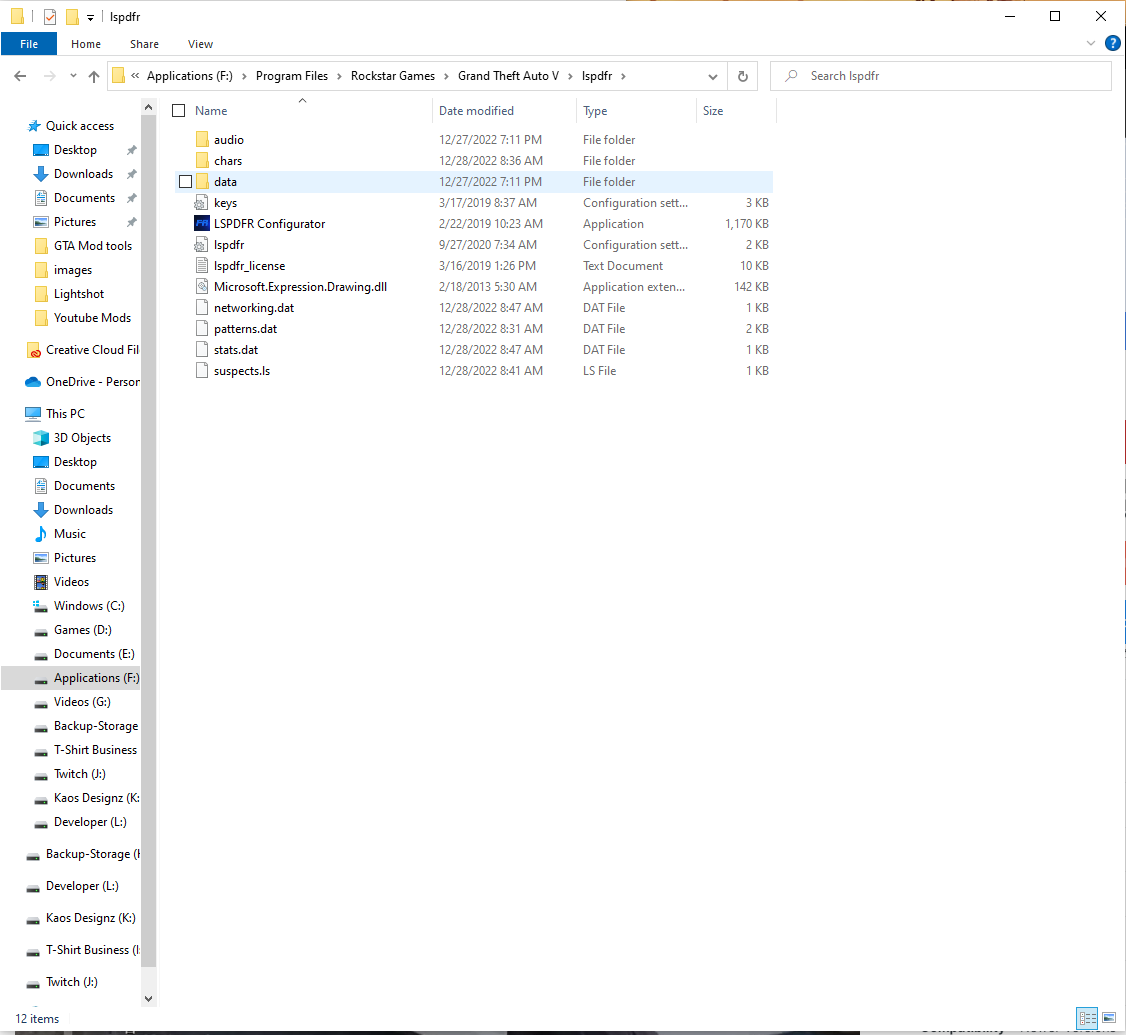
Always ensure you are downloading the latest stable version of LSPDFR to avoid compatibility issues and benefit from bug fixes and new features.
- Visit the Official LSPDFR Website: The primary source for LSPDFR downloads and information is the official LSPDFR website (often found by searching for “LSPDFR official”).
- Navigate to the Downloads Section: Look for the “Downloads” or “Get LSPDFR” section.
- Download the Main Mod Package: Download the latest release of the LSPDFR core mod. This will usually be a ZIP or RAR archive.
Installing the Core LSPDFR Files
Once downloaded, the installation process is relatively straightforward.
- Extract the LSPDFR Archive: Open the downloaded LSPDFR archive.
- Locate the
pluginsFolder: Inside the extracted LSPDFR files, you will find a folder namedplugins. - Copy the
pluginsFolder: Copy the entirepluginsfolder from the extracted LSPDFR archive directly into your main Grand Theft Auto V installation directory.- Crucial Note: If you already have a
pluginsfolder in your GTA V directory (perhaps from other mods), you will need to merge the contents. Ensure that thelspdfrfolder within thepluginsfolder from the LSPDFR download is placed inside your existingpluginsfolder.
- Crucial Note: If you already have a
This step installs the core LSPDFR mod. When you launch GTA V and start a new game (or load a save), LSPDFR should automatically activate. You’ll typically see a notification on the top-left of your screen confirming that LSPDFR is loaded and ready.
Enhancing Your LSPDFR Experience: Add-ons and Configuration
While the core LSPDFR installation provides the fundamental police simulation, the mod is highly extensible. The true power of LSPDFR lies in its vast ecosystem of add-on plugins, vehicle packs, and customizability options that can significantly enhance realism and gameplay.
Exploring Essential Add-ons
Beyond the core mod, numerous third-party plugins and tools can dramatically improve your LSPDFR experience. These range from advanced traffic stop systems to realistic dispatching and even custom AI behaviors.
Recommended Add-ons:
- ALPR (Automatic License Plate Reader): This plugin adds a functional ANPR system that scans license plates of vehicles, alerting you to stolen cars, wanted vehicles, or unregistered ones.
- Stop The Ped (STP): STP enhances pedestrian AI, making them more reactive to your presence, allowing for more dynamic interactions and investigations.
- Simple Trainer: While not strictly a LSPDFR add-on, a good trainer mod can be invaluable for spawning vehicles, changing the time of day, or teleporting to locations, aiding in testing and troubleshooting.
- Custom Vehicle Packs: The default police vehicles can be replaced with highly detailed, realistic models of real-world police cars, motorcycles, and even helicopters. Websites like GTA5-Mods.com are excellent resources for these.
- Weapon Packs: To complement the law enforcement theme, various weapon packs can add more authentic firearms for your virtual officer.
Installing Add-ons:
The installation method for add-ons can vary. Most plugins will come with their own instructions, but generally, they involve copying specific files (.dll, .asi, .ini) into your GTA V directory or the plugins folder. Always read the README files provided with any add-on carefully.
Configuring LSPDFR and its Plugins
LSPDFR and many of its plugins utilize configuration files (usually .ini files) that allow you to customize various aspects of the mod. This is where you can fine-tune the difficulty, adjust AI behavior, set keybinds, and tailor the experience to your preferences.
Finding and Editing Configuration Files:
- Locate the
pluginsFolder: Navigate back to your GTA V installation directory and open thepluginsfolder. - Find Plugin
.iniFiles: Inside thepluginsfolder (or sometimes within alspdfrsubfolder), you will find.inifiles associated with LSPDFR and its installed plugins. For example,lspdfr.iniis a common configuration file for the main mod. - Open with a Text Editor: Use a simple text editor like Notepad (built into Windows) or Notepad++ (a free, more advanced alternative) to open these files.
- Make Adjustments: Within the
.inifiles, you’ll see lines of text that represent settings. These are usually in the formatSettingName=Value. Carefully read the comments within the file (often starting with;or#) to understand what each setting does. Be cautious when editing these files. Incorrect changes can lead to unexpected behavior or crashes. It’s a good practice to make a backup of the.inifile before you start editing.
Some common settings you might adjust include:
- Callout Frequency: Adjust how often you receive different types of calls.
- AI Aggression: Control how aggressive AI drivers and pedestrians are.
- Traffic Stop Options: Modify the parameters for initiating and completing traffic stops.
- Keybinds: Assign specific keys to activate certain LSPDFR functions.
Troubleshooting Common Issues and Maintaining Your Mod
Even with careful installation, modding can sometimes lead to unforeseen problems. Knowing how to troubleshoot common issues and maintain your LSPDFR installation is crucial for a smooth and enjoyable experience.
Common LSPDFR Issues and Solutions
- LSPDFR Not Loading:
- Cause: Missing or incorrectly placed Script Hook V or .NET Script Hook files.
- Solution: Double-check that
ScriptHookV.dll,dinput8.dll, andScriptHookVDotNet.asiare in the main GTA V directory. Ensure you have the latest compatible versions of both.
- Game Crashing on Startup or During Gameplay:
- Cause: Conflicting mods, corrupted game files, or a faulty LSPDFR installation.
- Solution:
- Verify Game Files: Use Steam or Epic Games Launcher’s “Verify integrity of game files” feature.
- Remove Recent Mods: If the issue started after installing a new mod, try removing it.
- Clean LSPDFR Reinstall: Delete your
pluginsfolder and reinstall LSPDFR from scratch. - Check for Updates: Ensure all your mods, including LSPDFR and its dependencies, are up to date.
- Incorrect Behavior or Missing Features:
- Cause: Outdated mods, incorrect configuration, or installation errors.
- Solution: Re-read the installation instructions for LSPDFR and any add-ons. Carefully review your
.iniconfiguration files.

Maintaining Your LSPDFR Installation
- Regular Updates: Keep LSPDFR, Script Hook V, and .NET Script Hook updated to their latest versions. This is paramount for stability and compatibility.
- Mod Compatibility: Be aware that not all mods are compatible with each other. If you encounter issues, research specific mod conflicts or consider using a mod manager (though these are less common and more complex for GTA V scripting mods).
- Clean Installation for Major Updates: When GTA V receives a major game update, it can sometimes break mods. In such cases, it’s often best to perform a clean installation of LSPDFR and your essential add-ons after confirming they are compatible with the new game version.
- Organization: Keep your mod files organized. Consider creating subfolders within your
pluginsdirectory for different add-ons to make management easier.
By following these guidelines, you can effectively install and enjoy the unparalleled law enforcement simulation that LSPDFR offers, transforming your Grand Theft Auto V experience into a thrilling career of virtual justice.
aViewFromTheCave is a participant in the Amazon Services LLC Associates Program, an affiliate advertising program designed to provide a means for sites to earn advertising fees by advertising and linking to Amazon.com. Amazon, the Amazon logo, AmazonSupply, and the AmazonSupply logo are trademarks of Amazon.com, Inc. or its affiliates. As an Amazon Associate we earn affiliate commissions from qualifying purchases.