
In today’s fast-paced commercial landscape, efficiency and adaptability are paramount for businesses of all sizes. The ability to seamlessly accept payments, manage operations, and gain actionable insights can make the difference between merely surviving and truly thriving. Enter Square – a robust ecosystem of hardware, software, and financial services designed to empower entrepreneurs and businesses with intuitive tools. Far more than just a payment processor, Square has evolved into a comprehensive technological partner that can transform how you run your business.
This guide delves deep into the “how-to” of leveraging your Square system, focusing exclusively on its technological features, operational mechanics, and integrated software solutions. We’ll navigate the setup, master its core functionalities, explore advanced capabilities, and ensure you’re equipped to maximize its potential within the tech realm. Whether you’re a new user or looking to unlock more value from your existing setup, understanding the nuances of Square’s technological offerings is key to its effective deployment and your business’s operational success.

Getting Started with Square: Setup and Core Functionality
The journey with Square begins with a straightforward setup process, quickly transitioning you from registration to processing your first transaction. Understanding the foundational elements of your Square account and choosing the right hardware are critical first steps in integrating this powerful tech solution into your daily operations.
Account Creation and Business Profile Setup
Your Square ecosystem starts with an online account. The registration process is designed for simplicity, requiring basic business information such as your legal business name, address, and bank account details for transfers. It’s crucial to accurately complete your business profile, as this information underpins all your transactions, reporting, and regulatory compliance. You’ll define your business type, categorize your primary offerings, and set up your tax information. This initial setup establishes the digital identity of your business within Square’s robust platform, ensuring that all subsequent activities, from sales to payroll, are correctly attributed and managed. Paying careful attention to these details upfront saves considerable time and potential headaches down the line, laying a solid, compliant foundation for your technological operations.
Choosing Your Square Hardware
Square offers a diverse range of hardware solutions, each tailored to specific business needs and environments. The choice of hardware significantly impacts your operational workflow and customer experience.
- Square Reader: The most portable and cost-effective option, the Square Reader connects wirelessly to your smartphone or tablet, transforming it into a mobile point-of-sale (POS) system. It accepts contactless payments (tap) and chip cards (dip), making it ideal for mobile businesses, market stalls, or businesses with occasional in-person sales.
- Square Terminal: A standalone device that combines a POS, payment processor, and receipt printer in one. It’s perfect for countertop use, offering a professional appearance and the ability to accept all major payment types without needing an additional tablet or smartphone. Its intuitive touchscreen interface and built-in features make it a versatile tool for various retail and service environments.
- Square Register: A complete, integrated POS system with a customer-facing display. The Square Register offers the most robust functionality, including large, clear screens for both staff and customers, a lightning-fast processor, and options for external peripherals like cash drawers and barcode scanners. It’s designed for high-volume businesses that require a dedicated, comprehensive checkout experience.
- Square Stand: This hardware solution turns your iPad into a fully functional POS system. It securely holds your iPad and integrates a card reader, providing a sleek, modern countertop solution. The Square Stand leverages the iPad’s powerful capabilities while offering dedicated payment processing hardware, making it a flexible option for businesses that already use iPads for various tasks.
Selecting the right hardware depends on your transaction volume, mobility requirements, and aesthetic preferences. Each piece of hardware is engineered to integrate seamlessly with the Square software, ensuring a consistent and reliable user experience across the ecosystem.
Navigating the Square POS App
At the heart of the Square system is its intuitive Point of Sale (POS) app, available on iOS and Android devices. This software serves as your command center, allowing you to manage products, process sales, and access crucial business data. The app’s user interface is designed for ease of use, featuring a clear product catalog, a straightforward checkout flow, and quick access to reporting tools.
Upon launching the app, you’ll find sections for item management (where you can add products, set prices, and track inventory), a transactional screen for processing sales, and a dedicated tab for reporting and analytics. Customizing your item library with detailed descriptions, photos, and variations (like size or color) enhances the customer experience and streamlines checkout. The app also allows for tax settings, discounts, and custom modifiers, giving you full control over how you present and sell your products or services. Familiarity with the POS app’s layout and features is essential for efficient daily operations, enabling quick transactions and accurate record-keeping.
Mastering Payment Processing and Transaction Management
The core technological function of Square lies in its ability to securely and efficiently process payments. Beyond merely swiping a card, Square offers a sophisticated suite of tools for handling various payment methods, managing digital transactions, and addressing common post-sale scenarios like refunds and disputes.
Accepting Card Payments (Swipe, Dip, Tap)
Square hardware supports all modern forms of card payment, ensuring you can cater to customer preferences while maintaining transaction security.
- Tap (Contactless Payments): Utilizing Near Field Communication (NFC) technology, tap payments allow customers to simply hold their contactless card or mobile device (e.g., Apple Pay, Google Pay) near the Square Reader or Terminal. This method is the fastest and often preferred by customers due to its speed and hygiene. Square’s technology ensures these transactions are encrypted and processed in real-time, providing immediate confirmation.
- Dip (Chip Card Payments): EMV chip cards are inserted into the designated slot on Square hardware. The chip interacts securely with the POS device, generating a unique, encrypted code for each transaction, which significantly reduces the risk of fraud compared to older magnetic stripe cards. The Square app guides you through the process, prompting the customer for a signature or PIN if required.
- Swipe (Magnetic Stripe Cards): While less common today, Square still supports magnetic stripe cards via a dedicated reader accessory or integrated functionality on some devices. This acts as a fallback for older cards or in situations where chip or contactless options are unavailable, ensuring no sale is lost due to payment method limitations.
Each method is underpinned by Square’s robust encryption and compliance with Payment Card Industry Data Security Standard (PCI DSS) regulations, safeguarding both your business and your customers’ financial information.
Processing Digital Payments and Invoices
Square’s technological capabilities extend beyond in-person transactions. It provides powerful tools for accepting payments remotely and managing professional invoicing.
- Square Invoices: This feature allows you to create, send, and track professional invoices directly from your Square Dashboard or POS app. Invoices can be customized with your branding, itemized lists of services or products, due dates, and terms. Customers receive a secure link to pay online using their credit/debit card, Apple Pay, or Google Pay. This digital solution simplifies billing for service-based businesses, freelancers, and B2B transactions, offering automated reminders and clear tracking of payment statuses.
- Card on File: For recurring services or loyal customers, Square allows you to securely store customer card information on file (with their permission). This streamlines future transactions, enabling you to charge customers for repeat services or subscriptions without needing to re-enter card details. The data is tokenized and encrypted, adhering to the highest security standards.
- Manual Keyed-In Payments: In situations where a physical card isn’t present or a digital invoice isn’t practical, you can manually key in card details directly into the Square app. While subject to slightly higher processing fees due to increased fraud risk, this option provides flexibility for phone orders or remote transactions, ensuring you never miss a sale.
These digital payment solutions integrate seamlessly into your overall Square reporting, consolidating all transaction data regardless of how the payment was processed.
Managing Refunds, Returns, and Disputes
Effective transaction management involves more than just processing sales; it also includes handling post-sale scenarios efficiently. Square’s system provides straightforward tools for managing refunds, returns, and even disputes.
- Processing Refunds and Returns: The Square POS app allows for quick and easy processing of full or partial refunds directly from the transaction history. You can select specific items for return, apply restocking fees, or issue store credit. The system automatically reverses the payment and credits the customer’s original payment method, simplifying accounting and customer service.
- Voiding Transactions: If a mistake is made during a transaction that hasn’t been settled yet (typically before the end of the business day), you can void it. Voiding a transaction means the customer is never charged, and no funds are exchanged, which is different from a refund where money has already been processed and then returned.
- Handling Chargebacks and Disputes: While Square provides robust fraud protection, chargebacks can occasionally occur. Square offers tools and guidance within your Dashboard to help you respond to disputes. You can submit evidence (such as receipts, shipping information, or communication logs) to support your case. Square acts as an intermediary, facilitating the dispute resolution process and providing insights into the status of each case. Understanding and utilizing these features is crucial for maintaining accurate financial records and strong customer relations.
Beyond Payments: Leveraging Square’s Ecosystem for Growth
Square’s true power lies in its expansive ecosystem of integrated business tools that extend far beyond simple payment processing. These technological solutions streamline various aspects of your operations, from inventory tracking to online sales and team management, all accessible from a unified dashboard.
Inventory Management and Item Catalogs
An organized inventory is the backbone of efficient retail and service operations. Square’s inventory management system, integrated directly into your POS app and online Dashboard, empowers you to meticulously track your products.
- Creating and Categorizing Items: You can create detailed item profiles, including names, descriptions, prices, SKUs, and categories. Categorizing items helps organize your catalog, making it easier for staff to find products and for customers to browse online stores.
- Stock Tracking and Alerts: The system allows you to set current stock levels for each item and configure low-stock alerts. When an item reaches a predetermined threshold, Square automatically notifies you, prompting timely reordering. This proactive approach minimizes stockouts and ensures popular items are always available.
- Variants and Modifiers: For products with multiple options (e.g., a shirt in different sizes and colors, or a coffee with various milk choices), Square supports variants and modifiers. This ensures accurate pricing and inventory tracking for each specific permutation, enhancing flexibility without complicating the POS experience.
- Vendor Management and Purchase Orders: Advanced Square plans offer tools for managing vendor relationships and creating purchase orders. This streamlines the procurement process, helping you track incoming stock and manage supplier information efficiently, all within the same ecosystem.
By centralizing inventory data, Square reduces manual errors, saves time, and provides real-time insights into your product performance, enabling smarter purchasing decisions.
Employee Management and Permissions

For businesses with a team, Square offers robust employee management features that simplify scheduling, time tracking, and permissions, all designed to enhance operational control and efficiency.
- Team Member Setup: You can create individual profiles for each team member, assigning them unique POS passcodes or login credentials. This ensures accountability and allows you to track sales performance by employee.
- Role-Based Permissions: Square allows you to define specific roles and assign tailored permissions to each team member. For instance, a cashier might only have access to process sales and refunds, while a manager could have full access to reports, inventory, and employee settings. This granular control protects sensitive business data and streamlines workflows by limiting access to only necessary functions.
- Time Tracking and Payroll Integration: The Square system includes built-in timekeeping capabilities, allowing employees to clock in and out directly from the POS. This data is automatically recorded and can be seamlessly integrated with Square Payroll (a separate service) or exported for use with other payroll providers, simplifying wage calculation and reducing administrative overhead.
- Performance Tracking: With individual employee logins, you can generate reports that track sales performance by team member, offering insights into individual contributions and identifying areas for training or recognition. This technological feature provides valuable data for human resource management and operational analysis.
Building an Online Store with Square Online
In the digital age, an online presence is almost as crucial as a physical storefront. Square Online provides a user-friendly platform to build and manage an e-commerce store, fully integrated with your in-person operations.
- Seamless Integration: Your Square Online store is directly linked to your Square POS and inventory. When you update an item in your POS, it automatically updates online, ensuring consistent product information and real-time inventory synchronization. This eliminates the need for manual data entry across multiple platforms, saving time and preventing discrepancies.
- Easy Store Builder: Square Online features an intuitive drag-and-drop website builder that requires no coding knowledge. You can choose from customizable templates, add product photos, descriptions, and set up various shipping and pickup options. It’s designed to get businesses online quickly, efficiently, and professionally.
- Order Management: Online orders appear directly in your Square Dashboard, alongside in-person sales, providing a unified view of all transactions. You can manage orders, print shipping labels, and communicate with customers all from a central location.
- Advanced Features: Square Online supports various advanced e-commerce features, including gift cards, coupons, customer accounts, and SEO tools to help improve visibility. For restaurants, it offers online ordering capabilities for pickup and delivery, further extending its utility as a comprehensive tech solution for diverse business types.
By leveraging Square Online, businesses can expand their reach, offer greater convenience to customers, and open up new revenue streams, all powered by a familiar and integrated Square backend.
Data-Driven Decisions: Understanding Square Analytics and Reporting
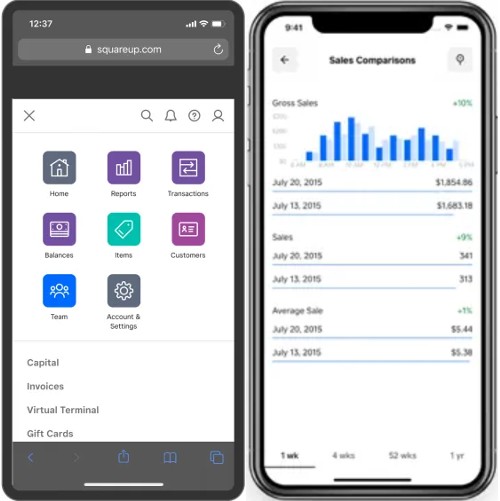
One of Square’s most invaluable technological features is its robust analytics and reporting suite. This functionality transforms raw transaction data into actionable insights, enabling you to make informed decisions that drive growth and optimize performance. All reports are accessible from your Square Dashboard, providing a comprehensive view of your business’s health.
Accessing Sales Reports and Transaction History
Square provides a wealth of reports designed to give you a clear picture of your sales performance.
- Sales Summary Reports: These reports offer an overview of your total sales, net sales, refunds, discounts, and average transaction size over chosen periods (daily, weekly, monthly, annually). You can quickly identify peak selling times, understand daily fluctuations, and track overall revenue trends.
- Item Sales Reports: Dive into the performance of individual products. This report shows which items are selling best, which are underperforming, and helps identify seasonal trends or popular product pairings. This data is crucial for inventory planning and merchandising strategies.
- Category Sales Reports: Understand the performance of different product categories. If you sell both apparel and accessories, this report can show which category contributes more to your revenue, helping you allocate resources and marketing efforts effectively.
- Payment Method Reports: Analyze how customers are paying. This report details the percentage of sales made via cash, credit card (broken down by card type), mobile payments, or gift cards. Understanding payment preferences can help optimize your checkout process and marketing.
- Transaction History: A detailed log of every single transaction, including the date, time, items sold, payment method, and associated employee. This granular data is invaluable for reconciliation, investigating discrepancies, and providing customer support.
These reports are presented in clear, digestible formats, often with visual graphs and charts, making complex data easy to understand at a glance.
Identifying Trends and Customer Insights
Beyond raw numbers, Square’s analytics tools are designed to help you uncover deeper business insights.
- Customer Directory: Square automatically builds a customer directory with contact information, purchase history, and visit frequency. This allows you to identify your most loyal customers, segment your audience for targeted marketing, and understand buying patterns. Integrated CRM-lite features help foster customer relationships.
- Employee Sales Performance: As discussed, with team member logins, you can generate reports that break down sales by employee, commission tracking, and shift performance. This data aids in performance reviews, identifying training needs, and recognizing top performers.
- Sales by Location: For multi-location businesses, Square provides consolidated reports that allow you to compare performance across different outlets. This helps identify best practices, optimize staffing, and tailor inventory to specific store demographics.
- Time-Based Performance: Analyzing sales data by hour, day of the week, or month allows you to identify your busiest periods. This insight is critical for optimizing staffing schedules, planning promotions, and understanding customer traffic patterns.
By regularly reviewing these reports, businesses can identify opportunities for improvement, capitalize on emerging trends, and better understand their customer base, all within Square’s integrated technological platform.
Exporting Data for Accounting Purposes
Integration with accounting software is a critical requirement for most businesses, and Square provides the tools to ensure seamless data flow.
- CSV Exports: All sales, transaction, and inventory reports can be easily exported as CSV (Comma Separated Values) files. This universal format allows you to import data into virtually any spreadsheet program (like Excel or Google Sheets) or accounting software that supports CSV imports.
- Integrations with Accounting Software: Square offers direct integrations with popular accounting software solutions like QuickBooks, Xero, and other third-party applications. These integrations automate the process of syncing your sales data, payment information, and transaction fees directly into your accounting ledger, significantly reducing manual data entry and minimizing the risk of errors. This technological handshake ensures that your financial records are always up-to-date and accurate for tax purposes and financial planning.
- Developer APIs: For businesses with more complex needs or custom systems, Square provides a robust set of Developer APIs (Application Programming Interfaces). These APIs allow developers to build custom integrations and applications that can pull data from Square, pushing it into proprietary systems or creating bespoke reports, offering unparalleled flexibility in data management.
By facilitating easy data export and direct integrations, Square ensures that its powerful sales and operational data can be readily utilized by your accounting team or external financial tools, providing a holistic view of your business’s financial health and simplifying compliance.
Optimizing Your Square Experience: Tips, Security, and Support
Maximizing your Square investment goes beyond understanding its features; it involves adopting best practices, safeguarding your data, and knowing where to turn for assistance. This final section focuses on operational optimization and leveraging Square’s inherent technological protections and support infrastructure.
Enhancing Security with Two-Factor Authentication
Digital security is paramount in handling financial transactions and sensitive business data. Square employs robust security measures, but users also play a crucial role in protecting their accounts.
- Two-Factor Authentication (2FA): This is a critical security feature that adds an extra layer of protection to your Square account. When enabled, logging in requires not only your password but also a second verification code sent to your phone or generated by an authenticator app. This significantly reduces the risk of unauthorized access, even if your password is compromised. It’s a simple yet highly effective technological safeguard that all users should enable.
- Strong Passwords: Always use strong, unique passwords for your Square account, combining uppercase and lowercase letters, numbers, and symbols. Avoid using easily guessable information or reusing passwords from other online services.
- PCI DSS Compliance: Square’s infrastructure is fully PCI DSS compliant, meaning it adheres to the highest industry standards for protecting cardholder data. This includes encryption for all transactions, secure data storage, and regular security audits. While Square handles the technical compliance, it’s important for users to understand their role in maintaining a secure environment (e.g., protecting physical hardware, never writing down passwords).
By actively engaging with these security features and practices, you ensure the integrity of your business data and the trust of your customers.
Troubleshooting Common Issues
Even with the most intuitive technology, occasional hiccups can occur. Knowing how to troubleshoot common Square issues can save time and minimize disruption.
- Connectivity Problems: If your Square Reader isn’t connecting, first check your device’s Bluetooth settings (for wireless readers) or ensure it’s firmly plugged in (for wired readers). Make sure the Square app has the necessary permissions to access Bluetooth. Sometimes, simply restarting the Square app or your smartphone/tablet can resolve minor glitches.
- Payment Processing Errors: For declined cards, ensure the card details are entered correctly if manually keying in, or that the chip/tap was performed properly. Sometimes a card is genuinely declined by the issuing bank; in such cases, prompt the customer to try another payment method. Verify your internet connection is stable, as intermittent connectivity can disrupt transactions.
- Hardware Issues: For issues with the Square Terminal or Register, try a soft reset by powering the device off and on again. Ensure the battery is charged, and check for any physical damage. If a receipt printer isn’t working, check the paper roll, thermal paper orientation, and connectivity.
- App Freezing/Crashing: Ensure your Square app is updated to the latest version. Outdated software can lead to performance issues. If the app is consistently crashing, try clearing its cache or reinstalling it (after backing up any critical data if applicable).
Square often provides on-screen prompts or error messages that offer clues to the underlying problem. A quick search of Square’s extensive online support library (discussed next) often provides solutions to frequently encountered issues.
Utilizing Square’s Support Resources
Square understands that effective technology requires robust support. They offer multiple avenues for assistance, ensuring you can quickly resolve issues and optimize your usage.
- Square Support Center: This comprehensive online knowledge base is your first stop for troubleshooting and learning. It features articles, guides, and FAQs covering every aspect of Square’s hardware and software, often with step-by-step instructions and video tutorials. Search functionality allows you to quickly find answers to specific questions.
- Community Forum: Square hosts an active online community forum where users can ask questions, share tips, and learn from each other’s experiences. This peer-to-peer support can be incredibly valuable for niche questions or real-world use cases.
- Direct Support: For issues that can’t be resolved through self-service, Square offers direct customer support via phone, email, or live chat. Availability and specific contact methods may vary based on your region and the type of Square product you are using. These channels connect you with knowledgeable support agents who can provide personalized assistance for more complex technical challenges.
- In-App Help: Many Square apps include an in-app help section, providing quick access to relevant articles or direct contact options, streamlining the process of getting assistance without leaving your workflow.
By familiarizing yourself with these resources, you ensure that you are never alone in your Square journey. Leveraging Square’s comprehensive support ecosystem is a vital part of successfully integrating and maintaining this powerful technological solution within your business.
In conclusion, Square is more than just a payment processor; it’s a sophisticated technological platform designed to simplify and streamline almost every aspect of running a modern business. By understanding its setup, mastering its payment processing capabilities, exploring its extended ecosystem of inventory, employee, and e-commerce tools, and leveraging its powerful analytics and support infrastructure, you can fully harness “my Square” to drive operational efficiency, enhance customer experience, and foster sustainable growth. This comprehensive guide has focused exclusively on the technological dimensions of Square, aiming to equip you with the knowledge to wield this powerful tool with confidence and expertise.
aViewFromTheCave is a participant in the Amazon Services LLC Associates Program, an affiliate advertising program designed to provide a means for sites to earn advertising fees by advertising and linking to Amazon.com. Amazon, the Amazon logo, AmazonSupply, and the AmazonSupply logo are trademarks of Amazon.com, Inc. or its affiliates. As an Amazon Associate we earn affiliate commissions from qualifying purchases.