
In the rapidly evolving landscape of digital commerce, establishing a robust online presence and streamlining procurement processes are paramount for businesses of all sizes. Amazon Business stands as a pivotal digital platform designed to cater specifically to the operational needs of enterprises, offering a suite of features that go far beyond a standard consumer account. This guide will walk you through the comprehensive process of creating an Amazon Business account, delving into its technological underpinnings, key functionalities, and strategic advantages from a purely tech-centric perspective. Understanding this digital tool and its optimal setup is crucial for any organization aiming to enhance efficiency, reduce costs, and modernize its purchasing workflows.
Understanding Amazon Business: A Platform for Digital Commerce Efficiency
At its core, Amazon Business is an advanced digital marketplace tailored for companies, offering a vast catalog of products alongside specialized features designed to simplify and optimize B2B transactions. It’s not merely Amazon for businesses; it’s a sophisticated technological infrastructure built to support complex organizational purchasing requirements, integrating seamlessly into existing business operations.
What is Amazon Business and Why it Matters for Your Enterprise
Amazon Business serves as a dedicated digital portal where registered businesses can access millions of products, often at exclusive prices, with specialized services not available to individual customers. For an enterprise, this platform represents a significant technological asset. It centralizes procurement, provides granular control over spending, and automates many aspects of the purchasing cycle that would otherwise be manual and prone to error. By leveraging Amazon’s expansive logistics and supply chain technology, businesses gain unprecedented access to resources, from office supplies and IT equipment to industrial tools and components, all managed through a unified digital interface. Its importance lies in its ability to transform a traditionally cumbersome process into a lean, efficient, and transparent digital workflow, directly contributing to operational agility and cost-effectiveness.
Core Digital Features and Benefits for Businesses
The technological architecture of Amazon Business offers a distinctive array of features that differentiate it from its consumer counterpart. These are designed to address the unique complexities of business procurement:
- Multi-User Accounts with Granular Permissions: This crucial feature allows businesses to invite multiple users to a single account, assigning them specific roles and spending limits. Administrators can define purchasing groups, approve workflows, and restrict access to certain functionalities, ensuring strict adherence to internal policies and enhancing digital security. This advanced user management system is a cornerstone of its B2B functionality.
- Purchasing Analytics and Reporting: The platform provides robust digital tools for tracking expenditures, generating custom reports, and gaining insights into purchasing patterns. This data-driven approach allows businesses to identify cost-saving opportunities, monitor compliance, and forecast future needs more accurately, all through an intuitive dashboard interface.
- Tax-Exempt Purchases: Eligible tax-exempt organizations can register their exemption status directly with Amazon Business, automating the application of tax exemptions on qualified purchases. This digital integration streamlines compliance and reduces the administrative burden associated with tax recovery.
- Integrated Invoicing and Payment Solutions: Amazon Business supports various payment methods, including corporate credit cards, purchasing cards, and line of credit options. It also facilitates integration with existing accounting and e-procurement systems, ensuring that invoicing and reconciliation are handled efficiently through digital channels.
- Business-Exclusive Pricing and Quantity Discounts: Beyond standard Amazon pricing, businesses often gain access to special pricing on eligible products, as well as tiered discounts for bulk purchases. This is managed dynamically by the platform’s algorithms, automatically applying the best available rates based on purchase volume.
These features collectively represent a powerful technological ecosystem designed to empower businesses with greater control, visibility, and efficiency in their digital purchasing operations.
Differentiating from a Standard Amazon Account
While both Amazon Business and a standard Amazon consumer account operate on the same core e-commerce platform, their underlying functionalities and user interfaces diverge significantly. A standard account is built for individual shopping experiences, focusing on personal recommendations and simple transaction flows. Amazon Business, however, is engineered for organizational buyers. It includes enterprise-grade features like purchase order management, multi-user access with approval flows, spend visibility dashboards, and integration capabilities with ERP systems. The digital infrastructure supports complex logistical requirements, such as shipping to multiple addresses and consolidating orders across various departments. Essentially, a standard account is a simple browser-based storefront, whereas Amazon Business is a sophisticated, feature-rich B2B digital procurement platform.
Preparing for Your Digital Account Creation: Essential Prerequisites
Before embarking on the digital setup process for an Amazon Business account, it’s imperative to gather specific information and ensure your business meets the necessary criteria. This preparatory phase is critical for a smooth and efficient registration, minimizing potential delays or verification issues.
Gathering Key Company Information
The foundation of your Amazon Business account is accurate and verifiable company data. You’ll need to compile the following details, ensuring they are consistent with your legal business registration:
- Legal Business Name: The exact name under which your company is legally registered.
- Physical Business Address: The primary operational address of your company.
- Contact Information: A reliable business phone number and an email address that will serve as the primary administrator’s contact.
- Tax ID (EIN/VAT Number): Your employer identification number (EIN) for US-based businesses, or the equivalent VAT/GST number for businesses in other regions. This is crucial for verifying your business entity and for tax-exempt purchases.
- Credit Card or Payment Method: While not strictly required for initial setup, having a business credit card or access to other corporate payment methods ready will expedite the finalization of your account and future purchases.
Having these details readily accessible will streamline the data input phase of the registration process.
Verifying Eligibility and Account Requirements
Amazon Business is exclusively for legitimate businesses and organizations. To be eligible, your entity must operate as a recognized business, whether it’s a sole proprietorship, LLC, corporation, non-profit, or government agency. Amazon employs a verification process to confirm the legitimacy of your business. This might involve cross-referencing your provided information with public business registries or, in some cases, requesting additional documentation such as business licenses, tax certificates, or official letters. Understanding these requirements beforehand helps ensure your application aligns with Amazon’s verification protocols, preventing potential rejections due to incomplete or inaccurate information.
Technical Setup Considerations
While creating an Amazon Business account is primarily a web-based process, a few technical considerations can enhance your experience:
- Reliable Internet Connection: A stable and fast internet connection is essential for uninterrupted data entry and document uploads.
- Modern Web Browser: Use an updated version of a widely supported browser (e.g., Chrome, Firefox, Edge, Safari) to ensure compatibility with Amazon’s web interface and prevent rendering issues or functional glitches.
- Dedicated Business Email Address: It is highly recommended to use a professional email address (e.g., user@yourcompany.com) rather than a generic personal email. This reinforces the business nature of the account and is often a prerequisite for certain verification steps. Ensure you have immediate access to this email for verification links and communications.
Addressing these technical aspects before starting the registration process can prevent common frustrations and ensure a smoother digital onboarding experience.
Step-by-Step: Navigating the Amazon Business Account Setup Interface
The actual creation of an Amazon Business account is a straightforward digital process, largely guided by Amazon’s intuitive user interface. This section breaks down each stage, from initiation to customization, highlighting the key interactions with the platform.
Initiating the Registration Process
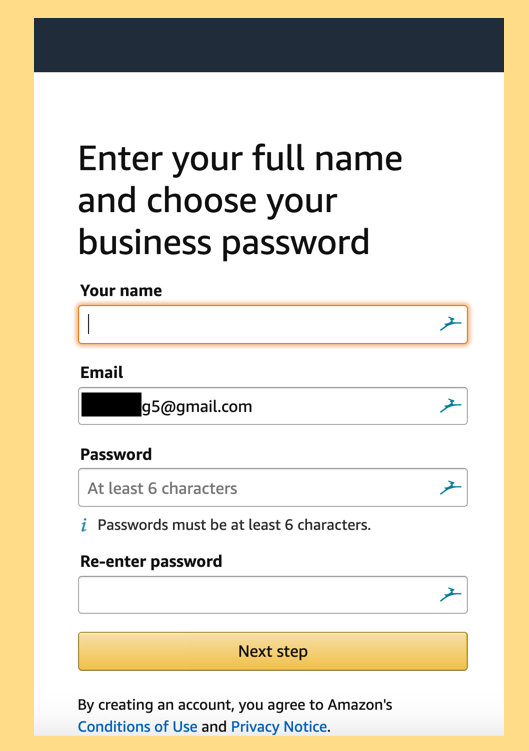
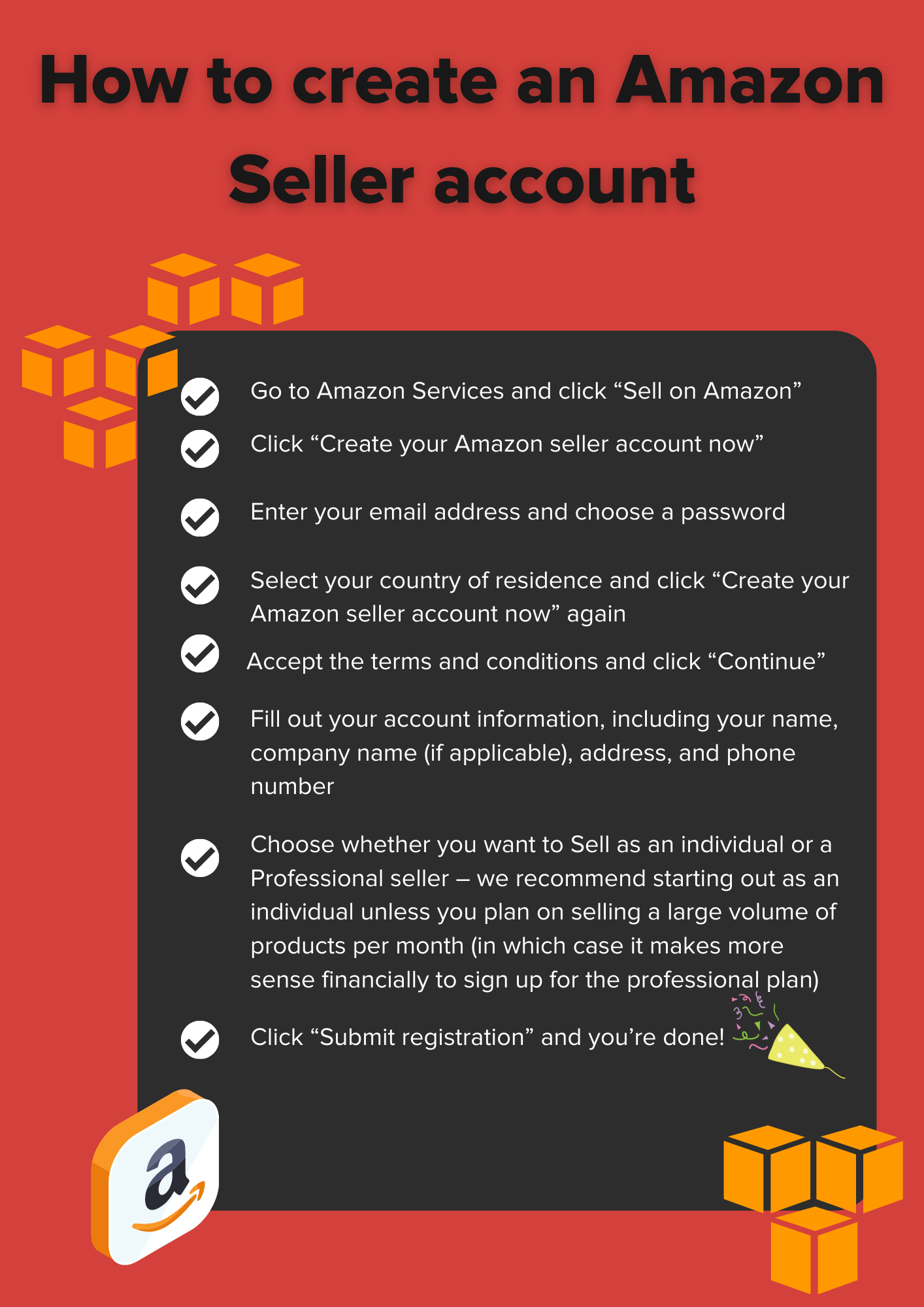
The journey begins by visiting the dedicated Amazon Business registration portal. Typically, this can be found by searching “Amazon Business” or directly navigating to business.amazon.com. Once on the landing page, you will be prompted to create an account. This usually involves clicking a prominent “Create a free account” or “Register now” button. You will then be asked to provide your email address, which will serve as the primary login credential for the account administrator. If you already have a personal Amazon account associated with that email, the system might ask if you wish to link it or create a new one. For security and clarity, it’s often advisable to use a dedicated business email and start fresh, even if the system allows linking.
Inputting Business and User Details
This is the most critical data entry phase. The digital form will request the comprehensive company information gathered in the preparation stage. You’ll enter:
- Business Legal Name: Ensure this matches your official registration.
- Primary Business Address: Including street, city, state/province, and postal code.
- Industry Type: Selecting your industry from a dropdown menu helps Amazon tailor future recommendations and services.
- Tax Information: Depending on your region, you’ll be prompted for your EIN, VAT, or other relevant business tax ID.
- Primary Administrator Details: Your name, title, and contact number. This individual will be the main point of contact and have full control over the account initially.
Accuracy here is paramount. Any discrepancies could trigger verification delays. The interface is designed to be user-friendly, with clear prompts and field validations to guide you through the process.
Verification and Security Protocols
After submitting your business and user details, Amazon initiates its verification process. This typically involves several layers:
- Email Verification: An essential security step where Amazon sends a verification link or code to the email address provided. Clicking the link or entering the code confirms ownership of the email.
- Business Entity Verification: Amazon will attempt to verify your business using the tax ID and legal name provided. This is often an automated process, cross-referencing public databases.
- Document Uploads (If Required): In some cases, if automated verification is unsuccessful or if your business type requires it, Amazon may request additional documentation. This could include a copy of your business license, tax certificate, or a utility bill in your company’s name. You will be provided with a secure digital upload mechanism for these documents.
This verification period can range from a few minutes to several business days, depending on the complexity of your business entity and the region. During this time, the system might provide a status update or send email notifications regarding the progress.
Customizing Your Account Settings
Once your business account is verified and active, you’ll be directed to your Amazon Business dashboard, where you can begin customizing settings to fit your organizational needs. Key areas to configure include:
- Payment Methods: Adding corporate credit cards, setting up a line of credit, or integrating with purchasing card programs.
- Shipping Addresses: Adding multiple shipping addresses for different departments or locations.
- User Management: Inviting additional users from your organization, assigning them roles (e.g., requester, approver, administrator), and creating user groups. This is a crucial step to leverage the multi-user capabilities of the platform.
- Approval Workflows: Configuring rules for purchase approvals, such as requiring manager approval for orders exceeding a certain amount.
- Tax Exemption Setup: If your business is tax-exempt, completing the digital application process within the account settings to avoid sales tax on eligible purchases.
These initial customizations are vital for tailoring the digital platform to your specific operational structure, ensuring that your procurement processes are efficient, compliant, and secure from day one.
Leveraging Advanced Digital Features Post-Setup
The true power of an Amazon Business account unfolds once the initial setup is complete and you begin to explore its advanced digital functionalities. These features are designed to optimize procurement, enhance financial oversight, and streamline operational workflows within a technological framework.
Implementing Multi-User Accounts and Permissions Management
One of the most significant advantages of Amazon Business is its sophisticated multi-user management system. After creating your primary administrator account, you can invite colleagues, department heads, and procurement teams to join your business account. Each invited user can be assigned specific roles, such as:
- Requesters: Can browse products and create shopping carts, which then require approval.
- Approvers: Can review and approve purchase requests from requesters, often with predefined spending limits.
- Administrators: Have full control over account settings, user management, payment methods, and reporting.
This granular control over user permissions and the ability to create customized groups ensures that purchasing policies are enforced digitally, reducing rogue spending and increasing accountability. The user management interface provides a clear overview of all users, their roles, and their activity, all centrally managed.
Utilizing Purchase Analytics and Reporting Tools
Amazon Business offers powerful data analytics capabilities embedded directly into its platform. Through the “Business Analytics” or “Reporting” dashboard, administrators can generate detailed reports on:
- Spend by Category: Identifying where the majority of your budget is being allocated.
- Spend by User/Group: Tracking individual or departmental purchasing activities.
- Order History: Comprehensive records of all purchases, including product details, vendors, prices, and delivery status.
- Savings Opportunities: Identifying areas where quantity discounts or business-exclusive pricing could be better leveraged.
These digital tools provide actionable insights, enabling businesses to optimize their purchasing strategies, negotiate better deals with suppliers (if applicable), and ensure budget compliance. The ability to export these reports for integration with internal financial systems further enhances their utility.
Integrating with Procurement Systems
For larger organizations, Amazon Business offers integration capabilities with existing e-procurement or Enterprise Resource Planning (ERP) systems. This advanced technological linkage can dramatically streamline the entire procure-to-pay process. Through PunchOut catalogs or API integrations, businesses can:
- Seamlessly access Amazon Business directly from their ERP: Users can shop on Amazon Business while remaining within their internal procurement system.
- Automate Purchase Order (PO) creation: Once a purchase is made on Amazon Business, a PO can be automatically generated and sent back to the ERP.
- Simplify Invoice Reconciliation: Invoices from Amazon Business can be electronically matched with POs in the ERP, automating the reconciliation process and reducing manual effort.
These integrations leverage the power of system interoperability, reducing data entry errors, accelerating approval cycles, and providing a unified view of all purchasing activities across the organization.
Exploring Payment Solutions and Tax Exemption Tools
Beyond standard credit card payments, Amazon Business provides sophisticated payment solutions tailored for corporate finance:
- Amazon Business Line of Credit: A flexible payment option that allows businesses to make purchases and pay later, simplifying cash flow management.
- Purchasing Cards (P-Cards): Integration with corporate P-Card programs allows for centralized tracking and control of expenditures.
- Centralized Payment Methods: The ability to store multiple payment methods and assign them to specific user groups or departments, providing control over how funds are spent.
Furthermore, the robust tax exemption program ensures that qualifying non-profit, government, and educational institutions can apply their tax-exempt status directly within the platform. This digital certification process automatically removes sales tax from eligible purchases, ensuring compliance and immediate cost savings without manual intervention.
Optimizing Your Amazon Business Account: Best Practices for Digital Operations
Establishing your Amazon Business account is merely the first step. To truly harness its technological capabilities and drive operational excellence, continuous optimization and strategic management are key. Adhering to best practices ensures maximum efficiency, security, and cost-effectiveness.
Enhancing Digital Security and User Management
Maintaining robust digital security is paramount for any business account. For Amazon Business, this translates into meticulous user management and diligent monitoring:
- Regularly Review User Roles and Permissions: As teams evolve or employees leave, it’s crucial to update access levels promptly. Remove inactive users immediately and adjust permissions for those whose responsibilities change. This minimizes unauthorized access and maintains data integrity.
- Enforce Strong Password Policies: Encourage or enforce the use of strong, unique passwords for all users. Consider implementing two-factor authentication (2FA) if available for enhanced login security, providing an additional layer of protection against phishing attempts and unauthorized access.
- Monitor Account Activity: Regularly review purchasing logs and user activity reports. Unusual patterns or suspicious transactions can be red flags indicating potential security breaches or policy violations. Amazon’s analytics tools provide the data necessary for this oversight.
- Educate Users: Provide training to all users on secure browsing habits, how to identify phishing attempts targeting their Amazon Business login, and the importance of adhering to internal purchasing policies within the platform.
By taking these proactive steps, businesses can significantly reduce their digital risk exposure and maintain the integrity of their procurement processes.
Streamlining Procurement Workflows with Technology
The full potential of Amazon Business is realized when its features are strategically integrated into and leveraged within your existing procurement workflows. This involves using the platform’s technological tools to automate and simplify processes:
- Automate Approvals: Configure automated approval workflows based on predefined rules (e.g., spending thresholds, specific product categories, or department budgets). This reduces manual intervention, speeds up purchase cycles, and ensures compliance without human bottlenecks.
- Leverage Guided Buying: Utilize features that guide users towards preferred products, specific vendors, or pre-approved categories. This can be achieved through custom catalogs or by setting purchasing policies that highlight compliant options, reducing off-contract spending.
- Consolidate Orders: Encourage users to consolidate multiple small orders into larger, less frequent shipments to reduce shipping costs and environmental impact, leveraging Amazon’s logistics network efficiently.
- Utilize Recurring Deliveries: For frequently purchased consumables, set up recurring orders using Amazon’s subscription features. This automates inventory replenishment, prevents stockouts, and saves time.
- Integrate with Accounting Software: Beyond ERP systems, explore simpler integrations with accounting software (e.g., QuickBooks, Xero) for automated invoice processing and reconciliation, reducing manual data entry and errors.
These practices transform Amazon Business from a simple shopping portal into a powerful, integrated component of your digital procurement ecosystem.

Staying Updated with Platform Features and Updates
Amazon Business is a dynamic platform, continuously evolving with new features, security enhancements, and technological updates. To ensure your organization benefits from the latest advancements:
- Subscribe to Amazon Business Communications: Opt-in for newsletters and announcements from Amazon Business. These communications often highlight new features, best practices, and important updates regarding policy changes or security enhancements.
- Regularly Explore the Admin Dashboard: Periodically navigate through the different sections of your administrator dashboard. New functionalities are often introduced and explained within the interface.
- Participate in Webinars and Training: Amazon Business occasionally offers webinars or online training sessions designed to educate users on new features or optimize their use of existing ones. These can be invaluable for staying current.
- Review Feature Documentation: When a new feature is rolled out, consult Amazon’s official documentation or help guides for detailed instructions on how to implement and leverage it effectively within your organization.
By staying informed and proactively adapting to new technological capabilities, your business can continuously optimize its Amazon Business account, ensuring it remains a cutting-edge tool for efficient and secure digital procurement.
aViewFromTheCave is a participant in the Amazon Services LLC Associates Program, an affiliate advertising program designed to provide a means for sites to earn advertising fees by advertising and linking to Amazon.com. Amazon, the Amazon logo, AmazonSupply, and the AmazonSupply logo are trademarks of Amazon.com, Inc. or its affiliates. As an Amazon Associate we earn affiliate commissions from qualifying purchases.