
Amazon Prime Video has evolved into a cornerstone of digital entertainment, offering a vast library of films, TV shows, and original content accessible to millions worldwide. Far more than just a supplementary service, it stands as a robust streaming platform designed for diverse viewing preferences and device ecosystems. For new subscribers, or even long-time Amazon Prime members who haven’t fully explored its capabilities, understanding how to navigate and optimize their viewing experience is key to unlocking its full potential. This comprehensive guide will walk you through the technical intricacies and user-friendly functionalities of Amazon Prime Video, ensuring you can enjoy your favorite movies and shows with utmost ease and quality.
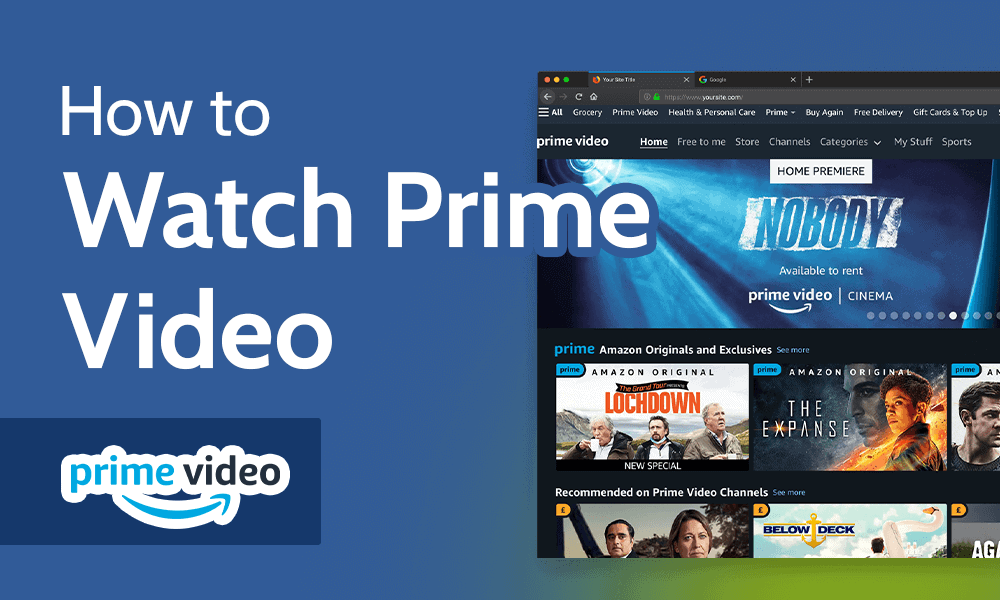
At its core, Amazon Prime Video is a digital video streaming and rental service that is automatically included with an Amazon Prime subscription. Beyond the convenience of free two-day shipping and other Prime benefits, members gain instant access to thousands of titles available for streaming at no additional cost. However, the platform also hosts a massive catalog of newer releases and premium content available for individual rental or purchase, creating a hybrid model that caters to both casual browsers and dedicated cinephiles. Our focus here is to demystify the process of accessing, managing, and troubleshooting your viewing experience, leveraging the platform’s technological infrastructure.
Getting Started with Amazon Prime Video: Your Gateway to Entertainment
Before diving into the cinematic universe of Amazon Prime Video, a few fundamental steps and understandings are necessary. The platform is designed for broad accessibility, but a foundational setup ensures a smooth and enjoyable experience from the get-go.
Understanding Amazon Prime Membership
The primary prerequisite for accessing the included content on Amazon Prime Video is an active Amazon Prime membership. This is not a standalone video service but an integral part of the broader Amazon Prime ecosystem. If you’re already a Prime member, you automatically have access. If not, you can sign up for a free trial or a paid subscription directly through the Amazon website. The membership not only unlocks Prime Video but also a suite of other Amazon services, emphasizing its value proposition as a comprehensive digital utility. For those primarily interested in video content, Amazon does offer a standalone Prime Video subscription in some regions, but the full Prime membership often provides better value dueaking into account the additional perks.
Essential Requirements for Seamless Streaming
To ensure a seamless streaming experience, a few technical requirements must be met. These are largely standard for any modern streaming service but are worth reiterating for optimal performance:
- Internet Connection: A stable and sufficiently fast internet connection is paramount. For standard definition (SD) streaming, a minimum of 1-2 Mbps is generally recommended. For high definition (HD), 3-5 Mbps is usually sufficient, while 4K Ultra HD content demands at least 15-25 Mbps, depending on the specific content and encoding. A wired Ethernet connection often provides more stability than Wi-Fi, though modern Wi-Fi standards (Wi-Fi 5 or Wi-Fi 6) can certainly handle high-bandwidth streaming effectively.
- Compatible Device: Amazon Prime Video supports a vast array of devices, ensuring flexibility in how and where you watch. This includes smart TVs, streaming media players (like Amazon Fire TV devices, Roku, Apple TV, Chromecast), gaming consoles (PlayStation, Xbox), desktop computers (via web browsers), and mobile devices (smartphones and tablets running iOS or Android). Ensuring your device’s operating system and the Prime Video app are up-to-date is crucial for compatibility and accessing the latest features.
- Amazon Account: All access is tied to your Amazon account, which serves as your central hub for purchases, subscriptions, and profile management across all Amazon services. Ensure you have your login credentials readily available.
Diverse Platforms: Accessing Prime Video Across Your Devices
One of Prime Video’s strengths is its ubiquitous availability. Whether you’re at home or on the go, there’s likely a way to access your content. Understanding the specific methods for each device category enhances the overall user experience.
Streaming on Desktops and Laptops
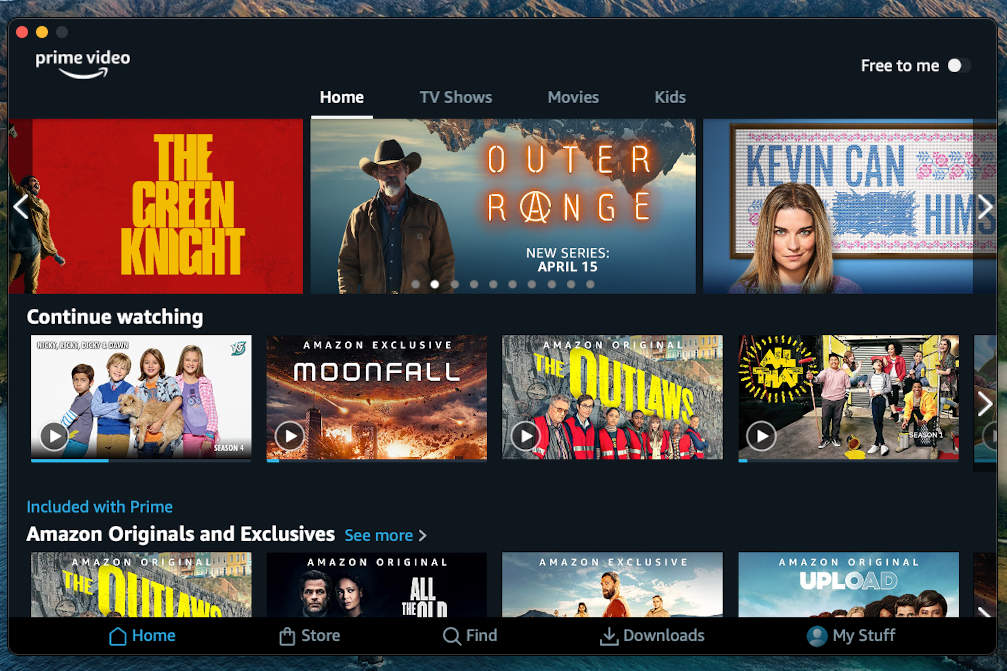
For many, a desktop or laptop computer offers the most flexible viewing experience. Simply open your preferred web browser (Chrome, Firefox, Edge, Safari, etc.), navigate to primevideo.com, and log in with your Amazon credentials. The web interface provides full access to the library, account settings, and playback controls. For optimal quality and performance, ensure your browser is up-to-date and consider clearing your browser cache periodically if you encounter performance issues. Some operating systems also offer a dedicated Prime Video app (e.g., for Windows), which can provide a more integrated experience with system notifications and offline playback capabilities.
Enjoying on Mobile Devices: iOS and Android Apps
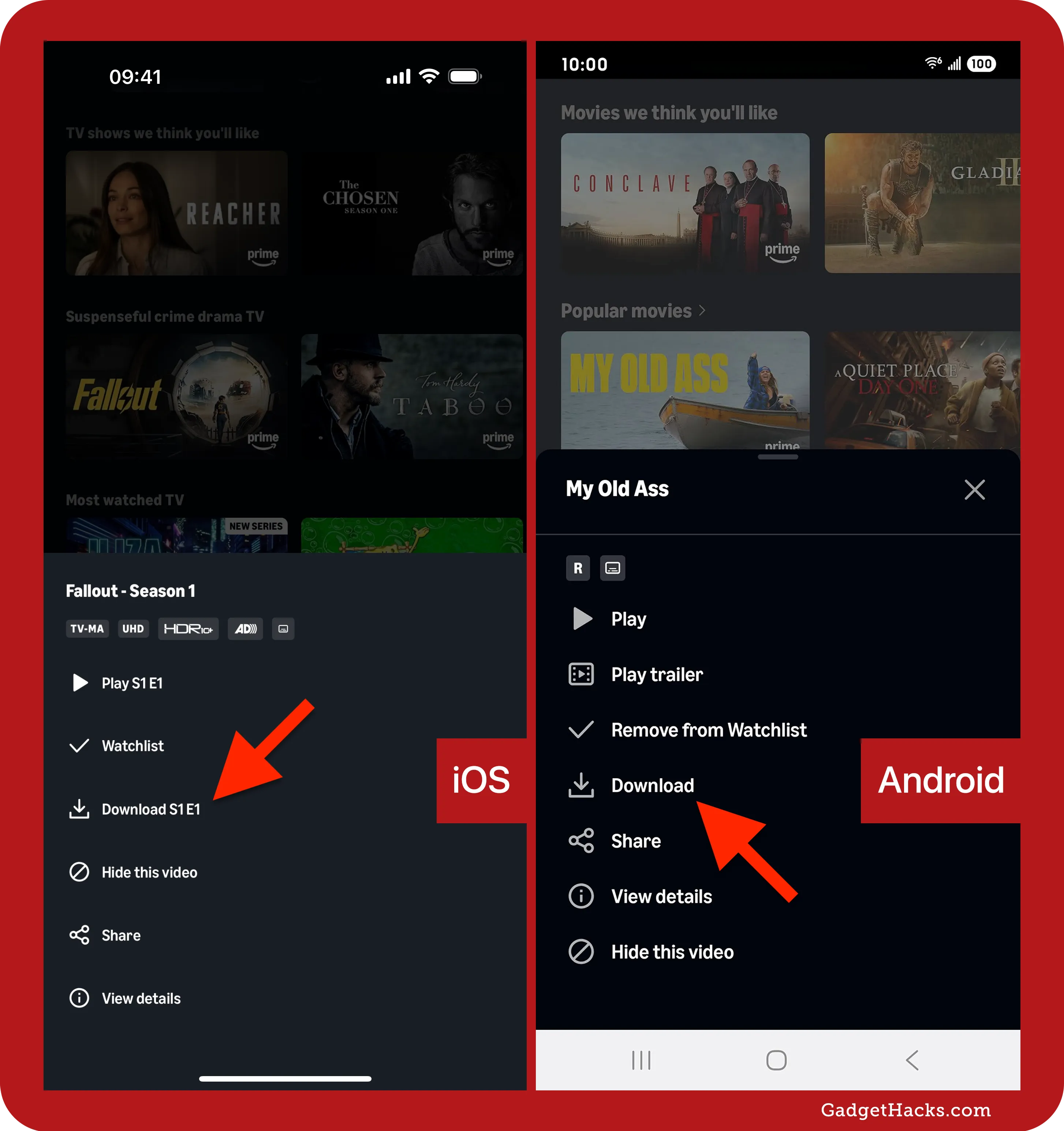
The Prime Video app for iOS and Android smartphones and tablets is exceptionally well-designed for mobile consumption. Download the “Amazon Prime Video” app from the Apple App Store or Google Play Store, then log in. The mobile app features intuitive navigation, touch-friendly controls, and crucially, allows for downloading content for offline viewing. This is invaluable for travel, commutes, or areas with limited internet access, turning your device into a portable entertainment library. Remember to download content over Wi-Fi to avoid consuming excessive mobile data.
The Big Screen Experience: Smart TVs, Streaming Sticks, and Consoles
For the ultimate cinematic experience, watching on a large screen is paramount. Most modern smart TVs come with the Amazon Prime Video app pre-installed or available for download from their respective app stores. Dedicated streaming media players like Amazon Fire TV devices, Roku players, Apple TV, and Google Chromecast also offer the Prime Video app. Gaming consoles such as PlayStation (PS4, PS5) and Xbox (One, Series X/S) also support the app, transforming them into powerful entertainment hubs.
Installation is typically straightforward:
- Navigate to your device’s app store or home screen.
- Search for “Amazon Prime Video.”
- Download and install the app.
- Open the app and follow the on-screen instructions to log in. This usually involves entering your Amazon credentials directly or visiting a specific URL on a separate device and entering a code displayed on your TV screen for quick authentication.
Ensure your TV or streaming device firmware is regularly updated, as these updates often include performance improvements and new features for streaming applications.
Offline Viewing: Entertainment On-the-Go
As mentioned, the mobile app is not just for streaming. It enables users to download a select range of titles for offline viewing. This feature is particularly useful for saving data, occupying children on long journeys, or simply ensuring entertainment is available even when Wi-Fi is scarce.
- Open the Prime Video app on your mobile device or tablet.
- Browse or search for the movie or show you wish to download.
- On the title’s detail page, look for a “Download” button (often represented by a down-arrow icon).
- Tap to initiate the download. You may be prompted to select a video quality, with higher quality files consuming more storage space.
Downloaded content is stored within the app and can be accessed from the “Downloads” section in the app’s menu. Downloads typically have an expiration period once viewing begins, or after a certain time if not watched.
Mastering the Prime Video Interface and Features
Beyond just getting the video to play, understanding the platform’s features and navigation will significantly enhance your viewing and discovery experience.
Navigating Content: Search, Categories, and Watchlists
Prime Video’s interface, while intuitive, offers several tools for content discovery:
- Search Bar: The most direct way to find specific titles. Located prominently, it allows searching by title, actor, director, genre, or even keywords.
- Categories and Genres: Content is organized into broad categories (e.g., Movies, TV Shows, Kids) and granular genres (Action & Adventure, Comedy, Drama, Sci-Fi, Documentaries, etc.), facilitating exploration based on mood or interest.
- Recommendations: Amazon’s robust recommendation engine learns from your viewing habits to suggest titles you might enjoy, often displayed as personalized carousels on the home screen.
- Watchlist: A crucial feature for organizing content you intend to watch later. You can add titles to your Watchlist from their detail pages, creating a personalized queue that syncs across all your devices.
Unlocking Enhanced Features: X-Ray, 4K, and Profiles
Prime Video is packed with features designed to enrich the viewing experience:
- X-Ray (powered by IMDb): This innovative feature provides real-time contextual information about what you’re watching. During playback, simply tap or click on the screen (or press up on a remote) to see details about the actors on screen, the music playing, trivia, and behind-the-scenes content, seamlessly integrated without interrupting your viewing.
- 4K Ultra HD and HDR Support: Many titles are available in stunning 4K resolution with High Dynamic Range (HDR), offering superior clarity, color accuracy, and contrast. To enjoy this, you’ll need a compatible 4K HDR TV or monitor, a device that supports 4K HDR streaming, and a robust internet connection. The app often indicates available resolutions on the title page.
- User Profiles: Prime Video supports multiple user profiles within a single Amazon account. This allows each family member to have their own personalized recommendations, watch history, and watchlist, without their viewing habits influencing or being mixed with others. You can create and switch between profiles directly within the app.
Managing Your Viewing: Parental Controls and Subtitles
- Parental Controls: Amazon Prime Video offers comprehensive parental control settings, allowing adults to restrict content based on rating or prevent purchases/rentals. These can be set for individual profiles, requiring a PIN for access to restricted content. This ensures a safe viewing environment for children.
- Subtitles and Audio Options: Almost all content comes with multiple subtitle options, and many titles offer alternative audio tracks (e.g., different languages or audio descriptions for the visually impaired). These settings are usually accessible during playback via a dedicated icon (often a speech bubble or settings gear) on the player interface.
Distinguishing Between Included Content and Paid Content
It’s important to understand the two main content categories:
- Included with Prime: These titles are freely accessible to Prime members and are typically marked with a “Included with Prime” banner or a Prime logo.
- Rent or Buy: Newer releases, premium shows, or titles not part of the Prime subscription are available for individual rental or purchase. These are clearly marked with pricing information. Once rented, you usually have a certain window (e.g., 30 days to start watching, and 48 hours to finish once started) before the rental expires. Purchased titles remain in your digital library indefinitely.
Optimizing Your Prime Video Experience
Even with the best equipment and connection, minor adjustments can significantly improve your streaming quality and troubleshoot common annoyances.
Troubleshooting Common Streaming Issues
Encountering buffering, low quality, or playback errors can be frustrating. Here are common troubleshooting steps:
- Check Internet Connection: Run a speed test on your device or a connected device. If speeds are low, reset your modem and router.
- Restart the App/Device: A simple restart of the Prime Video app or the entire streaming device (smart TV, console, phone) can resolve many transient software glitches.
- Clear Cache: On mobile apps or smart TV apps, clearing the app’s cache (usually found in device settings under Apps > Prime Video) can resolve performance issues.
- Update App/Firmware: Ensure the Prime Video app and your device’s operating system/firmware are running the latest versions.
- Reduce Streaming Quality: If your internet connection is consistently slow, you can manually reduce the streaming quality in the Prime Video app settings to prevent buffering.
- Disable VPN: While some VPNs work, many can interfere with streaming services’ geo-restriction detection, leading to playback errors. Try disabling your VPN if you’re experiencing issues.
Tips for High-Quality Playback
- Wired Connection: For fixed devices like smart TVs or streaming boxes, an Ethernet cable provides the most stable and fastest connection, minimizing buffering.
- Dedicated Bandwidth: If multiple devices are using your home network, consider prioritizing bandwidth for your streaming device, especially during peak viewing times. Many modern routers offer Quality of Service (QoS) settings for this purpose.
- Device Placement: For Wi-Fi, ensure your streaming device is relatively close to your router and not obstructed by walls or other electronic devices.
- Screen Calibration: For the best visual experience, consider calibrating your TV’s picture settings (brightness, contrast, color) to professional standards or using recommended settings from online guides for your specific TV model.
Beyond Movies: Exploring the Prime Video Ecosystem
While this guide focuses on movies, Prime Video offers a much broader array of content and features, continually expanding its technological offerings.
Original Series and Exclusive Content
Amazon has heavily invested in its own original programming, producing critically acclaimed series like “The Marvelous Mrs. Maisel,” “The Boys,” “Jack Ryan,” and “Lord of the Rings: The Rings of Power.” These exclusive titles are often a major draw for Prime membership and are only available on the platform, showcasing Amazon’s commitment to being a major player in the content creation space.
Live Events and Channels
Prime Video is also venturing into live sports and events, offering exclusive streaming rights to certain sports leagues and events in various regions. Additionally, “Prime Video Channels” allow subscribers to add premium channel subscriptions (like HBO, Showtime, Starz, or regional sports networks) directly within the Prime Video app. This consolidates all your streaming subscriptions into one interface, simplifying billing and access, and further cementing Prime Video as a central hub for digital entertainment. This integration demonstrates a sophisticated backend technology designed to manage multiple content providers and subscription models seamlessly.
In conclusion, watching movies on Amazon Prime Video is a straightforward, feature-rich experience, thanks to its robust technological foundation and user-centric design. By understanding the membership requirements, leveraging the diverse platform availability, mastering the intuitive interface, and utilizing the advanced features, users can unlock a vast world of entertainment. Whether you’re streaming in pristine 4K on your smart TV, downloading content for an offline commute, or exploring actor bios with X-Ray, Prime Video offers a comprehensive and engaging digital cinema experience for everyone. Embrace these insights, and your next movie night on Amazon Prime Video will be nothing short of spectacular.
aViewFromTheCave is a participant in the Amazon Services LLC Associates Program, an affiliate advertising program designed to provide a means for sites to earn advertising fees by advertising and linking to Amazon.com. Amazon, the Amazon logo, AmazonSupply, and the AmazonSupply logo are trademarks of Amazon.com, Inc. or its affiliates. As an Amazon Associate we earn affiliate commissions from qualifying purchases.