
In the vast and ever-evolving landscape of digital subscriptions, Amazon Prime stands out as a colossal entity, offering a plethora of services from expedited shipping to exclusive streaming content. Given its ubiquity and the sheer volume of features it encompasses, it’s not uncommon for users to occasionally find themselves wondering, “Do I actually have Amazon Prime?” This question might arise if you’ve recently inherited an account, used a free trial, or simply haven’t actively engaged with certain Prime benefits for a while.
From a technological standpoint, verifying your Amazon Prime status isn’t just about a simple yes or no; it’s about understanding your digital footprint within one of the world’s largest e-commerce ecosystems. This article will guide you through the digital pathways and technical indicators to confidently confirm your Prime membership, offering insights into how Amazon’s platform is designed to make this information accessible and manageable.
The Digital Gateway: Why Confirming Your Prime Status Matters
In an age where digital subscriptions are a cornerstone of modern consumerism, understanding your active memberships is crucial. For Amazon Prime, specifically, knowing your status empowers you to leverage its full spectrum of technological benefits and avoid unnecessary expenditures or missed opportunities. This isn’t just a financial check; it’s a digital health check for your online service usage.
Unlocking a Universe of Benefits
Amazon Prime is far more than just a delivery service; it’s a comprehensive digital package. An active Prime membership grants access to a diverse array of tech-centric services:
- Expedited Shipping: The foundational benefit, offering free two-day, one-day, or even same-day delivery on millions of eligible items, powered by Amazon’s sophisticated logistics and warehousing technology.
- Prime Video: An extensive library of movies and TV shows, including Amazon Originals, accessible via streaming on a multitude of devices (smart TVs, gaming consoles, mobile apps, Fire devices).
- Amazon Music Prime: Ad-free access to millions of songs and thousands of stations and playlists, integrating seamlessly with Amazon Echo devices and mobile apps.
- Prime Reading: A rotating selection of thousands of books, magazines, and comics available on Kindle devices and the Kindle app, leveraging digital distribution technology.
- Amazon Photos: Unlimited full-resolution photo storage and 5 GB for video, a robust cloud storage solution for digital media.
- Prime Gaming (Twitch Prime): Free games, exclusive in-game content, and a free Twitch channel subscription each month, bridging e-commerce with the gaming and streaming community.
- Exclusive Deals: Early access to Lightning Deals and special discounts, including the highly anticipated Prime Day, a massive e-commerce event driven by personalized algorithms.
Knowing you have Prime means you can immediately tap into these digital offerings without additional cost, maximizing the value of your subscription.
Avoiding Unnecessary Subscriptions or Missed Opportunities
Forgetting about an active Prime membership can lead to two primary issues:
- Duplicate Subscriptions: You might inadvertently sign up for a service (e.g., Prime Video) separately, not realizing it’s already included with your existing Prime. This is a common pitfall in the fragmented digital services landscape.
- Missed Savings: Conversely, if you don’t realize you have Prime, you might pay for standard shipping on purchases or miss out on exclusive Prime-only deals, effectively leaving money and convenience on the table.
Confirming your status ensures you’re utilizing your digital services efficiently and cost-effectively, a key principle of smart technology adoption.
Streamlining Your Online Shopping Experience
Beyond the direct financial implications, an active Prime membership fundamentally alters your interaction with the Amazon platform. The presence of Prime badges, filter options for Prime-eligible items, and the default selection of faster shipping options significantly streamlines the shopping process. This technological integration transforms Amazon from a simple online store into a highly personalized and efficient purchasing portal, making every digital interaction smoother and more responsive.
Navigating the Amazon Ecosystem: Step-by-Step Verification
Amazon, as a leading technology company, provides multiple intuitive ways to check your Prime status across its various platforms. Whether you’re using a desktop browser or a mobile device, the process is designed to be straightforward and accessible.
Checking via the Amazon Website (Desktop/Browser)
The Amazon website remains the most comprehensive portal for managing your account and subscriptions.
- Access Amazon.com: Open your preferred web browser and navigate to Amazon.com.
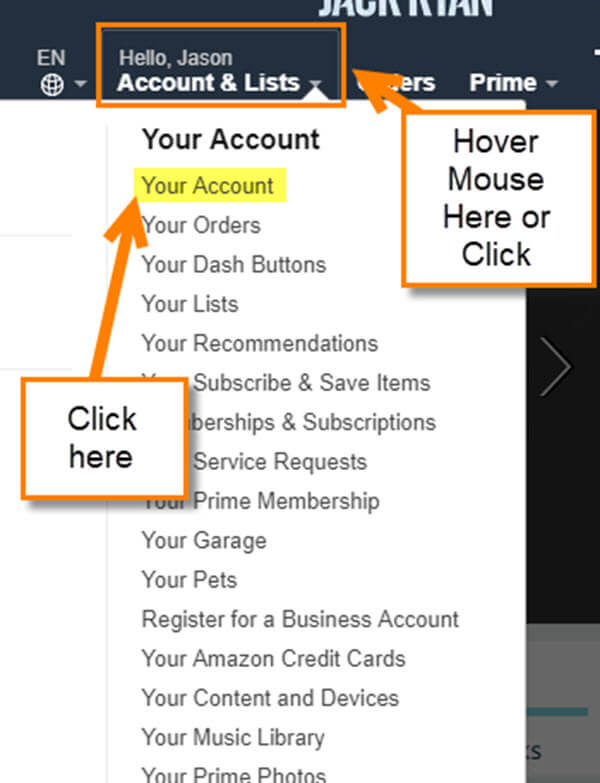
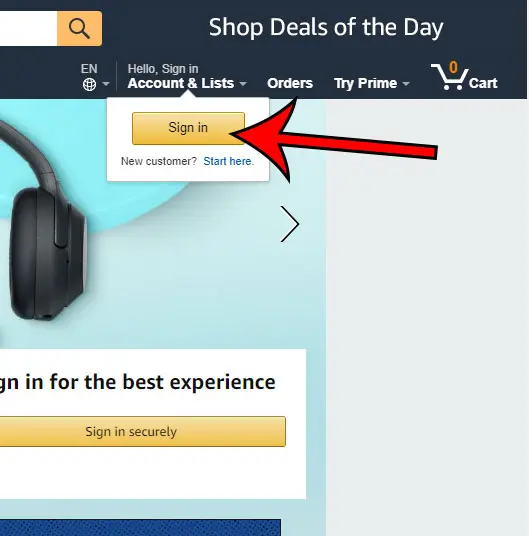
- Sign In: If you’re not already signed in, click “Account & Lists” (usually in the top right corner) and then “Sign In.” Enter your registered email address or mobile number and password. It’s crucial to ensure you’re logging into the correct account that might have Prime.
- Navigate to Your Account: Once signed in, hover over “Account & Lists” again. From the dropdown menu, select “Your Prime Membership.” This dedicated section is the central hub for all Prime-related information.
- Review Membership Details: On the “Your Prime Membership” page, you will see your current status clearly displayed. It will typically show:
- Active Membership: Indicates you are currently a Prime member.
- Trial Membership: If you’re in a free trial period, it will specify the trial end date.
- Expired/Cancelled Membership: If your Prime has ended, it will state this, often with an option to rejoin.
This page also provides critical technical details such as your next billing date, the payment method on file, and options to manage or cancel your membership. This interface is Amazon’s central control panel for your Prime subscription, providing all the necessary data points for informed decision-making.
Verifying Through the Amazon Mobile App (iOS/Android)
For users who primarily interact with Amazon via their smartphones, the mobile app offers a streamlined experience to check Prime status.
- Open the Amazon Shopping App: Launch the Amazon Shopping app on your iOS or Android device.
- Access the Menu: Tap the menu icon (usually three horizontal lines or a silhouette of a person, often labeled “Account” or “Profile”) at the bottom or top of the screen.
- Go to Your Account: Scroll down and tap “Account.”
- Find Prime Settings: Within the “Account” section, look for a category or option related to “Prime Membership” or “Manage Prime Membership.” Tapping this will take you to a similar interface as the website, displaying your membership status, renewal date, and billing information. The app provides a touch-optimized interface for managing your digital services on the go.
The Order History Clue
Even without diving deep into account settings, your past order history can offer a strong indicator of Prime membership.
- Check Past Orders: Browse your recent Amazon orders (accessible from “Account & Lists” on the website or “Your Orders” in the app).
- Look for Prime Shipping: Many order details will explicitly state “FREE Prime Shipping” or show “Prime” next to the shipping method if it was eligible for and used Prime benefits. The absence of such indicators on multiple recent orders might suggest your Prime membership is inactive. This is a subtle but effective real-world application of how Amazon’s system flags Prime benefits.
Recognizing the Hallmarks of an Active Prime Membership
Beyond the direct account verification, an active Amazon Prime membership manifests itself through various technological cues and service availabilities across the Amazon ecosystem. These are the functional indicators that confirm your access to Prime’s integrated services.
Expedited Shipping Badges and Options
The most visible and frequently used indicator of Prime is the shipping benefits. When browsing products on Amazon:
- Prime Badges: Look for the distinctive “Prime” logo (often a blue and orange wordmark) next to the product price or description. This signifies that the item is eligible for Prime shipping.
- Shipping Options: During checkout, you’ll see options for “FREE Two-Day Shipping,” “FREE One-Day Shipping,” or even “FREE Same-Day Delivery” (where available) automatically selected or prominently offered. If these free, fast shipping options are consistently available for eligible items, you likely have Prime. If only standard, paid shipping options appear, your Prime membership may be inactive. This is Amazon’s technology actively surfacing Prime benefits.
Prime Video & Music Access
Attempting to access Prime’s digital content services is a definitive test:
- Prime Video: Navigate to PrimeVideo.com or open the Prime Video app. If you can stream titles labeled “Included with Prime” without prompts to subscribe or rent, your Prime Video access (and thus Prime membership) is active. The user interface of Prime Video will generally differentiate between content included with Prime and content available for rent/purchase.
- Amazon Music Prime: Open the Amazon Music app or go to music.amazon.com. If you can stream millions of songs ad-free and access Prime Playlists, you have Music Prime. If the app constantly prompts you to upgrade to Amazon Music Unlimited or only offers limited access, your Prime Music benefits may not be active.
These streaming platforms are designed to directly reflect your subscription status through content availability and feature sets.
Exclusive Deals and Discounts
Amazon Prime members often receive preferential treatment in terms of pricing and access to sales events:
- “Prime Member Deal” Labels: During significant sales events or even on regular product pages, you might see “Prime Member Deal” or “Prime Exclusive Discount” displayed. If these are active and you can apply them, your membership is confirmed.
- Prime Day: The ultimate litmus test. If you can participate in Prime Day sales and access the exclusive discounts available only to Prime members, your membership is active. This annual event is technologically orchestrated to heavily leverage Prime membership.
Other Digital Perks
Several other less obvious, but equally telling, digital perks confirm your Prime status:
- Prime Reading/First Reads: Check if you can download books from the Prime Reading library or get early access to select titles via Amazon First Reads.
- Amazon Photos: Verify if you have unlimited full-resolution photo storage in the Amazon Photos app or on the website.
- Twitch Prime: Link your Amazon Prime account to Twitch (via gaming.amazon.com) and see if you can claim free games and a free channel subscription.
Each of these services requires an underlying Prime membership for full access, acting as distributed digital keys to the Amazon ecosystem.
Troubleshooting and Managing Your Prime Membership
Even with clear technological indicators, sometimes issues arise, or you simply need to manage your subscription. Amazon provides robust tools for this, all accessible through the account management features.
What If You Can’t Find Your Prime Membership?
If you’ve followed the steps and still can’t confirm Prime, consider these tech-related possibilities:
- Wrong Account: Are you logged into the correct Amazon account? Many users have multiple accounts (e.g., personal and business) linked to different email addresses. Double-check the login details.
- Expired Trial: Free trials automatically convert to paid memberships unless cancelled. If you intended to cancel, it might have expired.
- Payment Issues: If your payment method on file has expired or failed, Amazon may have suspended your Prime benefits. The “Your Prime Membership” page will usually flag this.
- Shared Account: If someone else pays for your Prime (e.g., through an Amazon Household), your individual account might not directly show a paid membership, but you’ll still receive benefits. Verify with the primary account holder.
- Corporate/Promotional Prime: Some companies or promotions offer Prime. Check the terms of these arrangements.
Understanding Different Prime Membership Types
Amazon offers various Prime membership models, each with slightly different activation and billing cycles:
- Monthly vs. Annual: Annual plans are often more cost-effective but involve a larger upfront charge.
- Student Prime: A discounted Prime membership for eligible students, typically with a longer free trial period.
- Prime with EBT/Medicaid: A reduced-price monthly Prime membership for qualifying government assistance recipients.
- Amazon Household: Allows two adults and up to four teens and four children to share Prime benefits across their individual Amazon accounts. This is a technical sharing mechanism built into the platform.
Each type offers the core Prime benefits, but understanding yours helps in management and billing inquiries.
Modifying or Cancelling Your Membership
Amazon’s account management tools allow you to take full control of your Prime subscription:
- “Your Prime Membership” Page: This is your control center.
- End Membership/Cancel Trial: You’ll find options to “End Membership” or “End Trial” here. Amazon typically offers a clear path, often including a prompt about the remaining benefits you’d lose.
- Change Payment Method: Update your credit card details to ensure uninterrupted service.
- Change Billing Cycle: Switch between monthly and annual plans if desired.
These features demonstrate Amazon’s commitment to user control over their digital subscriptions, allowing for flexible management.
When to Contact Amazon Customer Service
If you’ve exhausted all self-service options and still face issues, Amazon’s customer service provides direct human support for complex technical or billing problems. They can access your account details and provide specific insights that automated systems cannot. The “Your Prime Membership” page usually has a link to contact customer service for Prime-related inquiries.
Optimizing Your Amazon Prime Experience
Once you’ve confirmed your Amazon Prime membership, the next step is to fully integrate and optimize its benefits across your digital lifestyle. This involves leveraging Amazon’s technological ecosystem to its fullest potential, ensuring security, and staying informed about new features.
Leveraging Prime Features on Various Devices
Prime’s power truly shines through its multi-device compatibility:
- Fire TV and Echo Devices: Log into your Amazon account on these devices to instantly access Prime Video, Amazon Music, and even order items using Alexa’s voice commands.
- Kindle and Fire Tablets: Download Prime Reading titles, manage your Amazon Photos, and enjoy a seamless media experience.
- Mobile Apps: Utilize the dedicated Prime Video, Amazon Music, and Amazon Photos apps on your smartphone or tablet for on-the-go access.
Understanding how to connect and utilize your Prime membership across this diverse range of hardware and software is key to maximizing its value.
Digital Security Best Practices for Your Amazon Account
With a valuable Prime membership and linked payment methods, securing your Amazon account is paramount:
- Strong, Unique Password: Use a complex password not reused on other sites.
- Two-Factor Authentication (2FA): Enable 2FA on your Amazon account. This adds an extra layer of security, requiring a code from your phone in addition to your password, significantly protecting against unauthorized access.
- Regular Review of Authorized Devices: Periodically check your “Manage Your Content and Devices” section in your Amazon account settings to ensure only recognized devices are linked.
- Beware of Phishing: Be vigilant about emails or messages claiming to be from Amazon, especially those asking for personal information or payment details. Always verify through the official Amazon website or app.
These practices are fundamental to protecting any digital service, especially one as central as Amazon Prime.
Staying Informed About Prime Benefits and Updates
Amazon frequently adds new features and refines existing ones. To ensure you’re always getting the most out of your membership:
- Check Amazon’s Prime Page: Periodically visit the Amazon Prime hub on the website for announcements and benefit summaries.
- Read Amazon Communications: Keep an eye on emails from Amazon regarding Prime updates (though always verify their authenticity).
- Tech News Outlets: Follow reputable technology news sites that cover Amazon’s announcements.
Staying updated on Prime’s evolving technological offerings ensures you never miss out on new services or improvements that enhance your digital experience.
In conclusion, verifying your Amazon Prime membership is a straightforward process, deeply embedded within Amazon’s robust digital infrastructure. By utilizing the platform’s various account management features and recognizing the pervasive technological indicators of Prime benefits, you can confidently confirm your status. This understanding not only empowers you to fully leverage the vast array of services at your fingertips but also ensures efficient management of your digital subscriptions in today’s interconnected world.
aViewFromTheCave is a participant in the Amazon Services LLC Associates Program, an affiliate advertising program designed to provide a means for sites to earn advertising fees by advertising and linking to Amazon.com. Amazon, the Amazon logo, AmazonSupply, and the AmazonSupply logo are trademarks of Amazon.com, Inc. or its affiliates. As an Amazon Associate we earn affiliate commissions from qualifying purchases.