
In the burgeoning landscape of digital finance, cryptocurrencies have transcended their niche origins to become a significant asset class, empowering individuals with new forms of economic autonomy. Central to this revolution are platforms like Crypto.com, which serve as essential gateways for users to engage with digital assets. Beyond simply buying and selling, the ability to securely and efficiently transfer cryptocurrency to external wallets or other platforms is a fundamental function, bridging the gap between centralized exchanges and the broader decentralized ecosystem. This comprehensive technical guide will demystify the process of sending crypto on Crypto.com, offering a detailed tutorial grounded in best practices for digital asset management and security within the Tech domain.
Understanding the Crypto.com Ecosystem for Secure Digital Transfers
Crypto.com is more than just an exchange; it’s a multifaceted platform designed to facilitate various interactions with digital currencies, from trading and investing to spending and, crucially, transferring. For anyone looking to move their digital assets, understanding the platform’s architecture and the technical prerequisites is the first critical step.
The Role of Crypto.com as a Digital Asset Platform
Crypto.com operates as a centralized cryptocurrency exchange and a comprehensive financial services provider for digital assets. It offers an intuitive mobile application that acts as a primary interface for users, abstracting much of the underlying blockchain complexity. When you hold crypto on Crypto.com, it typically resides within the platform’s custodial wallets. Sending crypto, therefore, involves initiating a withdrawal request from these custodial holdings to an external, non-custodial wallet (like a hardware wallet or MetaMask) or another exchange’s wallet. This process necessitates robust internal systems for transaction processing, network interaction, and user identity verification. The platform’s commitment to security, including multi-factor authentication (MFA) and cold storage solutions, forms the technological backbone supporting these transfers.
Key Features for Asset Management and Transfer
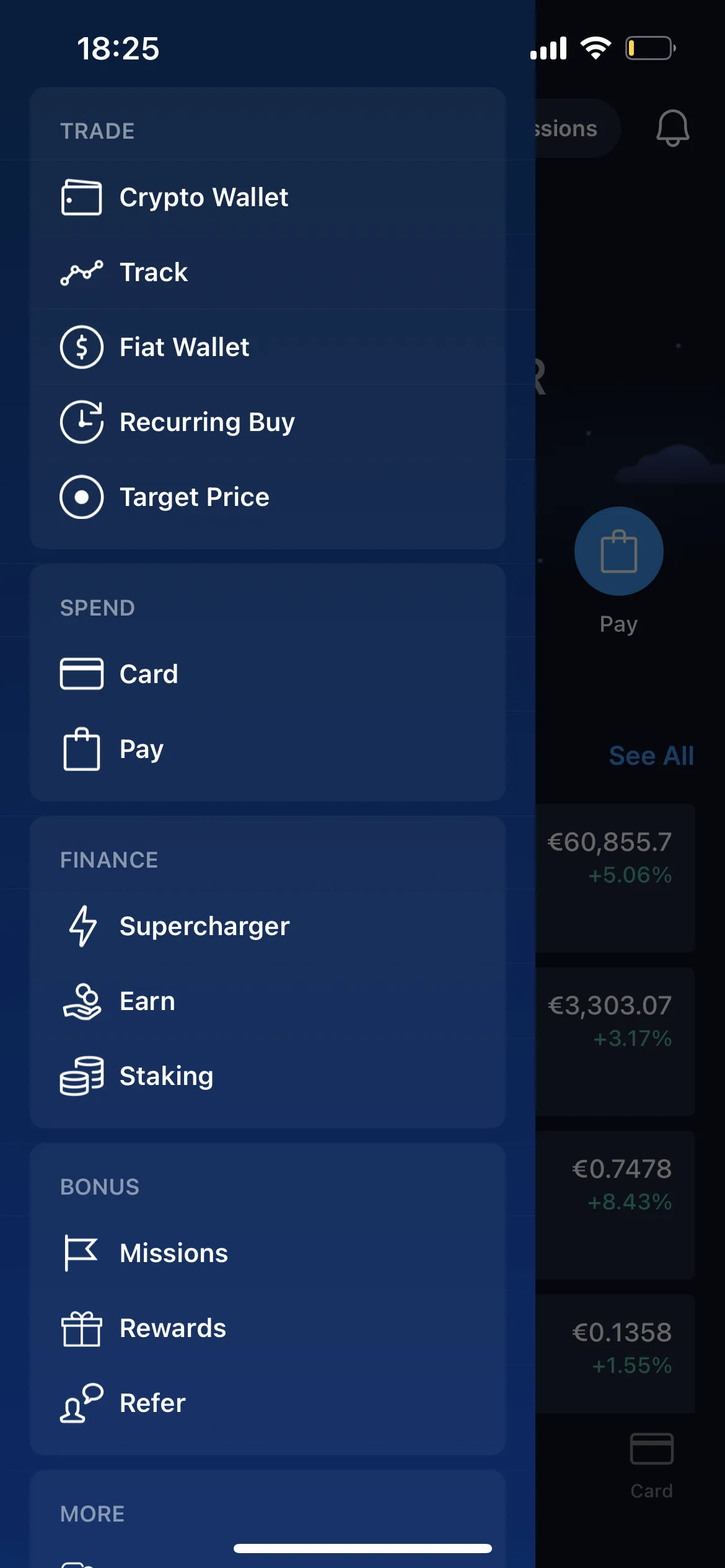
The Crypto.com app is engineered with several features that are pertinent to the transfer process. The “Crypto Wallet” section provides an overview of your asset holdings, while the “Transfer” function is the dedicated gateway for deposits and withdrawals. A critical technical feature is the “Whitelisting” of external wallet addresses, which adds an extra layer of security by requiring explicit approval for any new withdrawal address. This mitigates risks associated with phishing or unauthorized access, as funds can only be sent to pre-approved destinations. Furthermore, the platform supports a wide array of cryptocurrencies and their respective blockchain networks, demanding a precise understanding of network compatibility—a common pitfall for new users.
Essential Preparations: Account Verification and Funding
Before any cryptocurrency can be sent, a few technical and regulatory prerequisites must be met. The most significant is Know Your Customer (KYC) verification. This involves submitting personal identification documents (e.g., passport, driver’s license) and often a selfie or video verification. From a technical standpoint, KYC ensures regulatory compliance and enhances platform security by linking an identity to an account, making it harder for malicious actors to operate anonymously. Without full KYC verification, withdrawal limits are often severely restricted or entirely prohibited. Secondly, your Crypto.com account must be adequately funded with the cryptocurrency you intend to send. Ensuring sufficient balance, including a small buffer for potential network fees, is crucial to avoid failed transactions.
A Step-by-Step Technical Guide to Initiating a Crypto Transfer
The actual process of sending crypto from Crypto.com is designed to be user-friendly, yet each step carries significant technical implications that demand careful attention.
Navigating the Crypto.com App Interface
- Launch the App and Log In: Securely log into your Crypto.com app using your passcode, fingerprint, or facial recognition.
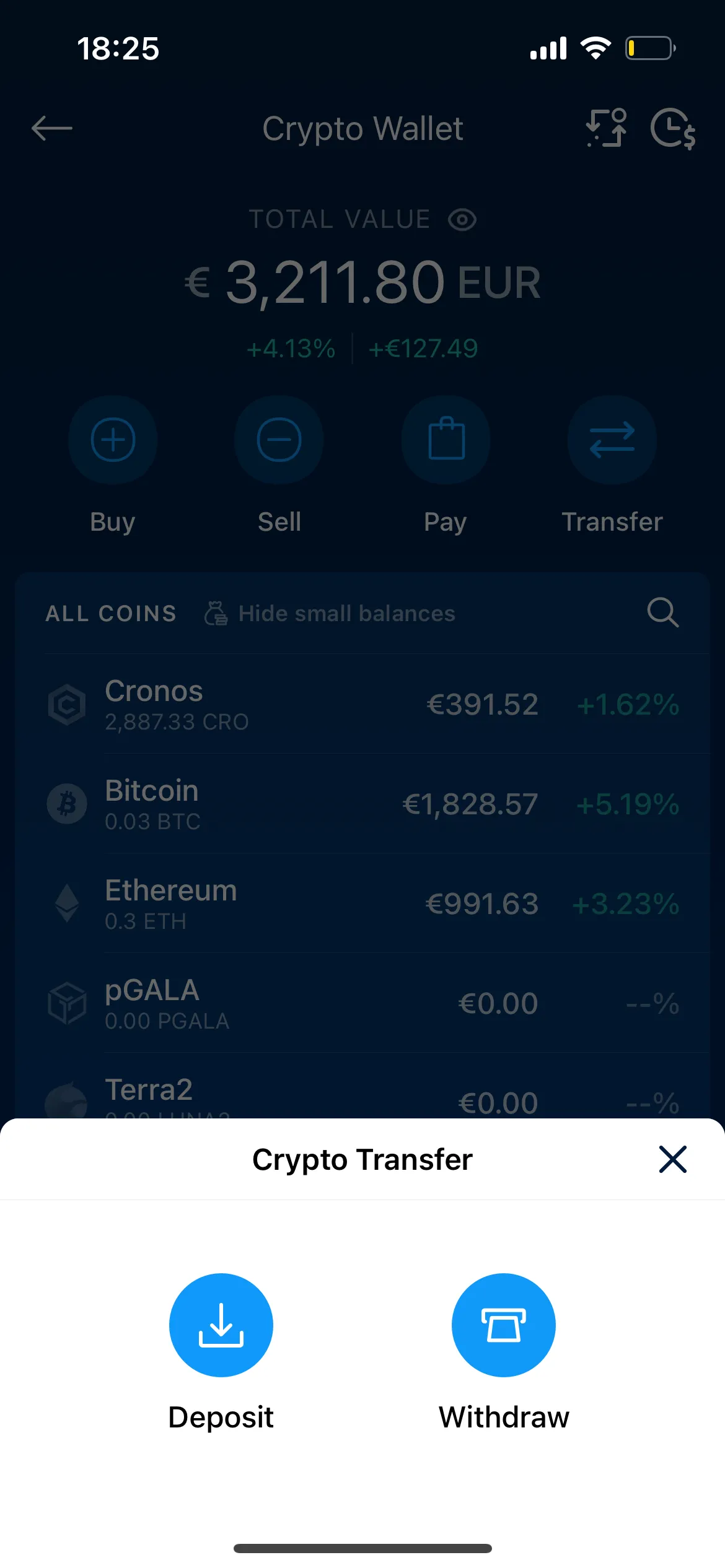
- Access the “Transfer” Menu: On the home screen, locate and tap the “Transfer” button. This will typically present options for “Deposit” and “Withdraw.” Select “Withdraw.”
- Choose “Crypto”: From the withdrawal options, select “Crypto” to indicate you wish to send digital assets rather than fiat currency.
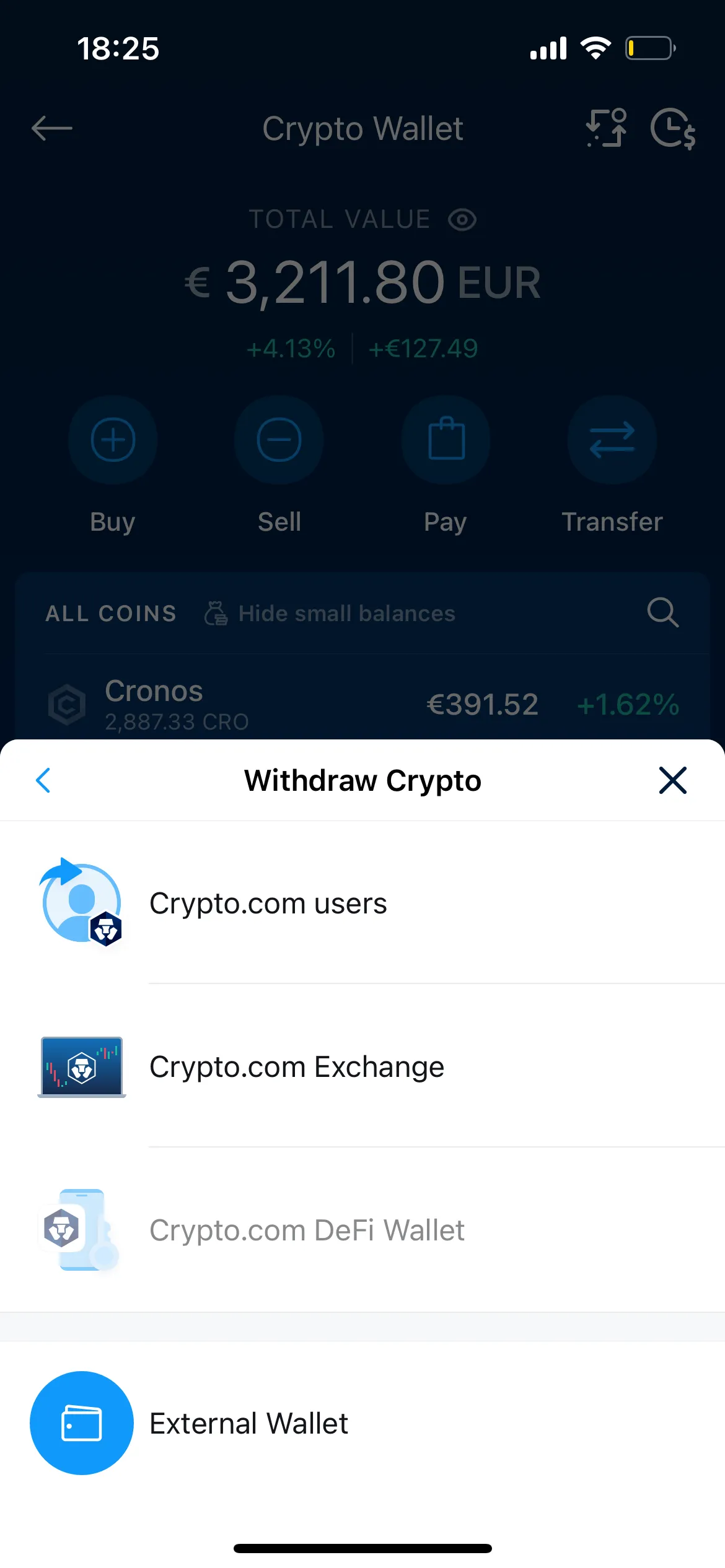
- Initiate External Wallet Transfer: You’ll usually be given the choice to “Withdraw to Crypto.com App User” (for internal transfers) or “External Wallet.” For sending crypto off the platform, select “External Wallet.”
Selecting the Cryptocurrency and Withdrawal Method
- Select the Cryptocurrency: A list of your supported cryptocurrencies will appear. Tap on the specific asset you wish to send (e.g., Bitcoin (BTC), Ethereum (ETH), Cronos (CRO)).
- Choose Withdrawal Address: If you’ve previously whitelisted addresses, they will appear here. If you’re sending to a new address, you’ll need to add it. This involves tapping the “+” icon or “Add Wallet Address.”
The Criticality of External Wallet Address Management
Adding a new external wallet address is the most critical step, requiring absolute precision.
- Retrieve Recipient Address: Obtain the recipient’s wallet address directly from their wallet interface or the receiving platform. This address is a unique string of alphanumeric characters specific to a particular blockchain and cryptocurrency. Always double-check and ideally use QR codes for accuracy.
- Input Address and Label: Paste the copied address into the designated field in the Crypto.com app. Add a descriptive label (e.g., “My Ledger Nano X BTC Wallet”) for future reference.
- Confirm Address (Whitelisting): Crypto.com’s security protocols often require email or MFA confirmation to whitelist a new address. This is a vital security gate to prevent unauthorized withdrawals to unknown destinations.
Choosing the Correct Blockchain Network: A Technical Imperative
This is arguably the most common point of failure for crypto transfers. Many cryptocurrencies exist on multiple blockchain networks (e.g., ETH on Ethereum, Polygon, BSC; USDC on Ethereum, Tron, Solana).
- Identify Recipient Network: Confirm with the recipient or the receiving platform which specific blockchain network their wallet address supports for the cryptocurrency you are sending. For example, if you are sending ETH, is it native Ethereum (ERC-20), or is it wrapped ETH on the Polygon network?
- Select Matching Network on Crypto.com: In the Crypto.com app, after selecting the crypto and destination address, you will be prompted to choose the withdrawal network (e.g., “ERC20,” “BEP20,” “Polygon,” “CRO Mainnet”). It is absolutely crucial that the selected network matches the recipient’s network. Sending assets on an incompatible network typically results in permanent loss of funds, as transactions cannot be reversed and assets are sent to an unrecoverable address on the wrong chain.
Reviewing Transaction Details and Confirming the Transfer
- Enter Amount: Input the exact quantity of cryptocurrency you wish to send. The app will usually display the equivalent fiat value and any applicable network fees.
- Review All Details: Before confirming, meticulously review every detail on the summary screen:
- Cryptocurrency type
- Recipient wallet address (compare the first few and last few characters against the source)
- Blockchain network (VERIFY THIS TWICE!)
- Amount
- Estimated network fees
- Net amount to be received
- Confirm with MFA: After thorough verification, proceed to confirm the transaction. You will typically be prompted to enter your passcode and/or complete an MFA challenge (e.g., Google Authenticator code, SMS code) to authorize the withdrawal. This final security step is vital for transaction integrity.
Technical Considerations: Networks, Fees, and Limits
Successful crypto transfers require an understanding of the technical infrastructure that underpins them – specifically, blockchain networks, the associated fee structures, and platform-imposed limits.
Deciphering Blockchain Networks and Their Implications
Each cryptocurrency operates on its own blockchain or is represented as a token on a major platform’s blockchain (e.g., ERC-20 tokens on Ethereum). Different blockchains have varying transaction speeds, security models, and fee structures.
- Ethereum (ERC-20): Known for its robustness and wide adoption, but often incurs higher “gas fees” (network fees) and can have slower confirmation times during network congestion.
- Binance Smart Chain (BSC/BEP20): Offers faster transactions and lower fees compared to Ethereum, making it popular for certain DeFi applications.
- Polygon (MATIC): A Layer 2 scaling solution for Ethereum, providing significantly lower fees and faster transactions by processing them off the main Ethereum chain.
- Cronos (CRO): Crypto.com’s native blockchain, designed for scalability and interoperability within their ecosystem.
Choosing the correct network is not just about cost or speed; it’s about compatibility. Sending an ERC-20 token to a BEP20 address, even if it’s the same token type (e.g., USDC), means the funds will be lost because the transaction is broadcast to a blockchain network that doesn’t recognize the recipient’s address format for that specific token standard.
Understanding Transaction Fees and Their Calculation
When you send crypto, two types of fees typically apply:
- Network Fees (Gas Fees): These are paid to the miners or validators of the blockchain network for processing and confirming your transaction. Crypto.com passes these fees on to the user. They fluctuate based on network congestion and the specific blockchain used. Ethereum’s gas fees, for example, can vary widely.
- Crypto.com Withdrawal Fees: While Crypto.com often absorbs some minor internal operational costs, for external withdrawals, they primarily pass on the network fees. In some cases, a small additional platform fee might be charged, though this is less common for standard withdrawals to external wallets. The app will always display the total fee before you confirm, so you can accurately assess the cost.
Navigating Withdrawal Limits and Processing Times
Crypto.com imposes daily and monthly withdrawal limits, which vary based on your KYC verification level and the specific cryptocurrency. These limits are a security measure to protect user funds and comply with regulatory requirements. You can usually view your specific limits within the app’s settings or withdrawal interface.
Processing times can range from a few minutes to several hours, depending on:
- Blockchain Network Congestion: High transaction volume on a network can delay confirmations.
- Crypto.com’s Internal Processing: The platform may have internal review processes for withdrawals, especially large ones, or those to new addresses.
- Recipient Platform’s Requirements: The receiving platform might require a higher number of network confirmations before crediting the funds to your account, adding to the perceived transfer time.
Crypto.com typically provides a transaction ID (TxID) or hash once the withdrawal is initiated, allowing you to track its status directly on the respective blockchain explorer.
Enhancing Digital Security During Crypto Transfers
Digital security is paramount in the cryptocurrency space. A single error or lapse in judgment can lead to irreversible loss of funds. Adhering to robust security practices is not optional; it is fundamental.
Best Practices for Securing Your Crypto.com Account
- Strong, Unique Passwords: Use complex passwords that combine letters, numbers, and symbols, and never reuse passwords across different services.
- Enable Multi-Factor Authentication (MFA): Always enable MFA, preferably using an authenticator app (like Google Authenticator or Authy) rather than SMS, which can be vulnerable to SIM swap attacks.
- Whitelisting Addresses: Always whitelist withdrawal addresses. While it adds an extra step, it significantly reduces the risk of funds being sent to an unauthorized address in case your account is compromised.
- Regular Software Updates: Ensure your Crypto.com app and device operating system are always updated to the latest versions to benefit from the newest security patches.
Verifying Wallet Addresses: Mitigating Human Error and Malicious Attacks
This cannot be stressed enough: verify the recipient wallet address meticulously.
- Copy-Paste with Care: While convenient, copy-pasting can sometimes be manipulated by malware (e.g., clipboard hijackers) that silently replaces the correct address with a malicious one. Always visually inspect the pasted address.
- Double-Check First and Last Characters: A common technique is to compare the first 4-5 and last 4-5 characters of the pasted address with the original source.
- Send a Small Test Transaction (Optional but Recommended): For large transfers or when sending to a new address for the first time, consider sending a minimal amount as a test. Once confirmed, you can proceed with the full amount. This small investment in network fees is cheap insurance against significant loss.
Awareness of Phishing and Social Engineering Tactics
Cybercriminals constantly evolve their methods to trick users into compromising their accounts or sending funds to malicious addresses.
- Phishing: Be wary of suspicious emails, SMS messages, or fake websites pretending to be Crypto.com. Always verify the sender’s email address and the URL before clicking any links or entering credentials.
- Social Engineering: Never share your password, MFA codes, or seed phrases with anyone, including individuals claiming to be Crypto.com support. Legitimate support will never ask for such information.
- Beware of Impersonators: Scammers often impersonate reputable projects or individuals on social media platforms, offering fake giveaways or investment opportunities that require you to send them crypto.
Troubleshooting Common Technical Issues and Post-Transfer Monitoring
Despite best practices, issues can sometimes arise. Knowing how to troubleshoot and monitor your transfers is crucial for peace of mind and problem resolution.
Addressing Delayed or Unconfirmed Transactions
If your transaction is taking longer than expected, several factors could be at play:
- Network Congestion: Check the status of the blockchain network (e.g., Etherscan for Ethereum, bscscan for Binance Smart Chain) to see if there’s high traffic.
- Insufficient Network Fees: While Crypto.com calculates fees, sometimes unexpected spikes in network demand can make the initially calculated fee too low, leading to delays.
- Platform Review: Large transactions or transfers to new addresses might be flagged for manual review by Crypto.com’s security team, adding to processing time.
If a significant amount of time has passed and the transaction still isn’t confirmed on the blockchain, contact Crypto.com support with your transaction details.
Utilizing Transaction IDs (TxIDs) for On-Chain Verification
Every blockchain transaction is assigned a unique identifier, known as a Transaction ID (TxID) or transaction hash. Crypto.com will provide this TxID once your withdrawal is successfully processed internally.
- How to Use TxID: Copy the TxID from your transaction history in the Crypto.com app.
- Blockchain Explorers: Paste the TxID into the search bar of the relevant blockchain explorer (e.g., Etherscan.io for ERC-20 tokens, bscscan.com for BEP-20 tokens, explorer.bitcoin.org for BTC).
- Verify Status: The explorer will show the transaction’s status (pending, confirmed), the number of confirmations, the sending and receiving addresses, and the amount. This provides an immutable, public record of your transaction.
What to Do if Funds Are Sent to an Incorrect Address
This is the most severe and often irreversible error. Due to the decentralized and immutable nature of blockchain transactions, funds sent to an incorrect or non-existent address are generally lost forever.
- Immediate Action: If you realize you’ve sent funds to an incorrect address, immediately contact Crypto.com support. While their ability to reverse transactions is virtually nil for external transfers, they might be able to offer guidance or record the incident.
- No Reversal Mechanism: Unlike traditional banking, there is no central authority to reverse or recall blockchain transactions once they are confirmed. This underscores the critical importance of meticulous verification at every step.
- Learning from Mistakes: Treat such an event as a very costly lesson in digital asset management. Implementing the “small test transaction” strategy for all new addresses can prevent such catastrophic losses.
In conclusion, sending crypto on Crypto.com is a powerful feature that connects users to the broader decentralized world. While the platform streamlines much of the technical complexity, users must remain vigilant and knowledgeable about the underlying blockchain technology, network compatibility, and stringent security protocols. By understanding these technical intricacies and adhering to best practices, users can navigate the digital asset landscape with confidence, ensuring their funds are transferred securely and efficiently.
aViewFromTheCave is a participant in the Amazon Services LLC Associates Program, an affiliate advertising program designed to provide a means for sites to earn advertising fees by advertising and linking to Amazon.com. Amazon, the Amazon logo, AmazonSupply, and the AmazonSupply logo are trademarks of Amazon.com, Inc. or its affiliates. As an Amazon Associate we earn affiliate commissions from qualifying purchases.