
The modification of Bethesda’s The Elder Scrolls V: Skyrim has evolved from a niche hobby into a sophisticated technical discipline. At the heart of this transformation lies a single, indispensable tool: the Skyrim Script Extender (SKSE). For the uninitiated, SKSE is a utility that expands the scripting capabilities of the game’s engine, allowing modders to implement complex features that the base game simply cannot support. Whether you are looking to overhaul the user interface, introduce complex combat mechanics, or enhance environmental realism, SKSE is the foundational layer upon which the modern modding ecosystem is built.

In this guide, we will explore the technical nuances of SKSE, provide a detailed walkthrough for installation, and address the common hurdles users face when integrating this tool into their software environment.
1. Understanding the Technical Architecture of SKSE
To appreciate why SKSE is necessary, one must understand how Skyrim processes instructions. The game uses a proprietary scripting language called Papyrus. While robust for a 2011 release, Papyrus has inherent limitations regarding how it interacts with the game’s engine and the Windows operating system.
The Evolution of Scripting Functions
SKSE works by “injecting” new code into the Skyrim process while it is running. It does not permanently alter the game’s executable files on your disk; instead, it hooks into the program’s memory. By doing so, it adds hundreds of new commands—functions—that modders can call upon. This is why many of the most popular mods, such as SkyUI, require SKSE. Without the extender, the game would not know how to render the advanced menus or handle the data-heavy requests these mods generate.
Compatibility Across Game Iterations
The technical landscape of Skyrim is split into several versions: the original 32-bit Legendary Edition (Oldrim), the 64-bit Special Edition (SE), and the more recent Anniversary Edition (AE). Each version requires a specific build of SKSE. Because SKSE interacts directly with the game’s memory addresses, even a minor update to the game’s executable (the .exe file) can “break” the extender. This makes understanding version parity the most critical step in the installation process.
2. Pre-Installation: Identifying Your Software Environment
Before downloading any files, a technical audit of your current game installation is required. Installing the wrong version of SKSE is the leading cause of “CTD” (Crash to Desktop) errors during the launch sequence.
Determining Your Version Number
To find your specific game version, navigate to your Skyrim installation folder (usually found under Steam/steamapps/common/Skyrim Special Edition). Right-click on the SkyrimSE.exe file, select “Properties,” and navigate to the “Details” tab. Look for the “Product version.”
- Version 1.5.97 is the standard “Pre-Anniversary” Special Edition.
- Version 1.6.x and above is considered the Anniversary Edition (even if you haven’t bought the DLC content, the engine update applies).
- GOG and Windows Store versions have different memory offsets and require their own specific SKSE builds.
Locating the Root Directory
A common mistake among novice modders is confusing the “Data” folder with the “Root” directory. The Root directory is the folder that contains the SkyrimSE.exe file. Most mods are installed inside the Data folder, but because SKSE acts as a wrapper for the engine itself, its core components must live one level higher, alongside the game’s primary executable.
3. Step-by-Step Installation Procedure
There are two primary ways to install SKSE: manual installation and via a mod manager. While mod managers like Vortex or Mod Organizer 2 (MO2) are excellent for managing assets, many power users prefer a manual installation of SKSE to ensure total control over the engine hooks.
The Manual Method: Precision and Control
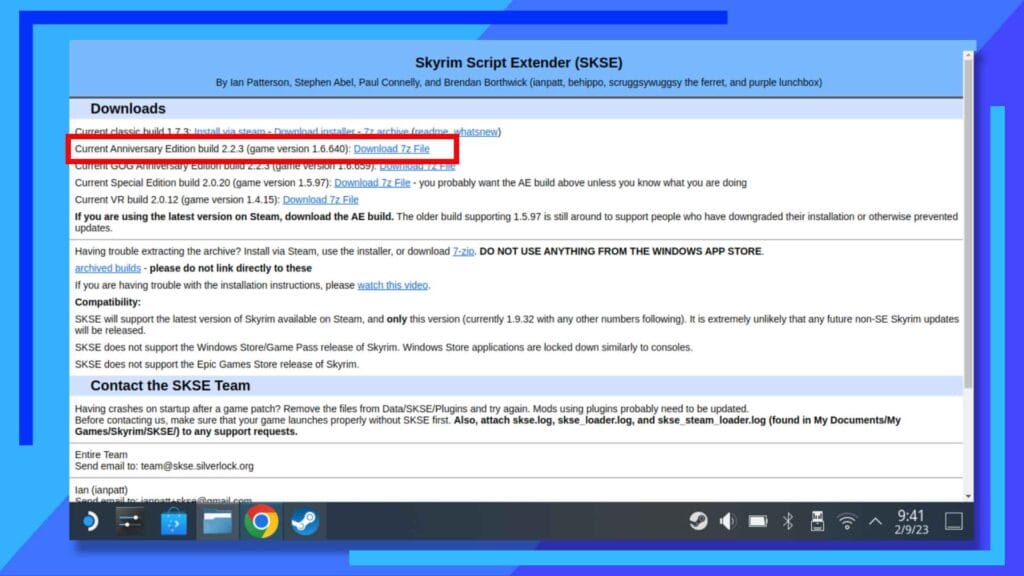
- Download the Archive: Visit the official SKSE website (silverlock.org) and download the build that matches your version number identified in the previous section.
- Extract the Files: Open the compressed archive (7z or Zip). You will see several files, including
skse64_loader.exe,skse64_1_6_640.dll(the numbers will vary), and aDatafolder. - Deployment: Copy the
.exeand the.dllfiles directly into your Skyrim Root directory. - The Scripts Folder: Inside the SKSE archive’s
Datafolder, there is a folder namedScripts. These.pexfiles are the “definitions” that tell the game how to use the new functions. You must copy these into your game’sData/Scriptsfolder. If you skip this, mods will appear to be installed but will fail to function correctly.
Mod Manager Integration
If you use Mod Organizer 2, you should install the Scripts portion of SKSE as a mod to keep your data folder “clean.” However, the .dll and .exe files must still be placed manually in the Root folder, as MO2’s virtual file system cannot “hook” files located in the root directory effectively during the initial boot sequence.
Validating the Installation
To confirm that SKSE is running, launch the game using skse64_loader.exe (not the standard Steam launcher). Once you reach the main menu, open the developer console by pressing the tilde (~) key and type:
getskseversion
If the console returns a version number and a build date, the installation was successful. If it returns an error, the script extender is not active.
4. Advanced Configuration and Troubleshooting
Even with a correct installation, the interplay between SKSE, the Windows OS, and security software can create friction.
The skse.ini File
Advanced users can further optimize their game by creating an skse.ini file. This file should be placed in Data/SKSE/. Within this file, you can enable features like “ClearInvalidRegistrations,” which helps prevent save-game bloat by removing script instances that no longer have a source. For users of the older 32-bit Skyrim, the skse.ini was also crucial for the “Memory Patch,” which allowed the game to allocate more scrap heap memory, significantly reducing crashes in mod-heavy environments.
Addressing Security Software Interference
Because SKSE utilizes “DLL injection,” some aggressive antivirus programs may flag skse64_loader.exe as a false positive. If the game fails to launch or the loader closes immediately, check your antivirus quarantine. It is recommended to add an exception for your Skyrim installation folder to prevent the security suite from blocking the memory hooks SKSE requires to operate.
Handling “Version Mismatch” Errors
One of the most frequent issues in the Skyrim tech community is the “Version Mismatch” popup. This occurs when the game has updated via Steam, but SKSE has not been updated to match. In this scenario, you have two options:
- Wait for an Update: The SKSE team is remarkably fast, but it can take 24–48 hours for a new build to release.
- Downgrade: Many tech-savvy users use “Downgrade Patchers” found on community repositories to revert their
SkyrimSE.exeto a previous version that is compatible with their current SKSE and mod list.
5. The Future of SKSE and Modding Technology
As we look toward the future of Bethesda titles and the eventual release of The Elder Scrolls VI, the legacy of SKSE serves as a blueprint for community-driven software enhancement. The transition from the 32-bit architecture to 64-bit was a major technical hurdle that the SKSE team navigated successfully, ensuring that mods created a decade ago could, with minor adjustments, function in a modern computing environment.
The continued development of SKSE-dependent plugins (often distributed as .dll files) allows for engine-level fixes that Bethesda themselves never implemented—such as improved memory management, better multi-core CPU utilization, and fixes for high-refresh-rate monitors.
In conclusion, installing SKSE is more than just a prerequisite for playing mods; it is an upgrade to the game’s core architecture. By following a disciplined approach to version checking and file placement, you unlock a level of technical flexibility that transforms Skyrim from a static software product into a dynamic, infinitely expandable platform. Whether you are a casual gamer or a budding software developer, mastering the installation and configuration of SKSE is your first step into the wider world of advanced PC gaming optimization.
aViewFromTheCave is a participant in the Amazon Services LLC Associates Program, an affiliate advertising program designed to provide a means for sites to earn advertising fees by advertising and linking to Amazon.com. Amazon, the Amazon logo, AmazonSupply, and the AmazonSupply logo are trademarks of Amazon.com, Inc. or its affiliates. As an Amazon Associate we earn affiliate commissions from qualifying purchases.