
In the rapidly evolving landscape of display technology, few terms have been as transformative—or as frequently misunderstood—as HDR, or High Dynamic Range. Whether you are shopping for a new 4K television, upgrading your gaming monitor, or browsing the camera settings on your latest smartphone, the HDR label is ubiquitous. It promises “bolder colors,” “deeper blacks,” and a “more lifelike picture.” But what does this actually mean in technical terms, and why has it become the gold standard for visual consumption?
HDR is not merely an increase in resolution like the jump from 1080p to 4K; rather, it is a significant improvement in the quality of the pixels themselves. It addresses two critical components of what makes a picture look “real” to the human eye: contrast ratio and color accuracy. By expanding the range between the brightest whites and the darkest blacks, HDR allows technology to more closely mimic the incredible range of light and color that our eyes perceive in the physical world.

The Science of Light: How HDR Works
To understand HDR, one must first understand the limitations of Standard Dynamic Range (SDR), which has governed our screens for decades. SDR was built around the constraints of old cathode-ray tube (CRT) monitors, which had limited brightness and color capabilities. Even as we moved to flat-panel LEDs, the software and data formats remained stuck in that legacy era. HDR breaks those chains by fundamentally changing how brightness and color data are processed and displayed.
Defining Dynamic Range and Contrast
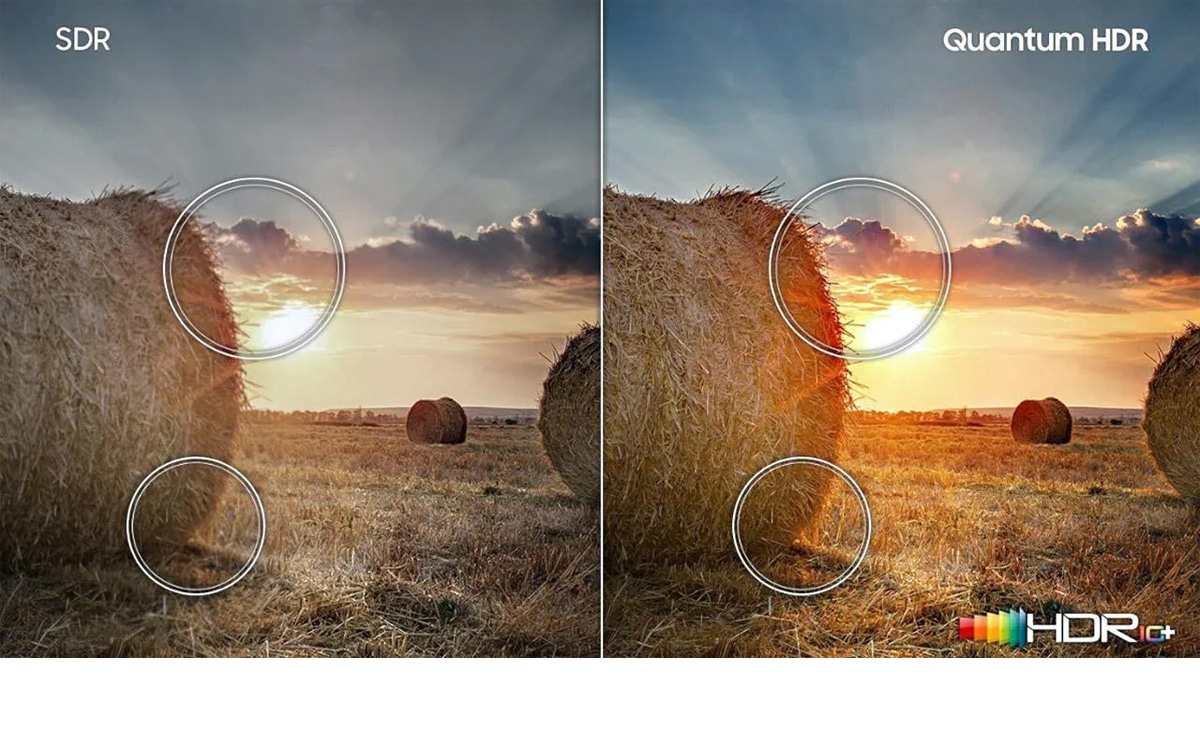
In tech terminology, “dynamic range” refers to the difference between the lowest and highest values a system can measure or display. In the context of a screen, this means the difference between the deepest black and the brightest white. In a standard display, shadow details often disappear into a murky grey-black, and bright highlights (like a sunset or a flashlight) “clip,” becoming a flat, featureless white. HDR expands this range, allowing for “specular highlights”—tiny, intense points of light—to pop against a dark background without washing out the rest of the image.
Luminance and the Power of Nits
The intensity of a display’s brightness is measured in “nits.” A typical SDR television usually peaks at around 100 to 300 nits. This is sufficient for a dark room but fails to capture the intensity of real-world lighting. HDR-capable displays, however, can reach 600, 1,000, or even 4,000 nits in high-end professional monitors. This headroom allows the screen to display a glint of sun off a car’s chrome or the glow of a lightsaber with a physical intensity that SDR simply cannot replicate.
Color Depth and Gamut: Beyond 16 Million Colors
While brightness is the most visible part of HDR, color is its silent partner. Most SDR content is mastered in 8-bit color, which provides roughly 16.7 million shades. While that sounds like a lot, it often leads to “banding”—visible stripes in gradients like a blue sky. HDR typically utilizes 10-bit or even 12-bit color depth. A 10-bit signal provides over 1 billion colors, while 12-bit reaches 68 billion. Furthermore, HDR is usually paired with a Wide Color Gamut (WCG), specifically the DCI-P3 or Rec.2020 standards, which allow for more saturated greens, deeper reds, and more vivid blues that were previously impossible to display.
Navigating the Alphabet Soup: HDR Formats and Standards
As with many technological breakthroughs, the rise of HDR has brought a “format war” of sorts. While the goal remains the same—better pictures—different companies use different software protocols (metadata) to tell the screen how to display the image.
HDR10 and HDR10+
HDR10 is the baseline, open-source standard used by almost every HDR-compatible device on the market. If a product says “HDR,” it almost certainly supports HDR10. It uses “static metadata,” meaning it sets a single brightness and color instruction for the entire duration of a movie or show.
HDR10+, championed largely by Samsung and Amazon, improves upon this by using “dynamic metadata.” This allows the brightness levels to be adjusted frame-by-frame or scene-by-scene. If a movie moves from a dark cave to a bright desert, HDR10+ adjusts the display instructions to ensure both scenes look optimal.
Dolby Vision: The Premium Experience
Developed by Dolby Laboratories, Dolby Vision is widely considered the most advanced HDR format. Like HDR10+, it uses dynamic metadata, but it supports higher peak brightness (up to 10,000 nits in theory) and 12-bit color depth. Because it is a proprietary, licensed technology, manufacturers must pay a fee to include it. This often results in more rigorous quality control, ensuring that the content looks exactly as the director intended. Most major streaming services, including Netflix and Disney+, favor Dolby Vision for their flagship content.

HLG (Hybrid Log-Gamma)
While HDR10 and Dolby Vision are perfect for streaming and Blu-rays, they are difficult to use for live television broadcasts. This is where HLG comes in. Developed by the BBC and NHK, HLG is designed to be backwards compatible. It sends a single signal that SDR TVs can interpret normally, while HDR TVs can “unfold” the extra data to show a high-dynamic-range image. This makes it the standard for live sports and news broadcasts.
The Hardware Ecosystem: HDR in Displays and Gadgets
Having an HDR-encoded movie is useless if your hardware isn’t up to the task. The effectiveness of HDR is heavily dependent on the display technology behind the glass.
OLED vs. LED-LCD in HDR Performance
The “black level” is half of the HDR equation. OLED (Organic Light Emitting Diode) displays are the kings of HDR because each pixel can be turned off individually, achieving “perfect blacks.” This creates an infinite contrast ratio. On the other hand, high-end LED-LCD screens use “Local Dimming” zones to control brightness. While they can’t match OLED’s black levels, they can often get much brighter, making them excellent for viewing HDR content in well-lit rooms.
VESA DisplayHDR Certifications for Monitors
For PC gamers and creative professionals, the term “HDR” can be misleading on cheaper monitors. To solve this, the Video Electronics Standards Association (VESA) created the “DisplayHDR” certification.
- DisplayHDR 400: The entry-level. It offers a slight bump over SDR but lacks the brightness for a true HDR experience.
- DisplayHDR 600/1000: These levels require “local dimming” and higher brightness, offering a significantly more impactful visual experience.
- DisplayHDR True Black: A specific tier for OLEDs that focuses on shadow detail rather than raw brightness.
Mobile HDR on Smartphones
Most modern flagship smartphones (iPhone 12 and later, Samsung Galaxy S series, etc.) now feature HDR-capable OLED screens. This has turned mobile devices into portable cinemas. Furthermore, many of these phones can now record in HDR (often Dolby Vision), allowing users to capture home movies with professional-grade color and light range.
HDR in Practice: Gaming, Content Creation, and Streaming
The impact of HDR is perhaps most felt in the worlds of interactive entertainment and professional media production.
Elevating the Gaming Experience
In gaming, HDR is a game-changer for immersion. In an SDR game, looking at the sun might just look like a yellow circle. In HDR, that sun can actually make you squint, while the details of the surrounding clouds remain visible. Major consoles like the PlayStation 5 and Xbox Series X are built around HDR output. Furthermore, “Auto HDR” technologies in Windows 11 use AI to upgrade older, SDR games into a simulated HDR workspace, breathing new life into classic titles.
Producing HDR Content: From Cameras to Software
For tech-savvy creators, HDR has changed the workflow of cinematography and photography. Modern mirrorless cameras capture “Log” footage, which preserves a massive amount of dynamic range in the raw file. During the editing process, colorists use software like DaVinci Resolve to “grade” this footage into an HDR format. This requires professional-grade reference monitors that can maintain consistent brightness and color accuracy, often costing tens of thousands of dollars.
Choosing the Right Setup: What to Look for When Buying
If you are looking to enter the world of HDR, you must ensure your entire “signal chain” is compatible. This includes the content (the movie or game), the source (the streaming box or console), and the display.
When shopping for hardware, don’t just look for the HDR logo. Check the technical specifications for two things: Peak Brightness and Contrast Method. An “HDR” TV with only 250 nits of brightness will likely look worse than a high-quality SDR TV because it lacks the hardware “oomph” to execute the HDR instructions. Look for displays with at least 600 nits of peak brightness and, if it’s an LCD, “Full Array Local Dimming” (FALD).
In conclusion, HDR is the most significant leap in display technology of the last decade. By focusing on the quality of light and the depth of color rather than just the number of pixels, it has brought us closer than ever to a truly cinematic experience in our pockets and our living rooms. As the technology matures and becomes more affordable, the vibrant, high-contrast world of HDR is set to become the standard for how we see the digital world.
aViewFromTheCave is a participant in the Amazon Services LLC Associates Program, an affiliate advertising program designed to provide a means for sites to earn advertising fees by advertising and linking to Amazon.com. Amazon, the Amazon logo, AmazonSupply, and the AmazonSupply logo are trademarks of Amazon.com, Inc. or its affiliates. As an Amazon Associate we earn affiliate commissions from qualifying purchases.