
In the modern digital landscape, the intersection of neurodiversity and technology has become a focal point for productivity experts and software developers alike. Attention Deficit Hyperactivity Disorder (ADHD) is no longer viewed solely through a clinical lens but increasingly through a functional one: how does it manifest in a high-speed, tech-driven environment? For many professionals, the “signs and symptoms” of ADHD are most visible in their digital behavior—missed deadlines in Slack, an overwhelming number of browser tabs, and the “time blindness” that occurs during deep-dive internet research.
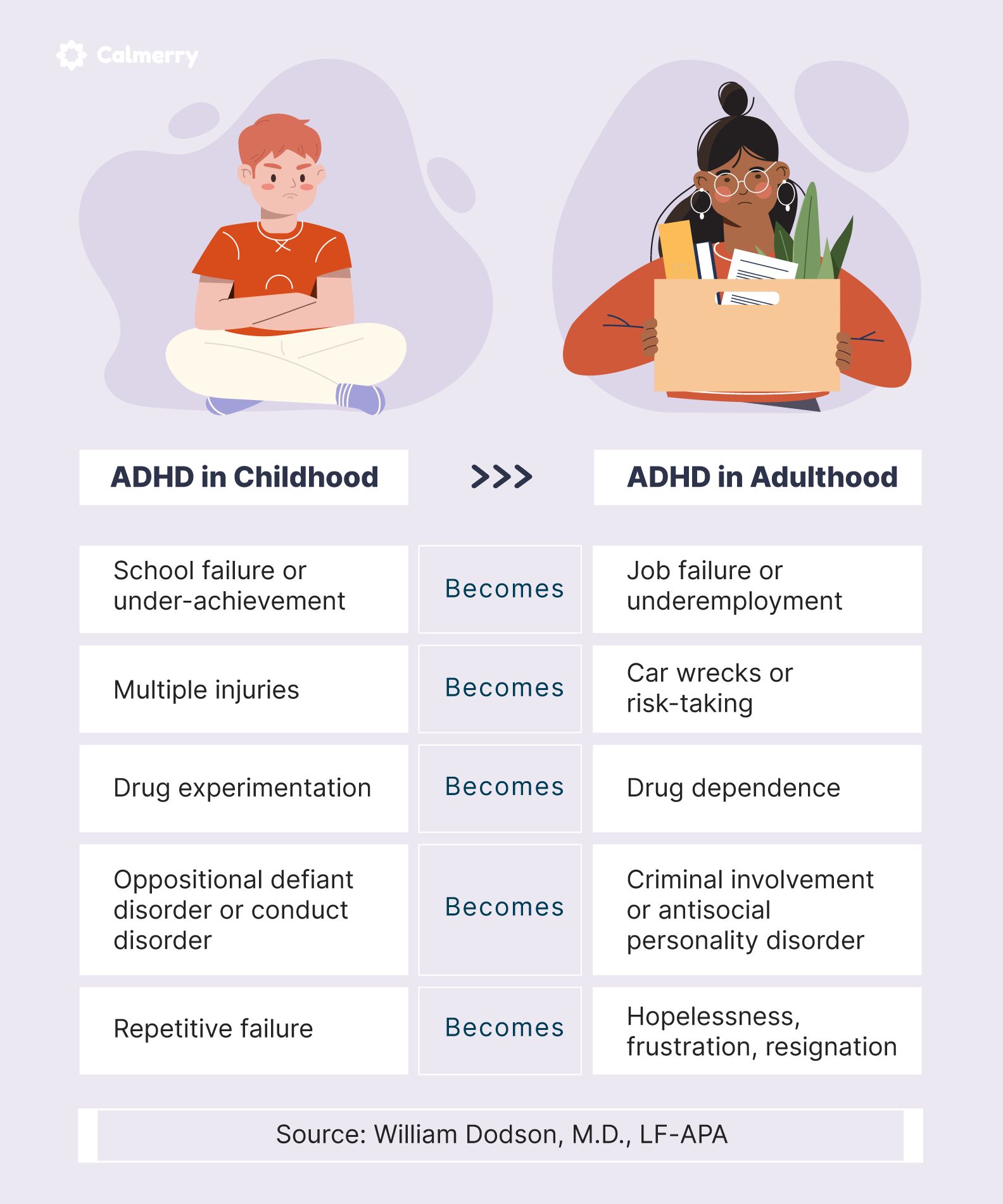
However, technology is a double-edged sword. While it provides the distractions that can exacerbate ADHD symptoms, it also offers the most sophisticated tools in history for mitigating them. This article explores the digital manifestations of ADHD and the comprehensive tech stack required to transform these challenges into a streamlined, high-output workflow.
1. Digital Manifestations: Recognizing the Signs of ADHD in the Modern Workspace
The traditional diagnostic criteria for ADHD—inattention, hyperactivity, and impulsivity—translate into specific, observable patterns within a digital ecosystem. Identifying these “digital symptoms” is the first step toward implementing a technological solution.
The Notification Trap and Digital Distraction
One of the primary signs of ADHD in a professional setting is an extreme susceptibility to “notification ping-pong.” For a neurotypical brain, a Slack notification or an email alert is a minor interruption; for a brain with ADHD, it can trigger a total derailment of the current task. This is the digital version of distractibility. The symptom here is not just the distraction itself, but the “recovery time” required to return to the original task, which is often significantly longer for those with ADHD.
Executive Dysfunction and the “Infinite Scroll”
Executive dysfunction is a core component of ADHD, manifesting as difficulty in starting tasks, prioritizing them, or shifting focus. Digitally, this is often seen as “doomscrolling” or a paralysis of choice when faced with a complex file system or a cluttered desktop. When the “signs” include an inability to sequence tasks, the digital environment becomes a source of anxiety rather than a tool for progress.
Time Blindness in the Cloud
“Time blindness”—the inability to sense the passage of time—is a hallmark symptom. In a tech context, this manifests as spending three hours perfecting a single slide in a deck while missing a major project milestone. It is a failure of digital time-management tools to provide the necessary “friction” or alerts to keep the user grounded in the temporal reality of their workday.
2. The AI Revolution: Cognitive Offloading for Neurodivergent Users
Artificial Intelligence has shifted from a novelty to an essential assistive technology for those managing ADHD. AI tools serve as an external “executive function,” handling the organization and sequencing that the ADHD brain often finds taxing.
Generative AI for Task Decomposition
One of the most paralyzing symptoms of ADHD is the “wall of awful”—the feeling that a task is too big to start. Generative AI tools like ChatGPT or specialized apps like Goblin.tools (which uses AI to “break things down”) are revolutionary. By inputting a vague goal, such as “Clean the office” or “Write a quarterly report,” the AI generates a step-by-step checklist. This effectively bypasses the executive function deficit by providing a clear, low-friction roadmap.
Smart Algorithms for Sequencing and Prioritization
Modern project management software now utilizes machine learning to suggest which tasks should be tackled first based on deadlines and past behavior. For an individual with ADHD, the sign of a successful tech intervention is the removal of the “decision fatigue” associated with choosing what to do next. AI-driven scheduling tools like Motion or Reclaim.ai automatically move tasks around a calendar, ensuring that the user is always working on the highest-priority item without having to manually manage their schedule.
Voice-to-Text and Thought Capture
Impulsivity in ADHD often means that ideas come rapidly and disappear just as fast. The “symptom” is the loss of valuable insights due to a lack of immediate recording. Tech solutions like Otter.ai or the built-in dictation features in iOS and Android allow for “cognitive offloading.” By capturing thoughts through voice, users can bypass the mechanical hurdle of typing, which often can’t keep up with the speed of ADHD-driven ideation.
3. Building an Essential Software Ecosystem for Focus
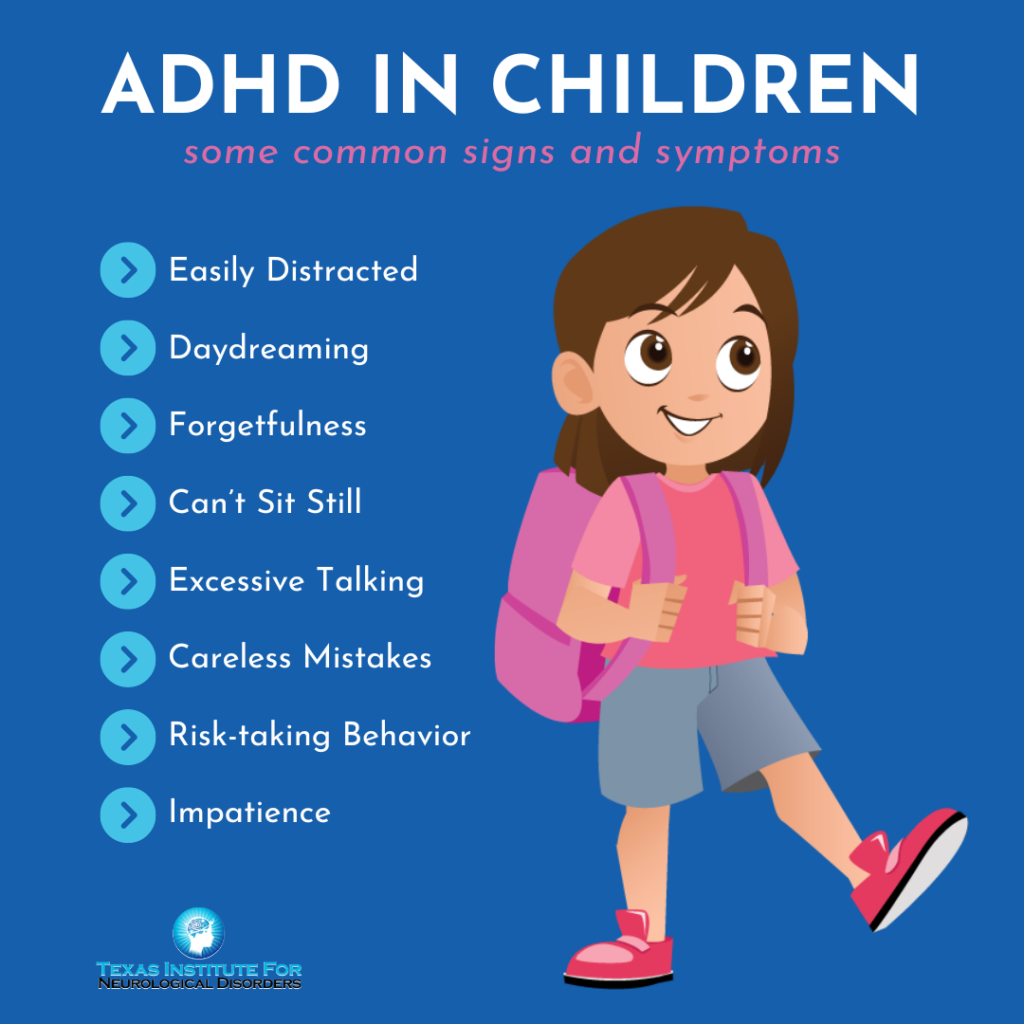
To mitigate the signs of inattention, one must build a “digital fortress.” This involves a curated selection of software designed to limit the environment and enforce focus.
Focus-Enhancing Browsers and Website Blockers
For many with ADHD, the browser is a minefield of distractions. Tools like “Cold Turkey” or “Freedom” allow users to hard-block distracting websites across all devices. Furthermore, niche browsers like “Arc” offer a more organized, “space-based” approach to browsing that helps prevent the “100-tab syndrome.” By grouping tabs into distinct folders and auto-archiving inactive ones, these tools manage the visual clutter that often triggers ADHD-related overwhelm.
Visual Project Management: Kanban and Beyond
Because many individuals with ADHD are visual learners, traditional list-based planners often fail. The “symptom” of a failed system is a list of 50 items where nothing feels urgent. Software like Trello, Asana, or Monday.com uses Kanban boards to provide a spatial representation of work. Seeing a task move physically from “To-Do” to “Doing” to “Done” provides a dopamine hit that is essential for maintaining momentum in neurodivergent workflows.
Digital Minimalism and Workspace Cleaners
A cluttered digital workspace is a sign of ADHD that leads to further cognitive load. Specialized utilities like “Hazel” for Mac or “Files by Google” can automate the organization of downloads and desktop files. By setting up “if-this-then-that” rules, the technology maintains a clean environment, preventing the sensory overload that occurs when a user cannot find a file amidst a sea of icons.
4. Hardware and Wearables: Physical Cues for Mental Clarity
The signs and symptoms of ADHD aren’t confined to the screen; they affect how a person moves through physical space. Wearable technology provides a bridge between the digital strategy and the physical experience of the user.
Haptic Feedback and the Combatting of Time Blindness
Smartwatches are perhaps the most effective hardware for managing time blindness. Unlike a wall clock, which requires the user to look at it, a smartwatch provides haptic feedback (vibrations). Setting “chime” intervals every 15 minutes can act as a “tactile nudge,” grounding the user in time and preventing them from falling down a digital “rabbit hole.”
Noise-Canceling Technology as a Sensory Filter
Distractibility is often fueled by sensory processing issues. The “sign” is a hypersensitivity to background noise—a hum of a refrigerator or a distant conversation. Active Noise Canceling (ANC) headphones, such as those from Sony or Bose, are not just gadgets; they are cognitive orthotics. By creating a “cone of silence,” they allow the user to enter a flow state that would otherwise be impossible in a standard office or home environment.
Distraction-Free Writing Tablets
For those whose ADHD makes the computer itself too distracting, dedicated hardware like the “reMarkable” or “Astrohaus Freewrite” offers a solution. These devices utilize E-ink screens and have no browsers or social media apps. They address the symptom of “task switching” by providing a digital space where only one action—writing or sketching—is possible.
5. Strategic Implementation: Avoiding Digital Overwhelm
While technology offers solutions for ADHD symptoms, the “paradox of choice” is itself a trigger for ADHD. If a user spends all their time setting up productivity tools rather than working, the tech has become the distraction.
The Dangers of “Procrastivity”
“Procrastivity” is the act of doing something productive (like organizing a Notion workspace) to avoid doing something important (like finishing a client project). A sign of a poorly managed tech stack is constant “tool-hopping.” Professionals must be wary of the “shiny object syndrome,” where the search for the perfect app becomes a symptom of the ADHD itself.
The Minimalist Tech Stack Approach
To combat the symptoms of ADHD effectively, the tech stack should be as thin as possible. A “Single Source of Truth” approach—using one integrated ecosystem like Google Workspace or Microsoft 365—is often better than using ten different “best-in-class” apps that don’t talk to each other. Integration reduces the “cognitive switching cost” of moving between different interfaces.
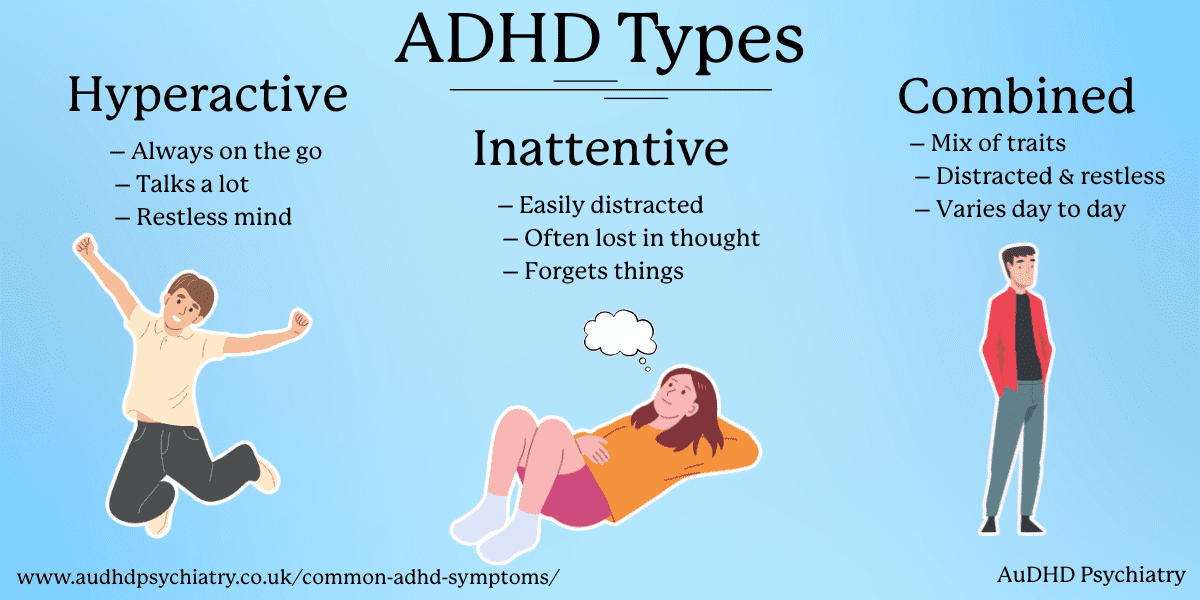
Creating a Sustainable Digital Routine
Ultimately, technology is a tool, not a cure. The most successful neurodivergent professionals use tech to build “scaffolding” around their symptoms. This includes setting automated “Digital Sunsets” where devices lock down at a certain hour to ensure sleep—since sleep deprivation significantly worsens ADHD symptoms. By leveraging AI for organization, wearables for time management, and software for focus, individuals can move from merely “managing” the signs of ADHD to utilizing their unique neurobiology for high-level innovation and digital mastery.
aViewFromTheCave is a participant in the Amazon Services LLC Associates Program, an affiliate advertising program designed to provide a means for sites to earn advertising fees by advertising and linking to Amazon.com. Amazon, the Amazon logo, AmazonSupply, and the AmazonSupply logo are trademarks of Amazon.com, Inc. or its affiliates. As an Amazon Associate we earn affiliate commissions from qualifying purchases.