
In the ecosystem of Apple software, few utilities have maintained as much respect and longevity as OnyX. Often searched for by its phonetic misspelling “OnlyX,” OnyX is a multi-function utility designed for macOS that provides a deep dive into system maintenance, optimization, and personalization. While Apple markets its computers as “just working,” power users and IT professionals know that beneath the sleek interface lies a complex Unix-based architecture that occasionally requires manual intervention to maintain peak performance.
This article explores the technical nuances of OnyX, why it remains a staple in the toolkit of Mac enthusiasts, and how it serves as a bridge between the average user and the hidden depths of the macOS operating system.
Understanding OnyX: More Than Just a System Utility
To understand what OnyX is, one must first understand the philosophy of macOS. Unlike Windows, which often exposes many of its internal gears to the user, macOS tends to hide its maintenance scripts and system configurations behind a polished curtain. OnyX, developed by Titanium Software, is a freeware utility that pulls back that curtain, offering a graphical user interface (GUI) for tasks that would otherwise require complex Terminal commands.
What is OnyX?
OnyX is a comprehensive maintenance and optimization tool specifically built for the Mac. It allows users to run system maintenance scripts, delete problematic cache files, rebuild various databases and indexes, and configure hidden parameters of the Finder, Dock, Safari, and other Apple applications. Because macOS is updated annually, the developers release a specific version of OnyX for every major release of the OS—from macOS Sonoma back to the legacy versions of Mac OS X. This specificity ensures that the software interacts safely with the unique file structures of each operating system version.
Why Mac Users Need Maintenance Tools
Even the most efficient operating systems accumulate “digital cruft” over time. This includes application caches that grow too large, broken symbolic links, outdated log files, and fragmented databases. While macOS has built-in automated maintenance routines, these are designed to run during the night or when the computer is idle. If a user frequently shuts down their laptop at night or puts it to sleep, these scripts may never execute. OnyX allows the user to trigger these deep-cleaning processes manually, ensuring the system remains responsive and free of redundant data.
Core Features and Technical Functionalities
OnyX is categorized as a “Tech” power tool because of the granular control it offers over the system. It is divided into several key modules, each targeting a specific area of the Mac’s performance.
System Maintenance and Cleaning
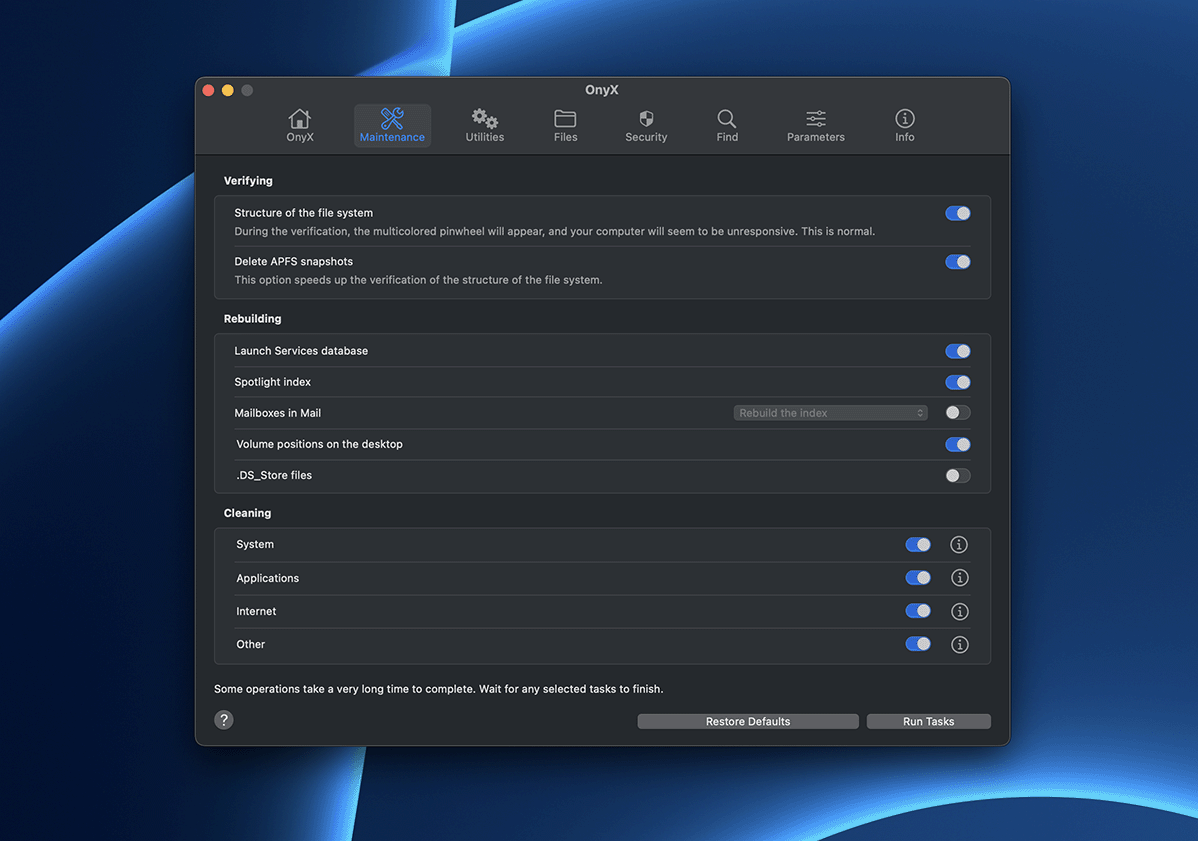
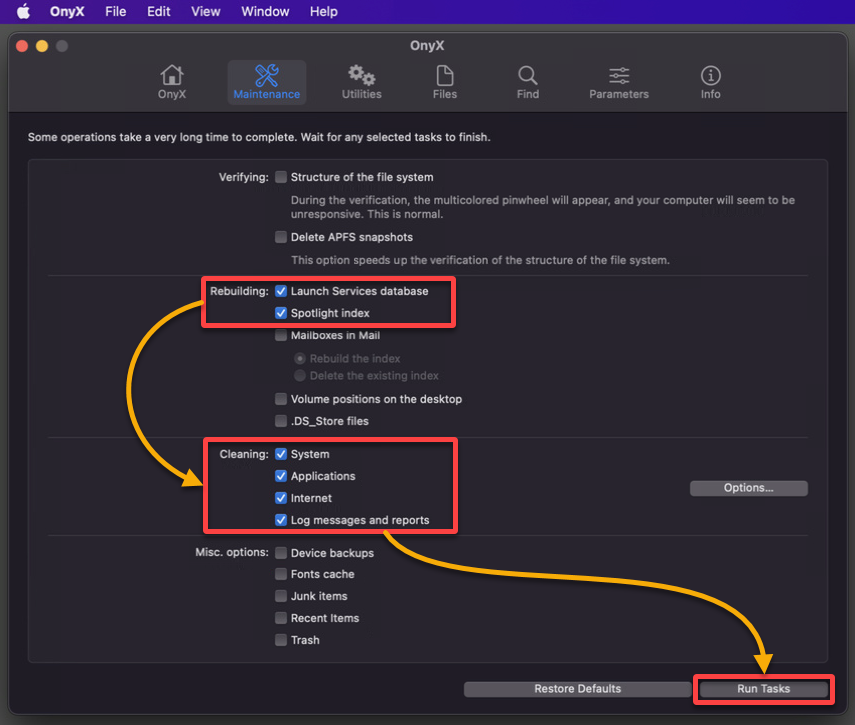
The most popular feature of OnyX is its “Maintenance” tab. This section allows users to verify the structure of the system files and run scripts that clean out the “junk” that slows down a machine.
- Cache Cleaning: It targets System, Kernel, and User caches. While caches are meant to speed up the OS, a corrupted cache can lead to application crashes and system instability.
- Log Files: Over time, system and application logs can take up gigabytes of space. OnyX identifies and purges these safely.
- Font Caches: For designers and creative professionals, font cache corruption is a common issue that causes text to render incorrectly. OnyX provides a one-click fix for this specific technical hurdle.
Deep Customization and Hidden Settings
Beyond cleaning, OnyX acts as a “tweak” tool. Under the “Parameters” tab, users can access settings that Apple does not include in the standard System Settings app.
- The Finder: You can change the default format of screenshots (from PNG to PDF or JPG), show hidden files and folders, or disable the “window zooming” animation for a snappier feel.
- The Dock: Users can add spacers to the Dock, lock its size, or change its appearance to a 2D look.
- System UI: You can customize the login screen, disable the startup sound (on older models), and modify how the Mac handles “Dark Mode” transitions.
Verification and Repair Tools
OnyX serves as a diagnostic tool for the Mac’s file system. Before running any maintenance, it can verify the “Structure of the System Files.” This is a critical technical step that checks the disk for errors without needing to reboot into Recovery Mode. If the utility detects issues with the APFS (Apple File System) container or the boot volume, it alerts the user, potentially preventing a total system failure by encouraging a timely backup.
How to Use OnyX Safely and Effectively
Because OnyX has the power to delete system-level files and modify core configurations, it must be used with a degree of technical caution. It is a tool designed for users who want to understand their machine, not just use it.
Installation and Version Control
The most important rule of using OnyX is matching the version to your OS. If you are running macOS Sonoma, you must download the Sonoma version of OnyX. Using an older version on a newer OS (or vice versa) can lead to system errors because the locations of system folders and the permissions of the file system change with every Apple update. Once installed, OnyX usually requires “Full Disk Access” in the macOS Privacy & Security settings to perform its deep-cleaning tasks.
Running the Maintenance Script
For most users, running the “Maintenance” routine once every few months is sufficient. When you initiate this process, OnyX will ask to close all open applications. It then proceeds to rebuild the Spotlight index (which speeds up file searching), rebuild the Mailbox envelopes (to fix searching issues in the Mail app), and clear out the aforementioned caches. A reboot is almost always required afterward to allow the operating system to rebuild the necessary “clean” versions of the files it just deleted.
Navigating the Parameters Tab for Performance
If you feel your Mac is sluggish, the “Parameters” tab offers several performance-enhancing tweaks. By disabling heavy graphical effects like transparency and certain animations, you can free up GPU and CPU cycles. This is particularly useful for users running the latest macOS on slightly older hardware where the hardware-accelerated interface might be taxing the system resources.
OnyX vs. Paid Alternatives: The Tech Philosophy
In a market saturated with “CleanMyMac,” “MacKeeper,” and other subscription-based optimization tools, OnyX occupies a unique space. It represents the “Old Guard” of the tech community—software that is powerful, free, and free of marketing fluff.
Comparing OnyX with Paid Software
Paid alternatives often focus on a “one-button” approach and a flashy UI. While tools like CleanMyMac X are excellent for casual users, they often include “background monitors” that actually consume RAM and CPU power to tell you that your RAM is full—an irony not lost on tech enthusiasts. OnyX, conversely, does nothing in the background. It is an “on-demand” tool. It doesn’t nag the user with notifications or try to sell a VPN subscription. From a technical standpoint, OnyX is more surgical; it provides the specific Terminal-level functions that professionals need without the overhead of a large, persistent application.
The Value of Freeware in the Modern Ecosystem
Titanium Software has kept OnyX free for over two decades. In the current “Software as a Service” (SaaS) era, this is a rarity. For the tech-savvy user, this signals a commitment to the utility itself rather than profit margins. This has built a community of trust; IT departments often keep a copy of OnyX on their “repair USBs” because they know exactly what it does and that it won’t introduce bloatware into a corporate environment.
Conclusion: The Power User’s Essential Toolkit
OnyX (or “OnlyX” as it is frequently searched) is far more than a simple “cleaning” app. It is a robust interface for the sophisticated Unix foundation that powers every Mac. Whether you are looking to reclaim lost disk space by purging massive system caches, troubleshooting a corrupted Spotlight index, or simply wanting to change the way your Dock looks and feels, OnyX provides the technical bridge to do so.
In the world of technology, where “optimization” is often a buzzword for “subscription,” OnyX stands as a testament to functional, deep-level utility design. It empowers the user to take control of their hardware, ensuring that the sleek experience Apple promises is backed by a clean, efficient, and highly customized file system. For any Mac owner looking to graduate from a casual user to a power user, OnyX is not just a recommendation—it is an essential part of the digital toolkit.
aViewFromTheCave is a participant in the Amazon Services LLC Associates Program, an affiliate advertising program designed to provide a means for sites to earn advertising fees by advertising and linking to Amazon.com. Amazon, the Amazon logo, AmazonSupply, and the AmazonSupply logo are trademarks of Amazon.com, Inc. or its affiliates. As an Amazon Associate we earn affiliate commissions from qualifying purchases.