
In the modern digital landscape, every action we take online leaves a trace. At the heart of this trace is a unique identifier known as an Internet Protocol (IP) address. For the average user, the question “What is my IP address?” often arises when troubleshooting a connection or attempting to access region-locked content. However, for those focused on digital security, understanding how tools like ExpressVPN interact with your IP address is fundamental to maintaining anonymity and safeguarding data. This guide explores the technical intricacies of IP addresses, how ExpressVPN facilitates privacy through IP masking, and why your digital identity depends on more than just a string of numbers.
Understanding the Digital Fingerprint: What is an IP Address?
To understand how ExpressVPN protects you, one must first understand what an IP address actually is. Think of an IP address as a digital return address for your computer or mobile device. Without it, the internet wouldn’t know where to send the data you request—whether that’s a website, an email, or a streaming video.
The Role of the Internet Protocol (IP)
The Internet Protocol is a set of rules that govern how data packets are transmitted across the internet. Every device connected to a network is assigned an IP address, which serves two primary functions: host or network interface identification and location addressing. Currently, the world uses two versions of IP addresses: IPv4 (e.g., 192.168.1.1) and IPv6 (a much longer hexadecimal string). As the number of connected devices has exploded, IPv6 was introduced to provide a virtually limitless pool of addresses, ensuring that every smartphone, laptop, and smart fridge can have its own unique identifier.
Public vs. Private IP Addresses
It is important to distinguish between your public and private IP addresses. Your private IP address is assigned by your local router to identify your device within your home or office network. In contrast, your public IP address is assigned by your Internet Service Provider (ISP) and is the “face” your network presents to the wider internet. When you ask “What is my IP address?” on a search engine, the result you see is your public IP. This is the address that websites, advertisers, and potentially malicious actors use to track your online activities.
Why Your IP Address Matters for Privacy
Your public IP address reveals a surprising amount of information. While it doesn’t usually pinpoint your exact house number, it can reveal your city, ZIP code, and ISP. More importantly, it acts as a “glue” that connects your disparate online activities. By tracking an IP address over time, data brokers can build a profile of your browsing habits, shopping preferences, and even your political leanings. This is why masking your IP address is a cornerstone of modern digital hygiene.
How ExpressVPN Shields Your Virtual Identity
ExpressVPN is designed to act as a barrier between your device and the internet. By using a Virtual Private Network (VPN), you are essentially rerouting your traffic through a secure, encrypted tunnel to a remote server operated by the VPN provider.
IP Masking and Virtual Location Switching
The primary technical benefit of using ExpressVPN is IP masking. When you connect to an ExpressVPN server in, for example, Tokyo, the websites you visit no longer see your actual IP address in London or New York. Instead, they see the IP address of the Tokyo server. This process effectively hides your physical location and replaces your identity with that of the server. This makes it significantly harder for websites to track you across different sessions, as you are sharing that IP address with hundreds of other users.
The Mechanics of a Secure VPN Tunnel
The “tunnel” created by ExpressVPN is more than just a reroute; it is an encrypted pathway. Using advanced protocols like Lightway—ExpressVPN’s proprietary protocol built for speed and security—your data is encrypted before it even leaves your device. This means that even if your ISP or a hacker intercepts your data, they cannot read its contents or see the final destination of your traffic. The encryption ensures that the link between your real IP address and your online destination is severed.
Shared IP Addresses vs. Dedicated IP Addresses
ExpressVPN utilizes shared IP addresses. This is a deliberate security choice. By having multiple users communicate through a single IP address, ExpressVPN provides “anonymity in numbers.” If a thousand people are using the same IP, it becomes mathematically difficult for an outside observer to attribute specific traffic to a specific individual. This is a major advantage over using a dedicated or static IP, which, while useful for some business applications, does not offer the same level of privacy.
Verifying Your Connection: How to Check Your IP Address with ExpressVPN
Once you have installed and activated ExpressVPN, it is a best practice to verify that the software is performing as expected. Ensuring that your real IP address is hidden is a vital step in maintaining your digital security.
Step-by-Step Guide to IP Verification
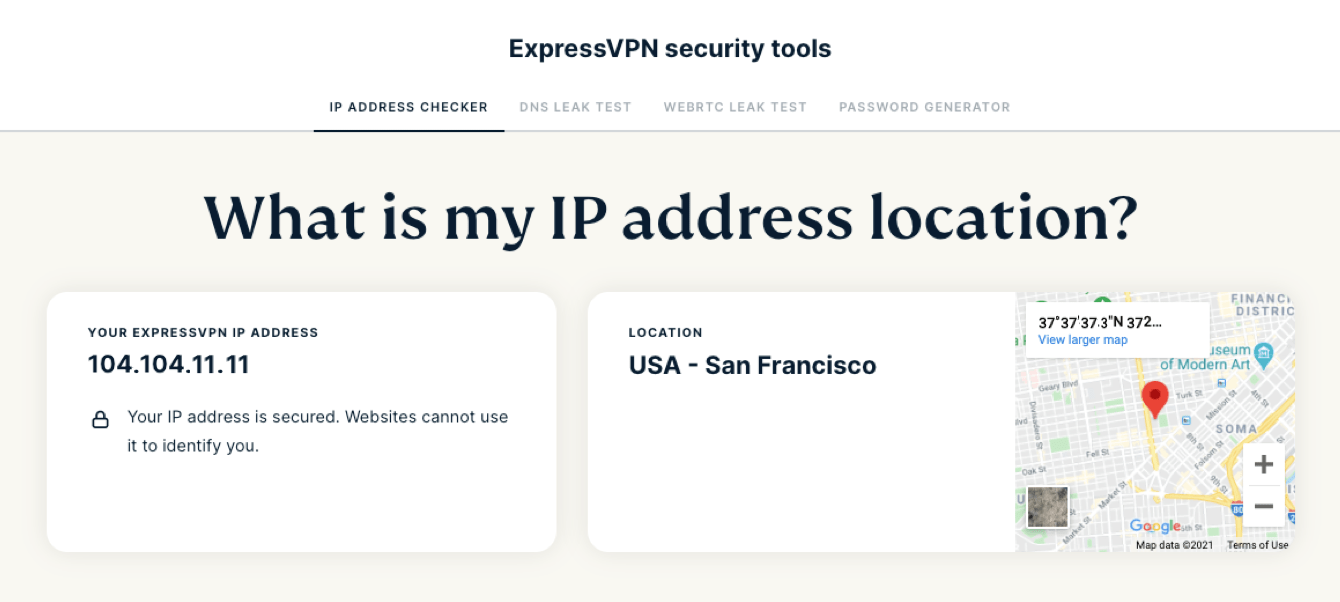
To verify your status, first, visit a reputable “What is my IP” website while the VPN is disconnected. Note the numbers and the location shown. Next, open the ExpressVPN app, select a server in a different country, and click connect. Refresh the “What is my IP” page. You should see a completely different set of numbers and a geographical location that matches the server you selected. If the numbers haven’t changed, the VPN tunnel has not been established correctly.
Identifying Your Real Location vs. VPN Location
A successful connection means that any web service you interact with will perceive your “virtual location” rather than your physical one. This is particularly useful for developers who need to test how their applications behave in different regions or for researchers who want to see localized search results without their own location biasing the data. ExpressVPN’s vast network of servers in 105 countries allows for a high degree of flexibility in choosing this virtual identity.
Using Built-in Leak Test Tools
ExpressVPN provides built-in tools within its application and on its website to check for leaks. These tools go beyond a simple IP check. They look for “leaks” where your browser might accidentally bypass the VPN tunnel and reveal your true identity. Running these tests regularly ensures that your software configuration remains secure against the evolving landscape of web tracking.
Deep Dive into Advanced Security: DNS and WebRTC Leak Protection
Simply changing your IP address is often not enough to ensure total privacy. Sophisticated tracking methods can sometimes “leak” your true identity even when a VPN is active. ExpressVPN employs several technical safeguards to prevent these vulnerabilities.
What is a DNS Leak?
DNS (Domain Name System) is often called the phonebook of the internet. It translates human-readable URLs (like google.com) into IP addresses. By default, your computer sends DNS requests to your ISP’s servers. Even if you use a VPN for your main traffic, your DNS requests might still go to your ISP, telling them exactly which websites you are visiting. ExpressVPN prevents this by running its own private, encrypted DNS on every server. This ensures that your DNS queries never leave the protected tunnel.
Preventing WebRTC Vulnerabilities
WebRTC (Web Real-Time Communication) is a technology built into modern browsers (Chrome, Firefox, Safari) that allows for voice and video chat directly within the browser. Unfortunately, WebRTC can be coerced into revealing your true local and public IP addresses, bypassing the VPN entirely. ExpressVPN’s browser extensions and desktop applications include specific code designed to block or spoof these WebRTC requests, ensuring that your browser doesn’t accidentally betray your privacy.
Ensuring IPv6 Protection
As mentioned earlier, IPv6 is the successor to the older IPv4 standard. Many VPNs struggle to handle IPv6 traffic, often letting it leak outside the VPN tunnel because the server infrastructure only supports IPv4. ExpressVPN addresses this by either routing IPv6 traffic through the tunnel or blocking it entirely if the destination does not support it, preventing any data from “slipping through the cracks” of the encryption.
The Benefits of a Hidden IP: Beyond Basic Privacy
The utility of masking your IP address with ExpressVPN extends beyond simple anonymity. In the tech world, controlling your IP address is a powerful tool for navigating the global internet without artificial barriers.
Bypassing Geo-Restrictions and Censorship
Governments and corporations often use IP addresses to restrict access to information. Whether it’s a social media platform blocked by a national firewall or a streaming service that only offers certain shows in specific countries, these restrictions are based on your IP. By changing your IP address to a different region, you can bypass these geo-blocks and access a truly open internet. This is a critical feature for journalists, activists, and travelers who need to stay connected to the information they rely on.
Avoiding ISP Throttling and Tracking
Many ISPs monitor user traffic to identify high-bandwidth activities like streaming or gaming. Once identified, the ISP may “throttle” or intentionally slow down your connection to save network resources. Because ExpressVPN encrypts your traffic and masks your IP, your ISP can no longer see what you are doing. They only see that you are connected to a VPN. Consequently, they cannot selectively throttle your connection based on your activity, often leading to more consistent speeds during peak hours.

Securing Public Wi-Fi Connections
Public Wi-Fi networks in cafes, airports, and hotels are notoriously insecure. Hackers on the same network can use various “man-in-the-middle” attacks to intercept your data. By using ExpressVPN on these networks, your IP is hidden and your data is encrypted, rendering it useless to anyone attempting to eavesdrop. In this context, the VPN acts as a personal firewall, ensuring that your digital identity remains protected regardless of the network’s inherent security flaws.
In conclusion, understanding “What is my IP address?” is the first step toward taking control of your digital life. Through the sophisticated application of IP masking, encryption, and leak protection, ExpressVPN provides a robust solution for anyone looking to secure their tech stack. By decoupling your physical location from your digital presence, you gain the freedom to browse, communicate, and explore the internet with the privacy and security that the modern era demands.
aViewFromTheCave is a participant in the Amazon Services LLC Associates Program, an affiliate advertising program designed to provide a means for sites to earn advertising fees by advertising and linking to Amazon.com. Amazon, the Amazon logo, AmazonSupply, and the AmazonSupply logo are trademarks of Amazon.com, Inc. or its affiliates. As an Amazon Associate we earn affiliate commissions from qualifying purchases.