
In the rapidly evolving landscape of modern work, where collaboration is paramount and teams are often distributed across geographies and time zones, the demand for dynamic, flexible, and integrated tools has never been higher. Microsoft Loop emerges as a powerful response to this need, representing a significant stride in the realm of collaborative workspaces. More than just an application, Loop is a fundamental shift in how teams can create, organize, and collaborate on content, breaking down traditional silos and fostering a more fluid, interactive work environment.
At its core, Microsoft Loop is designed to supercharge teamwork by enabling shared components that stay in sync across various Microsoft 365 applications. Imagine a paragraph of text, a task list, or a table that isn’t just copied and pasted, but rather lives dynamically and updates in real-time wherever it’s embedded – be it in a Teams chat, an Outlook email, a Word document, or a dedicated Loop workspace. This groundbreaking approach aims to eliminate version control headaches, reduce context switching, and ensure everyone is always working with the most current information. This article delves into the specific uses of Microsoft Loop, exploring how it revolutionizes collaboration and streamlines workflows for individuals and organizations alike.
The Core Concept: Deconstructing Microsoft Loop
To truly understand what Microsoft Loop is used for, one must first grasp its foundational elements. Loop is not merely a single application but an ecosystem designed around a few key principles: modularity, real-time synchronization, and pervasive integration across Microsoft’s suite of productivity tools. This architectural design allows teams to work with unprecedented agility and coherence.
What are Loop Components?
The heart of Microsoft Loop lies in its “Loop components.” These are live, interactive, and portable pieces of content that can be embedded and synchronized across multiple Microsoft 365 applications. Unlike static copy-pasted content, a Loop component maintains a single source of truth. When someone edits a component in a Teams chat, the changes instantly reflect in an Outlook email, a Loop page, or any other location where that same component is embedded.
Examples of common Loop components include:
- Task Lists: Interactive checklists where team members can assign tasks, set due dates, and mark progress, all updating in real-time.
- Paragraphs: Live text blocks for shared notes, quick updates, or collaborative drafting, ensuring everyone sees the latest version.
- Tables: Dynamic grids for organizing data, tracking information, or planning, with instant updates across all linked instances.
- Checklists: Simple interactive lists for tracking steps, requirements, or approvals.
- Bullet Lists/Numbered Lists: For collaborative brainstorming, agenda setting, or outlining ideas.
- Progress Trackers: Visual components to show project status or task completion.
- Voting Tables: To facilitate quick decision-making within a team.
The power of these components stems from their independence and interconnectedness. They are not merely attachments but living entities that bring dynamic functionality directly into the flow of communication, wherever that communication is happening.
The Loop Workspace
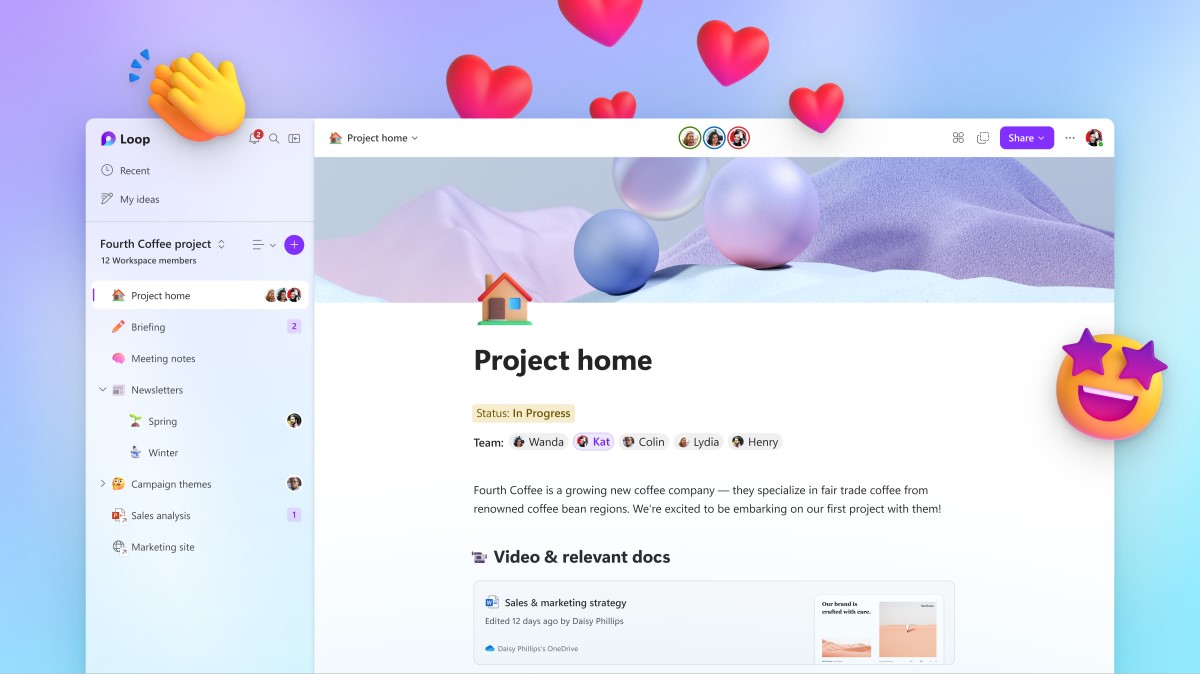
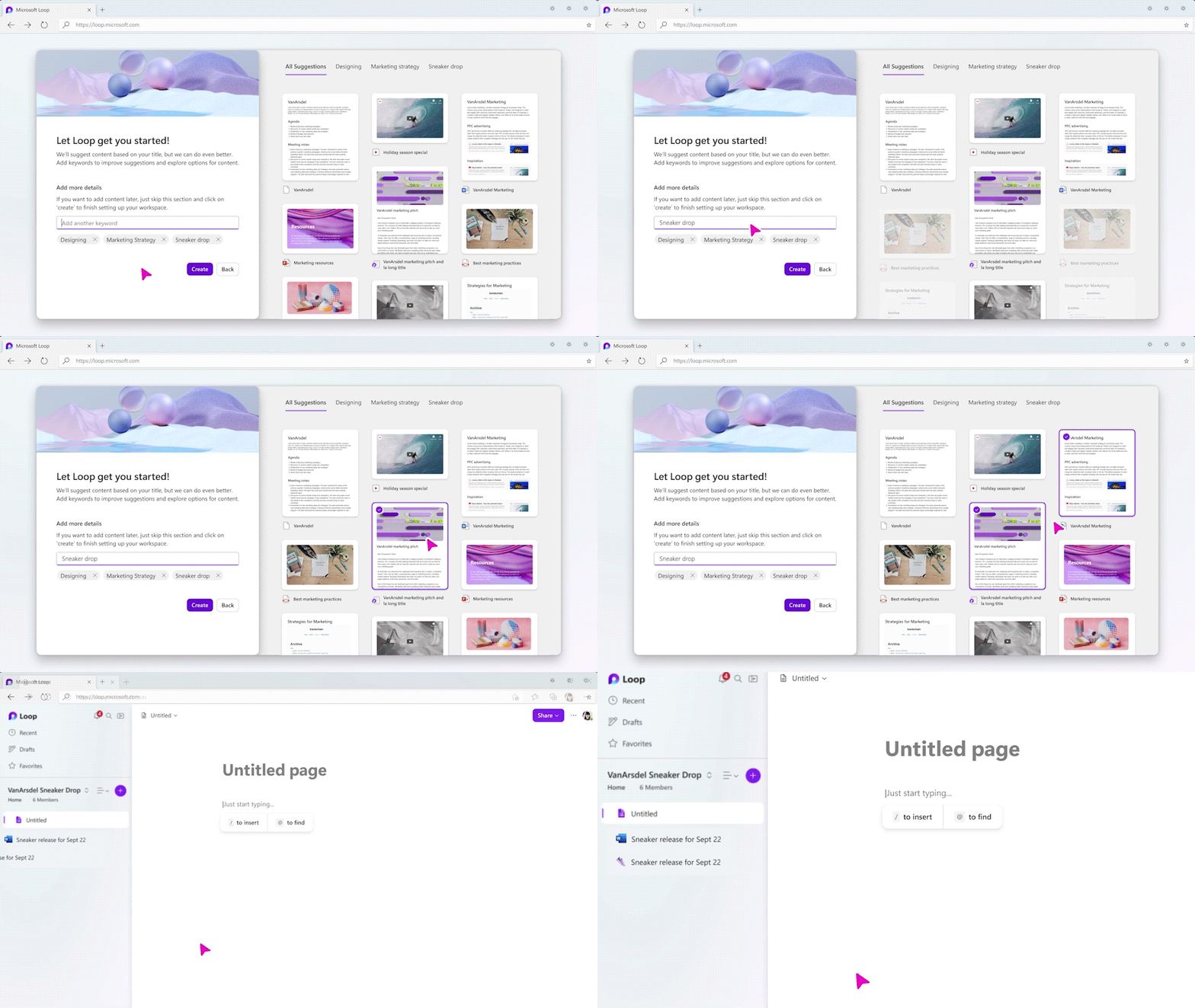
Beyond individual components, Microsoft Loop provides dedicated “Workspaces.” A Loop workspace is essentially a flexible digital canvas designed for organizing and collaborating on projects, ideas, and information. Think of it as a central hub where teams can bring together all relevant Loop components, documents, links, and other resources related to a specific project or initiative.
These workspaces are highly customizable, allowing teams to structure information in a way that makes the most sense for their workflow. They act as persistent homes for projects, ensuring that all related content is easily discoverable and accessible. This structured environment is particularly useful for long-term projects or ongoing initiatives where information needs to be continually updated and refined.
Pages and Subpages
Within a Loop workspace, content is organized into “pages” and “subpages.” A page is a flexible canvas where various Loop components can be arranged, along with text, images, and other embedded content. Teams can create individual pages for specific topics, meetings, project phases, or brainstorming sessions.
The ability to create subpages allows for hierarchical organization, enabling teams to break down complex projects into manageable sections. For example, a main project page might have subpages for “Brainstorming,” “Action Items,” “Design Reviews,” and “Meeting Notes.” This structured approach helps in maintaining clarity, navigating large amounts of information, and ensuring that all relevant content is logically grouped and easily retrievable within the workspace.
Empowering Real-Time Collaboration and Dynamic Workflows
The true utility of Microsoft Loop lies in its ability to transform how teams collaborate, moving beyond static document sharing to a more dynamic, real-time, and integrated approach. It addresses common pain points in modern teamwork, such as version control issues and context switching, by creating a unified environment for content interaction.
Seamless Integration Across Microsoft 365
One of Loop’s most significant strengths is its deep integration across the Microsoft 365 ecosystem. Loop components aren’t confined to a single app; they are designed to travel. Users can insert a Loop component directly into:
- Microsoft Teams: For real-time co-editing of notes, task lists, or shared agendas directly within chat conversations or channel posts. This allows teams to iterate on ideas or track progress without leaving their primary communication hub.
- Outlook: For embedding live updates, decision records, or collaborative notes directly into emails, ensuring recipients see the latest information without having to navigate to a separate document. This is particularly useful for project updates or meeting summaries.
- Word for the Web: To collaboratively build sections of documents or create interactive templates that can be updated in real-time.
- Microsoft Whiteboard: To bring structured data or action items from a brainstorming session into a live component.
This pervasive integration means that important collaborative elements can live where the conversation is happening, reducing the need for constant context switching between different applications and ensuring information consistency across all touchpoints.
Synchronized Updates and Version Control
The “live” nature of Loop components is a game-changer for version control. Instead of sending around multiple versions of a document or struggling to merge conflicting edits, Loop components ensure there is always a single, authoritative version. Any modification made to a component, regardless of where it’s embedded, instantly propagates to all other instances.
This synchronization eliminates the confusion and wasted effort associated with outdated information. Teams can be confident that they are always working with the latest data, making real-time decisions based on current facts. The inherent design of Loop largely negates the need for manual version tracking or complex merging processes, allowing teams to focus on the content itself rather than its management.
Facilitating Asynchronous and Synchronous Work
Microsoft Loop is uniquely positioned to support both synchronous (real-time) and asynchronous (distributed in time) collaboration models, which are crucial for hybrid and remote teams.
- Synchronous Work: During live meetings or brainstorming sessions, teams can co-edit Loop components in real-time, capturing ideas, decisions, and action items collaboratively. Everyone sees updates instantly, fostering a highly interactive and productive session.
- Asynchronous Work: For teams spread across different time zones or working flexible hours, Loop components and workspaces provide a persistent hub for collaboration. Team members can contribute to documents, update tasks, or add notes whenever they are available, knowing their contributions will seamlessly integrate with the collective work. The ability to react and respond to specific components means that conversations can evolve organically, even without everyone being online at the same moment. This flexibility is vital for global teams and remote workforces.
Practical Applications Across Diverse Scenarios
The versatility of Microsoft Loop makes it applicable across a multitude of professional scenarios, enhancing productivity and streamlining processes for various functions and teams. Its ability to create dynamic, interconnected content allows for innovative approaches to common workplace challenges.
Streamlining Project Management
Microsoft Loop offers powerful tools for project managers and teams seeking to optimize their project workflows.
- Task Management: Teams can create shared task lists within a Loop workspace or embed them directly into a project Teams channel. These lists can be assigned to individuals, include due dates, and track progress, providing a real-time overview of who is working on what and the status of each item.
- Brainstorming and Ideation: For early project phases, Loop pages can serve as dynamic canvases for collaborative brainstorming. Teams can use bullet lists, voting tables, and text components to capture ideas, prioritize concepts, and refine strategies together, with all contributions instantly visible to everyone.
- Progress Tracking: Loop can host simple progress trackers, shared roadmaps, or status reports that update automatically as tasks are completed. This allows project stakeholders to get an instant snapshot of project health without digging through static documents.
- Resource Allocation: Simple tables can be used to track resource availability, assign responsibilities, and manage dependencies, all within a live, collaborative environment.
Enhancing Meeting Productivity
Meetings often suffer from disorganization, lack of clear outcomes, and poor follow-up. Loop addresses these issues head-on.
- Collaborative Agendas: Before a meeting, a Loop component agenda can be shared in the meeting invite or Teams chat, allowing participants to add discussion points beforehand.
- Live Note-Taking: During the meeting, notes can be taken collaboratively within a Loop page or component, ensuring everyone contributes and sees the collective output in real-time. This eliminates the need for a single designated note-taker and fosters shared ownership of meeting content.
- Action Item Tracking: Key decisions and action items can be captured in a Loop task list component during the meeting, assigned to specific individuals, and tracked for completion. This ensures clear accountability and follow-through, as these components can then live on in subsequent communications or project workspaces.
- Post-Meeting Summaries: A Loop component containing meeting summaries, decisions, and action items can be easily shared via email or Teams, guaranteeing that all participants (and those who couldn’t attend) have access to the up-to-date information.
Collaborative Document Creation and Editing
For teams involved in content creation, report writing, or policy development, Loop offers a robust environment for shared ideation and iterative editing.
- Joint Drafting: Teams can collaboratively draft sections of reports, proposals, or presentations using Loop paragraph or table components. This allows multiple authors to contribute simultaneously to different parts of a document without worrying about merging conflicts.
- Feedback and Review: Loop components can be used to gather feedback on specific sections of content. Reviewers can add comments or make direct edits, and the changes are instantly visible, facilitating a rapid iteration cycle.
- Content Building: For marketing teams, training departments, or technical writers, Loop workspaces can act as central hubs for developing content assets, ensuring consistency and collaborative input throughout the creation process.
Knowledge Management and Information Sharing
Loop is an excellent tool for building living documents and repositories of information that evolve with the team.
- Team Wikis: Workspaces can be structured to function as dynamic team wikis, housing frequently asked questions, onboarding guides, best practices, and operational procedures. These “living documents” can be easily updated by authorized team members, ensuring the information is always current.
- Onboarding Materials: New hires can be directed to a Loop workspace containing all essential onboarding information, including task lists, team structure, important links, and company policies, all presented in an interactive and easily digestible format.
- Centralized Information Hubs: For ongoing projects or departments, a Loop workspace can become the single source of truth for all relevant information, from project charters and meeting notes to key decisions and final deliverables, all organized into logical pages and subpages.
The Strategic Advantages of Adopting Microsoft Loop
Beyond its practical applications, the adoption of Microsoft Loop brings several strategic advantages to organizations looking to optimize their operational efficiency and foster a more connected, agile workforce.
Boosting Productivity and Efficiency
By centralizing information and enabling real-time collaboration, Loop significantly reduces friction in daily workflows.
- Reduced Context Switching: With components living directly in the flow of communication (Teams, Outlook), employees spend less time jumping between applications to find or update information, leading to greater focus and efficiency.
- Faster Decision-Making: The ability to see and edit information in real-time, coupled with tools like voting tables, accelerates the decision-making process by ensuring everyone has the latest context and can contribute quickly.
- Elimination of Redundancy: The single source of truth model for Loop components means less time spent on reconciling different versions of documents or duplicating effort.
Fostering Innovation and Creativity
Loop’s flexible and interactive nature creates an environment conducive to brainstorming and creative problem-solving.
- Collaborative Ideation: Shared canvases and dynamic components make it easier for teams to collectively brainstorm, experiment with ideas, and iterate on concepts in real-time, regardless of physical location.
- Diverse Input: By allowing contributions from multiple team members simultaneously, Loop encourages a broader range of perspectives, potentially leading to more innovative solutions.
- Fluid Experimentation: The ease of creating and modifying components allows teams to quickly prototype ideas or structure information in different ways, fostering a culture of experimentation.
Improving Communication and Transparency
Transparency is key to effective teamwork, and Loop’s design inherently promotes it.
- Shared Understanding: Because everyone is working from the same live components, there’s a clearer shared understanding of project status, tasks, and decisions.
- Accessible Information: Workspaces and components provide a centralized, easily discoverable source of truth, making it simpler for team members to find the information they need without constant inquiries.
- Real-time Updates: The immediate synchronization of changes ensures that communication is always current, preventing misunderstandings arising from outdated information.
Adapting to Hybrid and Remote Work Models
In an era where hybrid and remote work are increasingly common, Loop is an indispensable tool for bridging geographical and temporal gaps.
- Seamless Remote Collaboration: Loop components allow remote employees to participate fully in collaborative tasks, whether during a live virtual meeting or by contributing asynchronously to a shared workspace.
- Equity in Participation: By making all content and contributions instantly accessible and editable, Loop helps ensure that remote team members have an equal voice and equal access to information as their in-office counterparts.
- Persistent Workspaces: Workspaces provide a stable, ongoing environment for projects, ensuring continuity and shared context even when team members are working across different locations and schedules.

Conclusion
Microsoft Loop is more than just another productivity tool; it represents a paradigm shift in how digital collaboration is approached within the Microsoft 365 ecosystem. By introducing live, interactive components that seamlessly integrate across applications and dedicated workspaces for organized content, Loop empowers teams to move beyond static documents and fragmented communication.
Its primary uses revolve around enhancing real-time collaboration, streamlining project management, boosting meeting productivity, fostering collaborative content creation, and serving as a dynamic knowledge management hub. In doing so, Loop effectively tackles modern workplace challenges like context switching, version control complexities, and the demands of hybrid work. Organizations that leverage Microsoft Loop will find themselves equipped with a more agile, transparent, and ultimately more productive workforce, ready to navigate the complexities of contemporary business with greater efficiency and innovation. As the world of work continues to evolve, Loop stands ready to be a cornerstone of future-proof collaboration strategies.
aViewFromTheCave is a participant in the Amazon Services LLC Associates Program, an affiliate advertising program designed to provide a means for sites to earn advertising fees by advertising and linking to Amazon.com. Amazon, the Amazon logo, AmazonSupply, and the AmazonSupply logo are trademarks of Amazon.com, Inc. or its affiliates. As an Amazon Associate we earn affiliate commissions from qualifying purchases.