
In the world of software development and digital infrastructure, few messages are as ubiquitous—and occasionally frustrating—as the “parse error.” Whether you are a seasoned software engineer, a hobbyist web developer, or an Android user trying to install an application from an unofficial source, encountering a parse error is a common rite of passage. At its core, a parse error is a communication breakdown between a human-written instruction and the machine’s ability to interpret it.
To understand a parse error, one must first understand the concept of “parsing.” In computing, parsing is the process of analyzing a string of symbols, either in natural language or computer languages, according to the rules of a formal grammar. When a computer program “parses” code, it is essentially reading the text and translating it into a format the machine can execute. If the code contains a typo, a missing character, or an structural inconsistency that violates the rules of the programming language, the parser stops, throws its hands up, and reports a “Parse Error.”
The Mechanics of Parsing: How Computers Read Your Code
The journey from a line of code to a functional software application involves several sophisticated stages. Understanding these stages helps clarify exactly where and why a parse error occurs.
The Role of the Lexical Analyzer
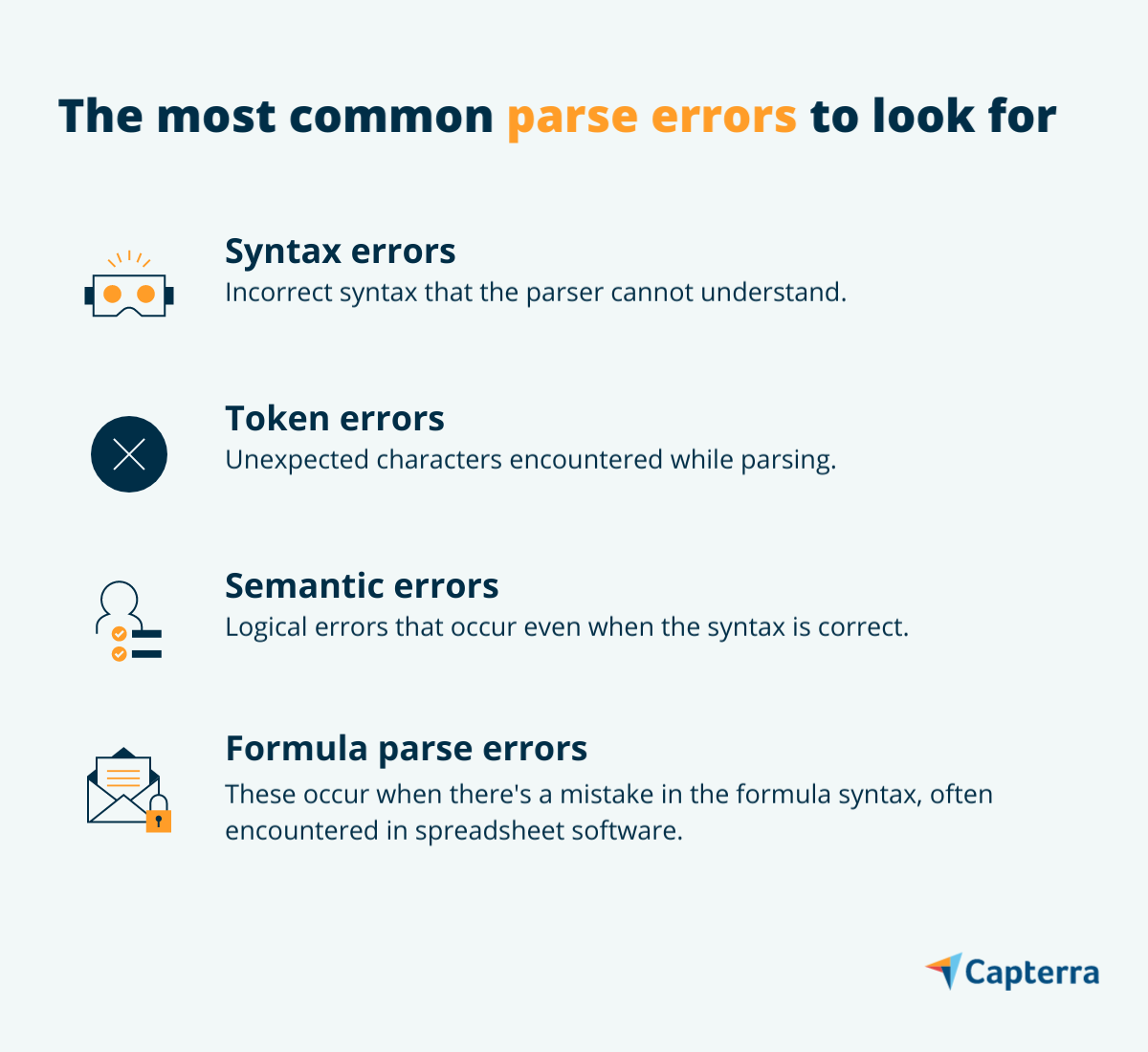
Before the actual parsing begins, a compiler or interpreter uses a lexical analyzer (or lexer). The lexer’s job is to break the raw source code into “tokens”—the smallest units of meaning, such as keywords (if, while, function), operators (+, -, *), and identifiers (variable names). A parse error can originate here if the lexer encounters a character it doesn’t recognize or a sequence that doesn’t form a valid token. However, most parse errors happen in the subsequent phase.
Syntactic Analysis and the Abstract Syntax Tree (AST)
Once the code is tokenized, the parser takes over to perform syntactic analysis. It checks the tokens against the grammatical rules of the language. For instance, in JavaScript, every opening brace { must eventually be followed by a closing brace }. If the parser finds a closing brace without a corresponding opening one, it cannot build the Abstract Syntax Tree (AST)—a tree representation of the abstract syntactic structure of the source code. Without this tree, the computer cannot understand the logic of the program, resulting in a parse error.
The Difference Between Parse Errors and Logic Errors
It is vital to distinguish parse errors from logic errors. A parse error is a “syntax error,” meaning the code is written in a way that is “unreadable” to the machine. It prevents the program from even starting. In contrast, a logic error occurs when the code is syntactically perfect and runs successfully, but produces the wrong result (e.g., adding two numbers instead of multiplying them). Parse errors are structural; logic errors are conceptual.
Common Causes and Triggers of Parse Errors
While every programming language has its own unique syntax, the triggers for parse errors are remarkably consistent across the tech landscape. Identifying these common pitfalls is the first step toward becoming a more efficient debugger.
Missing or Misplaced Punctuation
Punctuation in programming acts as the “glue” that holds logic together. In languages like C++, Java, or PHP, the semicolon ; is used to terminate a statement. Forgetting a single semicolon can cause the parser to merge two distinct commands into one unintelligible string, triggering an error. Similarly, missing commas in an array or a JSON object are frequent culprits.
Improperly Nested Tags and Brackets
In web development (HTML/XML) and structural programming (Python/C#), nesting is everything. A common parse error occurs when a developer closes a “div” tag before closing a “paragraph” tag inside it, or when a function’s closing parenthesis is accidentally deleted. In Python, which uses indentation to define blocks of code, even a single extra space or a missing tab can lead to an “IndentationError,” which is effectively a type of parse error.
Incompatible Software Versions
Tech ecosystems evolve rapidly. A parse error often occurs when code written for a modern version of a language (e.g., PHP 8.1) is run on a server using an outdated version (e.g., PHP 5.6). The newer version may introduce new keywords or syntax structures that the older parser doesn’t recognize. To the old parser, these new features look like gibberish, resulting in a failure to interpret the file.
Parse Errors in Different Environments
Parse errors manifest differently depending on the platform. From web servers to mobile operating systems, the context changes the “flavor” of the error.
Web Development: PHP and JavaScript
In the realm of web development, parse errors are a daily occurrence. PHP is famous for the “Parse error: syntax error, unexpected ‘…’ in your-file.php” message. This often happens due to unclosed quotes or the use of reserved keywords as variable names. In JavaScript, parse errors often happen in the browser’s console, preventing scripts from running and causing interactive elements of a website to fail. These are often caught during development, but if they reach production, they can break the entire user experience.
Android: “There was a problem parsing the package”
For Android users, the “Parse Error” is a common sight when trying to install an APK file (Android Package). Unlike developer-centric syntax errors, this specific error usually means the OS cannot read the manifest file of the app. This can happen if the APK is corrupted during download, if the app requires a higher version of Android than the device is running, or if the “Allow installation from unknown sources” setting is disabled. It is a security and compatibility hurdle rather than a coding typo.
Data Interchange Formats: JSON and XML
Modern software relies heavily on APIs and data exchange. JSON (JavaScript Object Notation) is the standard for this. A parse error in a JSON file—often caused by a trailing comma or using single quotes instead of double quotes—can bring an entire data pipeline to a halt. Because APIs are automated, a parse error in a data packet can cause a ripple effect, leading to “500 Internal Server Error” messages on front-end applications.
Best Practices for Debugging and Prevention
While parse errors are inevitable, the modern tech stack provides an array of tools designed to catch them before they ever reach the execution phase.
Utilizing Linting Tools and IDEs
Modern Integrated Development Environments (IDEs) like VS Code, IntelliJ, and PyCharm are the first line of defense. They use “linters”—programs that analyze source code to flag programming errors, bugs, stylistic errors, and suspicious constructs. A linter will highlight a missing semicolon in red real-time, allowing the developer to fix the parse error before they even attempt to run the code.
The Importance of Code Reviews and Version Control
Human eyes are excellent at spotting patterns that a tired developer might miss. Code reviews within a team environment ensure that syntax is double-checked. Furthermore, using version control systems like Git allows developers to “diff” their code—comparing the current version with a previous working version. If a parse error suddenly appears, a quick comparison often reveals the exact character that was accidentally changed.
Validating Data Input and API Responses
For errors involving data formats like JSON or XML, developers should use validation schemas (like JSON Schema). By validating data against a predefined structure at the entry point, systems can reject malformed “un-parsable” data with a clear error message, rather than allowing it to enter the system and cause a crash later in the process.
The Future of Parsing: AI-Assisted Error Detection
The landscape of debugging is shifting with the advent of Artificial Intelligence and Machine Learning. The way we interact with parse errors is becoming more proactive and less reactive.
Machine Learning in Static Analysis
Next-generation static analysis tools are now using machine learning models trained on millions of lines of open-source code. These tools can go beyond simple grammar checks; they can predict where a developer is likely to make a syntax error based on common patterns and offer “auto-fix” suggestions. This reduces the cognitive load on developers and speeds up the development lifecycle.

Real-time Correction in Modern Development Ecosystems
We are entering an era of “Natural Language Programming” and AI-assisted coding (like GitHub Copilot). These tools often prevent parse errors before they are even typed by suggesting the correct syntax in real-time. If a developer begins writing a complex nested loop, the AI can automatically complete the structure, ensuring all brackets and colons are in their proper places. As these AI models become more integrated into our text editors, the traditional “parse error” may eventually become a relic of the past, replaced by seamless, self-correcting code environments.
In conclusion, while a parse error might seem like a minor technicality, it represents the fundamental boundary between human creativity and machine logic. By understanding why these errors occur—and utilizing the sophisticated tools available to prevent them—tech professionals can ensure smoother deployments, more stable applications, and a more resilient digital world.
aViewFromTheCave is a participant in the Amazon Services LLC Associates Program, an affiliate advertising program designed to provide a means for sites to earn advertising fees by advertising and linking to Amazon.com. Amazon, the Amazon logo, AmazonSupply, and the AmazonSupply logo are trademarks of Amazon.com, Inc. or its affiliates. As an Amazon Associate we earn affiliate commissions from qualifying purchases.