
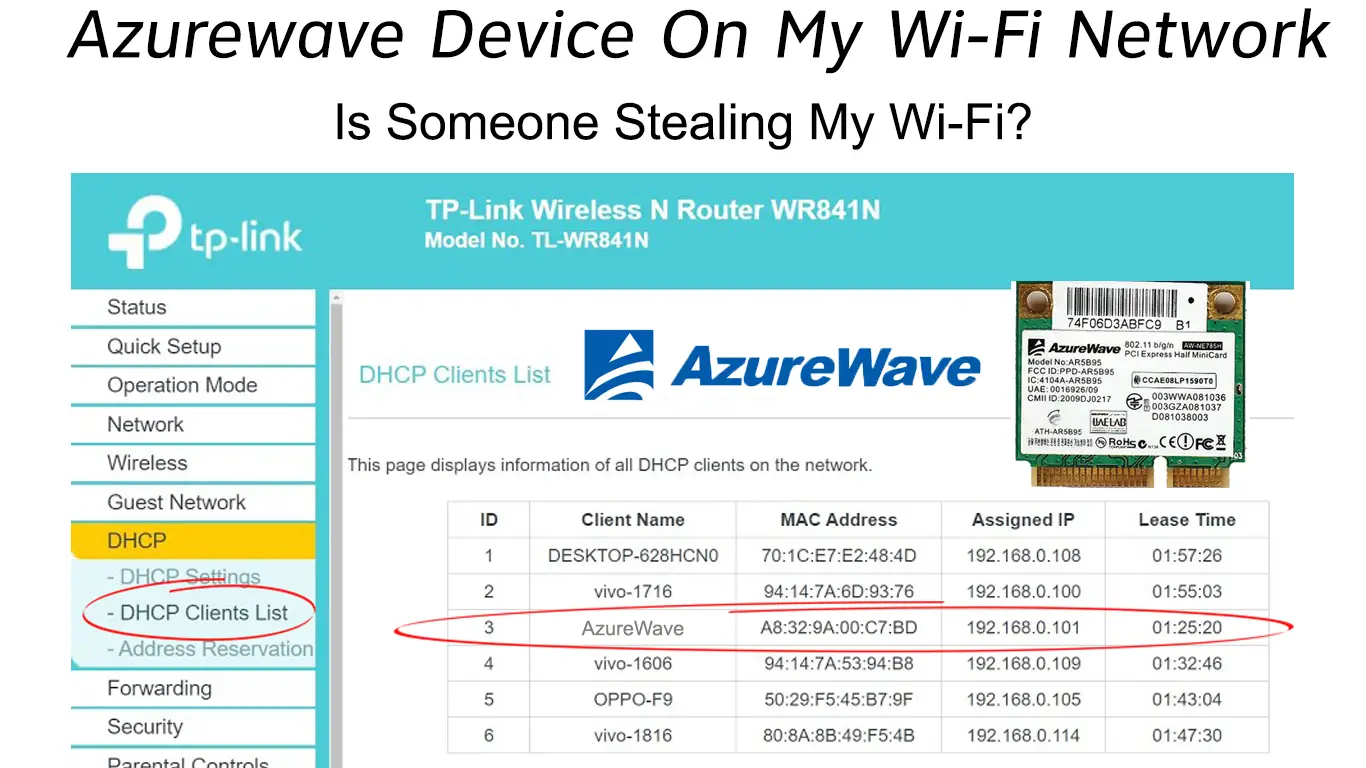
In the modern smart home, the local area network (LAN) has become a bustling ecosystem of interconnected hardware. When you log into your router’s administrative dashboard to monitor connected clients, you expect to see familiar names like “iPhone,” “Work-Laptop,” or “Sony-TV.” However, many users are often surprised—and sometimes alarmed—to find a mysterious entry labeled “AzureWave Technologies” or simply “AzureWave.”
The immediate reaction is often one of concern: Is this a neighbor stealing my bandwidth? Is it a malicious device intercepting my data? Or is it a piece of hardware I own that I simply don’t recognize? Within the tech industry, the appearance of AzureWave on a network map is a common occurrence that highlights the complex relationship between original equipment manufacturers (OEMs) and the final brands we see on store shelves.
Understanding AzureWave Technologies: The Silent Powerhouse Behind Your Wireless Connection
To demystify why an “AzureWave” device is appearing on your WiFi, one must first understand the architecture of the electronics industry. AzureWave Technologies Inc. is a leading Taiwanese manufacturer that specializes in wireless communication solutions. They do not typically produce consumer-facing products like laptops or smartphones under their own brand name. Instead, they provide the essential internal components that allow those devices to connect to the internet.
Who is AzureWave?
AzureWave is an OEM and ODM (Original Design Manufacturer) that produces wireless modules, including WiFi, Bluetooth, and GPS components, as well as camera modules. Their clients include some of the biggest names in technology, such as ASUS, HP, Sony, Microsoft, and various manufacturers of Internet of Things (IoT) appliances. When a company like ASUS builds a laptop, they may choose to source the WiFi card from AzureWave rather than manufacturing it in-house.
Why Your Router Labels Devices as “AzureWave”
Your router identifies devices using a unique identifier known as a MAC (Media Access Control) address. The first six characters of this address are the Organizationally Unique Identifier (OUI), which is registered to the manufacturer of the network interface controller.
When your router sees a device, it looks up the OUI in a global database. If the internal WiFi module was manufactured by AzureWave, the router will display “AzureWave” as the manufacturer, even if the device itself is a high-end gaming laptop or a smart refrigerator. This “identity gap” is the primary reason for the confusion among home network administrators.
Common Products Utilizing AzureWave Modules
AzureWave’s footprint is massive. You will often find their modules in:
- Laptops and Tablets: Particularly models from ASUS, Acer, and HP.
- Desktop Motherboards: High-end motherboards with integrated WiFi frequently use AzureWave cards.
- Smart Home Appliances: Smart washers, dryers, and ovens often use these cost-effective, reliable modules.
- Set-Top Boxes and TVs: Many digital media players and smart TVs rely on AzureWave for their wireless connectivity.
How to Identify the Physical Device on Your Network
Once you understand that AzureWave is a component manufacturer, the next step is determining which of your physical gadgets is claiming that title. Identifying these devices is a vital part of maintaining network hygiene and ensuring that every connection is authorized.
Using the MAC Address Search Method
The most precise way to identify a device is to match the MAC address shown in your router’s interface with the physical hardware.
- Find the MAC Address: In your router settings, locate the list of connected devices and note the MAC address associated with the AzureWave entry.
- Check Your Devices: On a Windows laptop, you can find your MAC address by typing
ipconfig /allin the Command Prompt. On a smartphone, it is usually under “Settings > About Phone > Status.” - Compare: If the addresses match, you have found your culprit.

The “Process of Elimination” Strategy
If you have dozens of IoT devices, checking MAC addresses manually can be tedious. The “Process of Elimination” is an effective low-tech alternative:
- Monitor the Connection: Keep your router’s “Connected Devices” list open.
- Disconnect Potential Devices: Turn off your smart TV or put your laptop into airplane mode.
- Refresh: If the AzureWave entry disappears from the list, the device you just turned off is the one using the AzureWave module.
Leveraging Third-Party Network Scanners
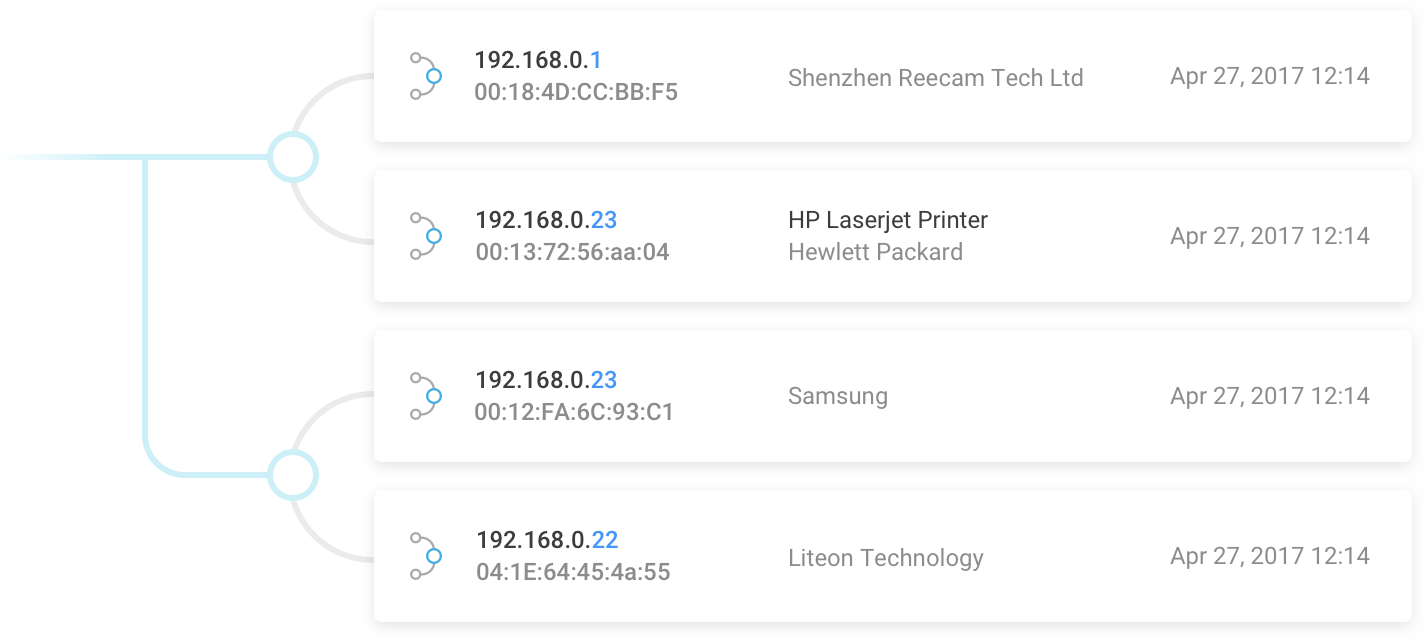
For a more detailed view of your network, tech-savvy users often turn to third-party software like Fing (available for mobile) or Advanced IP Scanner (for Windows). These tools often provide more granular data than standard ISP-provided routers. They can sometimes pull additional metadata from the device, such as the device’s NetBIOS name or open ports, which can give you a better clue (e.g., seeing a name like “Kitchen-Fridge-Smart” alongside the AzureWave manufacturer tag).
Security Implications: Is an AzureWave Device a Potential Threat?
In the realm of digital security, “trust but verify” is the golden rule. While most AzureWave entries are benign, any unidentified device on your network should be investigated. In a world of increasing cyber threats, understanding the risks associated with unknown hardware is paramount.
Distinguishing Between Legitimate Modules and Intruders
The presence of an AzureWave device is rarely a sign of a direct hack, but it can be a sign of a “piggyback” connection. If you have gone through your entire inventory of electronics and still cannot account for the AzureWave entry, there is a possibility that a neighbor is using your WiFi. Because AzureWave modules are so common in budget laptops and PC components, a neighbor’s computer is a likely candidate for an unauthorized connection.
The Risks of Unidentified IoT Devices
One of the biggest security challenges in modern tech is the “insecure IoT” phenomenon. Many smart devices that use AzureWave modules are manufactured with “convenience-first” mindsets, often lacking robust security protocols. These devices can become “zombies” in a botnet or serve as entry points for hackers to move laterally across your network. If the AzureWave device on your network is an old smart plug or a cheap camera that hasn’t received a firmware update in years, it could be a liability.
Addressing MAC Address Spoofing
While rare in a home environment, sophisticated attackers can “spoof” or mimic the MAC addresses of reputable manufacturers to blend in. An attacker might configure their device to appear as an AzureWave module because it is so common and less likely to raise suspicion than a generic or “Unknown” label. This is why verifying the physical device is a critical step in a comprehensive security audit.
Optimizing Your Network Hygiene and Management
After identifying your AzureWave devices, the final step is to implement a management strategy that ensures your network remains organized and secure. Technical clutter is often the precursor to security vulnerabilities.
Renaming Devices for Better Visibility
Most modern routers allow you to edit the names of connected devices. Once you have identified that the AzureWave device is actually your “ASUS Vivobook” or your “LG Smart Oven,” rename it immediately in the router dashboard. This creates a “known-good” baseline. In the future, if a new “AzureWave” or “Unknown” device appears, it will stand out immediately, allowing for rapid response.
Implementing Advanced Router Security Features
To prevent unauthorized AzureWave devices (or any other hardware) from joining your network, you should utilize the following tech protocols:
- WPA3 Encryption: If your router and devices support it, switch to WPA3, which offers superior protection against brute-force attacks compared to the aging WPA2 standard.
- Guest Networks: Place your IoT devices—many of which contain the AzureWave modules—on a separate Guest Network. This isolates them from your primary computers and NAS (Network Attached Storage) units, ensuring that if a smart lightbulb is compromised, your personal data remains inaccessible.
- MAC Filtering: For the ultimate “locked-down” network, you can enable MAC Filtering. This tells the router to only allow connections from a pre-approved list of MAC addresses. While this requires more maintenance when you buy new gadgets, it is a powerful deterrent against unauthorized access.
Firmware Updates and IoT Security Protocols
Finally, ensure that the device containing the AzureWave module is running the latest firmware. Manufacturers frequently release patches that fix security holes in the wireless communication stack. A regular audit of your network—checking for unfamiliar names like AzureWave and ensuring all recognized devices are updated—is the hallmark of a secure and well-managed digital home.
In conclusion, seeing an “AzureWave” device on your WiFi is not a cause for panic, but rather an invitation to better understand the hardware that powers your digital life. By recognizing the role of OEMs in the tech supply chain and utilizing network management tools, you can ensure your home network remains both high-performing and secure.
aViewFromTheCave is a participant in the Amazon Services LLC Associates Program, an affiliate advertising program designed to provide a means for sites to earn advertising fees by advertising and linking to Amazon.com. Amazon, the Amazon logo, AmazonSupply, and the AmazonSupply logo are trademarks of Amazon.com, Inc. or its affiliates. As an Amazon Associate we earn affiliate commissions from qualifying purchases.