
In the rapidly evolving landscape of social media software, Snapchat has consistently remained a pioneer of ephemeral content and interactive UI (User Interface) elements. For years, the platform’s primary metric for success was the “view count”—a simple tally of how many unique users opened a Story. However, with the introduction of Snapchat+, the company’s premium subscription tier, the app introduced a new layer of data transparency that has left many users asking: What exactly does the eyeball emoji mean on a Snapchat Story?
From a technical and software-centric perspective, this emoji is not merely a decorative icon. It represents a specific data-tracking feature known as the “Rewatch Indicator.” Understanding this feature requires a deep dive into Snapchat’s current subscription model, the mechanics of its viewer-tracking algorithms, and the broader implications for digital privacy and user engagement metrics.
1. The Technical Anatomy of Snapchat+ and the Rewatch Indicator
To understand the eyeball emoji, one must first understand the software ecosystem it inhabits. Snapchat+ is a collection of exclusive, experimental, and pre-release features available for a monthly subscription fee. Launched as a way to diversify revenue beyond advertising, Snapchat+ provides “power users” with enhanced data about their interactions.
The Rewatch Indicator Logic
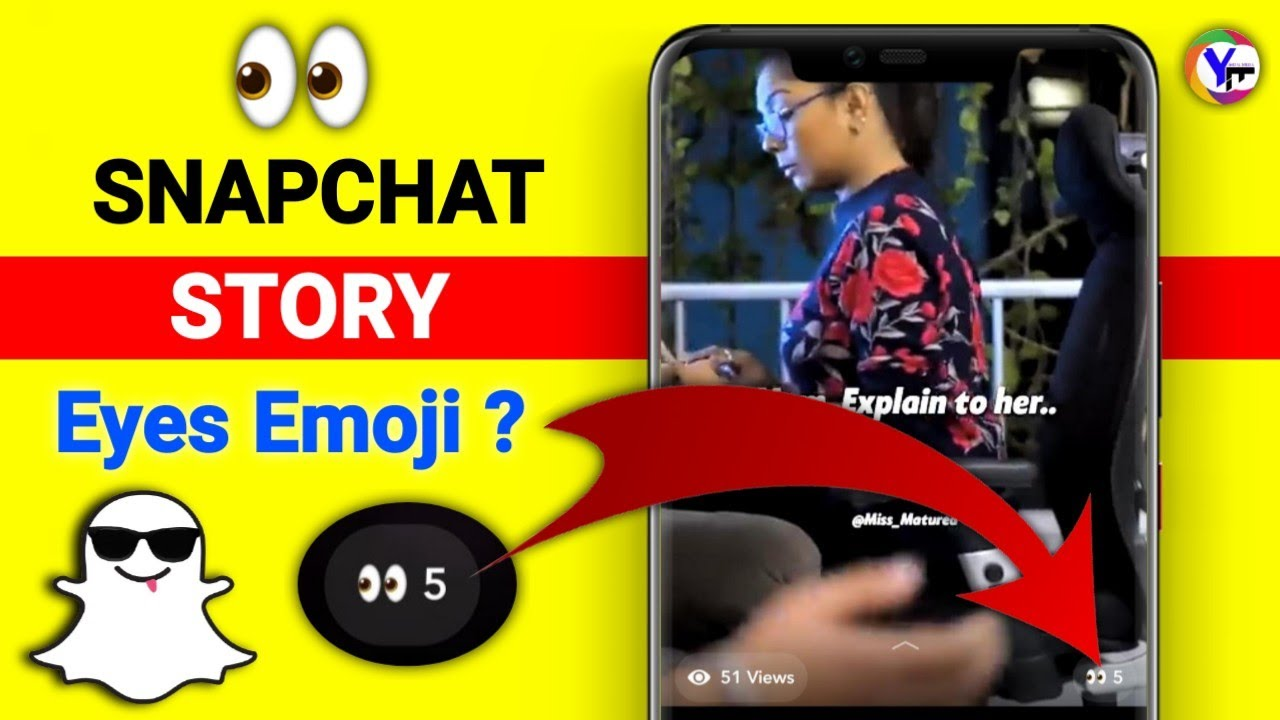
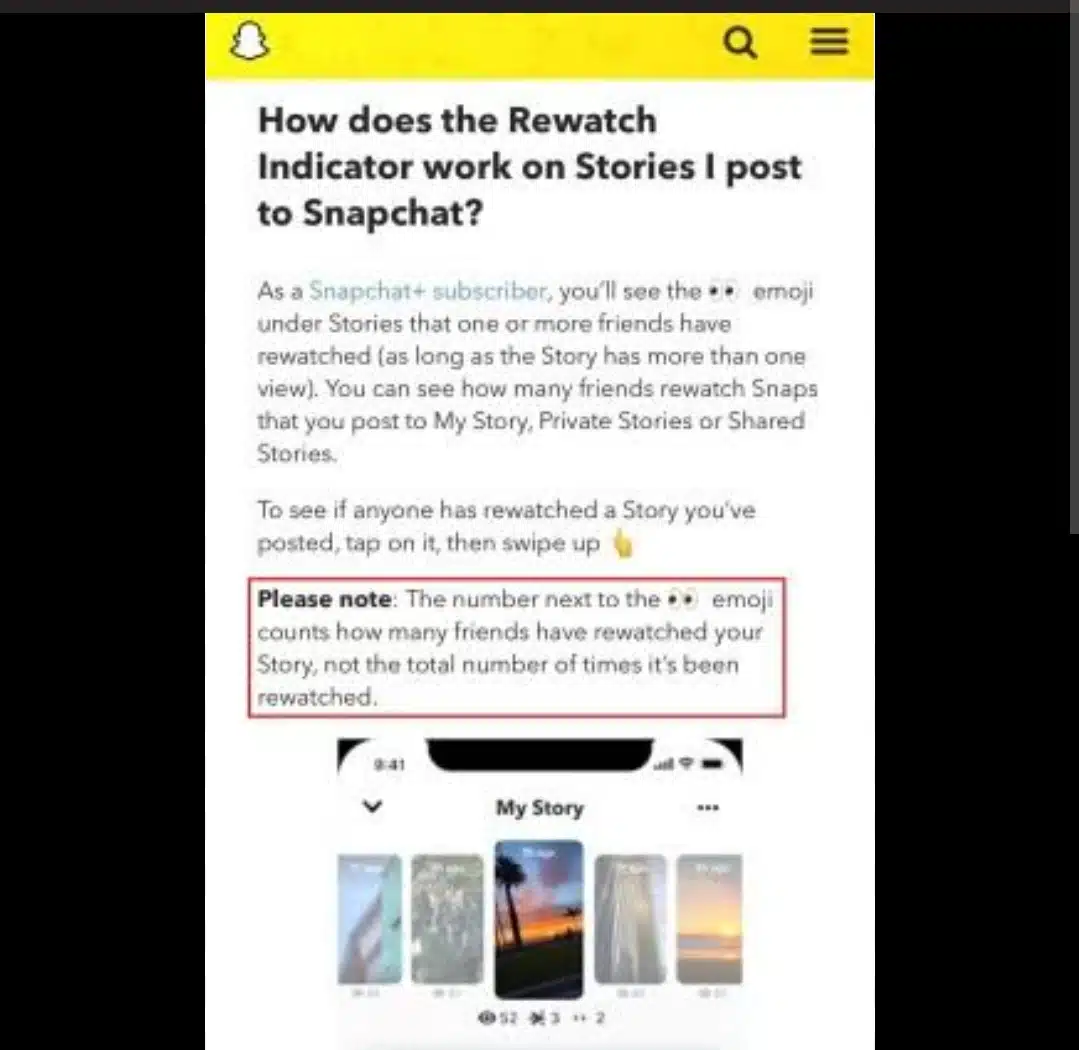
The eyeball emoji ( ) appears specifically within the viewer list of a Snapchat Story. When a user sees this icon next to their Story, it indicates that one or more of their friends have rewatched the Story. Unlike a standard view, which is triggered when the content is first loaded, a “rewatch” occurs when a user navigates back to a Story they have already completed or manually restarts the Story loop.
From a software engineering standpoint, this requires the app to distinguish between a “unique session view” and a “repeat session view.” While the standard viewer list tracks unique User IDs (UIDs), the Rewatch Indicator tracks the number of times those UIDs have re-engaged with the same media asset within its 24-hour lifecycle.
Is the Data Individualized?
One of the most frequent technical questions regarding this feature is whether the app identifies who specifically rewatched the Story. As of the current software build, Snapchat does not provide a one-to-one mapping. The eyeball emoji shows the total number of rewatches (or simply that a rewatch occurred), but it does not place the icon next to a specific friend’s name in the viewer list. This design choice maintains a level of “asymmetric transparency”—the poster knows their content was popular enough to be seen twice, but the rewatcher maintains a degree of anonymity.
2. Deciphering the UI: How to Access and Interpret the Metric
For users navigating the Snapchat interface, the presence of the eyeball emoji can be subtle. It is integrated into the “Story Management” section of the app. To see it, a user must swipe up on their own Story to view the list of people who have seen it.
Where the Emoji Appears
The eyeball emoji typically appears at the top of the viewer list or next to the total view count. It is accompanied by a number (e.g., 3). This number signifies how many people have rewatched the Story, not the total number of times it was rewatched. If one friend watches your Story five times, it may only count as one “rewatch” in terms of the unique user count, depending on the current iteration of Snapchat’s internal telemetry.
Requirements for the Feature to Activate
The Rewatch Indicator is a “opt-in” technical feature that requires the following conditions:
- Active Subscription: The creator of the Story must have an active Snapchat+ subscription.
- Privacy Settings: The Story must be set to “Friends Only” or “Public,” but the data is generally most accurate for “Friends” interactions.
- Feature Activation: The user must have the “Rewatch Indicator” toggled to ‘On’ within their Snapchat+ settings menu.
Why Some Views Don’t Count
There are technical limitations to how the eyeball emoji tracks engagement. For instance, if a user views a Story once, leaves the app, and the app clears its cache before the user returns, the second view might be registered as a “new” view rather than a “rewatch,” depending on the device’s handshake with Snapchat’s servers.
3. Privacy, Data Transparency, and Digital Etiquette

The introduction of the eyeball emoji marks a shift in how social media platforms handle “read receipts” and engagement data. In the early days of social media, “ghosting” or “lurking”—viewing content without the creator’s knowledge—was common. As software becomes more sophisticated, the “stealth” aspect of social media is slowly being eroded in favor of deeper metrics.
The Ethics of Engagement Tracking
From a digital security and privacy perspective, the Rewatch Indicator is a polarizing feature. While it provides creators with valuable feedback on what content is most engaging, it also creates a sense of surveillance for the viewer. If a user knows that their rewatching habits are being monitored (even if not identified by name), it may alter their behavior, leading to “chilling effects” in how they consume content.
Managing Your Digital Footprint
For users concerned about their privacy, it is important to understand that there is currently no way to “opt-out” of being counted as a rewatcher if the person posting the Story has Snapchat+. If you watch a Story more than once, the software will register that telemetry data. This is a crucial reminder of the “Terms of Service” reality in modern apps: when you use a platform, your behavioral data is the currency, and premium subscribers are often given the keys to view that data.
Comparison with Other Platforms
Snapchat’s move toward granular rewatch data mirrors trends seen in other tech giants:
- TikTok: Shows profile views (if opted in).
- LinkedIn: Provides detailed analytics on who viewed your profile and posts.
- Instagram: While it doesn’t show rewatches, it uses “close friends” and “view orders” to imply interest.
Snapchat’s approach is unique because it quantifies the intensity of interest in a specific piece of ephemeral content.
4. The Future of Algorithmic Feedback in Social Apps
The eyeball emoji is a symptom of a larger trend in software development: the gamification of social metrics. By providing users with “secret” data about who is paying attention to them, Snapchat incentivizes users to stay on the platform and pay for subscriptions.
Software Evolution: What’s Next?
As AI and machine learning become more integrated into social media backends, we can expect the Rewatch Indicator to become even more sophisticated. Future updates might include:
- Heatmaps: Showing which specific part of a video Story was rewatched (a feature already common in professional video hosting software like Wistia).
- Engagement Scores: Using rewatch data to boost certain Stories in the “Discover” or “Friends” feed algorithmically.
- Predictive Analytics: Notifying a user when a Story is likely to go viral based on early rewatch velocity.
Impact on Content Creation
For technical creators and influencers, the eyeball emoji provides a “soft” A/B testing tool. If a specific type of content (e.g., a tutorial or a high-action clip) consistently triggers the eyeball emoji, the creator can conclude that the technical format or the subject matter has a higher “stickiness” factor. This allows for data-driven content optimization without the need for complex external analytics suites.
5. Troubleshooting: Why Can’t I See the Eyeball Emoji?
Despite having a Snapchat+ subscription, some users may find the eyeball emoji missing from their interface. This is often due to technical glitches or versioning issues.
Common Technical Fixes
- Version Mismatch: Ensure that the Snapchat app is updated to the latest build via the App Store or Google Play. Premium features are often tied to specific API versions.
- Toggle Verification: Navigate to the Snapchat+ settings (accessible via the profile icon) and ensure the “Rewatch Indicator” is set to “On.”
- Cache Issues: Sometimes the app’s internal cache prevents real-time data from updating. Clearing the cache within the app settings can often force the UI to refresh.
- Regional Availability: While Snapchat+ is global, certain granular features are rolled out in phases. If the eyeball emoji isn’t appearing, it may be temporarily disabled in your specific server region for maintenance.
Conclusion: A New Era of Social Telemetry
The eyeball emoji on a Snapchat Story is more than just a quirky icon; it is a sophisticated data point that signals the end of anonymous re-consumption. For the subscriber, it is a tool for insight and ego-validation. For the viewer, it is a reminder that every interaction within a modern app is tracked, quantified, and potentially monetized.
As we move forward, the “tech” of social media will continue to pull back the curtain on user behavior. Whether this leads to a more connected experience or a more self-conscious one remains to be seen. For now, if you see those “eyes” on your Story, take it as a technical confirmation that your content was compelling enough to warrant a second look.
aViewFromTheCave is a participant in the Amazon Services LLC Associates Program, an affiliate advertising program designed to provide a means for sites to earn advertising fees by advertising and linking to Amazon.com. Amazon, the Amazon logo, AmazonSupply, and the AmazonSupply logo are trademarks of Amazon.com, Inc. or its affiliates. As an Amazon Associate we earn affiliate commissions from qualifying purchases.