
In the rapidly evolving landscape of social media interfaces, symbols often carry more weight than words. On Instagram, a platform that processes billions of interactions daily, the small “paper plane” or arrow icon has become one of the most significant tools for user engagement. While it may seem like a simple button, its role within the application’s ecosystem is multifaceted, bridging the gap between public content consumption and private digital communication.
For those navigating the platform, understanding what this arrow means is essential for mastering Instagram’s technical features and maximizing the social experience. This guide provides a deep dive into the technicalities, functional applications, and algorithmic significance of the Instagram arrow.
1. The Anatomy of the Instagram Arrow: Decoding the UI/UX Design
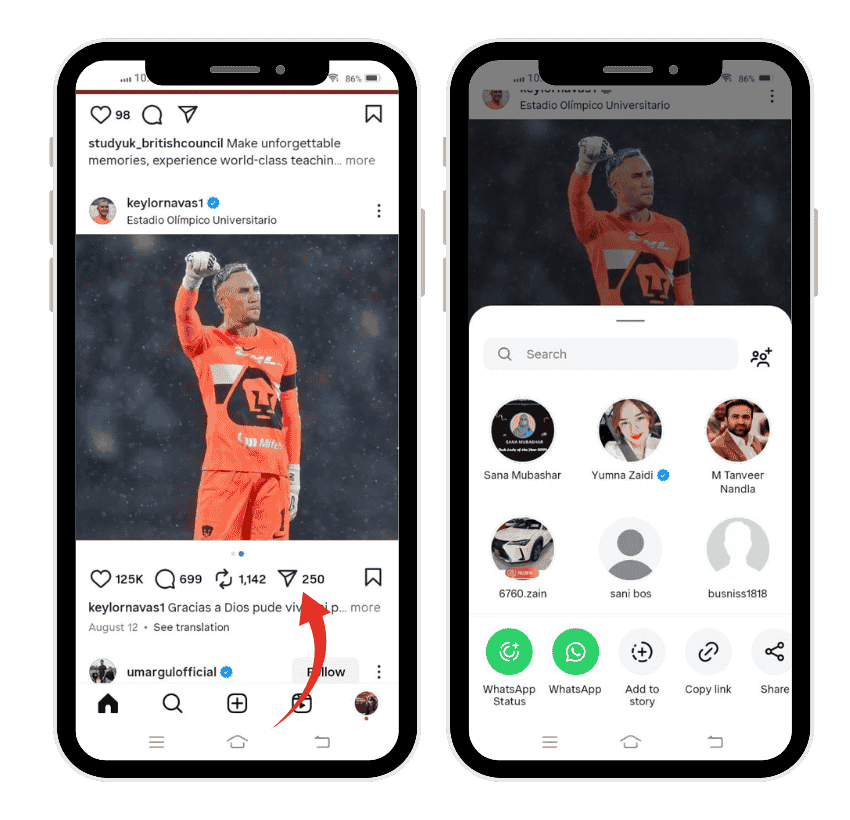
At its core, the arrow—frequently referred to as the “Paper Plane” icon—is Instagram’s universal symbol for “Share” or “Send.” Located consistently across different content formats, its placement is a deliberate choice by Meta’s UI/UX designers to encourage the circulation of media.
From Direct Messaging to a Multi-Purpose Sharing Tool
Originally, the paper plane was primarily associated with Instagram Direct, the platform’s private messaging service. In the early iterations of the app, the icon was found at the top right of the home feed to access the inbox. However, as the platform shifted from a static photo-sharing app to a dynamic content engine, the icon was integrated directly beneath every post. This change signaled a pivot in user behavior: content was no longer just for viewing; it was for distributing.
Icon Placement Across Different Formats
The arrow appears in several key areas, each serving a slightly different technical purpose:
- Feed Posts: Situated between the “Comment” bubble and the “Save” ribbon, it allows users to transmit the post instantly.
- Instagram Stories: Located at the bottom right, it enables users to share the story with others or respond to the creator.
- Instagram Reels: Found on the right-hand side of the screen in the vertical engagement stack, optimized for quick, one-handed sharing.
- Profiles: Sometimes an arrow icon is found next to the “Follow” or “Message” buttons on a user’s profile, often serving as a shortcut for sharing that profile with a third party.
2. Functional Dynamics: How the Share Icon Operates
The arrow is not merely a shortcut; it is a gateway to several integrated software functions. When a user taps the arrow, the application triggers a series of options that allow the content to leave its original location and move into new digital spaces.
Sharing to Instagram Stories
One of the most used features of the arrow is the “Add to Story” function. Technically, this creates a “re-share” wrapper. When you share a post to your story, Instagram’s backend links the original media to your story frame. This allows your followers to tap the shared image and be redirected to the original creator’s post. This creates a recursive loop of traffic that is vital for content virality.
Direct Messaging (DM) Integration
The primary function of the arrow remains the “Send to” feature. Upon tapping it, a list of your most frequent contacts appears. From a technical standpoint, this integrates the Feed API with the Messaging API. You aren’t just sending a link; you are sending a preview of the content that remains synced. If the original poster deletes the post, the preview in the DM will also show as “Content Unavailable,” ensuring data consistency across the platform.
External Sharing and Cross-Platform Utility
Beyond the internal Instagram ecosystem, the arrow often houses the “Share to…” menu. This opens the mobile operating system’s native share sheet (iOS or Android). This allows for the generation of a URL or the direct export of content to other applications like WhatsApp, X (formerly Twitter), or Facebook. This cross-platform utility is what makes Instagram a “hub” for digital media.
3. The Algorithm and the Arrow: Why Sharing is a Critical Tech Metric
In the world of software engineering and data science, every interaction on a social media app is a data point. The arrow represents one of the most highly weighted “signals” in the Instagram algorithm.

The Shift from “Likes” to “Saves and Shares”
In recent years, Instagram executives have publicly stated that “Saves” and “Shares” (the actions triggered by the arrow) are more important for a post’s reach than “Likes.” A “Like” is a low-effort interaction. However, tapping the arrow indicates that the user found the content valuable enough to distribute it to someone else. This is viewed by the algorithm as a “High-Intent Signal.”
How “Sends” Influence Content Ranking
When you tap the arrow and send a post to a friend, the algorithm records this as a “Send.” If a post receives a high volume of sends within the first hour of publication, the backend system flags the content as “trending” or “highly engaging.” This triggers a cascade effect where the post is then pushed to the “Explore” page or higher up in the feeds of other users. For creators and tech-savvy users, the arrow is the engine that drives organic growth.
Measuring Interpersonal Affinity
The arrow also helps Instagram map the “Social Graph.” If you frequently send posts to a specific user via the arrow icon, the system identifies a “high affinity” between those two accounts. Consequently, you will see that person’s posts more often, and they will appear at the top of your share list when you tap the arrow.
4. Privacy, Security, and Permission Settings
The ability to share content via the arrow comes with significant technical safeguards regarding privacy and data permissions. The “Arrow” does not grant a universal right to distribute content; it is subject to the account’s security settings.
Account Privacy and Shareability
If a user has a “Private Account,” the arrow icon on their posts behaves differently. While you can still tap it and send the post to a friend, that friend will only be able to see the content if they also follow the private account. If they don’t, they will see a “link preview unavailable” message. This is a crucial security layer that prevents the unauthorized leakage of private data to the public.
Disabling the “Reshare to Stories” Feature
Instagram provides users with the technical ability to “opt-out” of the arrow’s functionality. Within the settings menu (under Privacy > Stories), users can toggle off the “Allow sharing to story” option. When this is disabled, the “Add post to your story” option disappears from the menu when others tap the arrow on your posts. This gives creators granular control over how their digital assets are utilized by the community.
Vanish Mode and Disappearing Media
When sharing media via the arrow in DMs, users can also utilize “Vanish Mode” or “View Once” settings. This adds a layer of ephemeral security, ensuring that the shared content is deleted from the chat history once it has been viewed, protecting the privacy of both the sender and the receiver.
5. Troubleshooting and Evolution: When the Arrow Changes
As Instagram undergoes frequent software updates, the appearance and behavior of the arrow icon may change, leading to confusion or technical hurdles for users.
UI Refresh and A/B Testing
Instagram frequently conducts A/B testing, where different groups of users see different icons. Sometimes the paper plane is replaced by a more traditional “upward arrow” icon or a “plus” symbol within a box. These changes are usually part of a UX study to see which icon drives more shares. If your arrow looks different or has moved, it is likely due to a server-side update or an ongoing experiment by Meta’s engineering team.
Solving “Missing Share Button” Issues
Occasionally, users may find that the arrow icon is missing or unresponsive. This can be attributed to several technical factors:
- Outdated App Version: If the app’s API is out of sync with the server, engagement buttons may fail to load.
- Shadowbanning or Feature Restrictions: If an account has violated community guidelines, Instagram may temporarily “grey out” the share button to prevent the spread of spam.
- Cache Corruption: On Android devices especially, a bloated app cache can lead to UI elements disappearing, requiring a manual clear of the application data.
The Future of the Arrow: Integration with AI
Looking forward, the arrow is expected to become even more “intelligent.” With the integration of Meta AI, tapping the arrow may soon offer “Smart Sharing” suggestions—predicting who you want to send a post to based on the content of the image or the caption. This evolution will move the arrow from a simple “Send” button to an AI-assisted distribution tool.
Conclusion
The arrow on Instagram is far more than a decorative icon; it is a sophisticated piece of UI design that manages the flow of information across the global digital landscape. By understanding its functions—from its role in private messaging and story resharing to its massive influence on the Instagram algorithm—users can better navigate the platform and leverage its power for communication. Whether you are a casual user or a professional content creator, mastering the “paper plane” is the key to unlocking the full potential of social connectivity in the modern age.
aViewFromTheCave is a participant in the Amazon Services LLC Associates Program, an affiliate advertising program designed to provide a means for sites to earn advertising fees by advertising and linking to Amazon.com. Amazon, the Amazon logo, AmazonSupply, and the AmazonSupply logo are trademarks of Amazon.com, Inc. or its affiliates. As an Amazon Associate we earn affiliate commissions from qualifying purchases.