
In the landscape of modern technology, the Light Emitting Diode (LED) serves as the primary visual interface between complex internal circuitry and the user. Among the various colors used in electronics, the red LED is perhaps the most significant. Historically and psychologically associated with warnings, power, or critical status, a red light on a device can signal anything from a routine operational state to a catastrophic hardware failure. For tech enthusiasts, IT professionals, and general users alike, understanding the specific meaning behind these glowing apertures is essential for effective troubleshooting and device management.
Decoding the Language of Hardware Status
In the realm of computing and enterprise hardware, the red LED is often the first line of communication when the system encounters an obstacle. Because computers lack a human voice to explain internal conflicts, they rely on these “status codes” to direct a technician’s attention.
The “Critical Error” Signal in Computing
On a computer motherboard, specifically within the DIY PC building community, red LEDs are often part of a diagnostic array known as “EZ Debug LEDs.” These lights are labeled specifically—CPU, DRAM, VGA, and BOOT. If a red light stays solid on the “CPU” indicator, it typically signifies that the motherboard does not recognize the processor or that the processor is not receiving adequate power. This is a critical failure that prevents the system from completing its Power-On Self-Test (POST). Understanding this nuance allows a user to narrow down a hardware issue to a specific component rather than guessing blindly across the entire system.
Network Connectivity and Router Alerts
Networking hardware, such as routers and modems, utilizes red LEDs to indicate a break in the digital chain. Most modern routers feature a dedicated “Internet” or “WAN” light. While a green or white light indicates a successful handshake with the Internet Service Provider (ISP), a solid or blinking red light usually signals a loss of signal. This could be due to a physical break in the fiber optic line, an authentication error at the ISP level, or a hardware malfunction within the router’s radio frequency (RF) module. In specialized enterprise equipment, a red LED on a port may indicate a “collision” or a “link down” status, demanding immediate attention to maintain network uptime.
Power Management and Battery Health
In portable electronics, such as laptops and power banks, red LEDs are almost universally reserved for battery states. A pulsing red light often indicates that the battery has dropped below a critical threshold (usually 10% or 20%), while a solid red light during charging indicates that the device is currently drawing a high current to replenish its cells. In some sophisticated lithium-ion management systems, a rapidly flashing red light serves as a safety warning, indicating that the battery has reached an unsafe temperature or that the cells are unbalanced, necessitating a shutdown to prevent thermal runaway.
Red LEDs in Smart Home and IoT Ecosystems
As our homes become increasingly populated with Internet of Things (IoT) devices, the red LED has taken on new roles, moving beyond simple error reporting to include privacy signaling and environmental monitoring.
Security Cameras and Privacy Indicators
One of the most common sightings of red LEDs in a modern home is on smart security cameras. Here, the red light serves a dual purpose. Many cameras feature a ring of infrared (IR) LEDs that glow a faint, dull red in the dark. These are not status lights, but rather the source of “night vision,” illuminating the area with light invisible to the human eye but visible to the camera’s sensor. However, a bright, solid red LED on the front of a camera often serves as a “Recording” or “Active” indicator. This is a crucial privacy feature, informing those in the room that their data is being captured and transmitted to the cloud.
Smart Appliances and Maintenance Notifications
Smart refrigerators, air purifiers, and water filtration systems use red LEDs to signal maintenance cycles rather than hardware failures. For example, a red light on a high-end air purifier typically indicates that the HEPA filter is saturated and requires replacement. In this context, the red color is used to create a sense of urgency, ensuring the user maintains the device’s efficiency. Similarly, in smart thermostats, a red glow might indicate that the system is running in “Emergency Heat” mode or that there is a fault in the HVAC communication line.
Voice Assistants and Mute Functions
Devices like the Amazon Echo or Google Nest utilize a red light ring or LED to signify a state of “privacy lock.” When a user presses the physical mute button to disconnect the microphones, the device typically glows red. This is a standardized tech convention designed to provide psychological comfort; the red color signals that the “ears” of the device are stopped, and it is no longer listening for a wake word.
The Role of Red LEDs in Consumer Electronics and Entertainment
In the world of professional audio, video, and gaming, red LEDs are synonymous with active states and high-performance monitoring.
Audio-Visual Equipment and Recording States
In professional recording studios, the “Red Light” is a hallowed symbol. When a red LED is illuminated outside a studio door or on a microphone preamp, it signals that a recording is currently “live.” In the context of consumer cameras and DSLRs, a blinking red light on the back of the device signifies that data is being written to the SD card. Interrupting the device while this red light is active can lead to file corruption, making it one of the most important signals for a digital content creator to respect.
Gaming Hardware and Thermal Performance
The gaming industry has embraced LEDs—specifically RGB lighting—as a core aesthetic. However, red LEDs still maintain a functional role in this niche. Many high-end graphics cards (GPUs) feature red LED indicators near the power connectors. If these lights are illuminated, it often means the card is not receiving the correct voltage from the Power Supply Unit (PSU). Furthermore, some gaming peripherals use red lighting as a default “high-performance” or “overclocked” profile indicator, suggesting that the hardware is running at its maximum thermal and processing limits.
Optical Audio (TOSLINK) and Data Transmission
A unique application of red light is found in TOSLINK (optical audio) ports on TVs and soundbars. This is not an indicator light in the traditional sense, but the actual data transmission medium. The red glow seen inside the port is a tiny laser or high-intensity LED transmitting digital audio signals via pulses of light through a fiber optic cable. If this red light is missing when the device is powered on, it indicates a failure of the internal optical transmitter or a software configuration error where digital output is disabled.
Specialized Applications: From Fiber Optics to Digital Security
Beyond consumer-facing gadgets, red LEDs play a vital role in the infrastructure of digital security and advanced data transmission.
Biometric Sensors and Health Tech
Wearable technology, such as smartwatches and fitness trackers, utilizes red LEDs for photoplethysmography (PPG). While green LEDs are commonly used to measure heart rate, red and infrared LEDs are used to measure blood oxygen saturation (SpO2). The red light penetrates deeper into the tissue, and the amount of light reflected back to the sensor allows the device’s AI algorithms to calculate the oxygen levels in the blood. In this tech application, the red light is a sophisticated medical-grade sensor rather than a simple status indicator.
Fiber Optic Diagnostics
In the telecommunications industry, technicians use a tool known as a Visual Fault Locator (VFL), which is essentially a high-powered red LED or laser pointer designed to connect to fiber optic cables. Because red light has a specific wavelength that is highly visible through the jacket of a fiber cable, a technician can look for a red glow leaking out of a cable to identify a break or a sharp bend that is causing data loss. Here, the red LED is an indispensable tool for maintaining the backbone of the global internet.
Server Room and Data Center Alerts
In data centers, “light path diagnostics” use red LEDs to lead technicians to the exact component that needs replacement among thousands of identical units. If a hard drive fails in a RAID array, a red LED will illuminate on the specific drive tray. This reduces the “Mean Time to Repair” (MTTR), ensuring that the high-availability demands of modern software-as-a-service (SaaS) platforms are met.
Troubleshooting and Resolving Red Light Alerts
When a user encounters a red LED, the transition from observation to action is critical. Most red light scenarios can be resolved with a systematic technical approach.
General Diagnostic Steps
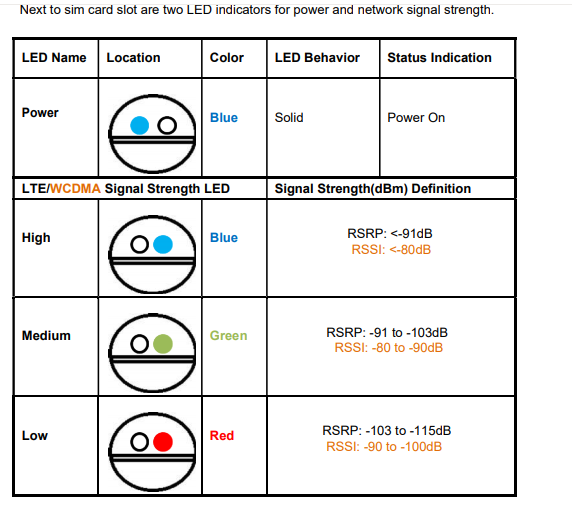
The first step in troubleshooting any red LED is to consult the hardware manual’s “LED Status Table.” Because there is no universal standard for what a blinking versus a solid red light means across different brands, the manual is the definitive source of truth. However, a common tech “rule of thumb” is that a blinking red light indicates a non-fatal error or a process in progress (like a firmware update), while a solid red light indicates a hardware-level fault that requires manual intervention.
Power Cycling and Reseating Components
For many consumer electronics, a red light is a result of a “static hang” in the firmware. Performing a “hard reset”—unplugging the device, holding the power button for 30 seconds to drain capacitors, and plugging it back in—often clears the red light. In desktop PCs, “reseating” the component (taking out the RAM or GPU and putting it back in) is the standard solution for red diagnostic lights, as it ensures the electrical contacts are clean and secure.
When to Seek Professional Support
There are instances where a red LED is the “kiss of death” for hardware. The most famous historical example is the Xbox 360’s “Red Ring of Death,” which signaled a general hardware failure usually caused by heat-induced desoldering of the GPU. If a device displays a red light and remains unresponsive after a power cycle, or if the red light is accompanied by a smell of ozone or burning plastic, it indicates a component-level failure. In these cases, the red LED is a safety signal, and the device should be disconnected immediately to prevent further damage or fire hazards.
In conclusion, while the red LED may initially cause concern, it is a vital tool in the tech ecosystem. It bridges the gap between complex binary states and human understanding, providing a clear, immediate signal that demands attention. Whether it is a sensor measuring your health, a camera protecting your home, or a motherboard flagging a memory error, the red LED remains the most important light in our digital lives. By understanding its language, users can better maintain their technology and ensure their digital tools remain functional and secure.
aViewFromTheCave is a participant in the Amazon Services LLC Associates Program, an affiliate advertising program designed to provide a means for sites to earn advertising fees by advertising and linking to Amazon.com. Amazon, the Amazon logo, AmazonSupply, and the AmazonSupply logo are trademarks of Amazon.com, Inc. or its affiliates. As an Amazon Associate we earn affiliate commissions from qualifying purchases.