
In the world of modern computing, aesthetics have become nearly as important as raw performance. For many enthusiasts, a PC is no longer just a tool hidden under a desk; it is a centerpiece of digital craftsmanship. If you have spent any time browsing modern PC components, gaming peripherals, or custom builds, you have undoubtedly encountered the term “ARGB.”
While it might seem like just another acronym in a sea of technical jargon, ARGB represents a significant leap forward in lighting technology. To the uninitiated, it may look identical to standard RGB, but the “A” makes all the difference. In this comprehensive guide, we will explore what ARGB means, how it functions, and why it has become the gold standard for tech enthusiasts worldwide.

Understanding the Basics: What is ARGB?
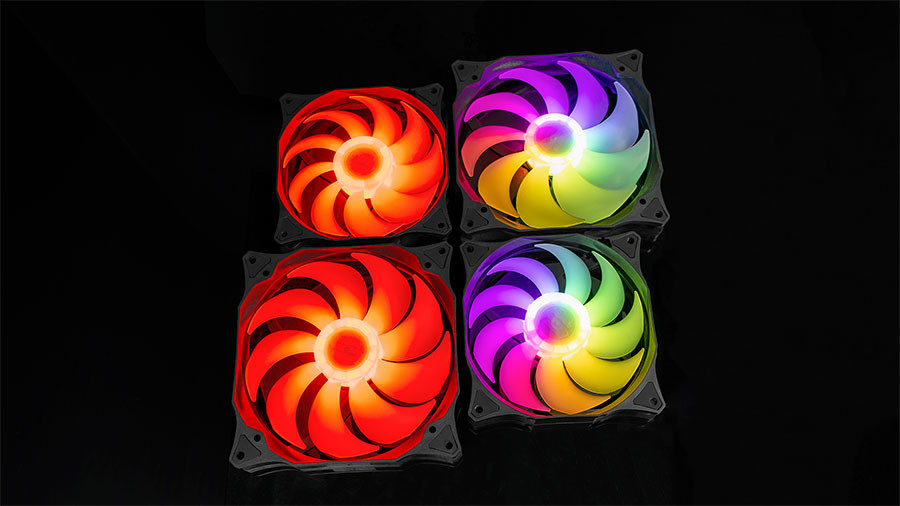
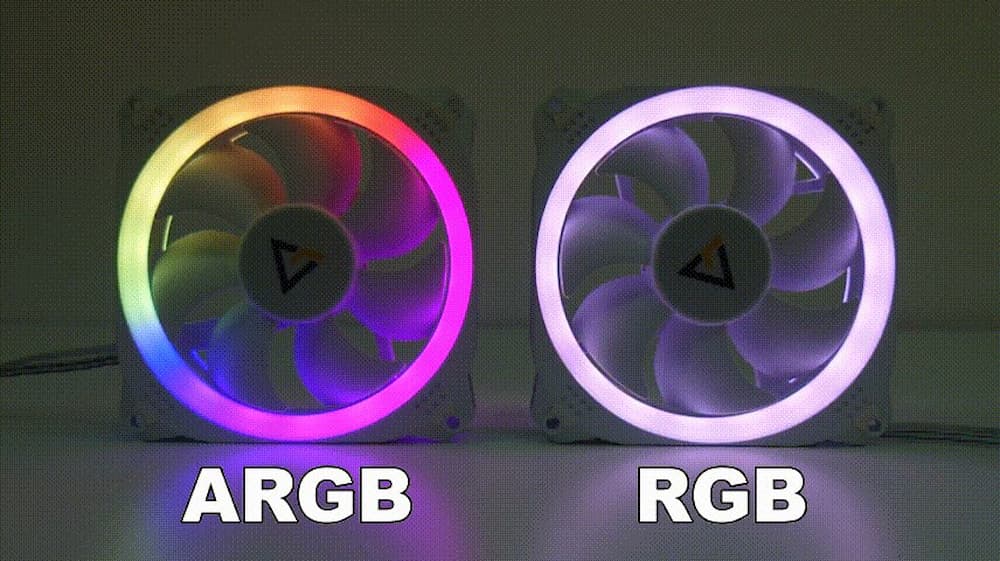
At its core, ARGB stands for Addressable Red Green Blue. To understand why this is revolutionary, we must first look at its predecessor: standard RGB. In a traditional RGB setup, every LED on a strip or inside a fan is wired together. If you set the software to “Blue,” every single LED turns blue. If you choose “Red,” the entire strip turns red. While this allows for millions of color options, the entire component is restricted to one color at a time.
ARGB changes the game by introducing “addressability.” Every individual LED in an ARGB device has its own dedicated integrated circuit (IC). This allows a controller to send specific instructions to each LED independently.
The Difference Between RGB and ARGB
The fundamental difference lies in control. Standard RGB (often referred to as 12V RGB) is an “analog” signal system. It provides power to the red, green, and blue channels simultaneously across the whole strip. ARGB, conversely, is a “digital” system. It uses a data signal to tell LED #1 to be red, LED #2 to be green, and LED #3 to be off.
This granular control enables complex visual effects that standard RGB simply cannot achieve. Patterns like rainbows, “breathing” gradients, chasing lights, and even reactive lighting that mimics the action on your monitor are only possible through ARGB.
How ARGB Works: The Digital Signal
The magic of ARGB happens through a three-wire system: Ground, 5V Power, and Data. The “Data” line is the brain of the operation. The motherboard or a dedicated lighting controller sends a serial stream of data packets down this line. Each LED chip reads the first packet meant for it, executes the color command, and passes the remaining data to the next LED in the chain. This happens at incredibly high speeds, creating the illusion of fluid, seamless movement across your hardware.
The Hardware Behind the Glow: Connectors and Voltages
From a technical perspective, the most critical thing to understand about ARGB is that it is physically and electrically incompatible with standard RGB. For a PC builder, mixing these up can result in permanent hardware damage.
5V vs. 12V: The Critical Distinction
Standard RGB operates on a 12V system and typically uses a 4-pin connector. ARGB operates on a 5V system and uses a 3-pin connector (which often looks like a 4-pin layout with one pin missing).
Plugging a 5V ARGB component into a 12V RGB header is a recipe for disaster. The 12V surge will instantly fry the delicate integrated circuits inside the ARGB LEDs. This is why manufacturers have moved toward the 3-pin “keyed” design—to prevent users from accidentally connecting them to the wrong headers. When selecting a motherboard or a case, ensuring compatibility between your headers and your components is the first step of any successful tech build.
Headers, Controllers, and Hubs
As the demand for ARGB has grown, so has the complexity of managing it. Most modern mid-to-high-end motherboards come with at least one or two ARGB headers. However, if you are building a system with nine fans, two LED strips, and a GPU bracket, a single header won’t suffice.
This is where ARGB Hubs and Controllers come in.
- ARGB Hubs: These act as power splitters. They take the signal from one motherboard header and replicate it across multiple devices. All devices connected to a hub will usually display the same pattern.
- ARGB Controllers: These are more advanced. They often connect via USB to the motherboard and allow for independent control of every device plugged into them, regardless of how many headers your motherboard has.
Implementing ARGB in Your Setup
The versatility of ARGB has led to its integration into almost every facet of the modern workstation and gaming rig. It is no longer limited to just “cool lights”; it is a tool for personal expression and environmental immersion.
ARGB Fans and Cooling Solutions
Fans are the most common application of ARGB. Manufacturers like Corsair, Lian Li, and Noctua have integrated addressable LEDs into the hubs or the outer rings of their fans. Beyond fans, All-In-One (AIO) liquid coolers now feature ARGB pump blocks that can display system temperatures through color—shifting from blue to red as the CPU gets hotter. This blends aesthetic appeal with functional utility, a hallmark of great tech design.
LED Strips and Case Lighting
For those who want to illuminate the interior of their chassis, ARGB LED strips offer the most flexibility. Unlike the static strips of a decade ago, modern ARGB strips can be diffused to look like solid bars of light (often called Neon strips). These can be mapped to create “ambient” light that spills out of the case, reflecting the user’s mood or the specific theme of their software environment.
Peripheral Integration
The ARGB ecosystem extends beyond the PC case. Keyboards, mice, and even mousepads now feature addressable zones. Through unified software, a user can synchronize their keyboard’s “wave” effect to match the fans inside their PC, creating a cohesive visual experience across their entire desk.
Software Ecosystems and Customization
Hardware is only half of the story. To unlock the potential of ARGB, you need sophisticated software to tell those individual LEDs what to do. The tech industry currently faces a “walled garden” challenge, where different manufacturers have their own proprietary software.
Motherboard Software vs. Third-Party Apps
Major motherboard manufacturers provide their own suites, such as ASUS Aura Sync, MSI Mystic Light, Gigabyte RGB Fusion, and ASRock Polychrome. These allow for basic synchronization and are generally stable for controlling components directly plugged into the motherboard.
However, many enthusiasts turn to third-party or open-source solutions for deeper customization. Programs like SignalRGB or OpenRGB attempt to bridge the gap between different brands. These tools allow a user to sync a Razer mouse, a Corsair keyboard, and an ASUS motherboard under one unified interface, creating complex “canvases” where light moves across different brands of hardware as if they were a single display.
Creating Dynamic Profiles and Syncing
Advanced ARGB software allows for “Layered” lighting. You can have a base layer of dim purple light, with a secondary layer that sends a white “sparkle” through the system every time you press a key. You can also sync your lighting to music (Visualizers) or the colors on your screen (Ambilight). For tech professionals who use their PCs for creative work, these lights can even be programmed to turn a certain color when a “Render” is finished or when an email arrives.
The Future of Lighting: Why ARGB Matters Beyond Aesthetics
While critics often dismiss ARGB as “puerile” or “distracting,” the technology behind it is a testament to the miniaturization and efficiency of modern electronics. Looking forward, ARGB is evolving from a mere decorative choice into a sophisticated interface for human-computer interaction.
Performance Monitoring and Visual Cues
In high-performance computing, monitoring system health is vital. ARGB provides a non-intrusive way to stay informed. Imagine a setup where the peripheral glow of your case turns yellow when your RAM usage hits 90%, or your keyboard flashes red if your GPU fans fail. This “glanceable” data allows users to stay focused on their work or play while maintaining a peripheral awareness of their hardware’s status.
Sustainability and LED Efficiency
From a sustainability standpoint, the shift toward ARGB is also a shift toward LED efficiency. Addressable LEDs are inherently more efficient than older lighting methods. Because they can be turned off individually or dimmed with extreme precision via Pulse Width Modulation (PWM), they consume very little power relative to the visual impact they provide. As the tech matures, we are seeing “Smart Lighting” integration, where your PC’s ARGB can communicate with your room’s smart bulbs via Wi-Fi, creating a holistic, energy-efficient ecosystem.
Conclusion
“What does ARGB mean?” is a question with two answers. Technically, it means Addressable Red Green Blue—a digital lighting standard that allows for individual control of LEDs. But in the broader context of technology, it represents the intersection of personalization and performance. It is the bridge between a functional machine and a personalized workspace.
Whether you are a hardcore gamer looking for total immersion, a creative professional wanting a refined aesthetic, or a system builder who enjoys the technical challenge of wiring and programming a complex light show, ARGB is the technology that makes it possible. As we move further into an era where our digital and physical spaces overlap, the precision and beauty of ARGB will undoubtedly continue to shine.
aViewFromTheCave is a participant in the Amazon Services LLC Associates Program, an affiliate advertising program designed to provide a means for sites to earn advertising fees by advertising and linking to Amazon.com. Amazon, the Amazon logo, AmazonSupply, and the AmazonSupply logo are trademarks of Amazon.com, Inc. or its affiliates. As an Amazon Associate we earn affiliate commissions from qualifying purchases.