
In the digital realm, the concept of “publishing” often conjures images of books, articles, or websites going live for public consumption. However, when we talk about a Google Form, “publishing” takes on a distinct and multifaceted meaning. It’s not about typesetting or formal distribution channels; it’s about transforming a draft questionnaire or data collection tool into an active, accessible instrument ready to gather information from its intended audience. Essentially, to publish a Google Form means to make it available for responses, configuring its settings, sharing it through various channels, and ultimately leveraging the data it collects. This seemingly simple act unlocks a powerful suite of capabilities that touch upon technology, brand strategy, and even financial outcomes for individuals and organizations alike.
Google Forms, as a free web-based application within the Google Workspace suite, provides an intuitive platform for creating surveys, quizzes, registration forms, and more. Publishing it involves a series of steps that move beyond mere creation to active deployment and management. It signifies the transition from a private draft to a public (or semi-public) data collection point, complete with real-time response tracking and robust integration with other Google services like Google Sheets. Understanding this process, and its implications across different domains, is crucial for anyone looking to harness the full potential of this versatile tool.
The Technicalities of “Publishing”: Making Your Form Live
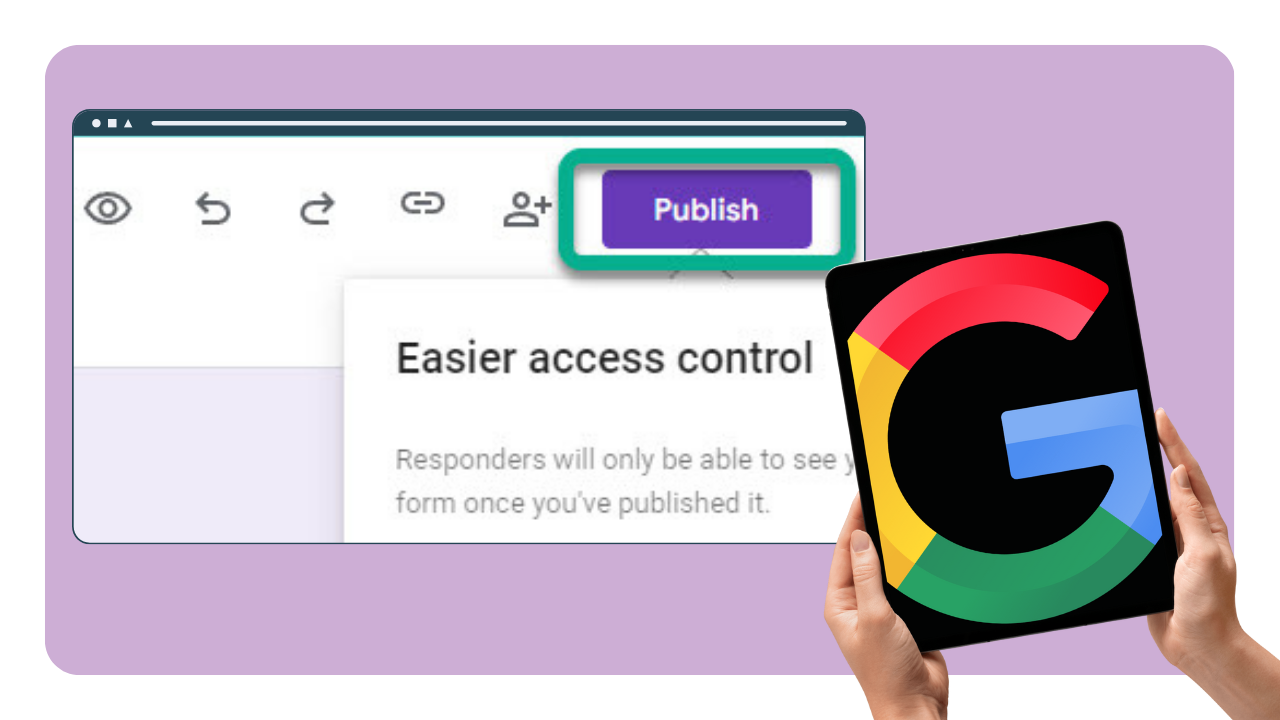
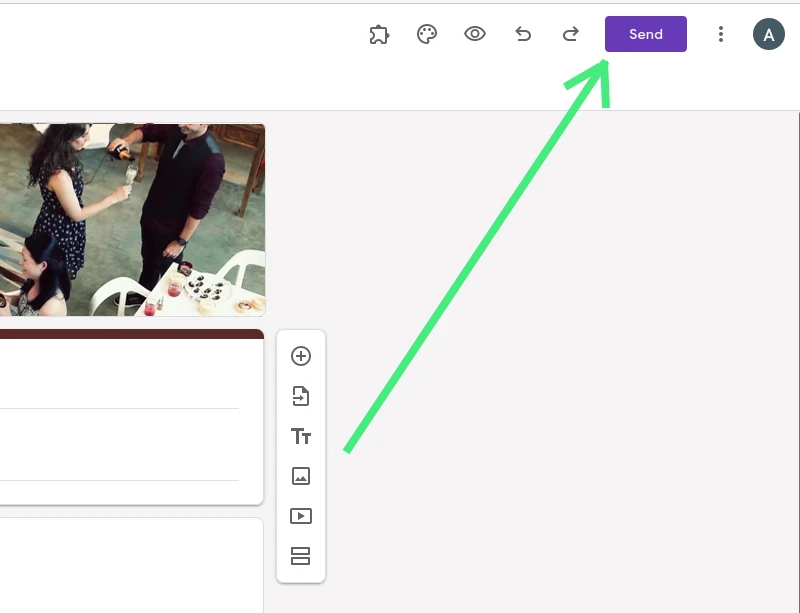
At its core, publishing a Google Form is a technical exercise in making a digital asset accessible and functional for data capture. This involves not just the act of clicking a “Send” button but a careful consideration of form design, distribution mechanisms, and the subsequent management of collected data.
Crafting Your Form for Optimal Data Collection
Before a Google Form can be truly “published,” it must first be meticulously crafted. This initial stage involves designing the questionnaire with clear objectives in mind. Google Forms offers a wide array of question types—from multiple choice and checkboxes to short answer, paragraph, and linear scale—allowing for tailored data collection. Beyond simply adding questions, optimization involves several key technical configurations:
- Settings Configuration: Publishing starts with defining the form’s behavior. This includes deciding whether to collect email addresses, limit responses to one per user, allow respondents to edit their answers after submission, or show a progress bar. For quizzes, settings include assigning point values and providing automated feedback.
- Response Limits and Accessibility: Depending on the purpose, you might want to restrict who can respond (e.g., only users within your organization) or set a specific response limit. Furthermore, ensuring the form is accessible across various devices and browsers without technical glitches is paramount for a smooth user experience.
- Basic Customization: While branding is discussed later, even at the technical stage, customizing the form’s theme, colors, and fonts provides a more professional appearance, aligning with user expectations for a polished online interaction. This foundational design ensures that when the form is published, it looks presentable and functions flawlessly.
Sharing Your Form: Distribution Channels
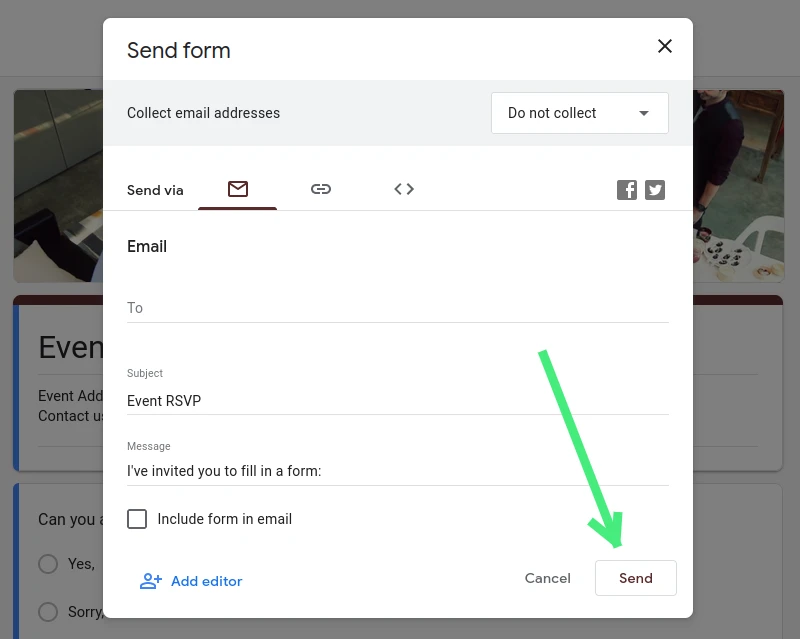
Once technically configured, the actual “publishing” act involves distributing the form to its intended audience. Google Forms offers several versatile sharing options, each suited for different scenarios:
- Direct Link: The most common method is sharing a direct URL to the form. This link can be pasted into emails, chat messages, documents, or anywhere a hyperlink can be used. Google also offers a “shorten URL” option for cleaner sharing.
- Email: Forms can be sent directly via email, either as a link or embedded within the email body itself (though embedding might not be universally supported by all email clients). This is ideal for targeted distribution to specific individuals or groups.
- Embedding on Websites/Blogs: For seamless integration into a webpage, blog post, or internal intranet, Google Forms provides an embed code (iframe). This allows the form to appear as a native element on your site, keeping users on your platform while they interact with the form. This is particularly useful for lead capture forms, event registrations, or contact forms on business websites.
- Social Media Sharing: The direct link can also be easily shared across various social media platforms, extending the form’s reach to a broader audience for surveys, contests, or feedback campaigns.
- Collaboration: While not strictly “publishing,” the ability to add collaborators who can edit the form is a technical aspect of its lifecycle, allowing teams to collectively refine and manage the form before and after it goes live.
Managing Responses and Data Security
Publishing a Google Form isn’t just about sending it out; it’s also about managing the inbound data. Every response collected is automatically stored in Google Forms, and crucially, can be linked to a Google Sheet. This integration is a powerful technical feature:
- Real-time Response Tracking: Form creators can view summary charts and individual responses directly within Google Forms.
- Google Sheets Integration: Linking to a Google Sheet provides a robust, organized database for all responses. This allows for advanced data analysis, filtering, sorting, and even integration with other tools or dashboards. This transition of raw data into an actionable spreadsheet is a core technical benefit of Google Forms.
- Data Privacy and Security: Publishing a form requires an understanding of data privacy. Google provides robust security for its platform, but the responsibility for what data is collected and how it’s handled rests with the form creator. This includes settings for restricting access, ensuring compliance with data protection regulations (like GDPR), and safeguarding sensitive information. For internal forms, restricting access to specific organizational users enhances security.
Leveraging Google Forms for Brand Building and Engagement
Beyond its technical utility, publishing a Google Form serves as a strategic asset for brand development and fostering meaningful engagement with various stakeholders. The way a form is presented and utilized can significantly impact how a brand is perceived.
Gathering Customer Insights and Feedback
One of the most powerful brand-building applications of published Google Forms is the systematic collection of customer insights. Understanding your audience is foundational to effective branding, and forms provide an accessible conduit for this:
- Product/Service Reviews: After a purchase or service interaction, a Google Form can be published to gather immediate feedback on satisfaction, usability, and areas for improvement. This shows customers that their opinions are valued and contributes to product refinement, enhancing brand reputation.
- Customer Satisfaction Surveys (CSAT): Regularly deployed CSAT surveys via Google Forms can track customer sentiment over time, identifying trends and enabling proactive responses to issues. A brand that actively seeks and acts on feedback is perceived as responsive and customer-centric.
- Market Research for New Offerings: Before launching a new product or service, publishing a form to gauge interest, preferred features, or pricing expectations from a target demographic can significantly reduce risk and ensure the offering aligns with market needs, strengthening the brand’s strategic positioning.
Enhancing Your Brand’s Professionalism and Reach
The presentation and purpose of a published Google Form directly reflect on your brand’s professionalism and its ability to connect with its audience:
- Event Registration and RSVPs: For webinars, workshops, or physical events, a professionally designed Google Form serves as the primary registration portal. Customizing it with your brand’s logo, colors, and specific imagery elevates the perceived professionalism of the event and, by extension, your brand.
- Lead Generation and Contact Forms: Embedding a branded Google Form on your website for lead capture (e.g., “Request a Demo,” “Get a Quote”) or as a general contact form provides an efficient and branded touchpoint. It ensures a consistent brand experience even during data submission, fostering trust and credibility.
- Building Community Interaction: Publishing forms for polls, quizzes, or open-ended discussions related to your brand or industry can foster a sense of community. It encourages participation, gathers user-generated content ideas, and positions the brand as an engaging and interactive entity rather than just a provider of goods or services.
- Branding Forms with Logos and Colors: This goes beyond basic customization. It involves strategically incorporating brand assets into the form’s design to ensure a cohesive visual identity. A form that clearly reflects the brand’s aesthetic reinforces brand recognition and leaves a lasting, positive impression.
Reputation Management and Continuous Improvement
A published Google Form can be an invaluable tool in proactive reputation management and fostering a culture of continuous improvement:
- Feedback Loops for Services: Implementing regular feedback forms after key service interactions allows brands to immediately address potential negative experiences and learn from positive ones. This agile approach to feedback is critical for maintaining a strong brand image.
- Identifying Areas for Improvement: By analyzing trends in responses from customer feedback forms, brands can identify systemic issues or recurring pain points. Addressing these demonstrates a commitment to excellence and continuous improvement, which are strong pillars of a positive brand reputation.
- Testimonials and Success Stories: A form can be published specifically to collect testimonials or success stories from satisfied customers. These can then be leveraged in marketing materials, providing social proof that significantly enhances brand credibility and attracts new customers.
Driving Financial Outcomes with Google Forms
While Google Forms is not a payment processing platform, its “publication” can indirectly but powerfully drive financial outcomes by streamlining operations, informing strategic decisions, and contributing to revenue generation and cost savings. This often involves leveraging the data collected to make smarter “Money” related choices.
Streamlining Business Operations and Sales
For businesses of all sizes, especially small businesses and solopreneurs, a published Google Form can act as a crucial operational backbone, impacting the bottom line:
- Simple Order Forms: While forms don’t process payments directly, they can serve as effective order capture tools. Businesses can publish forms to collect customer details, product selections, quantities, and delivery information. This streamlines the ordering process, reduces manual errors, and provides a clear record, which can then be used to generate an invoice or link to a separate payment gateway.
- Client Intake Forms: For service-based businesses (consultants, designers, coaches), publishing an intake form allows for efficient pre-qualification of potential clients. This gathers essential information about their needs, budget, and project scope before the first consultation, saving valuable time and ensuring a better fit, leading to higher conversion rates and thus, revenue.
- Collecting Information for Invoicing: After a service or sale, a Google Form can be used to gather all necessary details for accurate invoicing, such as project milestones completed, additional services rendered, or client-specific billing requirements. This reduces administrative overhead and potential billing disputes, ensuring timely and accurate payments.
- Lead Qualification Forms: Beyond simple lead capture, a published form can be designed to qualify leads by asking specific questions about budget, timeline, and decision-making authority. By filtering out unqualified leads early, sales teams can focus their efforts on high-potential prospects, improving sales efficiency and increasing revenue generation.
Informing Financial Decisions and Strategy
The data gathered through published Google Forms can provide critical insights that directly influence financial planning and strategic decision-making:
- Surveys for Market Viability of New Products/Services: Before investing significant capital into developing a new offering, publishing a market research survey can gauge potential demand, acceptable price points, and desired features. This data helps in making informed investment decisions, minimizing financial risk and maximizing potential returns.
- Collecting Data for Investment Analysis: For personal finance or small business investments, forms can be used to gather information from various sources (e.g., potential partners, market experts, customer preferences) that might influence an investment strategy. While not a direct financial tool, it helps in due diligence and data-driven decision-making.
- Budgeting and Expense Tracking (Personal and Small Business): Individuals and small businesses can publish internal forms to track expenses, categorize them, or submit budget requests. This systematizes financial data entry, making it easier to monitor cash flow, adhere to budgets, and identify areas for cost savings, thereby directly impacting financial health.
Indirect Revenue Generation and Cost Savings
The act of publishing a Google Form can also lead to indirect financial benefits through automation and improved efficiency:
- Automating Data Collection Reduces Administrative Costs: Replacing manual data entry or paper forms with digital Google Forms significantly reduces administrative time and associated labor costs. The time saved can be reallocated to more revenue-generating activities.
- Effectively Qualifying Leads Saves Sales Team Time: As mentioned, pre-qualifying leads via forms means sales teams spend less time chasing unlikely prospects and more time closing deals, directly impacting sales efficiency and revenue.
- Gathering Feedback to Refine Products/Services, Leading to Better Sales: By continuously collecting customer feedback through forms, businesses can refine their offerings to better meet market demands. Improved products and services naturally lead to higher customer satisfaction, repeat business, and positive word-of-mouth, all contributing to increased sales and profitability.
- Event Registrations for Paid Events: If you’re organizing a paid workshop or conference, a Google Form can manage registrations. While payment is handled separately (e.g., via PayPal or Stripe link provided on the confirmation page), the form ensures efficient attendee management, which is crucial for the financial success of the event.
Best Practices and Advanced Tips for Google Form Publishing
To truly master the act of publishing a Google Form and maximize its utility across tech, brand, and money aspects, adopting best practices and exploring advanced features is essential.
Design for User Experience (UX)
A well-designed form encourages completion and provides higher quality data:
- Keep it Concise and Focused: Only ask essential questions. Long, convoluted forms lead to abandonment and poor data.
- Clear Instructions and Guidance: Provide straightforward instructions at the beginning of the form and for individual questions. Use tooltips or descriptive text to clarify complex fields.
- Logical Flow and Grouping: Organize questions into logical sections. Use Google Forms’ section breaks to guide respondents through the form, especially for longer surveys.
- Mobile Responsiveness: Ensure the form looks and functions well on all devices, as many respondents will access it via smartphones or tablets. Google Forms are inherently responsive, but it’s good practice to preview.
Integrating with the Google Ecosystem and Beyond
The true power of a published Google Form is amplified through its integration capabilities:
- Google Sheets for Powerful Analysis: This is non-negotiable for serious data collection. Link your form to a Google Sheet immediately to leverage its advanced filtering, sorting, charting, and formula capabilities. You can even create pivot tables or connect it to Google Data Studio (Looker Studio) for interactive dashboards.
- Google Workspace Integration (Calendar, Meet): For event registrations, responses can trigger Google Calendar invitations. For booking forms, a Google Meet link can be automatically generated for confirmed appointments via add-ons.
- Add-ons for Enhanced Functionality: The Google Workspace Marketplace offers numerous add-ons for Google Forms that extend its capabilities. Examples include:
- Form Publisher: Converts form responses into professional documents (PDFs, Word files).
- Form Notifications: Sends custom email notifications to respondents or specific team members upon submission.
- Approval Workflows: Creates multi-step approval processes for requests submitted via forms.
- Timers and Quizzes: Enhances functionality for educational or assessment purposes.
- Connecting with CRM/Marketing Automation Tools (via Zapier, etc.): For businesses, integrating Google Forms with Customer Relationship Management (CRM) systems (like Salesforce, HubSpot) or marketing automation platforms (like Mailchimp, ActiveCampaign) is a game-changer. Tools like Zapier, Make (formerly Integromat), or IFTTT can automate workflows, such as adding new form submissions as leads in your CRM or subscribing them to an email list, thereby creating a powerful, automated sales and marketing funnel.
Conclusion
To “publish” a Google Form is to activate a dynamic and incredibly versatile tool within the digital landscape. It transcends the simple act of making a document available; it is a strategic decision that impacts how you gather information, engage with your audience, and ultimately drive results. From the technical nuances of form creation and sharing to its profound implications for building a strong brand and achieving financial objectives, a published Google Form is far more than just a survey. It’s a digital bridge, connecting you with data, insights, and opportunities across the realms of technology, branding, and finance. By understanding and embracing the full meaning of this simple act, users can unlock a powerful, free resource to enhance productivity, foster engagement, and inform critical decisions in an increasingly data-driven world.
aViewFromTheCave is a participant in the Amazon Services LLC Associates Program, an affiliate advertising program designed to provide a means for sites to earn advertising fees by advertising and linking to Amazon.com. Amazon, the Amazon logo, AmazonSupply, and the AmazonSupply logo are trademarks of Amazon.com, Inc. or its affiliates. As an Amazon Associate we earn affiliate commissions from qualifying purchases.