
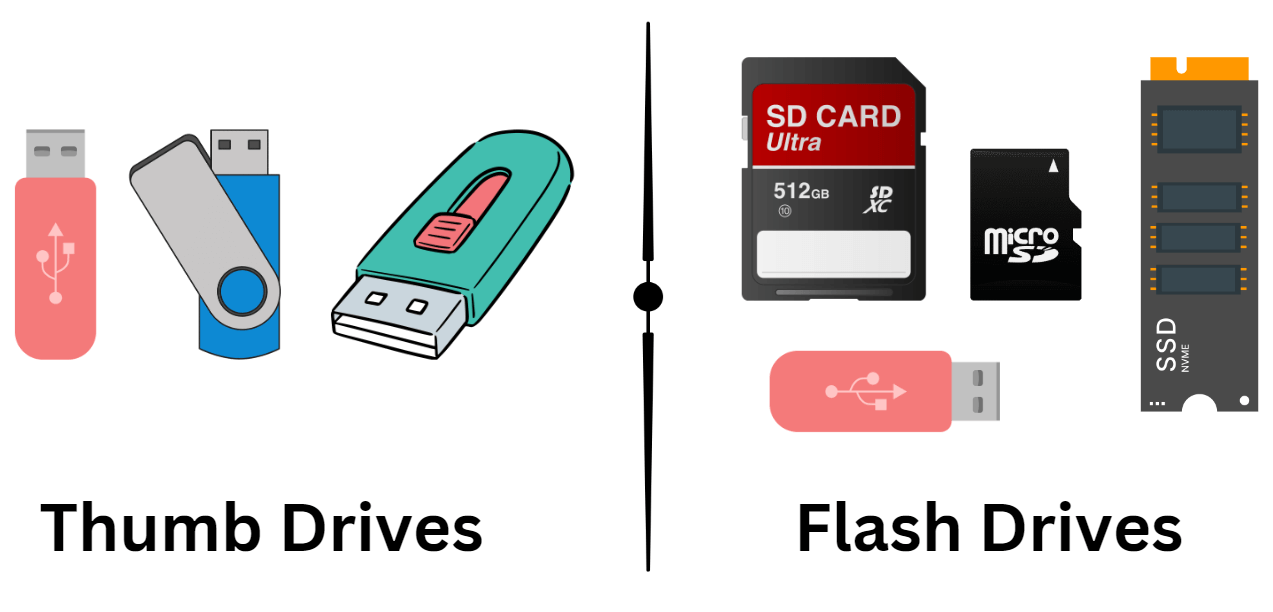
A thumb drive, also commonly known as a USB flash drive, flash drive, jump drive, pen drive, or memory stick, is a ubiquitous piece of portable storage technology that has revolutionized how we transfer, store, and access digital information. Its compact size, ease of use, and affordability have made it an indispensable tool for students, professionals, and everyday computer users alike. Far from being a simple data carrier, the thumb drive represents a significant evolution in personal computing and data management, offering a bridge between the physical and digital realms of information.
The advent of the thumb drive marked a departure from older, more cumbersome portable storage methods. Before its widespread adoption, users relied on floppy disks, CD-ROMs, and even external hard drives, which were often bulkier, slower, and had significantly lower storage capacities. The thumb drive’s innovation lay in its integration of flash memory technology, the same type found in solid-state drives and SD cards, into a small, portable form factor that connected directly to a computer’s Universal Serial Bus (USB) port. This seamless integration eliminated the need for dedicated drives or complex setup procedures, making data transfer as simple as plugging in a device.

Understanding the mechanics and evolution of the thumb drive offers a fascinating glimpse into the progress of digital storage. From its initial iterations with limited capacity to today’s massive storage solutions, the thumb drive continues to adapt and remain relevant in a landscape increasingly dominated by cloud storage and streaming services. Its enduring appeal lies in its tangible nature, offline accessibility, and the sheer convenience it offers for quick and secure data transfer.
The Evolution and Underlying Technology of Thumb Drives
The journey of the thumb drive is a testament to rapid technological advancement, particularly in the field of semiconductor memory. Its creation and widespread adoption were driven by the increasing demand for portable, high-capacity, and easily accessible data storage solutions.
From Floppy Disks to Flash Memory: A Storage Revolution
Before the thumb drive, the primary method for transporting small amounts of digital data was the floppy disk. These magnetic storage devices, while revolutionary in their time, were prone to physical damage, had very limited storage capacity (typically around 1.44 MB), and were relatively slow. The advent of optical media like CD-ROMs and CD-RWs offered larger capacities (around 700 MB) and improved durability, but still required dedicated drives and were not as easily rewritable or portable.
The true breakthrough came with the development of non-volatile flash memory. This type of memory retains its data even when the power is turned off, a crucial feature for portable storage. The underlying technology, often NAND flash memory, is organized into blocks and pages, allowing for efficient data storage and retrieval. Unlike older RAM technologies, flash memory is also more robust and resistant to physical shock, making it ideal for devices that are frequently carried around.
The Birth of the USB Interface
The Universal Serial Bus (USB) interface, first introduced in the mid-1990s, was designed to standardize the connection of peripherals to computers. Its key advantages included hot-swapping capabilities (allowing devices to be connected and disconnected without restarting the computer), a standardized connector, and the ability to deliver power to connected devices. This standardization was instrumental in the success of the thumb drive.
The first commercially available USB flash drives began appearing in the late 1990s and early 2000s. Companies like Trek Technology (with their ThumbDrive) and Netac (with their U-Disk) were pioneers in bringing this technology to the consumer market. These early drives typically offered capacities of just a few megabytes, a stark contrast to the gigabytes and even terabytes available today. However, their portability and ease of use immediately set them apart from existing solutions.
Functionality and Practical Applications
The thumb drive’s appeal lies in its straightforward functionality and its ability to serve a wide range of practical purposes for individuals and professionals alike. Its simplicity belies its versatility.
Data Transfer and Backup: The Core Utility
At its heart, a thumb drive is a tool for moving data. Whether it’s transferring a large presentation from a work computer to a home laptop, sharing photos with family, or moving large design files between different machines, the thumb drive offers a direct and reliable method. This is particularly valuable in situations where internet connectivity is limited or unreliable, or when sending large files over email is impractical due to size restrictions.
Beyond simple transfer, thumb drives are also excellent for creating local backups of important files. While cloud storage offers offsite backup solutions, having a physical copy of critical documents, personal photos, or important project files on a thumb drive provides an extra layer of security. This can be crucial in case of hardware failure, cyberattacks that affect cloud services, or even simple accidental deletion from a primary storage device. Users can regularly copy important data onto a thumb drive, ensuring they have a readily accessible and independent copy.
Bootable Drives and System Utilities
The functionality of thumb drives extends beyond basic file storage. They can be formatted and configured to become “bootable.” This means that a computer can be instructed to start its operating system or other software directly from the thumb drive, rather than from its internal hard drive. This capability is invaluable for several technical applications:
- Operating System Installation: Many operating systems, such as Windows and Linux distributions, can be installed onto a computer using a bootable thumb drive. This is often faster and more convenient than using DVDs.
- System Recovery and Repair: Bootable thumb drives can contain diagnostic tools, antivirus software, or system repair utilities. If a computer’s operating system becomes corrupted or unbootable, a user can boot from a specialized thumb drive to diagnose the problem, repair damaged files, or even reinstall the operating system.
- Live Operating Systems: Linux distributions, in particular, can be run directly from a thumb drive as a “live” operating system without installing anything on the computer’s internal hard drive. This is useful for testing different operating systems, accessing files on a compromised computer, or using a computer without leaving any trace of activity.
- Password Reset and Data Recovery: Specialized bootable thumb drives can be used to reset forgotten passwords for user accounts on various operating systems or to access and recover data from a computer that is otherwise inaccessible.
This dual functionality, encompassing both simple data storage and advanced system operations, highlights the thumb drive’s adaptability and its continued relevance in the digital age.
Advantages and Considerations for Modern Usage
While cloud storage and network-attached storage (NAS) solutions have gained significant traction, thumb drives continue to offer compelling advantages, alongside certain considerations that users should be aware of. Their appeal often stems from a combination of factors that cater to immediate, tangible needs.
Portability, Affordability, and Offline Access
The most obvious advantage of a thumb drive is its portability. Its small size makes it easy to slip into a pocket, wallet, or keychain, allowing users to carry vast amounts of data with them wherever they go. This is especially beneficial in educational settings, business presentations, or when working across multiple locations.
Affordability is another key factor. Compared to the ongoing costs associated with some cloud storage subscriptions, a thumb drive is a one-time purchase. While the initial investment for high-capacity drives can be significant, the cost per gigabyte has decreased dramatically over the years, making them an economical choice for many users.
Crucially, thumb drives offer offline access. This is perhaps their most significant differentiating factor from cloud-based storage. Users do not need an internet connection to access, read, or write data on a thumb drive. This makes them indispensable for working in remote locations, on airplanes, or during internet outages. The tangible nature of the device also provides a sense of security for some users, who prefer to keep critical data physically separate from online services.
Security, Durability, and Limitations
Despite their advantages, thumb drives also come with specific security considerations. They are susceptible to physical loss or theft. If a thumb drive contains sensitive information and is not encrypted, it can easily fall into the wrong hands. Many modern thumb drives offer built-in encryption software, or users can employ third-party tools to password-protect their data, mitigating this risk.
The durability of thumb drives can vary. While generally more robust than floppy disks, they can still be damaged by extreme temperatures, moisture, or physical impact. The USB connector can also be a point of failure over time with frequent use. It is advisable to handle them with care and avoid exposing them to harsh conditions.
One of the primary limitations of thumb drives is their capacity, especially when compared to the ever-increasing sizes of digital files. While multi-terabyte drives are now available, they are significantly more expensive than cloud storage options that offer similar capacities. Furthermore, the speed of data transfer, while vastly improved from early models, can still be slower than internal SSDs, particularly for very large files. Their reliance on physical ports also means they are not as seamlessly integrated into workflows that are exclusively wireless.
The Future of Thumb Drives in a Cloud-Centric World
The rise of cloud storage, ubiquitous Wi-Fi, and advanced networking has undoubtedly changed the landscape of data storage and transfer. However, to declare the thumb drive obsolete would be premature. Its enduring characteristics suggest a continued, albeit evolving, role.
Complementary Storage and Niche Applications
While cloud services provide immense convenience for collaboration and universal access, thumb drives excel in scenarios where immediate, offline, and portable storage is paramount. For instance, in developing regions with limited internet infrastructure, thumb drives remain a primary method for data exchange. Similarly, for individuals who prioritize having a completely independent physical backup of critical data, or those who work in environments with strict data security policies that limit cloud usage, thumb drives offer a vital solution.
The need for bootable drives for operating system installation, system recovery, and specialized software deployment ensures that thumb drives will continue to be a staple for IT professionals and power users. They offer a reliable and direct method to interact with a computer’s hardware at a fundamental level, a capability that cloud services cannot replicate.

Innovations and Continued Relevance
Manufacturers are not standing still. Innovations in thumb drive technology continue, focusing on increasing storage density, improving transfer speeds with newer USB standards (like USB 3.2 and USB4), and enhancing security features. We are also seeing hybrid devices that combine flash storage with other functionalities, potentially extending the thumb drive’s utility.
While the exact form factor and primary use cases might shift, the fundamental need for a small, portable, and direct means of digital storage and transfer is unlikely to disappear entirely. The thumb drive, in its various iterations, has proven remarkably resilient, adapting to technological shifts. Its simplicity, tangibility, and independence from network connectivity will likely ensure its place in the digital toolkit for the foreseeable future, serving as a reliable backup, a handy transfer medium, and an essential tool for technical operations.
aViewFromTheCave is a participant in the Amazon Services LLC Associates Program, an affiliate advertising program designed to provide a means for sites to earn advertising fees by advertising and linking to Amazon.com. Amazon, the Amazon logo, AmazonSupply, and the AmazonSupply logo are trademarks of Amazon.com, Inc. or its affiliates. As an Amazon Associate we earn affiliate commissions from qualifying purchases.