
In the fast-paced world of software development and project management, clear communication and structured workflows are paramount. Jira, a powerful issue and project tracking software developed by Atlassian, has become an indispensable tool for teams looking to streamline their processes. Within the Jira ecosystem, understanding fundamental concepts like “Stories” is crucial for effective collaboration and delivery. This article delves into the essence of what a Story is in Jira, exploring its purpose, characteristics, and how it fits into the broader Agile framework.
Understanding the Agile Context: User Stories as the Foundation
Jira is fundamentally designed to support Agile methodologies, particularly Scrum and Kanban. Within these frameworks, work is broken down into manageable pieces to facilitate iterative development and continuous feedback. The “Story” in Jira is a direct manifestation of this Agile principle, specifically rooted in the concept of User Stories.

The Genesis of User Stories
The User Story is a lightweight, informal description of a feature from the perspective of the end-user. It’s not a detailed technical specification but rather a concise statement that captures the desired functionality, the user who benefits from it, and the reason for its existence. The common template for a User Story is:
“As a [type of user], I want [an action] so that [a benefit].”
This simple structure ensures that every piece of work is tied back to a user’s need, fostering a user-centric approach to development. It encourages conversation and collaboration, as the team discusses the story to clarify requirements, estimate effort, and plan implementation.
Jira’s Role in Implementing User Stories
Jira translates the User Story concept into a tangible artifact within its platform. When you create a “Story” issue type in Jira, you are essentially creating a container for a User Story. This container allows teams to:
- Define and document: Capture the User Story’s text, along with any additional details, acceptance criteria, and attachments.
- Prioritize and plan: Place Stories in backlogs, allowing product owners and scrum masters to prioritize them based on business value and effort.
- Track progress: Assign Stories to team members, monitor their status through workflows, and visualize their progress on boards.
- Facilitate collaboration: Enable comments, attachments, and linked issues to foster communication around a specific piece of work.
Therefore, a Story in Jira is not just a label; it’s a structured representation of a user-centric requirement that drives the development process. It serves as the fundamental unit of work for delivering value to the end-user in an Agile environment.
The Anatomy of a Jira Story: Key Components and Characteristics
A Jira Story is more than just a brief description. It’s a multifaceted entity designed to provide enough context and detail for the development team to understand, estimate, and implement the required functionality. Understanding its constituent parts is key to leveraging Jira effectively.
Essential Fields and Information
When you create a Story in Jira, several fields are typically populated to provide a comprehensive view of the requirement:
- Summary: This is the concise title of the Story, often reflecting the “As a [user], I want [action]” format. It should be clear and easily understandable by all team members. For example, “As a registered user, I want to reset my password so that I can regain access to my account.”
- Description: This field provides more detail about the Story. It can include context, background information, and elaborations on the desired functionality. This is where the “so that [benefit]” part of the User Story template is often expanded upon to explain the value proposition.
- Acceptance Criteria: This is arguably one of the most critical components of a Story. Acceptance Criteria define the conditions that must be met for the Story to be considered “done” and complete. They are typically written as a list of specific, testable statements. For instance, for the password reset Story, acceptance criteria might include:
- “The user receives an email with a password reset link.”
- “The password reset link expires after 24 hours.”
- “The user can successfully set a new password using the provided link.”
- “An error message is displayed if the link is invalid or expired.”
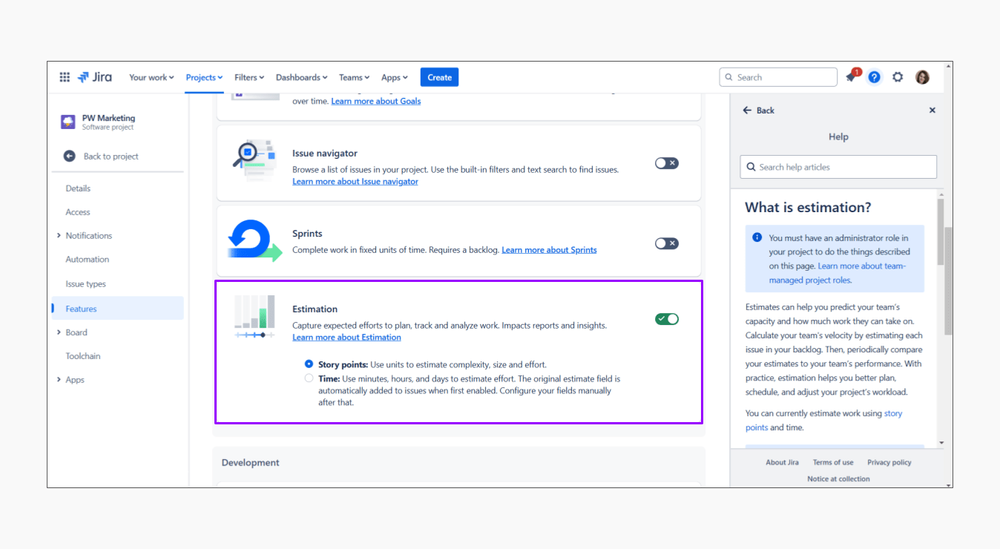
- Story Points (or other Estimation Units): Agile teams often estimate the relative effort required to complete a Story using Story Points. These are abstract units that represent complexity, effort, and uncertainty, rather than specific hours. This helps in planning sprints and forecasting team velocity.
- Assignee: The individual team member responsible for working on the Story.
- Reporter: The person who created the Story.
- Priority: Indicates the relative importance of the Story compared to others in the backlog.
- Labels: Keywords that can be used to categorize and filter Stories for easier organization and reporting.
- Attachments: Any relevant documents, mockups, wireframes, or screenshots that provide further clarity or context.
The Role of Conversation and Collaboration
It’s crucial to remember that a Jira Story is not a static document. The User Story, and by extension the Jira Story, is intended to be a “promise for a conversation.” The written details are a starting point. The real understanding and refinement of requirements happen through discussions between the product owner, the development team, and other stakeholders. Jira facilitates this by providing a central place for comments and discussions related to each Story. This collaborative aspect ensures that the team has a shared understanding of what needs to be built and why.
From Story to Done: The Lifecycle and Workflow of a Jira Story
A Jira Story embarks on a journey from its initial conception to its final completion, moving through a defined workflow that visualizes its progress and facilitates management. Understanding this lifecycle is essential for effective project tracking and delivery.
The Agile Workflow in Action
Jira’s strength lies in its ability to represent and manage these workflows. A typical Agile workflow for a Story might include the following statuses:
- To Do/Open: The Story is in the backlog and has not yet been started. It’s awaiting selection for a sprint or further refinement.
- In Progress: The Story has been picked up by a developer and is actively being worked on. This status signifies that development, coding, and initial testing are underway.
- In Review/Code Review: The code for the Story has been completed and is being reviewed by another developer or a technical lead. This is a crucial step for ensuring code quality and adherence to standards.
- In QA/Testing: The Story has passed code review and is now undergoing quality assurance testing by dedicated testers or the development team themselves. This phase aims to identify bugs and ensure the Story meets all acceptance criteria.
- Done/Closed: The Story has passed all testing, meets all acceptance criteria, and is considered complete and delivered.
This workflow is highly customizable in Jira to reflect the specific processes of a team. For example, some teams might have additional statuses like “Blocked,” “Ready for Deployment,” or “User Acceptance Testing (UAT).”
The Power of Visualizing Progress: Jira Boards
Jira’s visual boards, such as Scrum boards and Kanban boards, are instrumental in visualizing the progress of Stories.
- Scrum Boards: These boards are typically used in Scrum frameworks and are organized by sprints. Stories move across columns representing the workflow statuses as the sprint progresses. This provides a clear snapshot of what the team is working on and what remains to be done within the current sprint.
- Kanban Boards: Kanban boards focus on continuous flow. Stories move across columns that represent stages in the workflow. They often incorporate work-in-progress (WIP) limits to prevent bottlenecks and optimize flow.
By observing the movement of Stories across these boards, teams can quickly identify potential impediments, assess their progress, and make informed decisions about resource allocation and future planning. The visual nature of these boards makes the entire development process transparent and accessible to all team members and stakeholders.
Iterative Refinement and Feedback Loops
The lifecycle of a Jira Story is inherently iterative. As a Story moves through the workflow, feedback is continuously gathered. If bugs are found during testing, the Story might move back to “In Progress” or a related bug issue might be created and linked. If during development or review, it becomes clear that the initial understanding of the Story was incomplete, the team can engage in further conversations and update the Story’s description or acceptance criteria. This continuous feedback loop ensures that the final delivered functionality aligns with user needs and business objectives.
Distinguishing Stories from Other Jira Issue Types
While “Story” is a fundamental issue type in Jira, it’s important to understand how it differs from other common issue types. This clarity helps in correctly categorizing and tracking work, ensuring that the right level of detail and process is applied.
Epic: The Grand Vision
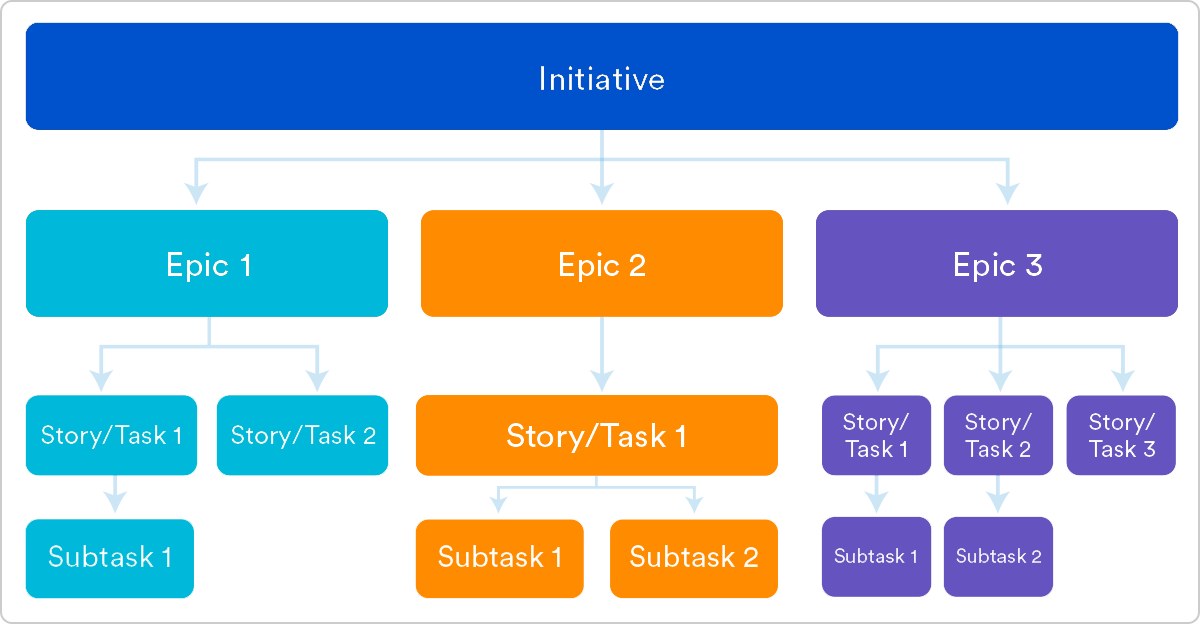
An Epic in Jira represents a large body of work or a significant feature that can be broken down into multiple smaller Stories. Epics are too large to be completed within a single sprint and often span across several sprints. They serve as a high-level roadmap item.
- Purpose: To group related Stories and track the progress of a larger initiative.
- Example: An Epic might be “Implement User Authentication System.” This would then be broken down into Stories like “As a new user, I want to register for an account,” “As a registered user, I want to log in to my account,” and “As a user, I want to forget my password and reset it.”
Task: Specific, Actionable Steps
A Task in Jira is a discrete unit of work that needs to be done to complete a Story or address an issue. Tasks are typically more technical and may not directly represent a user-facing feature.
- Purpose: To detail specific, actionable steps required for development or testing.
- Example: If a Story is “As a user, I want to view my order history,” a Task might be “Create database schema for order history,” “Develop API endpoint for fetching order history,” or “Write unit tests for order history service.”
Bug: Defects and Issues
A Bug in Jira is used to track and manage defects or unintended behaviors in the software. These are issues that prevent the software from functioning as expected.
- Purpose: To report and resolve problems in the software.
- Example: “Login button is not responsive on mobile devices,” “Shopping cart total is calculated incorrectly for discounted items,” or “Application crashes when uploading a file larger than 10MB.”
Sub-task: Granular Breakdown of a Task
A Sub-task is a smaller piece of work that is part of a larger Task. They allow for even further decomposition of work.
- Purpose: To break down a Task into even more granular, manageable steps.
- Example: If the Task is “Develop API endpoint for fetching order history,” Sub-tasks might be “Design API request and response structure,” “Implement logic to query the database,” and “Add error handling for API calls.”
The Hierarchy and Relationships
The relationship between these issue types is hierarchical. An Epic can contain multiple Stories. Each Story can be broken down into multiple Tasks. Tasks, in turn, can be broken down into Sub-tasks. Bugs can often be linked to the Story or Task they affect.
Understanding these distinctions is crucial for effective backlog management and sprint planning. By correctly categorizing work as Stories, Epics, Tasks, or Bugs, teams can ensure that their Jira projects accurately reflect the work being done, facilitate clear communication, and ultimately deliver higher-quality software. The “Story” in Jira serves as the primary unit of user-centric functionality, forming the backbone of most Agile development efforts.
aViewFromTheCave is a participant in the Amazon Services LLC Associates Program, an affiliate advertising program designed to provide a means for sites to earn advertising fees by advertising and linking to Amazon.com. Amazon, the Amazon logo, AmazonSupply, and the AmazonSupply logo are trademarks of Amazon.com, Inc. or its affiliates. As an Amazon Associate we earn affiliate commissions from qualifying purchases.