
The world of computing is a complex ecosystem of hardware and software working in tandem to deliver the seamless digital experiences we’ve come to expect. At the heart of many data-intensive operations lies storage, and for systems requiring high performance, reliability, and redundancy, RAID (Redundant Array of Independent Disks) technology plays a crucial role. While software RAID solutions exist, the performance and capabilities often hinge on dedicated hardware: the RAID adapter. This article delves into the fundamental nature of RAID adapters, exploring their purpose, functionality, and the critical role they play in modern computing environments.
Understanding RAID: The Foundation of the Adapter
Before dissecting the RAID adapter itself, it’s essential to grasp the foundational concept of RAID. RAID is not a single technology but rather a framework for combining multiple physical disk drives into one or more logical units. This combination serves various purposes, most notably:
- Data Redundancy: Protecting against data loss by storing identical copies of data across multiple drives. If one drive fails, the system can continue to operate using the redundant copies.
- Performance Improvement: Distributing data across multiple drives in a way that allows for simultaneous read and write operations, significantly boosting data throughput.
- Increased Capacity: Combining the storage space of multiple smaller drives into a larger logical volume.
RAID levels, such as RAID 0, RAID 1, RAID 5, RAID 6, and RAID 10, define the specific methods of data striping, mirroring, and parity calculation employed to achieve these goals. Each level offers a different balance between performance, redundancy, and cost.
The Need for Dedicated Hardware
While software RAID can be implemented through operating system features, it has inherent limitations. Relying on the CPU and system RAM for RAID calculations can consume valuable system resources, leading to performance bottlenecks, especially in demanding environments like servers, high-performance workstations, or large data storage systems. Furthermore, software RAID can be more susceptible to operating system crashes or corruption, potentially impacting data integrity. This is where hardware RAID adapters, also known as RAID controllers or Host Bus Adapters (HBAs) with RAID functionality, come into play.
How RAID Adapters Work: Bridging the Gap
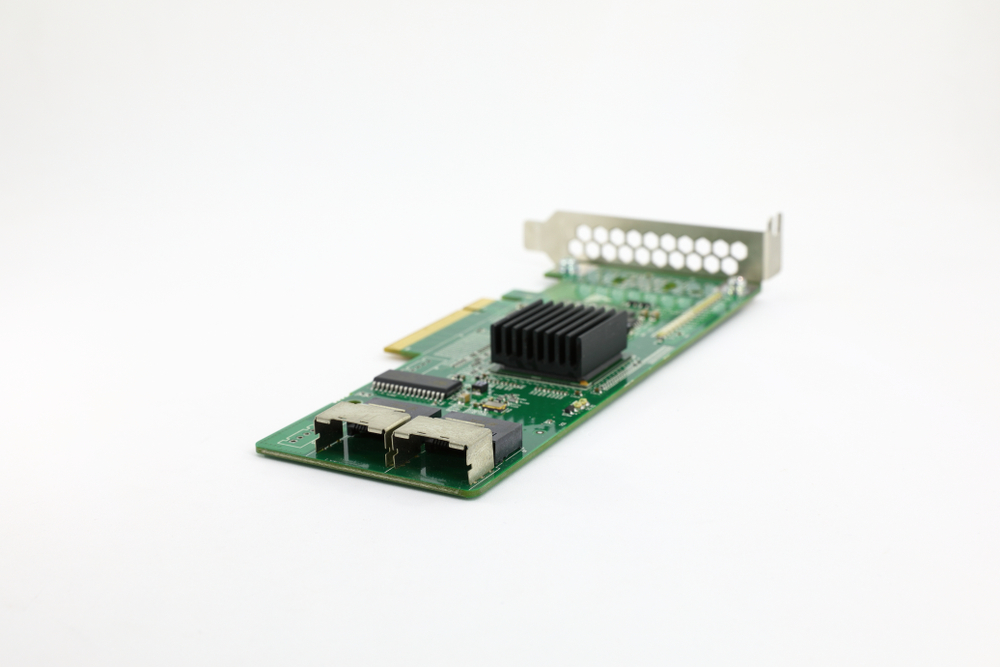
A RAID adapter is a specialized piece of hardware, typically a PCI Express (PCIe) card or integrated onto a motherboard, that is dedicated to managing and controlling a group of hard drives or solid-state drives (SSDs). Its primary function is to offload the complex RAID calculations and management from the host system’s CPU. This offloading is achieved through several key components and functionalities:
Onboard Processor and Cache Memory
One of the most significant advantages of a hardware RAID adapter is its onboard processor. This dedicated processing unit is designed specifically for handling RAID operations, including:
- Data Striping: Distributing data in blocks across multiple drives.
- Data Mirroring: Creating exact copies of data on separate drives.
- Parity Calculation: Generating and managing parity information, which is used to reconstruct lost data in parity-based RAID levels (like RAID 5 and RAID 6).
- Error Detection and Correction: Monitoring drive health and initiating recovery procedures in case of failures.
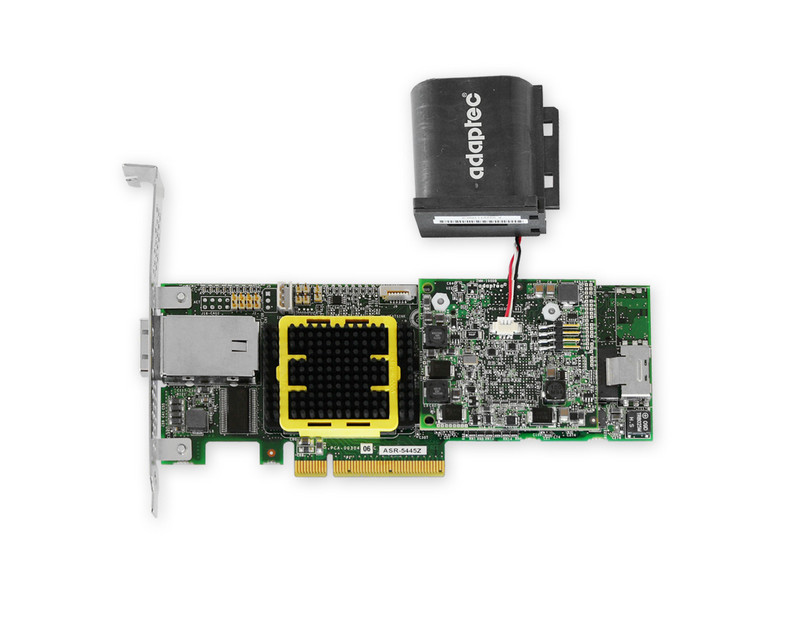
Alongside its processor, a RAID adapter typically features onboard cache memory, often DDR3 or DDR4 RAM. This cache serves as a high-speed buffer for read and write operations. When data is written, it’s first sent to the adapter’s cache, allowing the host system to proceed with other tasks while the adapter asynchronously writes the data to the drives. For read operations, frequently accessed data can be stored in the cache, dramatically reducing the latency of subsequent reads. The size and speed of this cache are crucial factors in the overall performance of the RAID array.
Drive Connectivity and Management
RAID adapters provide the physical interfaces for connecting the drives to the system. The common interfaces include:
- SATA (Serial ATA): The most prevalent interface for connecting hard drives and SSDs in consumer and most enterprise systems.
- SAS (Serial Attached SCSI): A higher-performance interface often found in enterprise-grade servers and storage systems, offering greater bandwidth, longer cable lengths, and support for more devices per port.
Modern RAID adapters can often support both SATA and SAS drives, providing flexibility for different storage needs. The adapter’s firmware manages the individual drives within the array, reporting their status, health, and identifying any potential issues.
Types of RAID Adapters
RAID adapters can be broadly categorized based on their capabilities and the types of RAID levels they support. While the term “RAID adapter” is often used generically, there are distinctions to be made:
Hardware RAID Controllers
These are the most sophisticated and performant RAID adapters. They feature dedicated processors, significant onboard cache memory (often with battery backup or flash-based protection for the cache data), and advanced management features. Hardware RAID controllers are designed to provide the highest levels of performance and reliability, making them the preferred choice for mission-critical applications and demanding enterprise environments. They typically support a wide range of RAID levels, from basic mirroring to complex parity configurations.
Key Features of High-End Controllers:
- Dedicated XOR Engine: For significantly faster parity calculations in RAID 5 and RAID 6.
- Write-Through vs. Write-Back Caching: Write-back caching, where data is confirmed written to the host system after being written to the adapter’s cache, offers higher performance but requires robust cache protection (like BBU/FBWC) to prevent data loss during power failures. Write-through caching is safer but slower.
- Hot-Swapping and Hot-Spares: The ability to replace a failed drive without shutting down the system, and to pre-designate a spare drive that automatically takes over when a drive fails.
- Online Capacity Expansion and RAID Level Migration: The ability to increase the size of an existing array or change its RAID level without rebuilding the entire array from scratch.
- Advanced Monitoring and Reporting: Detailed logs, S.M.A.R.T. (Self-Monitoring, Analysis and Reporting Technology) status, and proactive alerts for drive health.
Host Bus Adapters (HBAs) with RAID Functionality
Some HBAs, particularly those designed for enterprise use, offer basic RAID capabilities. These are often referred to as “firmware RAID” or “integrated RAID” solutions. While they can manage RAID configurations, they typically rely more heavily on the host system’s CPU for calculations and have less onboard cache or processing power compared to dedicated hardware RAID controllers. They might be sufficient for less demanding RAID configurations or environments where budget is a primary concern.
Differentiating from True Hardware RAID:
- CPU Dependency: Significant reliance on the host CPU for RAID parity calculations.
- Limited Cache: Minimal or no onboard cache memory.
- Basic RAID Levels: May only support simpler RAID levels like RAID 0 and RAID 1.
- Performance Trade-offs: Generally offer lower performance compared to full-fledged hardware RAID controllers.
It’s important to note that the line between a high-end HBA and a mid-range RAID adapter can sometimes blur, with manufacturers offering solutions that bridge these categories.
The Benefits of Using a RAID Adapter
The decision to employ a hardware RAID adapter, rather than relying solely on software RAID, is driven by a clear set of advantages that directly impact system performance, reliability, and manageability.
Enhanced Performance
As mentioned, offloading RAID processing to a dedicated adapter with its own processor and cache memory frees up the host system’s CPU. This is particularly beneficial in scenarios involving:
- Database Servers: Requiring rapid access to large datasets.
- Video Editing Workstations: Dealing with large video files and real-time playback demands.
- Virtualization Environments: Running multiple virtual machines, each with its own storage I/O requirements.
- Web Servers: Handling a high volume of simultaneous read requests.
The onboard cache acts as a performance accelerator, allowing for much faster data throughput. The parallel processing capabilities of the adapter enable it to handle multiple I/O requests concurrently, further improving responsiveness.
Improved Data Reliability and Redundancy
Hardware RAID adapters are engineered with data integrity as a paramount concern. Their dedicated processors ensure that RAID calculations are performed accurately and efficiently. In the event of a drive failure, the adapter takes immediate action to reconstruct data from the remaining drives, minimizing downtime and data loss.
Features Contributing to Reliability:
- Cache Protection: Battery Backup Units (BBUs) or Flash-Based Write Cache (FBWC) modules protect data in the adapter’s cache during unexpected power outages. This ensures that data written to the cache is not lost and can be successfully written to the drives once power is restored.
- Error Handling: Proactive monitoring of drive health and sophisticated error detection mechanisms allow the adapter to identify and address potential issues before they lead to data corruption or drive failure.
- Rebuild Management: When a drive fails and is replaced, the RAID adapter manages the data rebuild process efficiently, ensuring the integrity of the array with minimal performance impact on the live system.
Centralized Management and Monitoring
RAID adapters provide a centralized point of control for managing multiple storage devices. This simplifies administration, especially in large-scale deployments. Administrators can:
- Configure RAID Arrays: Easily create, modify, and delete RAID arrays with various levels.
- Monitor Drive Status: View the health and performance of each individual drive within the array.
- Receive Alerts: Get notified of drive failures, array degradation, or other critical events.
- Perform Maintenance Tasks: Initiate rebuilds, assign hot-spares, and perform other array maintenance operations.
This centralized management is typically accessed through a BIOS utility during system boot, a command-line interface (CLI), or a graphical user interface (GUI) provided by the adapter’s manufacturer.
Considerations When Choosing a RAID Adapter
Selecting the right RAID adapter is a critical decision that can have long-term implications for system performance, scalability, and budget. Several factors should be carefully evaluated:
Performance Requirements
The intended use of the system is the primary determinant of performance needs. For basic file serving or single-user workstations, a less powerful adapter might suffice. However, for enterprise-level applications, virtualized environments, or high-transaction databases, a high-performance controller with ample cache and a dedicated XOR engine is essential.
Key Performance Metrics:
- Throughput (MB/s): The amount of data that can be read from or written to the array per second.
- IOPS (Input/Output Operations Per Second): The number of read/write operations the array can handle per second, crucial for transactional workloads.
- Latency: The time it takes for a data request to be completed.
RAID Level Support
Ensure the adapter supports the specific RAID levels required for the desired balance of performance and redundancy. Common levels include RAID 0 (striping for performance), RAID 1 (mirroring for redundancy), RAID 5 (striping with parity for balance), RAID 6 (striping with double parity for enhanced redundancy), and RAID 10 (striped mirrors for high performance and redundancy).
Drive Connectivity and Capacity
The adapter must have the correct connectors (SATA, SAS) and sufficient ports to accommodate the planned number of drives. Consider the type of drives being used – NVMe SSDs, SATA SSDs, HDDs – and ensure compatibility. Also, factor in future expansion plans; choosing an adapter with more ports than initially needed can offer scalability.
SAS vs. SATA Considerations:
- SAS: Generally offers higher performance, better reliability, longer cable runs, and the ability to daisy-chain multiple devices.
- SATA: More cost-effective and widely available, suitable for many applications. Many modern SAS controllers can also handle SATA drives.
Cache Memory and Protection
The amount of onboard cache is directly related to performance. For write-intensive workloads, cache protection mechanisms like BBUs or FBWC are highly recommended to prevent data loss during power interruptions. The size of the cache (e.g., 256MB, 512MB, 1GB, 2GB) should align with the system’s I/O demands.
Management Features and Software Support
Evaluate the ease of management. Does the adapter come with a user-friendly GUI? Is there robust command-line support for scripting and automation? Consider the availability of management utilities for monitoring, configuration, and firmware updates. Compatibility with the operating system is also crucial.

Budget and Scalability
RAID adapters range significantly in price. Determine the budget allocated for storage hardware and balance it against the performance and reliability needs. Opting for a slightly more capable adapter upfront can often save costs and headaches in the long run by accommodating future growth and avoiding the need for premature upgrades.
In conclusion, a RAID adapter is a critical component for any system that demands robust storage performance, data protection, and reliability. By understanding its function, the different types available, and the key considerations for selection, IT professionals can make informed decisions to build and maintain efficient and resilient storage solutions.
aViewFromTheCave is a participant in the Amazon Services LLC Associates Program, an affiliate advertising program designed to provide a means for sites to earn advertising fees by advertising and linking to Amazon.com. Amazon, the Amazon logo, AmazonSupply, and the AmazonSupply logo are trademarks of Amazon.com, Inc. or its affiliates. As an Amazon Associate we earn affiliate commissions from qualifying purchases.