
In the vast digital landscape of our inboxes, where thousands of messages vie for our attention, tools that help us cut through the noise are invaluable. Among Gmail’s arsenal of productivity features, the humble star stands out as a deceptively simple yet profoundly powerful instrument for organization. Far more than just a decorative icon, a star in Gmail is a direct signal, a personal flag you plant on an email to denote its importance, urgency, or simply its status as something you need to revisit. It’s a foundational element of email management, allowing users to transform their chaotic inbox into a streamlined workflow tailored to their specific needs.
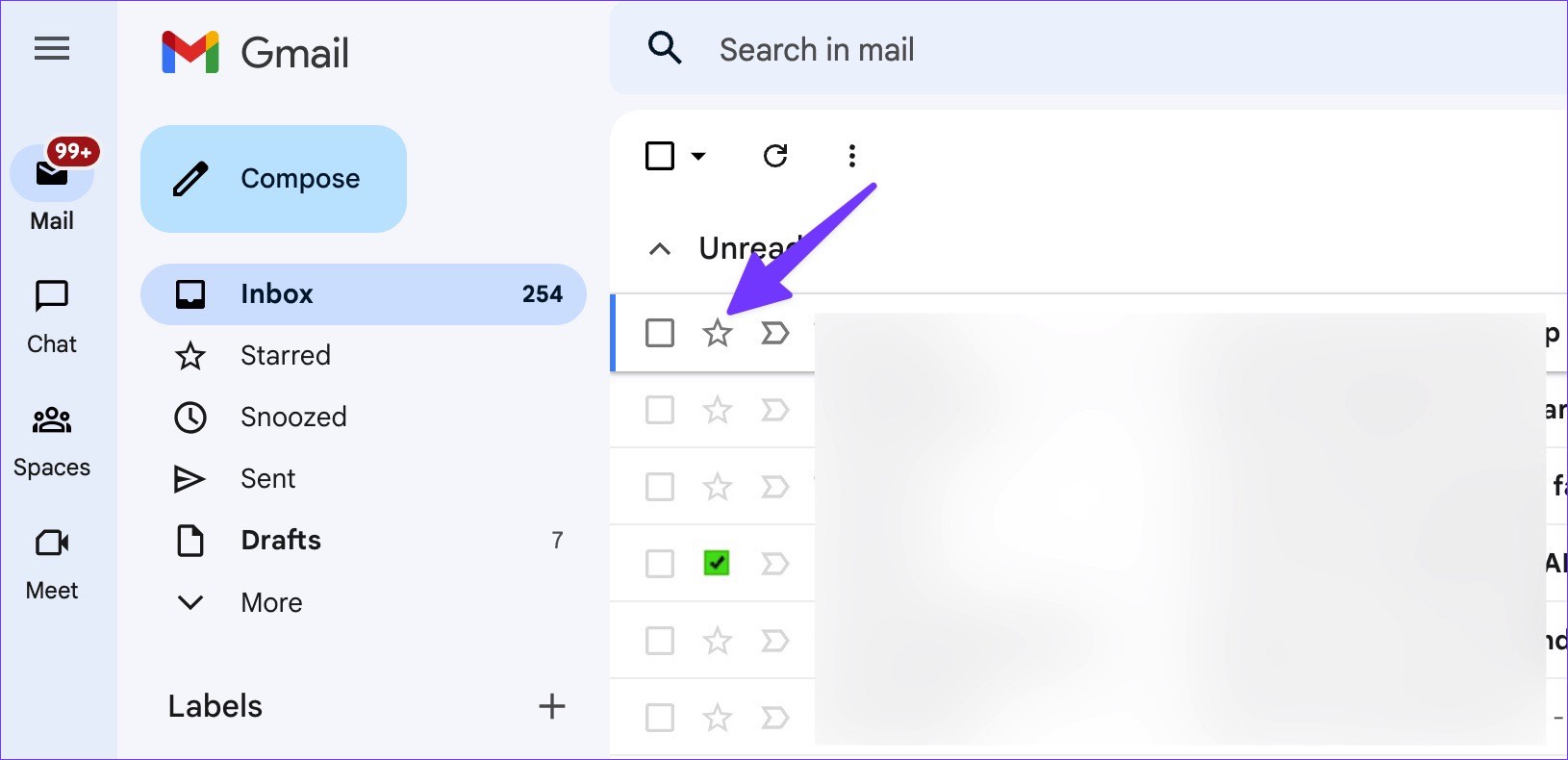
At its core, a Gmail star is a customizable marker designed to help you prioritize and categorize your emails. It acts as a visual bookmark, pulling crucial messages out of the general inbox stream and placing them into a dedicated “Starred” folder for easy access. While its primary function is straightforward—to mark an email as important—its true power unfolds in the diverse ways users can implement it to enhance productivity, manage professional relationships, and even track financial matters. This seemingly small feature, when leveraged effectively, becomes a cornerstone of digital organization, impacting everything from daily task management to long-term strategic planning in our tech-driven lives.
Understanding the Gmail Star System: Your Personal Digital Highlighter
The journey to an organized inbox often begins with understanding the basic mechanisms at play. Gmail’s star system is built on an intuitive interface, making it accessible to even the most casual user while offering depth for those who wish to customize their email experience further.
Basic Usage: How to Flag and Find Essential Emails
The most common iteration of the Gmail star is the classic yellow star. To apply it, you simply navigate to your inbox or an open email. To the left of the sender’s name or subject line, you’ll see a small star icon. A single click on this icon will turn it yellow, immediately flagging the email. Clicking it again will remove the star, returning the email to its unflagged state.
Once an email is starred, it doesn’t just stay in your main inbox. Gmail automatically adds it to a special “Starred” label, which functions like a dedicated folder. You can access this folder from the left-hand sidebar in your Gmail interface. This segregation is crucial: it creates a clean, focused space where all your important, flagged messages reside, separate from the endless stream of new incoming mail. This simple act of starring an email and having it aggregated into a dedicated view instantly reduces cognitive load, allowing you to focus on what truly matters without constant distraction. It’s the digital equivalent of highlighting important passages in a book or placing a sticky note on a crucial document, ensuring that key information is always within reach.
Beyond the Yellow Star: Exploring Superstars for Advanced Prioritization
While the single yellow star is highly effective, Gmail takes the concept of flagging to another level with its “Superstars” feature. This allows users to assign different colored stars and unique symbols to emails, transforming a binary “important/not important” system into a nuanced categorization tool. This advanced capability moves beyond basic flagging, offering a powerful layer of customization for users who manage a high volume of diverse communications.
To unlock and customize Superstars, you need to delve into your Gmail settings. Navigate to “Settings” (the gear icon), then “See all settings,” and finally to the “General” tab. Scroll down until you find the “Stars” section. Here, you’ll see “Not in use,” “In use,” and a sequence of icons. By dragging and dropping icons from “Not in use” to “In use,” you can activate different star types. Gmail offers a range of options, including red exclamation marks, purple question marks, green checkmarks, blue information icons, and more.
Once enabled, clicking the star icon next to an email no longer just toggles between unstarred and yellow-starred. Instead, each click cycles through the sequence of stars you’ve chosen in your settings. For example, the first click might give you a yellow star, the second a red exclamation mark, the third a green checkmark, and so on, before returning to unstarred.
This multi-star system is a game-changer for sophisticated email management. It allows you to develop a highly personalized visual language for your inbox. A red exclamation mark could signify “urgent action required,” a green checkmark could mean “awaiting reply/follow-up,” and a blue information icon could be for “reference material.” The “Starred” folder will then display these different icons, giving you an at-a-glance overview of the type of importance attached to each message. This granular control is a prime example of how Google’s tech tools empower users to tailor their digital environment, boosting efficiency and personal productivity in increasingly complex digital workflows.
Leveraging Stars for Enhanced Productivity and Workflow
The true genius of the Gmail star isn’t just in its ability to mark an email, but in how it integrates into broader productivity strategies. When used strategically, stars can transform your inbox from a passive repository of messages into an active task management system, closely aligning with modern productivity principles.
Practical Strategies for Email Management
Effective email management is a cornerstone of modern productivity, and Gmail stars provide a simple yet powerful framework for achieving it. Instead of merely being “read,” emails can be instantly categorized based on their required action or purpose.
- The “To-Do” List: For many, the inbox serves as an accidental to-do list. Stars can formalize this. A yellow star might mean “action required today,” while a red exclamation mark (if using Superstars) could signify “critical task – drop everything.” By filtering your “Starred” folder, you instantly have a prioritized list of tasks directly linked to their source communication. This is invaluable for cutting through clutter and ensuring urgent items are addressed promptly.
- Follow-Up Reminders: In business and personal communication, timely follow-ups are crucial. A particular star icon (e.g., a purple question mark or a green checkmark) can be designated for emails that require a follow-up or are awaiting a response. Periodically reviewing your “Starred” folder for these specific icons ensures that no important communication falls through the cracks, maintaining professional relationships and project momentum.
- Important Information & Reference Material: Not all important emails require immediate action. Many contain vital information that needs to be easily retrievable later—booking confirmations, account details, meeting notes, project specifications, or even recipe ideas. Designating a specific star (perhaps a blue information icon) for “reference” emails creates a readily accessible archive. This is particularly useful for digital security, as it helps you quickly locate important credentials or sensitive information that you might need to reference securely without rummaging through your entire inbox.
- “Read Later” Queue: For those who subscribe to numerous newsletters or receive articles from colleagues, the inbox can quickly become overwhelming. A designated star can mark emails that are interesting but not urgent, forming a “read later” queue. This allows you to quickly archive or move other emails, keeping your main inbox lean, while still ensuring valuable content isn’t lost.
- Project Management & Collaboration: In team environments, even with dedicated project management software, email remains a primary communication channel. Stars can be used within a shared inbox or a personal inbox context to denote project-specific status. For instance, different star colors could represent different project phases (e.g., yellow for “planning,” red for “urgent issue,” green for “awaiting approval”). While not a full-fledged project management system, it provides a quick, visual way to keep track of key communications related to ongoing projects.
Integrating Stars with Other Gmail Features
The power of stars is amplified when combined with other robust Gmail functionalities, creating a cohesive and highly efficient email ecosystem.

- Advanced Search & Filtering: Gmail’s search operators are incredibly potent. You can search specifically for
is:starredto see all your starred emails. Going further, if you use Superstars, you can search forhas:yellow-star,has:red-bang,has:purple-question, etc., to quickly pull up emails marked with a specific icon. This precision searching allows for rapid retrieval of specific categories of important emails. Moreover, you can create filters that automatically star incoming emails from specific senders or containing certain keywords, effectively automating your prioritization process. - Labels: While stars mark importance, labels provide thematic categorization. Combining them offers the best of both worlds. An email could be
is:starredANDlabel:Project X. This means it’s important and pertains to a specific project. This dual categorization helps maintain both urgency and contextual relevance. - Priority Inbox & Multiple Inboxes: For users who opt for more advanced inbox layouts, stars play a crucial role. In “Priority Inbox,” Gmail automatically sections your inbox into categories like “Important and unread,” “Starred,” and “Everything else.” Your starred emails get their own prominent section. With “Multiple Inboxes,” you can set up custom sections based on search queries. A common setup is to have one section specifically for
is:starred, creating an always-visible list of your most critical items, separate from your main inbox view. This integration ensures that your starred items are front and center, never buried beneath new mail.
The Star as a Tool for Professionals and Businesses
The impact of a simple star extends beyond personal productivity, significantly influencing brand perception, client relations, and financial management. For professionals and businesses, an organized inbox, facilitated by Gmail stars, is not just a convenience; it’s a strategic asset.
Branding and Client Relations
In the professional realm, responsiveness and reliability are cornerstones of a strong brand identity. How quickly and effectively you communicate can profoundly impact client satisfaction and partner relationships.
- Timely Responses & Professional Image: Using stars to flag client inquiries, partnership proposals, or critical internal communications ensures they are addressed promptly. A red exclamation mark could be for an urgent client issue, while a yellow star for a standard inquiry. This system helps prevent emails from slipping through the cracks, which can otherwise lead to frustration, lost opportunities, and a tarnished professional brand. Consistently timely and thoughtful responses cultivate an image of professionalism, attentiveness, and reliability, strengthening your personal and corporate identity.
- Managing Key Communications: Business development often hinges on key conversations—with potential investors, strategic partners, or influential media contacts. Starring these crucial email threads keeps them at the forefront of your attention, allowing you to easily track the communication history, follow up as needed, and ensure no critical detail is missed. This meticulous approach to communication management directly supports marketing efforts and helps maintain a positive public relations stance.
- Brand Consistency: For those managing brand guidelines or marketing campaigns, stars can help flag emails containing important brand assets, legal disclaimers, or approved messaging. This ensures easy access to essential information, supporting consistency across all brand touchpoints and preventing off-brand communications.
Financial Management and Opportunity Tracking
Beyond brand and client management, Gmail stars offer practical applications in the often-complex world of personal and business finance, as well as tracking online income and investment opportunities.
- Tracking Invoices and Payments: For freelancers, small business owners, or even individuals managing household budgets, starring invoices received, payment confirmations, or expense receipts can be invaluable. A green checkmark could signify “payment confirmed,” while a red exclamation mark could mean “invoice overdue.” This acts as a rudimentary but effective financial tracking system directly within your email, simplifying bookkeeping and ensuring financial obligations are met on time. This is a simple yet powerful tool for business finance and personal finance alike.
- Investment Alerts and Online Income: In the fast-paced world of investing and online income generation, timing can be everything. Starring alerts from investment platforms, market news updates, or notifications about new side hustle opportunities ensures you don’t miss critical information. You could use a specific star for “investment research” or “online income opportunity,” allowing you to quickly review them during dedicated times. This helps in making informed decisions for investing and leveraging online income streams.
- Managing Business Finances & Side Hustles: Whether it’s communication with financial advisors, banking institutions, or collaborators on a side hustle, starring relevant emails keeps all financial discussions organized. This might include loan applications, tax documents, or agreements for freelance work. Such organization is paramount for accurate financial reporting, tax preparation, and overall sound financial management, reinforcing the importance of digital tools in managing diverse money streams.
Best Practices and Future-Proofing Your Starred System
The effectiveness of any organizational tool lies in its consistent and thoughtful application. Gmail stars are no exception. To truly harness their power, users need to develop a systematic approach and integrate them into their overall digital hygiene strategy.
Developing a Consistent System
The key to long-term success with Gmail stars is establishing a clear, personal methodology. Without it, the system can quickly become as chaotic as an unstarred inbox.
- Define Your Star Meanings: The most crucial step is to assign specific meanings to each star type you decide to use. Write them down if necessary. For instance:
- Yellow Star: “General importance / To-do (next 24-48 hours)”
- Red Exclamation: “Urgent action required / Critical issue”
- Purple Question Mark: “Awaiting response / Follow-up needed”
- Green Checkmark: “Archived reference / Important information”
- Blue Information Icon: “Read later / Interesting content”
Having a defined legend eliminates ambiguity and ensures consistent application.
- Regular Review and Triage: Stars are not set-it-and-forget-it markers. Your “Starred” folder should be a dynamic space that requires regular review. Dedicate a few minutes each day or week to go through your starred emails. Act on them, reply, or move them to a more permanent archive (like a specific label) once their ‘starred’ purpose is fulfilled. An overcrowded “Starred” folder defeats its primary purpose of highlighting critical items.
- Avoid Over-Starring: The temptation to star everything that seems remotely important is strong, but it’s a trap. If every email is starred, then nothing is truly prioritized. Be selective. Reserve stars for emails that genuinely require attention, follow-up, or quick reference. The less clutter in your “Starred” folder, the more impactful each star becomes. This disciplined approach is fundamental to effective digital productivity.
The Future of Email Organization
While artificial intelligence and advanced algorithms are increasingly being integrated into email platforms to automatically categorize and prioritize messages, the human element of flagging remains profoundly relevant.
- AI vs. Human Intent: While AI can effectively identify spam or sort promotional emails, it still struggles with the nuances of human intent and personal priority. A message from a family member might be “low priority” to an AI but critical to you. A specific client email might not contain keywords an AI flags as urgent, but you know it demands immediate attention based on prior context. Stars allow users to inject their subjective, critical judgment into the categorization process, complementing rather than being replaced by AI.
- The Enduring Power of Simple Tools: In an age of complex software, the elegance of a simple toggle function like a star demonstrates the enduring power of intuitive design. It requires minimal learning curve and offers immediate value, making it accessible to a broad user base across all levels of tech proficiency. Its simplicity is its strength, proving that sometimes the most effective tools are not the most technologically advanced, but the most user-friendly.
- Digital Hygiene as a Core Skill: The conscious act of starring, organizing, and triaging emails fosters good digital hygiene habits. It encourages users to be more mindful about the information they receive and how they interact with it. In an increasingly digital world, managing our online presence and information flow effectively—from tech tools to personal branding—is becoming a core life skill.

Conclusion
The seemingly insignificant star in Gmail is, in fact, a remarkably versatile and powerful tool. From its basic function of marking an email for later, it expands into a sophisticated system of Superstars, enabling granular control over email prioritization. When strategically applied, it transforms an overflowing inbox into a well-organized command center, significantly boosting personal productivity and streamlining workflows across various professional and personal domains.
Beyond individual efficiency, the effective use of Gmail stars has tangible benefits for brand management, ensuring timely client communication and a professional image. It aids in meticulous financial tracking, from invoices to investment opportunities, serving as a simple yet effective tool for managing diverse money-related communications. In a world awash with digital information, the Gmail star empowers users to assert control over their communication, prioritize what truly matters, and ultimately, take command of their digital lives. It’s a testament to how small, well-designed tech features can have a profound and lasting impact on our daily routines and overall success.
aViewFromTheCave is a participant in the Amazon Services LLC Associates Program, an affiliate advertising program designed to provide a means for sites to earn advertising fees by advertising and linking to Amazon.com. Amazon, the Amazon logo, AmazonSupply, and the AmazonSupply logo are trademarks of Amazon.com, Inc. or its affiliates. As an Amazon Associate we earn affiliate commissions from qualifying purchases.