
Git, a name that resonates deeply within the developer community, is far more than just a buzzword. It’s the bedrock upon which modern software development is built, a sophisticated yet surprisingly accessible system for managing changes to code. In its essence, Git is a distributed version control system (DVCS). This seemingly technical phrase unlocks a world of collaborative efficiency, robust history tracking, and fearless experimentation for anyone involved in creating or modifying digital projects. Whether you’re a solo developer crafting your first application or part of a sprawling enterprise team, understanding Git is no longer a luxury; it’s a fundamental skill.

The true power of Git lies in its ability to meticulously track every alteration made to a project’s files. Imagine writing a book. Without any system, you might save different versions as “Manuscriptv1.doc,” “Manuscriptv2edits.doc,” and “Manuscriptfinalreallyfinal.doc.” This quickly becomes unmanageable, leading to confusion about which version is the most current, what changes were made between drafts, and how to revert to an earlier state if a mistake is introduced. Git automates and elevates this process to an art form, providing a clear, chronological record of every change, who made it, and when. This granular control is the foundation of effective software development.
The Core Concepts of Git
At its heart, Git operates on a few fundamental principles that are crucial to grasp for effective usage. Understanding these concepts will demystify the seemingly complex commands and workflows associated with Git.
Commits: Snapshots of Your Project
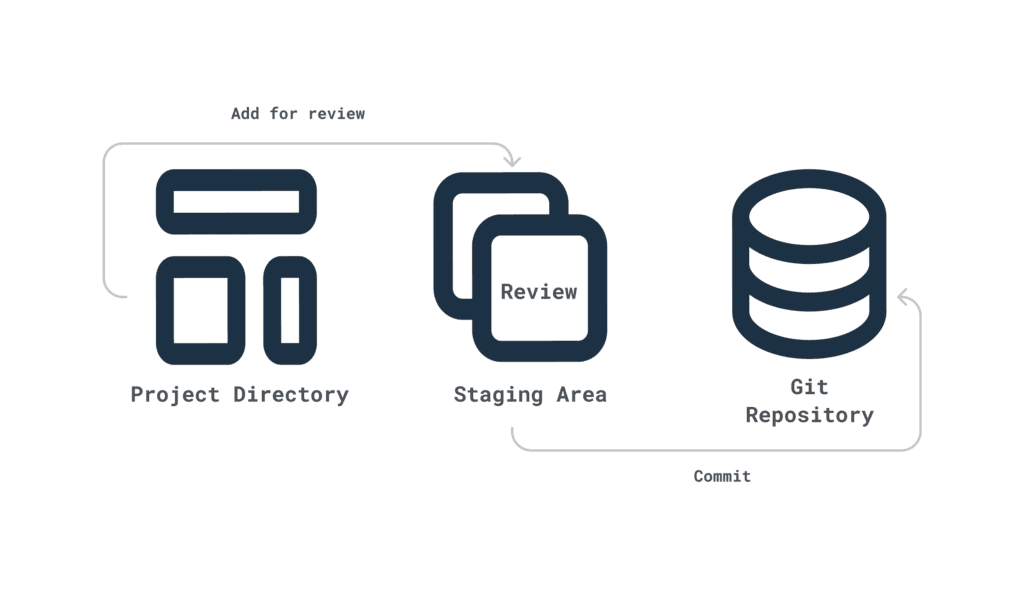
The most basic unit of work in Git is the commit. A commit is essentially a snapshot of your project at a specific point in time. When you make changes to your files – adding new features, fixing bugs, or refactoring code – you can then “commit” these changes. Each commit has a unique identifier (a SHA-1 hash), a descriptive message explaining what was changed, and metadata including the author and timestamp.
Think of commits like saving checkpoints in a video game. Each commit represents a distinct state of your project, allowing you to revisit any previous state with precision. This is invaluable for understanding the evolution of your code. If a new feature introduces an unexpected bug, you can easily revert to a previous commit where the code was stable. The commit message is vital; a well-written message acts as documentation, explaining the why behind the changes, which is incredibly helpful for both yourself and your collaborators in the future.
Branches: Parallel Universes of Development
One of Git’s most powerful features is its branching capability. A branch is an independent line of development. When you create a new branch, you’re essentially creating a parallel universe for your project. This allows you to work on new features, experiment with different approaches, or fix bugs without affecting the main, stable codebase.
The default branch in most Git repositories is typically named “main” (or historically, “master”). When you start a new project, you’re working on this main branch. However, as soon as you need to develop a new feature, it’s best practice to create a new branch from the main branch. For instance, if you’re building a user authentication system, you’d create a branch named “feature/user-authentication.” On this branch, you can make all the necessary code changes, commits, and tests. While you’re working on this feature branch, the “main” branch remains untouched and stable, ready for deployment if needed.
This isolation is critical for team collaboration. Multiple developers can work on different features simultaneously, each on their own branch. This prevents merge conflicts (more on that later) and allows for a more organized and efficient development process. Once a feature is complete and tested, it can be merged back into the main branch.
Merging: Reintegrating Your Work
When you’ve finished developing a feature on a separate branch, you’ll want to integrate those changes back into your main codebase. This process is called merging. Git provides sophisticated tools to combine the work from different branches.
The simplest form of merging occurs when there are no conflicting changes between the branches. Git can often automatically integrate the code. However, if the same lines of code have been modified differently on both branches, Git will flag a merge conflict. This is where human intervention is required. Git will highlight the conflicting sections, and it’s up to the developer to decide which changes to keep, or how to combine them to create a unified, correct version. While merge conflicts can seem daunting at first, they are a natural part of collaborative development and a testament to Git’s ability to highlight potential issues. Mastering conflict resolution is a key skill for any Git user.
Git’s Distributed Nature: Power in Decentralization
A defining characteristic of Git, and what sets it apart from older version control systems, is its distributed nature. Unlike centralized systems where a single server holds the entire project history, Git provides every developer with a complete copy of the repository, including its full history.
Local Repositories: Your Personal History
Every developer working with Git has a local repository on their own machine. This local copy contains all the files, all the branches, and the entire commit history. This has profound implications for workflow and resilience. You can commit, branch, merge, and review your project’s history entirely offline. This significantly speeds up operations as you’re not constantly relying on network connectivity to a central server.
The local repository acts as a safe haven for your work. You can experiment freely, knowing that your changes are safely stored locally. You can revert to any previous state, explore different commit histories, and prepare your changes before sharing them with others. This local control empowers developers and reduces reliance on external infrastructure.
Remote Repositories: Collaboration Hubs
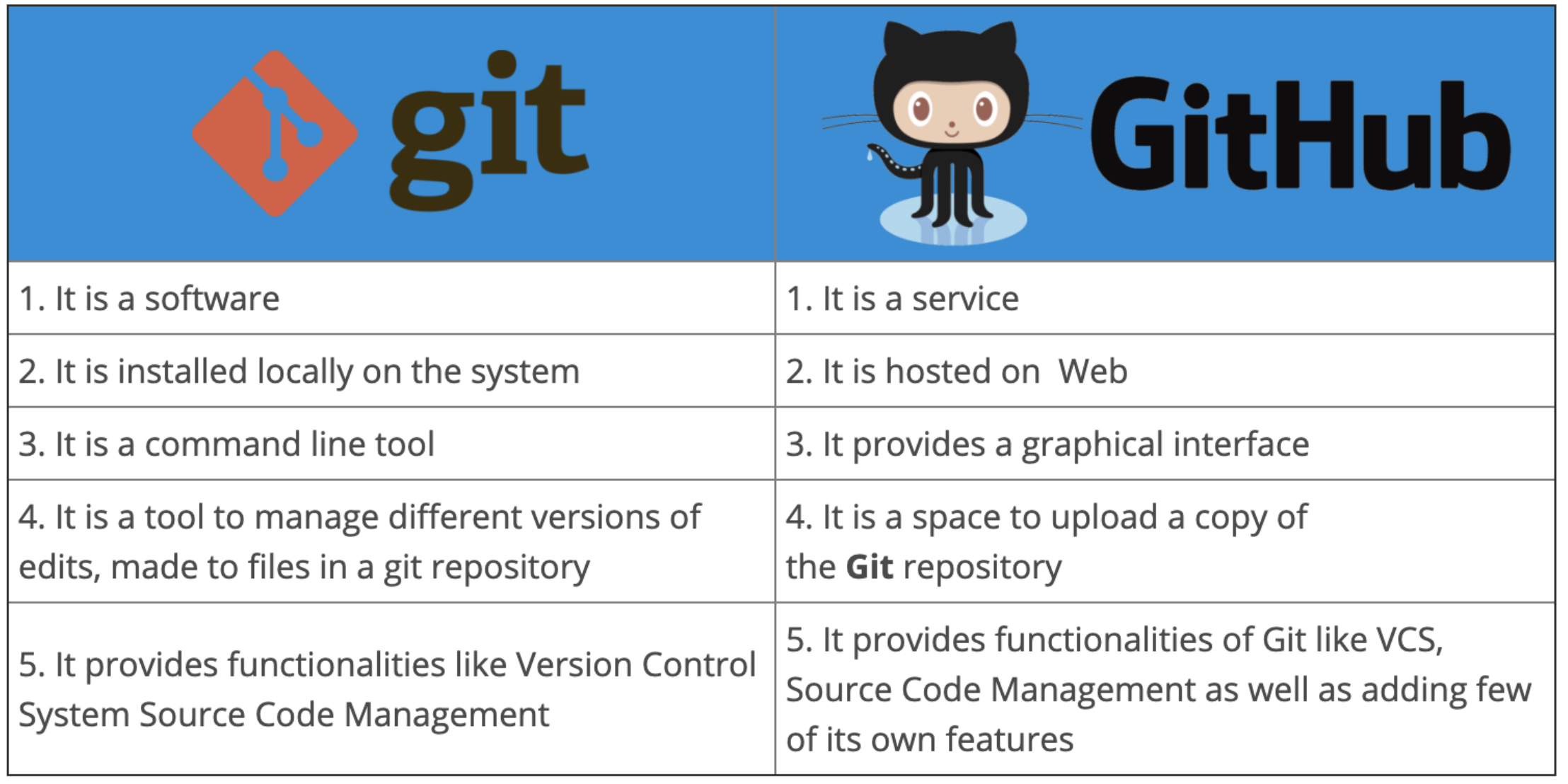
While local repositories are essential, collaboration requires a shared space. This is where remote repositories come into play. These are typically hosted on platforms like GitHub, GitLab, or Bitbucket, serving as a central point for teams to synchronize their work.
When you clone a repository, you’re downloading a copy of the remote repository to your local machine. When you want to share your local changes with others, you push them to the remote repository. Conversely, when you want to get the latest changes made by your colleagues, you pull them from the remote repository. This push/pull mechanism is the fundamental way teams collaborate using Git.
The distributed model ensures that even if the remote server goes down, each developer still has a full copy of the project. This redundancy makes Git incredibly resilient and robust. It also allows for asynchronous work; developers can push their changes at their convenience, and others can pull them when they’re ready.
Why Git is Indispensable in Modern Tech
The adoption of Git has revolutionized software development, making it more efficient, collaborative, and less prone to errors. Its impact extends far beyond just tracking code changes.
Facilitating Collaboration and Teamwork
Git is the de facto standard for collaborative software development. Its branching and merging capabilities allow multiple developers to work concurrently on different parts of a project without stepping on each other’s toes. Platforms like GitHub have further enhanced this by providing features like pull requests (now often called merge requests), which enable a structured way for developers to propose changes, get feedback from peers, and have their code reviewed before it’s integrated into the main codebase. This code review process is critical for maintaining code quality, sharing knowledge, and catching bugs early.
Enabling Agile and DevOps Methodologies
Modern software development methodologies like Agile and DevOps heavily rely on Git. Agile development emphasizes iterative progress and frequent releases, which are made possible by Git’s ability to manage frequent code changes and deploy stable versions quickly. DevOps, which aims to break down silos between development and operations, uses Git as the central hub for managing the entire software delivery pipeline. Infrastructure as Code (IaC), where server configurations and deployments are managed through code, is almost exclusively done using Git.
Providing a Robust Audit Trail and History
Every change made to a project is meticulously recorded in Git’s history. This provides an invaluable audit trail, allowing developers to see exactly who made what changes, when, and why (through commit messages). This is crucial for debugging, understanding the evolution of a feature, and for compliance purposes. If a bug is introduced, it’s often possible to pinpoint the exact commit that caused the issue, significantly speeding up the debugging process. Furthermore, the ability to revert to any previous state means that even catastrophic mistakes can often be undone without losing significant work.
Fostering Experimentation and Innovation
The ease of creating branches and the ability to experiment without fear of breaking the main codebase encourages developers to try new ideas and approaches. If an experiment on a branch doesn’t yield the desired results, it can simply be discarded. This low-risk environment for experimentation is vital for innovation, allowing teams to explore cutting-edge technologies or try out novel solutions without jeopardizing the stability of the project. This freedom to explore, coupled with the safety net of Git, fosters a more dynamic and creative development process.
In conclusion, Git is far more than just a tool; it’s an ecosystem that underpins modern technological advancement. Its distributed nature, sophisticated branching and merging capabilities, and robust history tracking make it an indispensable asset for any individual or team involved in software development, from open-source projects to enterprise-level applications. Mastering Git is an investment that pays significant dividends in efficiency, collaboration, and the overall quality of digital products.
aViewFromTheCave is a participant in the Amazon Services LLC Associates Program, an affiliate advertising program designed to provide a means for sites to earn advertising fees by advertising and linking to Amazon.com. Amazon, the Amazon logo, AmazonSupply, and the AmazonSupply logo are trademarks of Amazon.com, Inc. or its affiliates. As an Amazon Associate we earn affiliate commissions from qualifying purchases.