
Genshin Impact, the immensely popular open-world action RPG from HoYoverse, has captivated millions with its stunning visuals, engaging story, and vast world of Teyvat. While the game offers a wealth of official content and customization options, a dedicated community of players consistently seeks to push the boundaries of personalization through modding. For those passionate about injecting a unique flair into their gaming experience, understanding how to install Genshin Impact mods can unlock a new realm of aesthetic and quality-of-life enhancements.
This guide delves into the intricate world of Genshin Impact modding, offering a comprehensive overview of the tools, techniques, and crucial considerations involved. As a platform deeply invested in technology trends, software utilization, and digital security, we aim to provide a balanced perspective, empowering users with the knowledge to safely and effectively explore game modification while remaining acutely aware of the associated risks and responsibilities.
Understanding Genshin Impact Modding: What, Why, and the Imperative of Caution
Before diving into the technicalities, it’s essential to grasp what Genshin Impact mods entail, why players opt for them, and most critically, the inherent risks. Modding, at its core, involves altering a game’s assets or code to introduce new features, change existing ones, or enhance visuals.
What Exactly Are Genshin Impact Mods?
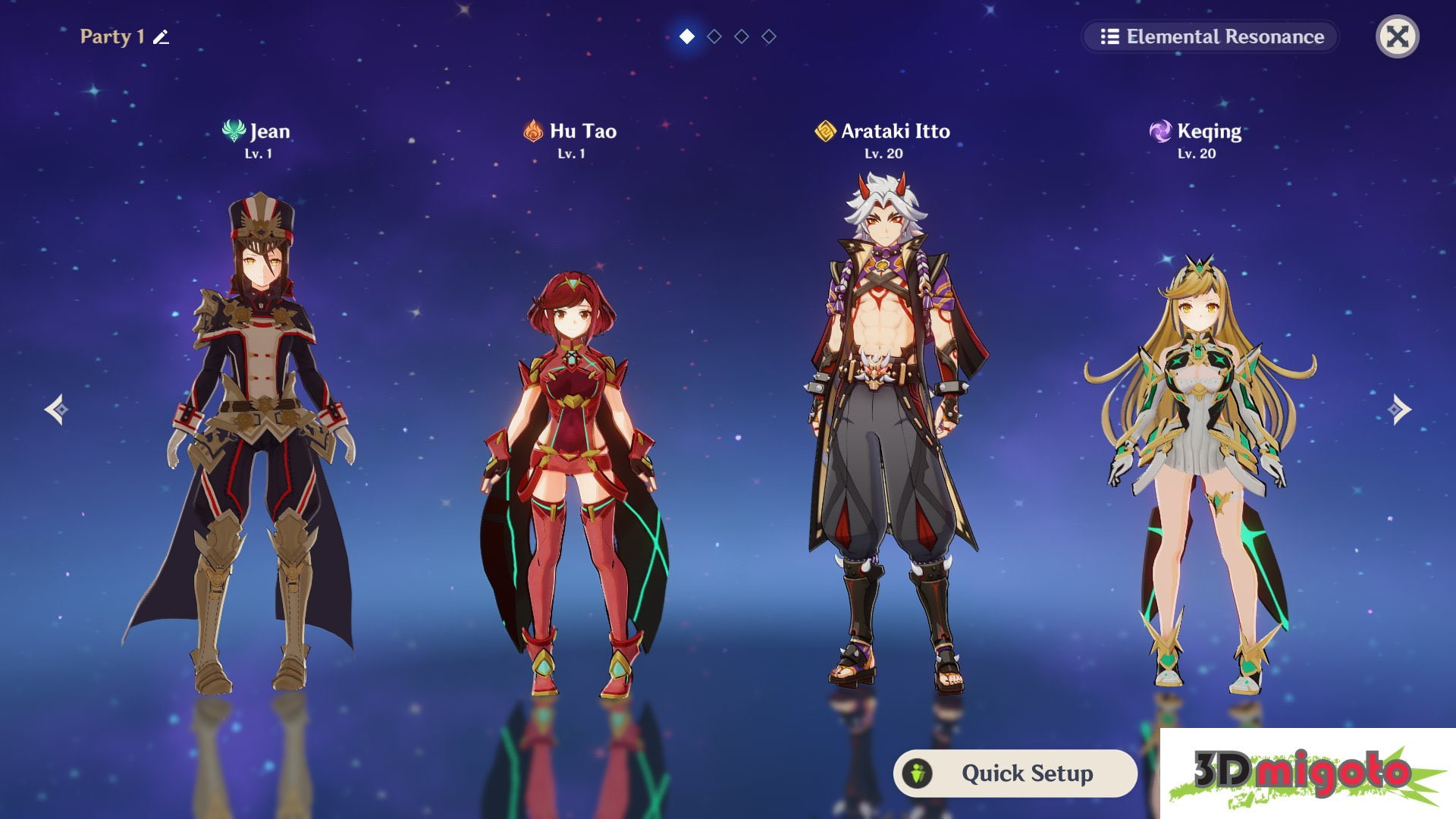
In the context of Genshin Impact, mods primarily focus on cosmetic and visual enhancements. Unlike some PC games where mods can fundamentally alter gameplay mechanics, Genshin Impact mods generally fall into categories such as:
- Character Reskins/Outfit Swaps: The most popular type, allowing players to replace the default appearance of characters with custom designs, alternative outfits, or even entirely different character models from other games (for personal viewing only).
- Visual Overhauls: These include custom textures for environments, weapons, or UI elements, designed to give the game a fresh aesthetic.
- Shader Presets (via ReShade): Tools like ReShade apply post-processing effects to the game’s render, enhancing colors, contrast, adding depth of field, or introducing new graphical filters to dramatically alter the visual style.
- Minor Quality-of-Life (QoL) Adjustments: While rarer and often more precarious due to their potential interaction with game mechanics, some mods might aim to provide minor interface tweaks or information overlays that do not confer an unfair gameplay advantage.
It’s important to differentiate these from hacks or cheats, which are designed to manipulate gameplay, grant unfair advantages, or bypass game security measures. Genuine mods, particularly cosmetic ones, generally aim to enhance the visual experience for the individual player, without impacting server-side logic or other players’ experiences.
Why Mod Genshin Impact? The Appeal of Personalization and Aesthetic Enhancement
The primary motivation for modding Genshin Impact is personalization. In a game with a fixed visual style and character designs, mods offer an unparalleled opportunity for players to:
- Express Individuality: Create a Genshin Impact that truly reflects their aesthetic preferences, whether it’s giving a favorite character a custom outfit or making the world itself look more vibrant or stylized.
- Refresh the Experience: For long-term players, new visuals can rekindle interest and provide a fresh perspective on familiar landscapes and characters.
- Enhance Graphics Beyond Official Settings: While Genshin Impact is visually stunning, certain mods (especially ReShade presets) can push graphical fidelity further, introducing cinematic effects or optimizing visuals for specific hardware setups.
- Community Engagement: The modding community itself is a vibrant space for creativity, sharing, and collaborative development, allowing players to connect over shared passions for customization.
From a technological standpoint, this pursuit of customization aligns perfectly with the broader trends in software user experience. Users increasingly demand control over their digital environments, and game modding is a powerful manifestation of this desire to adapt software to individual needs and tastes.
The Risks: Account Security, Fair Play, and Digital Integrity
Despite the appeal, engaging in Genshin Impact modding carries significant risks that cannot be overstated. Understanding these is paramount for any player considering this path:
- Violation of Terms of Service (ToS) and Account Bans: HoYoverse, like most online game developers, strictly prohibits the use of third-party software that interacts with their game client. This includes modding tools. While cosmetic mods might fly under the radar for a period, there’s always a non-zero risk of detection and a permanent account ban. HoYoverse has a robust anti-cheat system, and any modification could trigger it. For a platform focused on “Digital Security,” this is a critical warning. Players must understand they proceed at their own risk, potentially jeopardizing years of progress and investment.
- Digital Security Threats: Modding often involves downloading files from various community sources. Without proper vetting, these files could contain malware, viruses, keyloggers, or other malicious software. Relying on untrusted sources or authors is a direct threat to personal data and system integrity. This is a crucial “Digital Security” concern that aligns with the website’s focus.
- Game Instability and Performance Issues: Modifying game files can lead to crashes, glitches, broken textures, or significant performance drops, especially if mods are incompatible or incorrectly installed. This can degrade the overall gaming experience.
- Compatibility Issues with Game Updates: Genshin Impact receives frequent updates. Mods are often rendered incompatible with new patches, requiring mod authors to update their creations, or users to uninstall mods before playing. This can be a continuous cycle of maintenance.
Before proceeding, every player must weigh the desire for customization against these severe potential repercussions. Responsible modding necessitates a deep understanding and acceptance of these risks.
Essential Tools for Modding Genshin Impact: A Technical Overview
To successfully install most Genshin Impact mods, you’ll need specific tools that facilitate the injection of custom assets or apply post-processing effects. The primary tools used by the community include the Genshin Impact Modding Framework (UMF), 3DMigoto, and ReShade.
Genshin Impact Modding Framework (UMF): The Central Hub
The Genshin Impact Modding Framework (UMF), sometimes referred to simply as the “Genshin Mod Manager,” acts as a central injector and manager for various character and visual mods. It provides a more user-friendly interface for activating and deactivating mods compared to manually placing files.
- Purpose: UMF allows for easy loading of custom textures and models into the game’s memory without directly altering the game’s core files, making management of multiple mods more streamlined. It essentially creates a sandbox for your mods.
- Key Features:
- Mod Loading: Injects custom files (textures, models) at runtime.
- Management: Enables switching between different mods, activating/deactivating them.
- Compatibility: Often updated by its developers to maintain compatibility with Genshin Impact patches.
3DMigoto: Injecting Custom Models and Textures
3DMigoto is a versatile DirectX 11/12 wrapper often used in various PC games for injecting custom 3D models and textures. In the context of Genshin Impact, it’s the underlying technology that many character reskin mods rely on.
- Purpose: 3DMigoto intercepts rendering calls from the game, allowing it to substitute original game assets with custom ones provided by modders. This is how custom character outfits or weapon skins are displayed.
- Technicality: It operates by placing its DLL files in the game directory, causing the game to load 3DMigoto first, which then hooks into the game’s rendering pipeline.
- Mod Application: Mods designed for 3DMigoto typically come with specific folder structures (e.g., “DUMP” folders) where the custom textures and models are placed.
ReShade: Enhancing Visuals with Post-Processing
ReShade stands apart from UMF and 3DMigoto as it doesn’t modify game assets directly but rather applies post-processing effects to the final image rendered by the game. It’s a popular tool across many games for visual customization.
- Purpose: ReShade allows users to inject a vast array of graphical filters and effects, such as advanced anti-aliasing, ambient occlusion, depth of field, color correction, vibrance, sharpening, and more. It can drastically change the game’s mood and visual fidelity.
- Non-intrusive Nature: Because ReShade only affects the final output image and doesn’t touch game files or memory that dictate gameplay logic, it is generally considered less risky than other modding methods, though still technically a third-party application.
- Presets: Users can download and apply pre-configured “presets” created by others or craft their own unique visual styles.
Step-by-Step: Installing Genshin Impact Mods with Core Tools

This section provides a general outline for installing these tools. Always refer to the specific instructions provided by the mod authors and the tool developers, as steps can vary and updates may change processes.
Prerequisite Checklist: Essential Preparations
Before attempting any mod installation, ensure you have:
- A PC version of Genshin Impact: Modding is primarily for the PC client.
- Up-to-date Antivirus Software: Crucial for scanning downloaded files.
- Basic File Management Skills: Knowing how to extract archives (ZIP, RAR), copy, and paste files is essential.
- Backup Plan: Consider backing up your game directory or at least creating a restore point on your system.
- Understand the Risk: Reiterate the possibility of an account ban. Proceed with extreme caution and at your own risk.
Installing the Genshin Impact Modding Framework (UMF)
- Locate a Reputable Source: Search for the “Genshin Impact Modding Framework” or “UMF Genshin” on well-known modding platforms (e.g., GameBanana, specific modding Discord servers). Always verify the source and scan downloaded files.
- Download the Latest Version: Ensure you download the version compatible with the latest Genshin Impact patch.
- Extract the Archive: Unzip the downloaded UMF package to a temporary location.
- Place UMF Files in Game Directory: Copy the extracted UMF files (typically a folder containing the executable, DLLs, and a
modsfolder) into your Genshin Impact game folder. This is usuallyGenshin ImpactGenshin Impact Game. Ensure the UMF executable is in the same directory asGenshinImpact.exe. - Run UMF: Launch the UMF executable. This tool often acts as a launcher itself or provides instructions on how to launch Genshin Impact through it to enable mods.
- Add Mods: Place your downloaded individual mod files (which are designed for UMF) into the
modsfolder within the UMF directory. Use the UMF interface to activate or deactivate them.
Installing 3DMigoto for Custom Textures/Models
Often, UMF integrates 3DMigoto, simplifying the process. However, for standalone 3DMigoto mods or if UMF isn’t used:
- Download 3DMigoto: Obtain the correct version (usually d3d11.dll for Genshin Impact) from a trusted modding resource.
- Extract to Game Directory: Extract the 3DMigoto files (d3d11.dll, d3dx.ini, and relevant folders like
ShaderFixes,DUMP) directly into theGenshin ImpactGenshin Impact Gamefolder, next toGenshinImpact.exe. - Configure d3dx.ini (If Necessary): Some mods require specific settings in the
d3dx.inifile. Follow the mod author’s instructions carefully for any necessary edits. - Install the Mod: Download the specific 3DMigoto mod. It will usually contain a
DUMPfolder or similar structure. Copy the contents of this mod package into the corresponding folders within your 3DMigoto setup (e.g.,DUMP0000000texture_nameintoGenshin ImpactGenshin Impact GameDUMP0000000texture_name). - Launch Genshin Impact: Start the game normally. If installed correctly, 3DMigoto will load with the game, and your custom textures/models should appear.
Setting Up ReShade for Visual Enhancement
- Download ReShade: Visit the official ReShade website (reshade.me) and download the latest installer. Only download from the official site.
- Run the Installer: Execute the ReShade setup program.
- Select Genshin Impact: Click “Click here to select a game and manage its ReShade installation.” Browse to your Genshin Impact executable (
Genshin ImpactGenshin Impact GameGenshinImpact.exe). - Choose Rendering API: ReShade will ask you to select the rendering API. For Genshin Impact, this is typically Direct3D 11/12.
- Select Shader Packs: Choose the shader effect packages you want to install. “Standard effects,” “SweetFX,” and “Legacy effects” are common starting points. You can select all and deselect later if performance is an issue.
- Installation Complete: ReShade will install the necessary files into your game directory.
- Launch Genshin Impact and Configure: Start Genshin Impact. You should see a ReShade overlay appear (usually prompting with “Home” or “Shift+F2”). Follow the on-screen tutorial to open the ReShade menu, load presets, or manually adjust effects.
Navigating the Modding Ecosystem: Finding Reliable Sources and Maintaining Digital Security
The success and safety of your modding endeavors heavily rely on where you source your mods and how you manage them. This aspect ties directly into “Digital Security” and “Software” best practices.
Where to Find Reliable Genshin Mods
- Dedicated Modding Communities: Platforms like GameBanana are popular for hosting Genshin Impact mods. Look for sections specifically for the game.
- Discord Servers: Many mod authors and communities operate Discord servers where mods are shared, developed, and supported. These can be excellent for up-to-date information and troubleshooting.
- GitHub/Private Forums: Some developers share their tools and mods on GitHub or through private forums.
- Verification is Key:
- Author Reputation: Prioritize mods from well-known, reputable authors with a history of safe releases.
- User Reviews/Feedback: Check comments and reviews from other users. Have they reported issues or security concerns?
- Active Development: Mods that are regularly updated, especially after game patches, are generally more reliable.
Digital Security Best Practices for Modding
Given the inherent risks, rigorous digital security practices are non-negotiable:
- Scan All Downloads: Use robust, up-to-date antivirus software to scan every file downloaded from modding sites or Discord servers before opening or installing it.
- Use a VPN: While not directly related to mod safety, using a VPN can add an extra layer of privacy when browsing modding sites.
- Avoid Executables from Unknown Sources: Be extremely cautious of any mod presented as an
.exefile, especially if it’s not a recognized modding tool installer (like ReShade’s official one). Most mods are asset files (textures, models, configuration files). - Do Not Share Account Information: Never provide your Genshin Impact login credentials to any modding tool, website, or individual.
- Isolate Your Modding Environment (Advanced): For highly cautious users, consider running Genshin Impact in a virtual machine or a separate, sandboxed environment when experimenting with new mods. This can limit potential damage to your main system.
- Keep Tools Updated: Ensure your UMF, 3DMigoto, and ReShade versions are current, as developers often release compatibility fixes and security patches.
- Uninstall Before Major Game Updates: A common practice to avoid detection or game instability is to completely remove all modding tools and files before a major Genshin Impact update, then reinstall them once compatible versions are released.
Important Considerations and Troubleshooting Common Issues
Even with careful installation, modding can be temperamental. Knowing how to troubleshoot and understanding the broader implications are vital.
Understanding MiHoYo’s Stance and Personal Responsibility
As iterated, HoYoverse explicitly prohibits third-party software that interacts with their game. This means that at any point, using mods, even purely cosmetic ones, could lead to a permanent ban. This isn’t just about “getting caught”; their anti-cheat can detect unauthorized processes interacting with the game client.
- Personal Choice: The decision to mod Genshin Impact is a personal one, made with full awareness of these terms and the severe consequences. There is no official “safe” way to mod, as any modification carries risk.
- No Competitive Advantage: To minimize risk, stick to purely cosmetic mods that offer no competitive advantage. Avoid anything that alters gameplay mechanics, speeds, resources, or provides unfair information. Such mods are almost guaranteed to trigger anti-cheat systems.
Troubleshooting Common Modding Issues
- Mods Not Loading/Applying:
- Check Installation Path: Ensure all mod files and tools are in the correct directories (usually alongside
GenshinImpact.exe). - UMF/3DMigoto Configuration: Verify that the mod manager is active and pointing to the correct mod files, or that
d3dx.inifor 3DMigoto is correctly configured. - Compatibility: Is the mod/tool compatible with your current Genshin Impact version? Mods often break after game updates.
- Conflicts: If using multiple mods, they might conflict. Try enabling them one by one to isolate the issue.
- Check Installation Path: Ensure all mod files and tools are in the correct directories (usually alongside
- Game Crashing/Performance Issues:
- Remove Recently Added Mods: Start by removing the last mod you installed.
- Check System Resources: Some graphically intensive ReShade presets or high-resolution texture mods can impact performance.
- Verify Game Files: Use the Genshin Impact launcher’s “Verify Game Files” option to repair any corrupted official files (this might remove mod files).
- Reinstall Tools: If problems persist, try a clean reinstallation of the modding tools.
- Anti-Cheat Detection/Game Won’t Launch:
- This is the most serious issue. Immediately uninstall all modding tools and associated files.
- Verify game files through the launcher.
- If you receive a warning or ban, there’s little recourse.
When encountering issues, consulting the specific modding community (e.g., Discord servers) can be invaluable, as other users might have faced similar problems and found solutions.

Conclusion: Balancing Customization with Caution in Teyvat
Modding Genshin Impact offers a compelling avenue for personalization, allowing players to tailor their visual experience in Teyvat to their unique preferences. From custom character outfits to breathtaking shader effects, the creativity of the modding community is truly remarkable, reflecting a broader trend in technology towards user-driven customization and enhancement.
However, this journey into personalization is not without its perils. The stringent anti-cheat measures of HoYoverse and the inherent digital security risks associated with third-party software demand an approach characterized by extreme caution and informed decision-making. As outlined, the possibility of an account ban is a very real consequence, alongside the threats of malware and game instability.
For those who choose to embark on this path, adhering to best practices—sourcing mods from reputable communities, rigorously scanning all downloads, understanding the tools, and exercising constant vigilance—is paramount. Ultimately, customizing your Genshin Impact experience through mods is a personal choice, one that requires a careful balance between the desire for a unique adventure and a thorough understanding of the technical and policy risks involved. Proceed responsibly, and may your journey through a personalized Teyvat be both visually stunning and digitally secure.
aViewFromTheCave is a participant in the Amazon Services LLC Associates Program, an affiliate advertising program designed to provide a means for sites to earn advertising fees by advertising and linking to Amazon.com. Amazon, the Amazon logo, AmazonSupply, and the AmazonSupply logo are trademarks of Amazon.com, Inc. or its affiliates. As an Amazon Associate we earn affiliate commissions from qualifying purchases.