
Cash App, a product of Block, Inc. (formerly Square), has rapidly ascended to become a dominant force in the peer-to-peer (P2P) payment landscape and beyond. Its intuitive interface and diverse feature set have made it a go-to platform for sending money, paying bills, investing, and even managing Bitcoin. For individuals seeking a streamlined and accessible digital wallet, understanding the intricacies of Cash App is paramount. This guide will equip you with the knowledge to navigate its core functionalities, from initial setup to advanced features, ensuring you can leverage its full potential for your financial activities.
Getting Started with Cash App: Setting Up Your Account and Understanding the Basics
The journey with Cash App begins with a straightforward setup process, designed for immediate usability. Whether you’re downloading it for the first time or exploring its capabilities, understanding these initial steps is crucial for a smooth experience. This section will guide you through account creation, linking your bank account, and navigating the primary interface.
Creating Your Cash App Account
The first step to unlocking Cash App’s capabilities is creating your personal account. This process is designed to be quick and user-friendly, typically taking only a few minutes.
- Download and Installation: Begin by downloading the Cash App from your device’s respective app store (Apple App Store for iOS or Google Play Store for Android). Once downloaded, open the app.
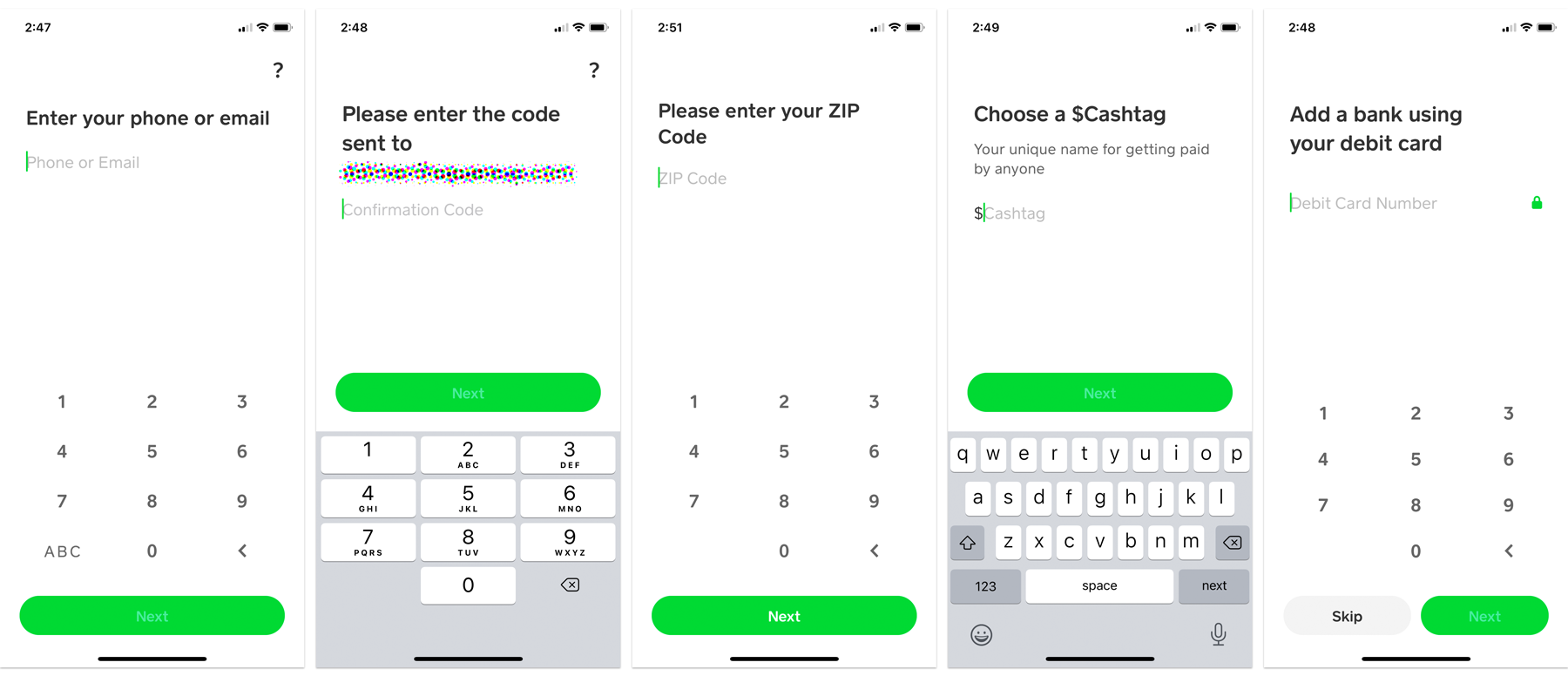
- Sign-Up Process: You will be prompted to enter your email address or phone number. Cash App will send a verification code to the provided contact. Enter this code to proceed.
- Creating a Username ($Cashtag): The next crucial step is creating your unique
$Cashtag. This is your personal identifier within Cash App, allowing others to send you money without needing your personal information. Choose a$Cashtagthat is easy to remember and share. Once set, it can be changed, but only a limited number of times. - Account Verification: For full functionality, especially for larger transactions or accessing certain features, Cash App will require you to verify your identity. This typically involves providing your full name, date of birth, and the last four digits of your Social Security Number (SSN). Some users may also be prompted to upload a photo of their government-issued ID. This is a standard security measure to prevent fraud and comply with financial regulations.
Linking Your Bank Account and Cards
To send and receive money effectively, you’ll need to connect your financial accounts to Cash App. This integration allows for seamless transfers between your bank and your Cash App balance.
- Adding a Bank Account: Navigate to your profile by tapping your profile icon (usually in the top-right corner). Select “Linked Banks” and then “Link Bank.” You will be guided through a secure process, often involving entering your online banking credentials. Cash App uses Plaid, a trusted third-party service, to facilitate these connections securely.
- Adding Debit and Credit Cards: You can also link debit cards for instant deposits and withdrawals, though credit cards may have higher transaction fees for adding funds. To add a card, go to your profile, tap “Add Bank or Card,” and follow the on-screen instructions to enter your card details.
- Understanding Transaction Limits: Cash App imposes daily and weekly limits on sending and receiving money. These limits can vary and are often increased for verified accounts. It’s essential to be aware of these limits, especially if you plan on conducting larger transactions. You can typically find information about your specific limits within the app’s settings or FAQ section.
Navigating the Cash App Interface
Once your account is set up and linked, you’ll be presented with Cash App’s clean and intuitive interface. Understanding its layout will enhance your user experience.
- Home Screen: The primary screen displays your current Cash App balance. Below this, you’ll see options to “Cash Out” (transfer funds from Cash App to your bank) and “Add Cash” (transfer funds from your bank to Cash App).
- Send and Request: The central feature of the app is the ability to send and request money. Tapping the “$” icon at the bottom of the screen brings up the payment interface. You can enter the amount, then select a recipient by their
$Cashtag, phone number, or email. For requests, you initiate the process by entering the amount and selecting a recipient who owes you money. - Activity Feed: The “Activity” tab, usually represented by a clock icon, shows a chronological record of all your past transactions. This is invaluable for tracking your spending and income.
- Profile Settings: Your profile icon provides access to all your account settings, including linked accounts, notifications, privacy settings, and support.
Core Functionalities: Sending, Receiving, and Cashing Out
The primary purpose of Cash App for many users is its ability to facilitate quick and easy money transfers. This section delves into the mechanics of sending money, receiving funds, and managing your Cash App balance by cashing out to your linked bank account.
Sending Money to Friends and Family
The peer-to-peer payment feature is the bedrock of Cash App. It’s designed to be as simple as sending a text message.
- Initiating a Payment: Tap the “$” icon on the home screen. Enter the desired amount you wish to send.
- Selecting a Recipient: You can select recipients from your contacts list (if you’ve granted Cash App access), or you can manually enter their
$Cashtag, phone number, or email address. If the recipient is not yet on Cash App, they will receive an invitation to sign up and claim the funds. - Adding a Note (Optional but Recommended): It’s good practice to add a brief note to your payment, explaining the reason for the transfer (e.g., “Dinner last night,” “Rent share”). This helps both parties keep track of transactions.
- Confirming and Sending: Review the payment details, including the recipient and the amount, and then tap “Pay.” For added security, Cash App may require a Touch ID or Face ID confirmation, or your device passcode.
Receiving Payments
Receiving money on Cash App is an automated process. When someone sends you funds, they will appear in your Cash App balance.
- Notifications: You will receive an in-app notification and potentially an email or SMS alert when someone sends you money.
- Instant Availability: Funds sent to you are typically available immediately in your Cash App balance. You can then choose to keep them in Cash App for future transactions or cash them out to your bank account.
- Accepting Funds: For first-time recipients, Cash App may prompt them to accept the funds. This usually involves confirming their identity.
Cashing Out Your Balance

Once you have funds in your Cash App balance, you can transfer them to your linked bank account. This process is known as “cashing out.”
- Initiating a Cash Out: From the home screen, tap the “Cash Out” button.
- Selecting the Amount: You can choose to cash out your entire balance or a specific amount.
- Choosing Transfer Speed: Cash App offers two main options for cashing out:
- Standard Transfer: This option is free and typically takes 1-3 business days to appear in your bank account.
- Instant Transfer: For a small fee (which can fluctuate), you can have the funds deposited into your linked bank account almost immediately. The fee is usually a percentage of the amount being transferred, with a minimum charge.
- Confirmation: After selecting your transfer speed and confirming the amount, the funds will be processed.
Beyond P2P: Expanding Your Cash App Usage
While peer-to-peer payments are Cash App’s foundation, the app has evolved to encompass a broader range of financial tools, making it a more comprehensive digital wallet. This section explores some of these advanced functionalities, including bill pay, investing, and the Cash Card.
Paying Bills with Cash App
Cash App has integrated a bill pay feature that allows users to manage and pay various bills directly from the app. This simplifies your financial management by consolidating payments into one place.
- Adding Billers: Navigate to the “Bills” tab (usually represented by a bill icon). Tap “Add Bill.” You can search for popular billers by name, or manually enter biller information if they are not listed.
- Setting Up Recurring Payments: For bills that are the same amount each month (like rent or subscriptions), you can set up recurring payments to ensure they are paid on time automatically.
- Making One-Time Payments: For variable bills, you can make one-time payments by entering the bill amount and selecting a payment date.
- Payment Methods: You can pay bills using your Cash App balance or directly from your linked bank account.
- Payment Confirmation and History: Each bill payment will appear in your “Activity” feed, providing a clear record of your outgoing payments.
Investing with Cash App
Cash App has democratized investing by offering accessible options for buying and selling stocks and Bitcoin. This feature is particularly appealing to novice investors.
- Accessing the Investing Tab: Locate the “Investing” tab within the app (often represented by a stock chart icon).
- Buying Stocks:
- Research: You can search for specific companies by name or ticker symbol. Cash App provides basic company information to aid in your decision-making.
- Purchasing Shares: You can buy fractional shares, meaning you don’t need to have enough money to buy a full share of a company. You can invest with as little as $1.
- Order Types: Currently, Cash App primarily offers market orders, meaning your shares will be bought or sold at the prevailing market price.
- Buying Bitcoin:
- Account Setup: To buy Bitcoin, you’ll need to complete additional verification steps within the app.
- Purchasing Bitcoin: Similar to stocks, you can buy Bitcoin with small amounts. Cash App handles the conversion and storage of your Bitcoin.
- Selling Bitcoin: You can also sell your Bitcoin and have the proceeds added to your Cash App balance or withdrawn to your bank account.
- Important Considerations: While investing through Cash App is convenient, it’s crucial to remember that investing involves risk, and the value of investments can go down as well as up. Cash App provides basic tools, but for comprehensive investment strategies, consulting with a financial advisor is recommended.
The Cash Card: A Visa Debit Card Linked to Your Cash App
The Cash Card is a free Visa debit card that bridges the gap between your digital Cash App balance and the physical world, allowing you to spend your funds anywhere Visa is accepted.
- Ordering Your Cash Card: Within the app, navigate to the “Cash Card” tab. You can order your card for free, and it will be mailed to your address within 7-10 business days. You’ll receive a digital card immediately that you can use for online purchases and add to your mobile wallet (like Apple Pay or Google Pay) while you wait for the physical card.
- Spending and ATM Withdrawals: Once activated, you can use your Cash Card for purchases at any merchant that accepts Visa. You can also use it to withdraw cash from ATMs. Note that ATM withdrawals typically incur fees from both Cash App (for non-network ATMs) and the ATM operator.
- Boosts and Rewards: Cash App frequently offers “Boosts,” which are limited-time discounts or cashback offers that you can activate before making a purchase with your Cash Card. These Boosts can provide significant savings on everyday purchases at participating merchants.
- Managing Your Card: Through the Cash Card tab in the app, you can view your transaction history, activate your card, report it lost or stolen, and manage your PIN.
Security and Support: Protecting Your Account and Getting Help
In the realm of digital finance, security and reliable support are paramount. Cash App employs robust security measures to protect user data and funds, and it offers various channels for assistance when needed.
Understanding Cash App Security Measures
Cash App prioritizes the security of your financial information and transactions. Awareness of these measures empowers you to use the app with confidence.
- Encryption: All transactions and data transmitted through Cash App are protected using end-to-end encryption, ensuring that your personal and financial information remains confidential.
- Fraud Monitoring: Cash App utilizes advanced fraud detection systems to monitor for suspicious activity on your account.
- Two-Factor Authentication (2FA): While not always explicitly visible as a separate setting, Cash App employs layers of authentication, including device verification and PIN/biometric prompts for sensitive actions.
- Account Security Tips:
- Never Share Your PIN or Passcode: Treat your Cash App PIN and device passcode with the same security as your bank account credentials.
- Be Wary of Phishing Scams: Cash App will never ask for your login information, PIN, or SSN via email or text message. Be suspicious of any unsolicited communications.
- Enable Biometrics: Utilize Touch ID or Face ID for added security when making payments.
- Review Activity Regularly: Periodically check your transaction history for any unfamiliar entries.
Accessing Cash App Support
Despite its user-friendly design, you may occasionally encounter questions or issues that require assistance. Cash App offers several avenues for support.
- In-App Support: The most efficient way to get help is through the app’s dedicated support section. Navigate to your profile icon, then tap “Support.” This section offers a comprehensive FAQ database and allows you to contact Cash App support directly via email or chat for more specific issues.
- Cash App Website: The official Cash App website also features a robust help center with articles and guides covering a wide range of topics.
- Social Media (Use with Caution): While Cash App has official social media channels, it’s generally not recommended to share sensitive personal or financial information on these public platforms. Use them for general information and updates.
- Reporting Fraud: If you suspect fraudulent activity on your account, it is crucial to report it immediately through the in-app support system. Prompt reporting can help mitigate potential losses.
By understanding and utilizing the various features and security protocols of Cash App, you can confidently manage your digital finances, from everyday P2P transactions to investing and everyday spending. Cash App continues to innovate, aiming to provide a comprehensive and secure platform for its growing user base.
aViewFromTheCave is a participant in the Amazon Services LLC Associates Program, an affiliate advertising program designed to provide a means for sites to earn advertising fees by advertising and linking to Amazon.com. Amazon, the Amazon logo, AmazonSupply, and the AmazonSupply logo are trademarks of Amazon.com, Inc. or its affiliates. As an Amazon Associate we earn affiliate commissions from qualifying purchases.