
In the rapidly evolving landscape of financial technology, the transition from physical wallets to digital ecosystems is nearly complete. At the forefront of this revolution is Google Pay, a multifaceted payment platform that has redefined how consumers interact with merchants, service providers, and each other. Formerly a fragmented system of various apps like Android Pay and Google Wallet, the unified Google Pay (often referred to as GPay) leverages sophisticated Near Field Communication (NFC) technology and robust encryption to facilitate seamless transactions.
Understanding how to pay with Google Pay is no longer just a convenience—it is a fundamental digital literacy skill in a world where “contactless” is the gold standard. This guide explores the technical architecture, setup procedures, and diverse application methods of Google Pay to ensure you can navigate the digital economy with confidence.
1. Setting Up the Digital Infrastructure: Initial Configuration
Before you can tap your phone at a checkout counter, you must establish a secure digital foundation. Google Pay operates as a container for your financial instruments, requiring a specific set of hardware and software prerequisites.
Device Compatibility and Requirements
To use Google Pay for in-store transactions, your smartphone must be equipped with an NFC chip. Most mid-range to flagship Android devices manufactured in the last five years include this hardware. Additionally, your device must be running a modern version of Android (typically Android 7.0 or higher) and must not be “rooted,” as a compromised operating system triggers Google’s security protocols, disabling payment features to protect your data. For iOS users, Google Pay is available for peer-to-peer transfers and online shopping, though the “tap-to-pay” functionality is restricted by Apple’s hardware limitations in favor of Apple Pay.
Linking Financial Instruments
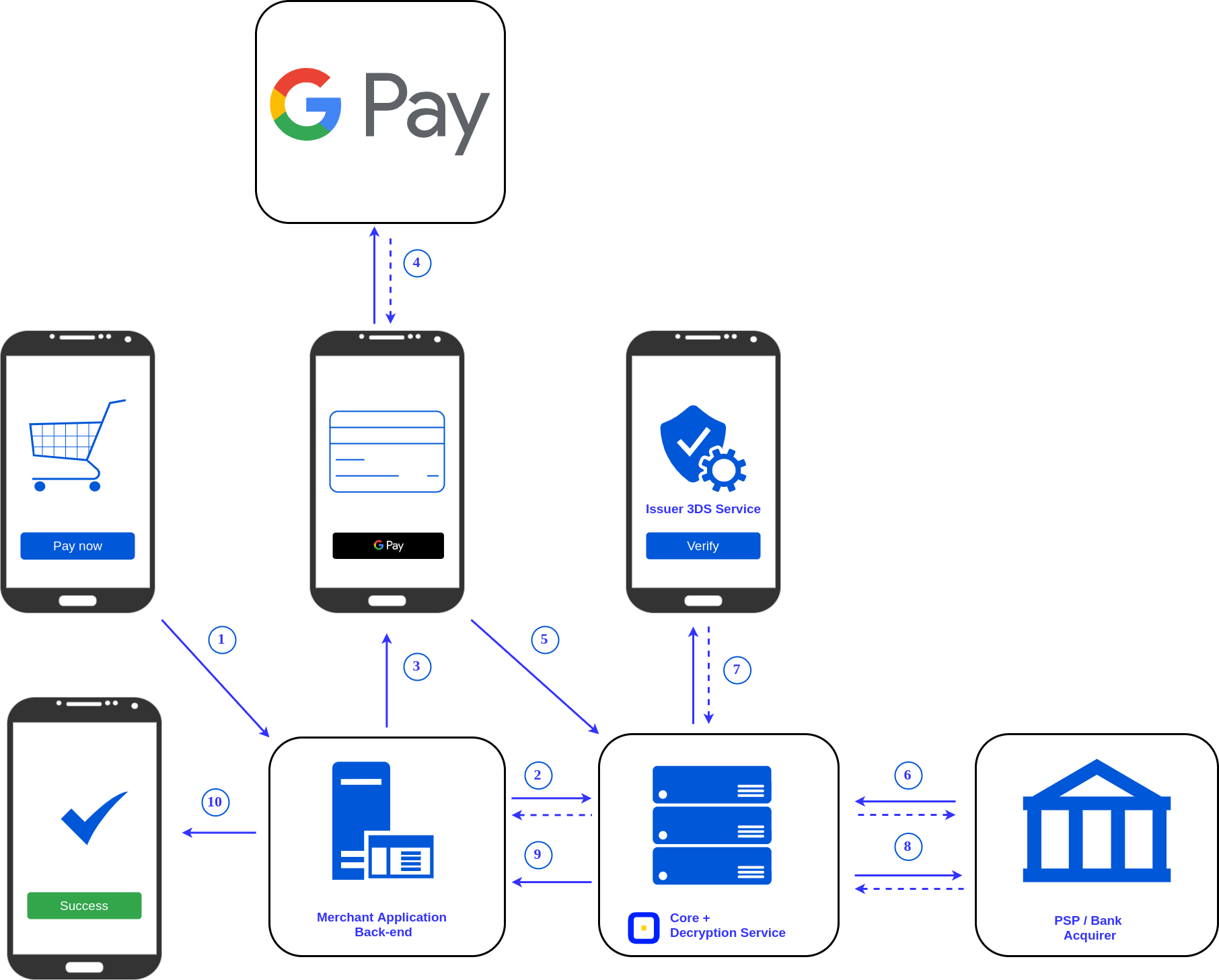
The process begins by downloading the Google Pay app from the Play Store or App Store. Once authenticated with your Google Account, the “Add a Card” feature allows you to input credit or debit card details. The app uses Optical Character Recognition (OCR) to scan your card via the camera, though manual entry is always an option. A critical technical step here is “Bank Verification.” To ensure the cardholder is the one adding the card, Google initiates a handshake with your bank, requiring a one-time password (OTP) sent via SMS or email.
Securing the Application
Because Google Pay handles sensitive financial data, it mandates device-level security. You cannot use the full suite of GPay features without a screen lock (PIN, pattern, or biometrics). From a technical standpoint, this serves as the first layer of two-factor authentication. In the settings menu, users should also enable biometric prompts for every transaction to ensure that even if a phone is handed to someone else while unlocked, the “wallet” remains sealed.
2. The Mechanics of In-Store Payments: Leveraging NFC Technology
The most common use case for Google Pay is at the point-of-sale (POS) terminal in retail environments. This process relies on Near Field Communication, a short-range wireless connectivity standard.
Activating and Using Tap-to-Pay
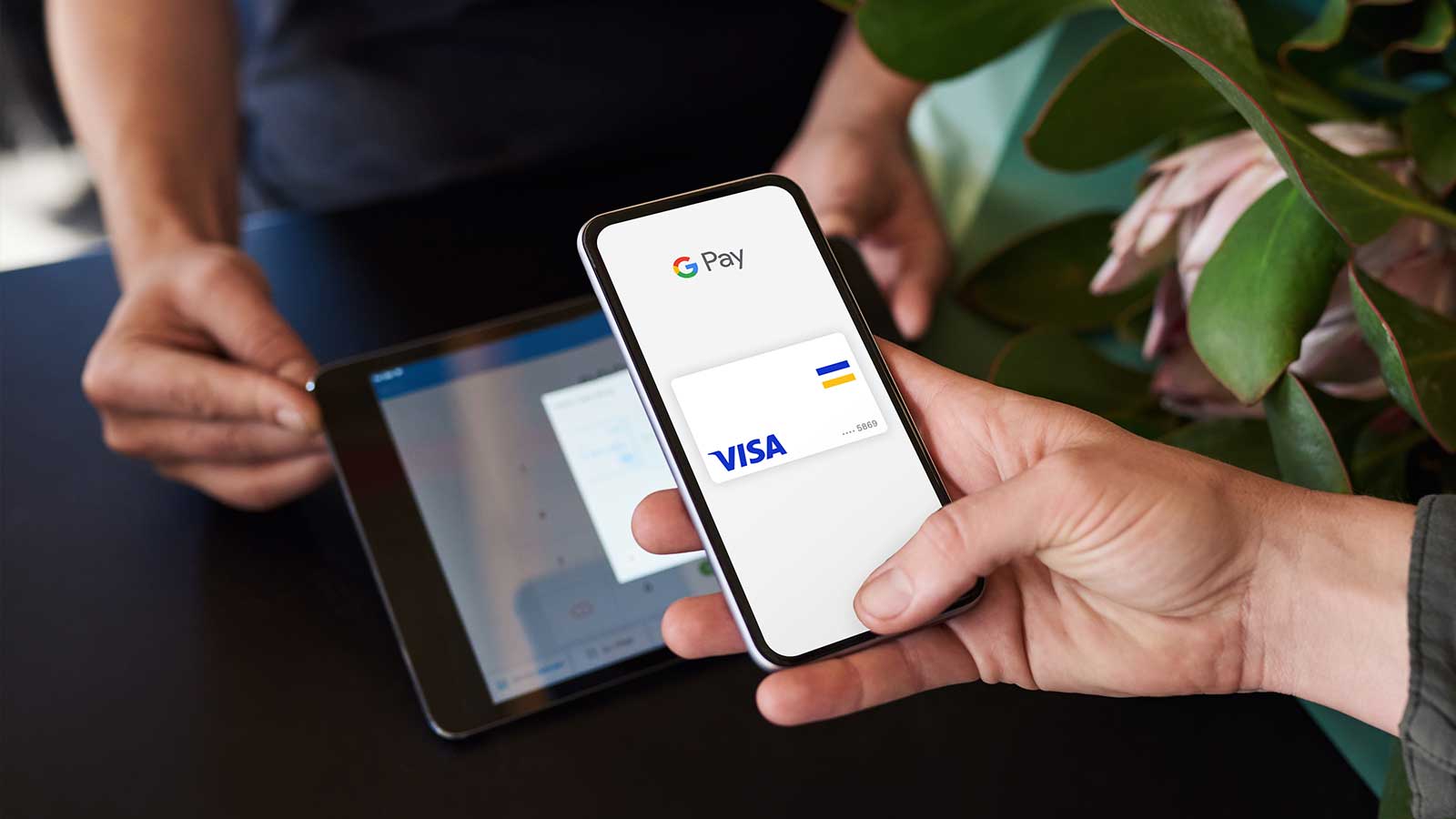
To pay in a store, you must first ensure that NFC is toggled “On” in your phone’s connectivity settings. When you are ready to pay, you do not even need to open the Google Pay app in many instances. Simply wake your phone (unlocking it is usually required for amounts over a certain threshold) and hold the back of the device near the contactless symbol on the payment terminal.
The devices communicate within a four-centimeter range. Upon a successful connection, a blue checkmark appears on your screen, indicating that the encrypted payment data has been transmitted. This process is significantly faster than inserting a chip card and eliminates the wear and tear associated with physical cards.
Understanding Tokenization and Security
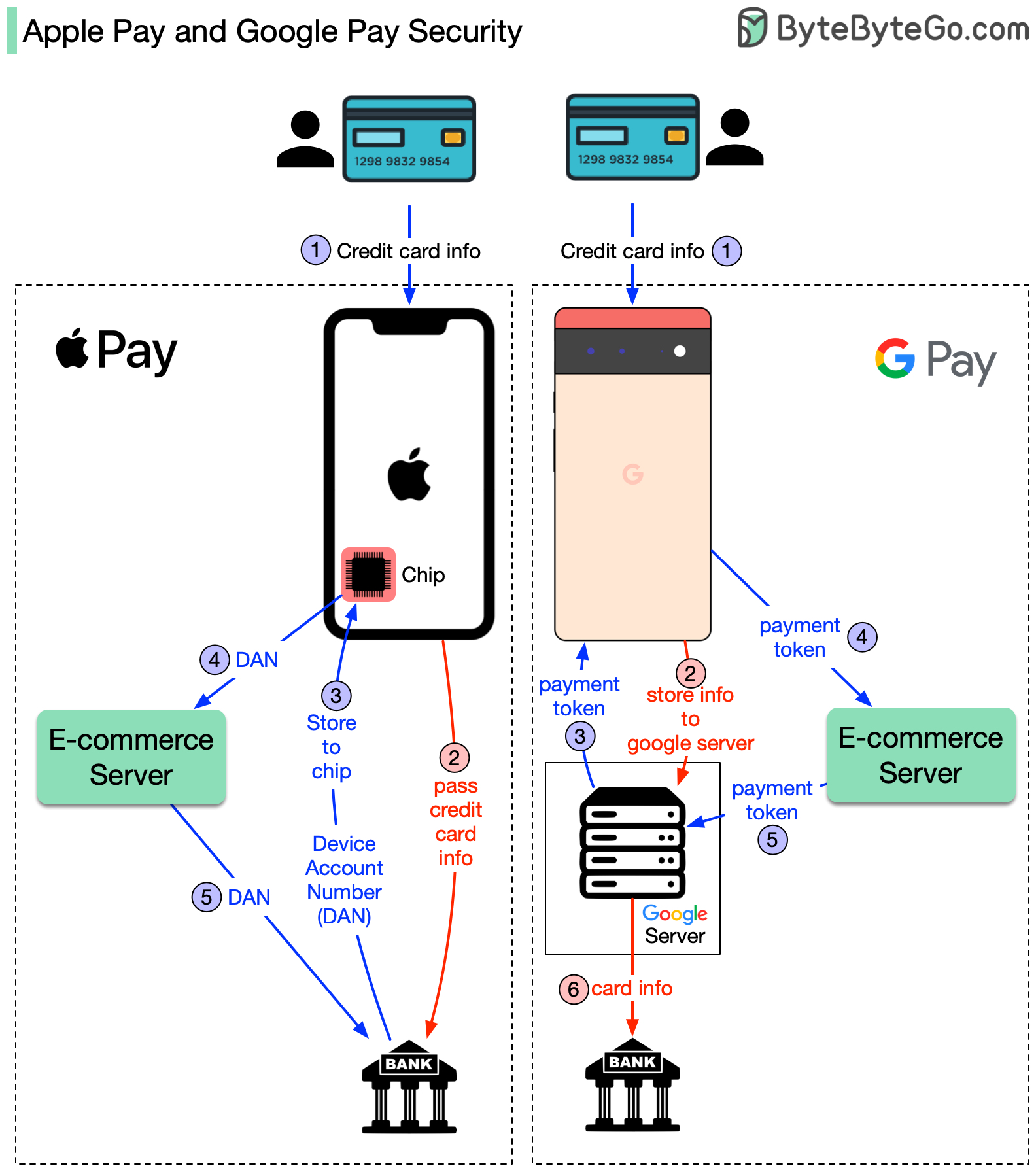
One of the most impressive technical feats of Google Pay is “Tokenization.” When you pay in a store, Google Pay does not share your actual credit or debit card number with the merchant. Instead, it shares a “Virtual Account Number”—a temporary, encrypted alias known as a token.
If a merchant’s database is ever hacked, your actual card details remain safe because they were never stored on the merchant’s server. This layer of abstraction is the primary reason why digital wallets are technically more secure than physical plastic cards, which broadcast their primary account number (PAN) during every transaction.
Troubleshooting Connection Failures
Occasionally, the “tap” may fail. This is often due to the placement of the NFC antenna, which is usually located near the top of the phone or around the camera module. Heavy metal or thick ruggedized cases can also interfere with the radio frequency signals. Ensuring the phone is held flat against the terminal’s reader usually resolves these technical hiccups.
3. Seamless Integration: Online and In-App Transactions
Beyond the physical world, Google Pay serves as a streamlined checkout solution for e-commerce and mobile applications. This eliminates the “friction” of manual data entry, which is a leading cause of cart abandonment in digital marketing.
The “Buy with Google Pay” Button
When shopping on a mobile browser (like Chrome) or within an app like Uber or DoorDash, look for the Google Pay brand mark at checkout. When selected, a simplified overlay appears, showing your default card and shipping address. Because your identity is already verified via your Google Account login and device biometrics, you can complete a purchase in two taps.
Chrome Integration and Autofill
For desktop users, Google Pay integrates directly with the Google Chrome browser. If you have cards saved in your Google Pay profile, Chrome can “autofill” payment forms on websites that don’t even have a dedicated GPay button. While the browser fills in the card number and expiry date, it will typically require you to enter the CVV (Card Verification Value) or use a biometric sensor on your laptop to authorize the decryption of the data.
Managing Digital Tickets and Passes
Google Pay’s utility extends into the “Passes” ecosystem. Tech-savvy users can add boarding passes, movie tickets, and loyalty cards to the app. These are often triggered by “Location-Based Services.” For example, when you arrive at an airport, your Google Pay boarding pass may appear as a notification on your lock screen, leveraging GPS and geofencing technology to provide the right information at the exact moment it is needed.
4. Peer-to-Peer (P2P) Transfers and Utility Management
In several regions, most notably the United States and India, Google Pay has evolved into a comprehensive platform for sending money to individuals and paying monthly bills.
Sending Money to Contacts
The P2P feature allows users to send money to friends or family using only a phone number or email address. Technically, this acts as an overlay for the Automated Clearing House (ACH) in the US or the Unified Payments Interface (UPI) in India. When you initiate a transfer, Google Pay sends an instruction to your bank to move funds to the recipient’s linked account. These transactions are usually instantaneous or take a few minutes, depending on the underlying banking rails.
QR Code Payments
In markets with high mobile-first adoption, QR codes are the dominant form of transaction. Google Pay includes a built-in scanner that parses the data embedded in a merchant’s QR code (which includes their banking ID and the transaction amount). This is a highly efficient way for small vendors who lack expensive NFC terminals to accept digital payments. The user simply scans, enters the amount, and authorizes the transfer with their PIN.
Automating Bill Payments
The “Explore” or “Bills” section of the app allows users to link their utility accounts—such as electricity, water, and internet. The app uses APIs (Application Programming Interfaces) to fetch your current balance from the utility provider’s server. Users can set up “Autopay,” which creates a recurring technical instruction to settle the bill on a specific date, ensuring that services are never interrupted due to human forgetfulness.
5. Privacy, Data Integrity, and Future Trends
As we look toward the future of Google Pay, the focus remains on enhancing the intersection of privacy and convenience.
Privacy Controls
A common concern with tech giants is data usage. Google Pay provides a “Privacy and Security” dashboard where users can opt-out of sharing their transaction history for personalizing other Google services. Technically, Google encrypts your payment history, and while they facilitate the transaction, the granular details of what you bought are often shielded from the broader Google advertising profile, depending on your selected settings.
Find My Device Integration
If your phone is lost or stolen, the technical safeguards of Google Pay are robust. Because the app requires a screen lock, a thief cannot easily make purchases. Furthermore, through Google’s “Find My Device” service, a user can remotely wipe their phone, which instantaneously deletes the digital keys and tokens associated with Google Pay, rendering the digital wallet useless to unauthorized users.
The Evolution toward a Universal Wallet
The roadmap for Google Pay suggests an expansion into digital IDs, such as driver’s licenses and office keycards. This involves a technology called “Identity Credentials,” which uses the secure element (a dedicated hardware chip for encryption) on modern smartphones to store government-verified data.
In conclusion, learning how to pay with Google Pay is a gateway to a more efficient, secure, and streamlined lifestyle. By understanding the underlying NFC technology, the security of tokenization, and the versatility of the app’s online and P2P features, you can fully embrace the digital-first era. As hardware and software continue to converge, the smartphone is no longer just a communication tool—it is the most powerful financial instrument in your possession.
aViewFromTheCave is a participant in the Amazon Services LLC Associates Program, an affiliate advertising program designed to provide a means for sites to earn advertising fees by advertising and linking to Amazon.com. Amazon, the Amazon logo, AmazonSupply, and the AmazonSupply logo are trademarks of Amazon.com, Inc. or its affiliates. As an Amazon Associate we earn affiliate commissions from qualifying purchases.