
In the intricate world of technology, where systems operate with the precision of a finely tuned organism, it’s easy to overlook the subtle signs of impending trouble until they manifest into glaring issues. Just as our bodies communicate distress through symptoms like a cold or a fever, our digital infrastructure, software applications, and individual devices often exhibit analogous “ailments.” Understanding the distinction between a minor performance sniffle (a “cold”) and a critical systemic meltdown (a “fever”) is paramount for maintaining robust, reliable, and secure technology environments. This article delves into these metaphorical tech maladies, offering insights into their symptoms, diagnosis, treatment, and crucially, prevention.
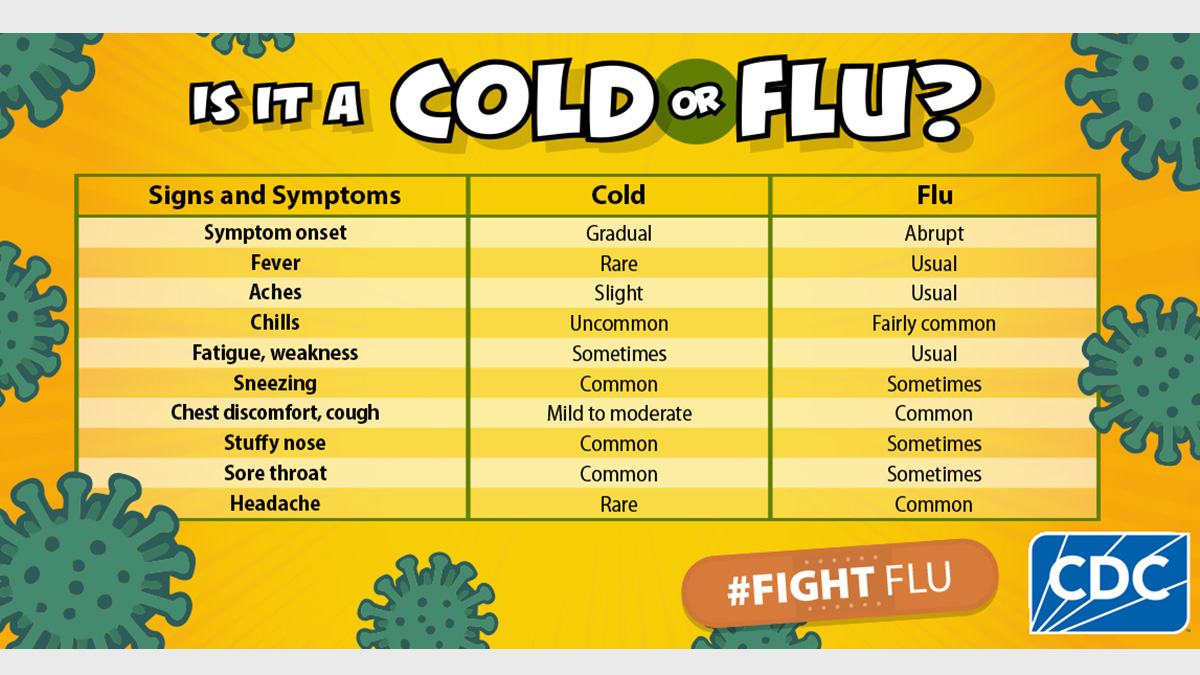
The analogy might seem whimsical at first, but it serves a vital purpose: it helps us categorize and prioritize the myriad issues that can plague digital systems. A “cold” in your tech might be a slow boot-up or a sporadic software glitch, while a “fever” could manifest as persistent system crashes, severe overheating, or a full-blown cyberattack. Recognizing which state your tech is in dictates the urgency and nature of the required intervention. Ignoring either can lead to more severe complications, but confusing them can lead to overreaction for minor issues or, worse, complacency in the face of impending disaster.
Defining the Ailments: Minor Annoyances vs. Critical Conditions
To effectively manage technological health, we must first establish clear definitions for these metaphorical illnesses. The “cold” represents a state of mild, localized, and often temporary dysfunction, while the “fever” signifies a more severe, systemic, and potentially debilitating condition that demands immediate and comprehensive attention.
The “Cold” State: Performance Sniffles and Latency Sneezes
A “cold” in your tech systems refers to a collection of minor performance degradations and intermittent glitches that, while annoying, typically do not threaten the core functionality or integrity of your data. These are the digital equivalents of a runny nose or a mild cough – uncomfortable, disruptive to your workflow, but generally self-limiting or easily resolved with basic remedies. Examples include slower-than-usual application loading times, occasional software freezes that resolve themselves after a few seconds, a slightly sluggish user interface, or minor network latency that causes momentary buffering.
These “colds” often stem from an accumulation of digital “dust” – such as bloated caches, fragmented hard drives, an excessive number of startup programs, or minor software conflicts. Outdated drivers or small, non-critical bugs within an operating system or application can also contribute to this state. The key characteristic of a tech “cold” is that the system remains operational, and core tasks can still be performed, albeit with reduced efficiency or occasional frustration. The user experience is degraded, but the system is not actively failing or under immediate threat of data loss.
The “Fever” State: Systemic Overheating and Critical Crashes
In stark contrast, a “fever” indicates a much more serious and widespread issue affecting the fundamental stability, security, or functionality of your tech systems. This is akin to a high biological fever, signaling a significant underlying problem that could lead to severe consequences if left unaddressed. A tech “fever” manifests as persistent system crashes (e.g., the infamous Blue Screen of Death on Windows or kernel panics on macOS/Linux), severe hardware overheating to the point of risking component damage, data corruption that renders files inaccessible or compromised, or widespread security breaches like ransomware attacks.
These issues are systemic, impacting multiple components or layers of the technology stack, and they pose a significant threat to data integrity, operational continuity, and even the physical longevity of hardware. Unlike a “cold,” a “fever” often renders the system partially or completely unusable, demanding immediate and expert intervention. It suggests a deeper, more critical infection or malfunction that transcends minor annoyances and ventures into the realm of catastrophic failure. The implications extend beyond user inconvenience to potential financial losses, reputational damage, and irreversible data loss.
Symptoms and Diagnostics: Reading Your System’s Health Indicators
Just as a doctor observes symptoms to diagnose an illness, tech professionals and savvy users must learn to interpret the various signs their systems exhibit. Differentiating between “cold” and “fever” symptoms is crucial for initiating the correct diagnostic and remedial actions.
Identifying “Cold” Symptoms: Lag, Glitches, and Minor Inconsistencies
Recognizing a tech “cold” primarily involves observing subtle yet consistent degradations in user experience and system performance. Users might notice applications taking noticeably longer to launch or respond to commands. Web pages might load slowly, even on a fast connection, or multimedia content might buffer more frequently. Occasional, non-reproducible graphical glitches, minor interface elements freezing momentarily, or a slight but perceptible increase in fan noise might also indicate a “cold.”
Another common symptom is an increase in seemingly innocuous error messages that don’t lead to crashes but interrupt workflow, such as an application “not responding” briefly before recovering, or a peripheral device needing to be reconnected occasionally. While these issues might individually seem minor, their cumulative effect can significantly impact productivity and user satisfaction. The key is their intermittent nature and lack of catastrophic consequence; the system still functions, albeit with some “sniffles” and “sneezes” that demand attention but not panic. Early detection through careful observation of these subtle changes can prevent escalation.
Recognizing “Fever” Indicators: Overheating, Error Storms, and Data Corruption
Detecting a tech “fever” requires vigilance for more alarming and severe indicators. One of the most critical signs is excessive hardware heat; if a laptop feels burning hot to the touch, or desktop components are running significantly hotter than usual, it’s a strong indicator of an overloaded or failing component. Persistent and frequent critical error messages, such as consistent application crashes, operating system freezes that require a hard reboot, or the dreaded Blue Screen of Death, are unequivocal signs of systemic failure.
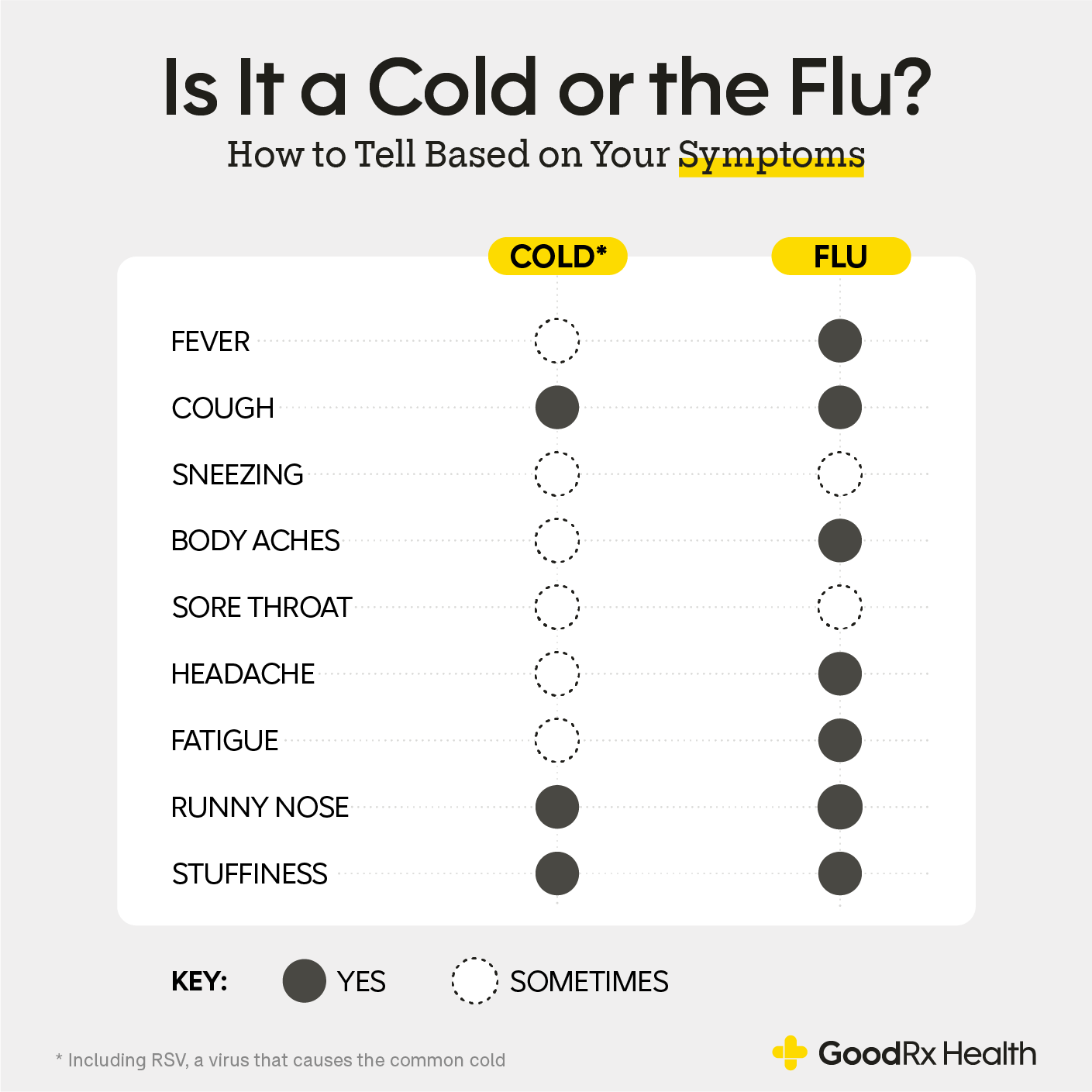
Furthermore, a “fever” often manifests through data integrity issues: files becoming corrupted, disappearing, or being inaccessible. Sudden and inexplicable system shutdowns or reboots, especially during demanding tasks, point to hardware instability or critical software errors. Beyond performance, security-related “fever” symptoms include unusual network activity (e.g., unexplained outbound data transfers), pop-ups from unknown sources, inability to access personal files (a hallmark of ransomware), or unauthorized changes to system settings. These are not minor inconveniences; they are distress signals indicating a severe underlying problem that threatens the system’s core viability and security.
Treatment and Prevention: Restoring Digital Well-being
Once symptoms are identified, the next step is intervention. The type of ailment dictates the appropriate course of action, ranging from routine maintenance for a “cold” to emergency protocols for a “fever.” Proactive measures are also critical for building long-term digital immunity.
Remedying the “Cold”: Routine Maintenance and Software Updates
Treating a tech “cold” is analogous to resting, hydrating, and taking over-the-counter remedies for a biological cold. The primary approach involves regular system maintenance and timely software updates. This includes running disk cleanup utilities to remove temporary files and cached data, defragmenting hard drives (for HDDs) or optimizing storage (for SSDs), and uninstalling unused applications that consume system resources. Regularly restarting your system can also clear transient memory issues and improve overall responsiveness.
Crucially, keeping your operating system, applications, and hardware drivers updated is one of the most effective ways to prevent and remedy “colds.” Updates often contain performance enhancements, bug fixes, and compatibility improvements that address the root causes of minor glitches and sluggishness. Running periodic, light malware scans can also catch and remove minor adware or potentially unwanted programs that contribute to system slowdowns. These steps are preventative as much as they are curative, acting like regular check-ups to keep minor issues from escalating.
Addressing the “Fever”: Emergency Protocols and Disaster Recovery
A tech “fever” demands immediate and decisive action, akin to seeking emergency medical care. The first step often involves isolating the affected system to prevent further spread, particularly in cases of suspected malware or network-borne attacks – disconnect from the internet and any local networks. Next, focus on data preservation: if possible and safe, perform an emergency backup of critical data to an external, isolated storage device. However, exercise caution, as copying infected files could spread the problem.
For hardware-related “fevers,” immediate shutdown is often necessary to prevent permanent damage from overheating. Diagnostics tools provided by hardware manufacturers can help pinpoint failing components. In cases of severe software corruption or critical security breaches, a full system restore from a clean backup image or a complete reinstallation of the operating system might be the only viable solution. This is where robust disaster recovery plans become invaluable, allowing organizations to quickly revert to a known good state. Professional IT support or cybersecurity experts are often indispensable for diagnosing and treating complex “fever” conditions, as specialized knowledge and tools are usually required.
The Prognosis: Building Resilience and Ensuring Longevity
Beyond immediate treatment, the long-term health of your tech systems depends on building resilience and fostering a culture of proactive management. Just as a healthy lifestyle strengthens the immune system, continuous vigilance and strategic planning fortify digital infrastructure against future ailments.
Building Immunity: Proactive Monitoring and Cybersecurity Hygiene
Building immunity for your tech systems involves a multi-faceted approach focused on proactive measures and stringent cybersecurity hygiene. Implementing advanced threat detection systems, robust firewalls, and endpoint protection solutions creates a strong defensive perimeter. Regular security audits, penetration testing, and vulnerability assessments help identify and patch weaknesses before they can be exploited by malicious actors. Automated backup solutions, both local and cloud-based, ensure data redundancy and quick recovery capabilities.
Performance monitoring tools that track CPU usage, memory consumption, disk I/O, and network traffic can provide early warnings of potential “colds” or even developing “fevers,” allowing for intervention before symptoms become severe. Furthermore, continuous education for users on safe browsing habits, phishing awareness, and strong password policies is crucial, as human error remains a significant vulnerability. By embedding these practices into daily operations, organizations and individuals can significantly reduce the likelihood of contracting severe tech ailments, much like vaccination and healthy habits protect physical health.
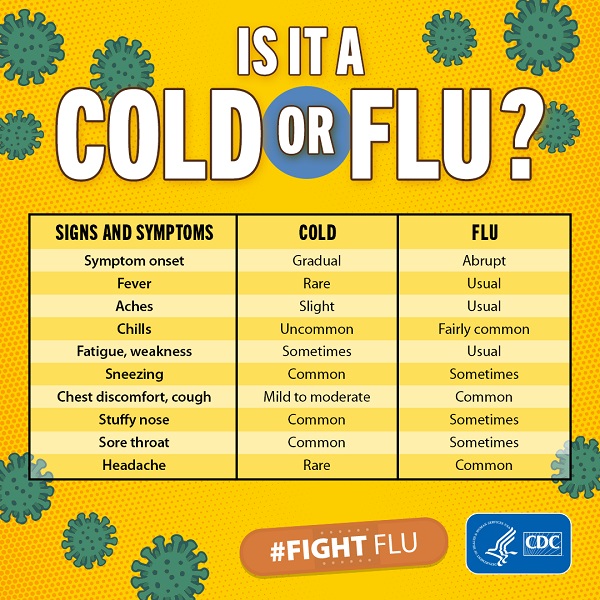
The Cost of Neglect: Chronic Conditions and Systemic Failure
Ignoring the early warning signs of a tech “cold” or dismissing the more urgent indicators of a “fever” can have severe and far-reaching consequences. A minor performance issue, left unaddressed, can evolve into a chronic condition, eroding productivity over time and leading to user frustration and dissatisfaction. For instance, accumulated junk files or outdated software can eventually cause system instability, escalating a mere “sniffle” into a persistent “cough” that impacts reliability.
More critically, neglecting a developing “fever” can lead to catastrophic systemic failure. A minor security vulnerability, if ignored, can become an open door for a devastating cyberattack. Overheating components, if not diagnosed and remedied, will inevitably lead to hardware failure, requiring costly replacements and potentially resulting in irreparable data loss. The financial repercussions can be substantial, encompassing repair costs, data recovery expenses, lost productivity, legal fees, and reputational damage. In a competitive digital landscape, a lack of proactive tech health management can undermine trust, erode customer loyalty, and ultimately jeopardize the very existence of a business or the functionality of critical personal systems.
In conclusion, understanding the metaphorical difference between a “cold” and a “fever” in your tech systems is more than just an exercise in analogy; it’s a critical framework for effective IT management and personal digital responsibility. Recognizing the subtle distinctions between minor annoyances and critical threats enables timely, appropriate responses, preventing small issues from spiraling into major crises. By adopting a proactive mindset, prioritizing routine maintenance, robust security, and continuous monitoring, we can build resilient digital ecosystems that perform optimally and withstand the inevitable challenges of the technological landscape, ensuring longevity and reliability in our increasingly digital world.
aViewFromTheCave is a participant in the Amazon Services LLC Associates Program, an affiliate advertising program designed to provide a means for sites to earn advertising fees by advertising and linking to Amazon.com. Amazon, the Amazon logo, AmazonSupply, and the AmazonSupply logo are trademarks of Amazon.com, Inc. or its affiliates. As an Amazon Associate we earn affiliate commissions from qualifying purchases.