
The iPad, once heralded as the post-PC device, continues its relentless evolution, pushing the boundaries of mobile computing. Each year brings a flurry of updates, encompassing both groundbreaking hardware innovations and transformative software enhancements, solidifying its position as a versatile tool for creativity, productivity, and entertainment. To answer “what is the latest update for the iPad” is to delve into a confluence of recent advancements that collectively redefine the user experience, making the current generation of iPads more powerful, intuitive, and indispensable than ever before. From revolutionary chips to reimagined operating systems and intelligent features, the latest updates underscore Apple’s commitment to making the iPad a truly professional and personal device.
The Latest Iteration of iPad Hardware: A New Generation of Power and Design
Apple’s commitment to pushing the envelope in hardware design and performance is vividly demonstrated in the latest iPad lineup. The recent introduction of the M4 iPad Pro and the M2 iPad Air represents not just incremental upgrades but significant leaps that set new benchmarks for tablet computing. These devices are designed to handle the most demanding tasks with remarkable fluidity, while also offering an unparalleled visual and tactile experience.
The M4 Chip: Unleashing Unprecedented Performance
At the heart of the latest iPad Pro models lies the formidable M4 chip, a testament to Apple’s prowess in custom silicon design. This is not just an update; it’s a paradigm shift, as the M4 is the first chip from Apple to integrate a next-generation Neural Engine, specifically engineered to excel at artificial intelligence tasks. With a 10-core CPU providing a significant performance boost over its predecessors and a 10-core GPU delivering faster rendering and advanced graphics capabilities, the M4 transforms the iPad Pro into a mobile powerhouse. It facilitates real-time 4K video editing, complex 3D rendering, and sophisticated machine learning workflows that were once the exclusive domain of high-end desktop computers. The M4’s efficiency also ensures that this immense power is delivered without compromising battery life, allowing professionals and creatives to work untethered for extended periods.
OLED Tandem Display: Visual Brilliance Redefined
Complementing the M4 chip’s raw power is the groundbreaking Ultra Retina XDR display, featuring pioneering Tandem OLED technology. This isn’t just an OLED screen; it’s two OLED panels stacked together, resulting in extraordinary full-screen brightness, with up to 1000 nits for SDR and HDR content, and a staggering 1600 nits peak for HDR. The Tandem OLED architecture also delivers an unprecedented 2,000,000:1 contrast ratio, ensuring true blacks and vivid colors with stunning accuracy. For artists, photographers, videographers, and anyone who demands the utmost in visual fidelity, this display offers an immersive and true-to-life viewing experience, making detailed editing and vibrant content consumption more captivating than ever before. Its precise control over individual pixels opens up new possibilities for creative work, ensuring that what you see on the screen is exactly what you intend to create.
Ultra-Thin Design and Portability
Alongside the internal upgrades, Apple has also reimagined the physical form factor of the iPad Pro, making it the thinnest Apple product ever created. The 13-inch iPad Pro measures an astonishing 5.1mm thin, and the 11-inch model is 5.3mm. This remarkable feat of engineering doesn’t just make the device more aesthetically pleasing; it significantly enhances portability and ergonomics. Despite its svelte profile, the new iPad Pro remains incredibly robust, thanks to its durable aluminum enclosure. This ultra-thin and lightweight design means that carrying a powerful professional tool no longer means sacrificing comfort or convenience, making it an ideal companion for mobile professionals, students, and creatives on the go.
Enhanced Accessories: Apple Pencil Pro and Magic Keyboard
No discussion of iPad hardware updates is complete without acknowledging its ecosystem of accessories, which have also received significant upgrades. The new Apple Pencil Pro introduces a suite of intuitive features that expand creative possibilities. A new squeeze gesture allows users to quickly bring up a tool palette, while barrel roll enables precise control of tools like brushes and pens simply by rotating the pencil. Haptic feedback provides subtle pulses to confirm actions, and “Find My” integration ensures it’s always locatable. These enhancements make the Apple Pencil Pro an even more natural and versatile extension of the creative hand.
The redesigned Magic Keyboard for the iPad Pro also elevates the user experience. It now features a more spacious trackpad with haptic feedback, an aluminum palm rest for a premium feel, and a dedicated function row for quick access to brightness, volume, and other controls. These additions bring the iPad Pro closer to a laptop-like experience, offering greater comfort and efficiency for typing and navigation, further blurring the lines between tablet and traditional computer workstations. Additionally, the latest iPad Air, featuring the M2 chip, brings the power of Apple Silicon to a broader audience, with enhanced performance and Wi-Fi 6E connectivity, making it a compelling option for those seeking high performance at a more accessible price point.
iPadOS 18: Software Innovations Elevating the Experience
While hardware provides the foundation, it’s the software that truly unlocks the iPad’s potential. iPadOS 18, unveiled as the latest iteration of Apple’s tablet operating system, introduces a wealth of features designed to make the iPad more personal, more capable, and seamlessly integrated into the broader Apple ecosystem. These updates reflect a strategic focus on customization, productivity, and the intelligent integration of AI, setting a new standard for tablet user interfaces.
Customization and Personalization Features
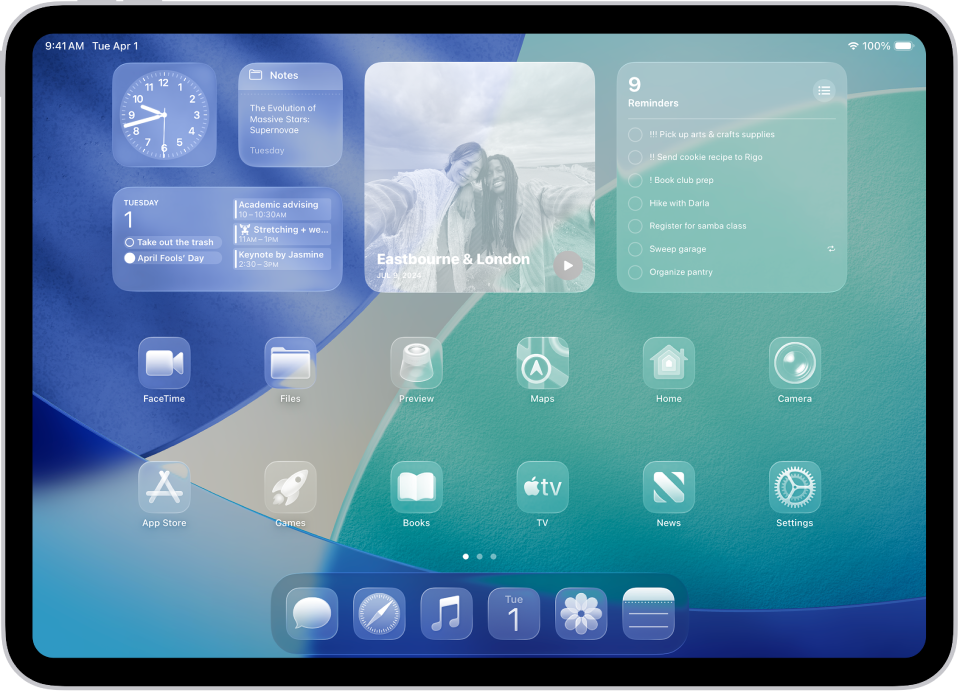
iPadOS 18 ushers in unprecedented levels of customization, allowing users to tailor their home screen and Control Center to reflect their individual style and workflow. Users can now tint app icons to create a unified aesthetic, making their device feel more personal than ever. The ability to place app icons and widgets anywhere on the home screen, freeing them from the rigid grid, offers a more expressive and flexible layout. The redesigned Control Center is also a major highlight, allowing users to customize controls, group related functions, and even add controls from third-party apps, making essential settings more accessible and organized. This focus on personalization ensures that each iPad can truly feel unique to its owner.
Enhanced Productivity Tools and Multitasking
For professionals and students, iPadOS 18 brings significant advancements in productivity and multitasking. The new Calculator app, a long-requested feature, arrives with “Math Notes,” allowing users to solve complex equations by simply writing them down with Apple Pencil and seeing the solution appear instantly. The Notes app has also been enhanced with new intelligent features, including audio transcription and the ability to summarize notes, greatly assisting in lectures or meetings. Stage Manager, Apple’s powerful multitasking tool, receives further refinements, making it even more intuitive to manage multiple app windows and switch between tasks effortlessly. These improvements collectively streamline workflows, enabling users to accomplish more directly from their iPad.
AI-Powered Intelligence (Apple Intelligence) Integration

Perhaps the most significant overarching update to iPadOS 18 is the deep integration of “Apple Intelligence.” This personal intelligence system leverages the power of Apple’s custom silicon to provide helpful, personalized, and contextually relevant assistance across various apps and functionalities. It’s designed with privacy at its core, performing most processing on-device. Apple Intelligence empowers users with new writing tools, such as Rewrite and Proofread, which can help refine text, summarize content, or generate different tones. It also introduces “Image Playground,” allowing users to create playful images and illustrations instantly based on text descriptions. Siri becomes more natural, capable of understanding on-screen context, and can perform actions across apps. From organizing emails with Smart Reply to generating custom emojis with Genmoji, Apple Intelligence is poised to redefine how users interact with their iPad, making it a truly proactive and indispensable assistant.
Gaming and Entertainment Enhancements
Beyond productivity, iPadOS 18 also elevates the gaming and entertainment experience. With the power of the M-series chips and enhanced graphics capabilities, graphically intensive games run smoother and look more stunning than ever. Features like Game Mode optimize performance by prioritizing CPU and GPU resources for gaming, while new MetalFX Upscaling technology renders high-quality graphics at lower resolutions, then upscales them for a breathtaking visual fidelity. The enhanced audio experience, including spatial audio with dynamic head tracking, immerses users deeper into their favorite movies, music, and games, transforming the iPad into a portable entertainment powerhouse.
The iPad Ecosystem: A Hub for Creativity and Professionalism
The true strength of the iPad lies not just in its individual components, but in how they coalesce within a rich ecosystem of applications and services. The latest updates further solidify the iPad’s role as a versatile platform, catering to a diverse range of users from professional artists and content creators to students and enterprises. The synergy between powerful hardware, intelligent software, and a vibrant app store transforms the iPad into a flexible tool capable of adapting to nearly any workflow.
Pro Apps and Creative Workflows
The arrival of the M4 chip, coupled with the advancements in iPadOS 18, has unlocked new possibilities for professional applications on the iPad. Apps like Final Cut Pro and Logic Pro for iPad have been optimized to leverage the M-series chips, enabling seamless editing of multi-stream 4K video and complex audio production with numerous tracks and effects. Graphic designers can utilize apps like Adobe Photoshop and Illustrator with enhanced performance, benefiting from the precise input of the Apple Pencil Pro and the stunning accuracy of the Ultra Retina XDR display. 3D artists can render intricate scenes in apps like Octane X with unprecedented speed. The iPad is increasingly becoming a primary device for a growing number of creative professionals, offering desktop-class performance in a portable form factor, truly bridging the gap between mobile and traditional workstations.
Education and Enterprise Applications
In educational settings, the iPad continues to be an invaluable tool. The new features in iPadOS 18, such as Math Notes and enhanced note-taking capabilities, make it an even more powerful learning companion for students. Its portability and versatility facilitate interactive learning, digital textbook integration, and collaborative projects. For enterprises, the iPad’s robust security features, ease of deployment, and growing suite of business-oriented apps position it as a formidable mobile workstation. From facilitating remote work with powerful communication and collaboration tools to enabling on-the-go data analysis and presentations, the latest iPad updates empower businesses to operate more efficiently and flexibly, adapting to the demands of modern work environments.
Accessibility Features for All Users
Apple’s unwavering commitment to accessibility is also evident in the latest iPadOS updates. New features are continually introduced to make the iPad accessible to a wider audience, regardless of their abilities. Eye Tracking, for instance, allows users to control iPad with just their eyes. Music Haptics lets deaf or hard of hearing users experience music through vibrations of the iPad’s Taptic Engine. Vocal Shortcuts enable users to assign custom phrases to launch apps or perform complex tasks. These thoughtful inclusions ensure that the iPad remains a device for everyone, fostering inclusivity and empowering individuals to connect, create, and achieve their goals with greater ease and independence.
Beyond the Updates: What the Future Holds for iPad
While the current updates are substantial, Apple’s trajectory with the iPad suggests an ongoing evolution, with future developments likely to build upon the foundations laid by the M4 chip, Tandem OLED, and Apple Intelligence. The iPad’s journey is far from over, and anticipating its future directions offers exciting prospects for users across all segments.
Continued AI Integration and Capabilities
The introduction of Apple Intelligence is merely the beginning of a deeper integration of artificial intelligence into the iPad experience. Future iterations are expected to enhance these capabilities significantly, making the iPad an even more proactive and intuitive personal assistant. We can anticipate more sophisticated on-device machine learning for predictive actions, deeper contextual understanding across more apps and system functions, and even more advanced generative AI features for creative and productivity tasks. The neural engine in the M-series chips will continue to be a focal point, enabling the iPad to handle increasingly complex AI workloads directly on the device, ensuring both speed and privacy.
Evolution of Display Technology and Form Factors
While the Tandem OLED display is a significant leap, display technology never stops evolving. Future iPads might incorporate micro-LED technology for even greater brightness, power efficiency, and longevity. Speculation also continues around more radical form factors, such as foldable iPads, which could offer an expansive screen when needed and a compact form factor for portability, opening up entirely new use cases and interaction paradigms. Larger iPad Pro models might also emerge, catering to professionals who desire maximum screen real estate for immersive workflows.
The Blurring Lines Between iPad and Mac
The increasing power of the iPad, particularly with the M-series chips, inevitably leads to discussions about its relationship with the Mac. The current software experience, iPadOS, maintains a distinct identity tailored for touch and Apple Pencil input. However, with professional apps like Final Cut Pro and Logic Pro now available on iPad, the functional overlap grows. Future updates might further blur these lines, perhaps offering more advanced window management, external display capabilities, or even a ‘Pro Mode’ that adapts the iPadOS interface closer to a desktop environment when connected to accessories. The goal will likely remain to offer distinct yet complementary experiences, rather than outright convergence, but the continued push for performance and versatility will undoubtedly inspire innovations that benefit both platforms.
In conclusion, the latest updates for the iPad represent a profound leap forward in both hardware and software. From the unparalleled power of the M4 chip and the visual brilliance of the Tandem OLED display to the transformative capabilities of iPadOS 18 and Apple Intelligence, the iPad continues to redefine what a mobile computing device can achieve. These innovations not only enhance existing workflows but also open up entirely new possibilities for creativity, productivity, and personal expression, firmly cementing the iPad’s status as a leading device in the technology landscape.
aViewFromTheCave is a participant in the Amazon Services LLC Associates Program, an affiliate advertising program designed to provide a means for sites to earn advertising fees by advertising and linking to Amazon.com. Amazon, the Amazon logo, AmazonSupply, and the AmazonSupply logo are trademarks of Amazon.com, Inc. or its affiliates. As an Amazon Associate we earn affiliate commissions from qualifying purchases.