
In an increasingly digital and self-service-oriented world, kiosk machines have become ubiquitous, quietly revolutionizing how businesses interact with customers and how individuals access services. Far more than just glorified tablets, a kiosk machine is a specialized, interactive terminal designed to facilitate specific functions or provide information, typically in a public setting, without the need for direct human assistance. From ordering food at a fast-food restaurant to checking in for a flight at an airport, these standalone digital stations embody the intersection of hardware and software innovation, empowering users with autonomy and businesses with efficiency. This comprehensive exploration delves into the technological fabric, diverse applications, evolutionary trajectory, and the inherent benefits and challenges of these indispensable digital assistants.
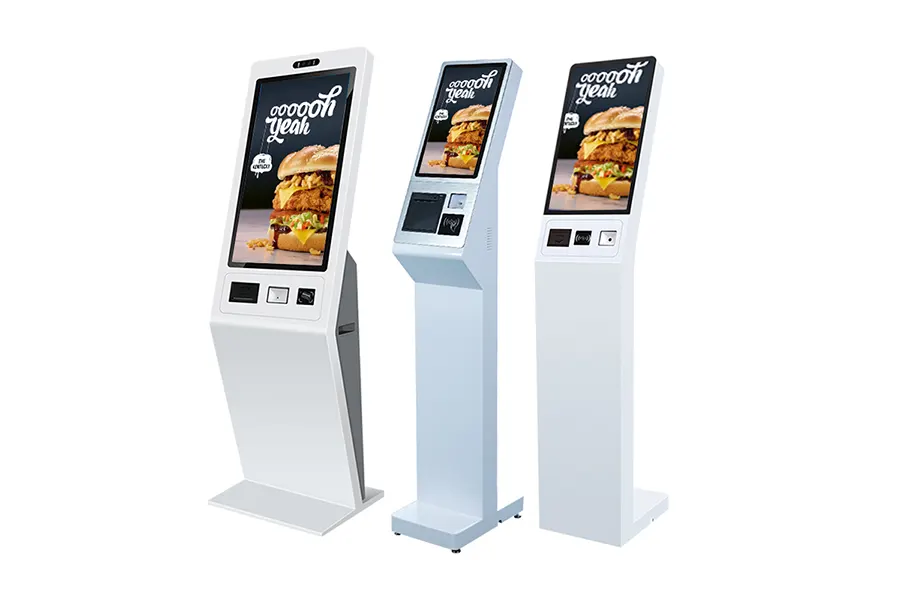
The Core Technology Behind Kiosk Machines
At its heart, a kiosk machine is a sophisticated piece of integrated technology, meticulously engineered to perform its designated tasks reliably and securely in various environments. Understanding its fundamental components reveals the complexity and ingenuity involved in creating these seemingly simple devices.
Hardware Components
The physical architecture of a kiosk machine is robust and purpose-built, designed for durability, ease of interaction, and specific functionality.
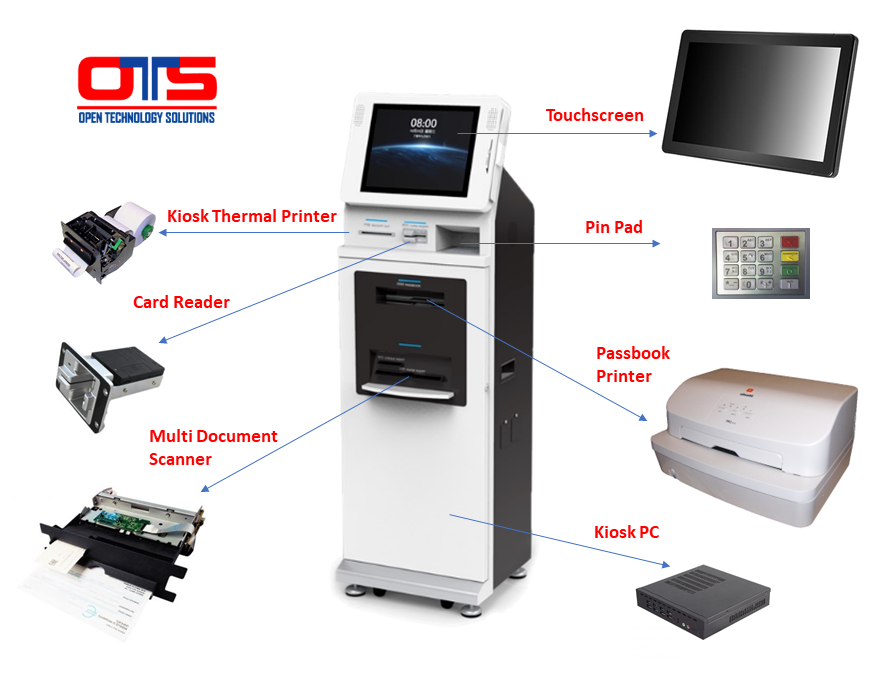
- Touchscreen Display: The most immediate and critical component, the touchscreen, serves as the primary interface. These can range from smaller 10-inch screens to large 55-inch interactive displays, featuring high-resolution graphics and responsive touch technology (capacitive or resistive) for intuitive user interaction. The display is often toughened to withstand constant public use and potential vandalism.
- Processing Unit: Much like a computer, kiosks are powered by an embedded processing unit, comprising a CPU, RAM, and storage (SSDs are common for speed and durability). These systems are typically chosen for their industrial-grade reliability, low power consumption, and ability to operate continuously. The processing power varies significantly depending on the complexity of the applications it needs to run.
- Peripherals: Kiosk functionality is often defined by its array of integrated peripherals. These can include:
- Card Readers: For payments (credit/debit, NFC/RFID for contactless) or identification (loyalty cards, access cards).
- Barcode/QR Code Scanners: For product lookups, ticket validation, or digital coupon redemption.
- Printers: For receipts, tickets, boarding passes, or informational printouts.
- Cameras: For security monitoring, photo capture (e.g., ID photos), or even facial recognition in advanced applications.
- Biometric Sensors: Fingerprint or iris scanners for secure authentication.
- Cash Acceptors/Dispensers: For automated payment and change return in certain vending or payment kiosks.
- Connectivity Modules: Kiosks require reliable internet access to process transactions, update information, and communicate with central servers. This is typically achieved through Ethernet, Wi-Fi, or cellular (4G/5G) modems, ensuring flexibility in deployment.
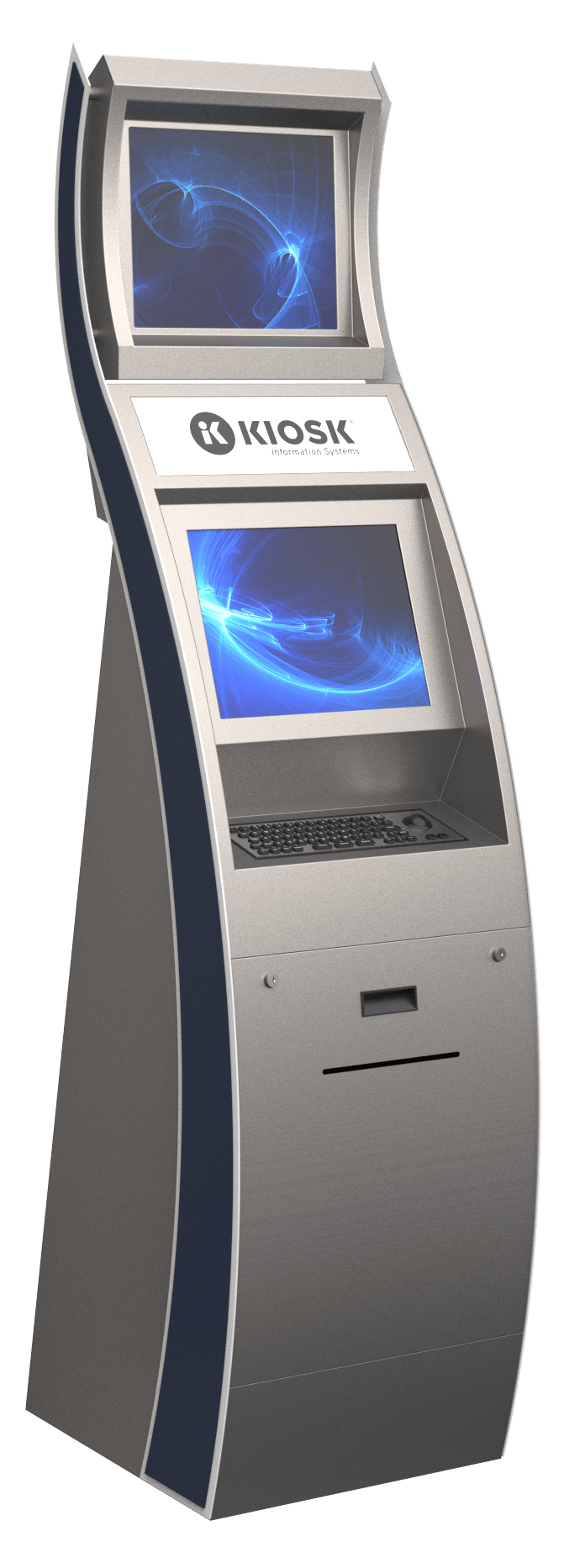
- Secure Enclosure: The exterior housing is crucial. Made from durable materials like steel, aluminum, or robust composites, it protects internal components from environmental factors, tampering, and vandalism. Designs range from sleek, minimalist stands to rugged, weatherproof outdoor units, often incorporating branding and ergonomic considerations.
Software Architecture
The hardware provides the skeleton; the software provides the intelligence and the user experience. A sophisticated software stack ensures the kiosk operates efficiently, securely, and effectively.
- Operating Systems: Kiosks often run specialized versions of common operating systems. Windows Embedded and Linux distributions (like Ubuntu Core) are popular for their stability, security, and customization options. Android is also gaining traction, particularly for consumer-facing applications, due to its familiarity and extensive app development ecosystem. These OS versions are stripped down to minimize overhead and enhance security.
- Application Software: This is the core program that defines the kiosk’s purpose. It’s often custom-developed or highly customized, featuring a user-friendly graphical interface (GUI) and the underlying business logic to perform specific tasks (e.g., order processing, ticket printing, information retrieval). The design emphasizes simplicity, clarity, and quick interaction.
- Remote Management Systems (RMS): For deployments of multiple kiosks, an RMS is indispensable. It allows administrators to remotely monitor kiosk status, deploy software updates, troubleshoot issues, gather usage data, and ensure security compliance without needing physical access to each unit. This significantly reduces operational overhead.
- Security Protocols: Given their public nature and often handling of sensitive data (payments, personal information), kiosks incorporate robust security measures. These include data encryption, secure boot processes, lockdown modes (restricting access to only the intended application), firewalls, and regular security patching to prevent unauthorized access and cyber threats.
Diverse Applications Across Industries
Kiosk machines are not a niche technology; they are transformative tools employed across an astonishing array of sectors, each leveraging the technology to streamline operations, enhance customer experience, and extend service reach.
Retail and Hospitality
The retail and hospitality industries have been at the forefront of kiosk adoption, transforming customer interactions.
- Self-Checkout Kiosks: Allowing customers to scan, bag, and pay for their purchases independently, reducing wait times and freeing up staff for more complex tasks.
- Order Placement Kiosks: Prevalent in fast-food and casual dining, enabling customers to browse menus, customize orders, and pay directly, often leading to increased average order value due to upselling prompts.
- Information and Wayfinding: Interactive kiosks in malls, hotels, and convention centers provide directories, event schedules, and local attraction information, helping visitors navigate large spaces efficiently.
- Loyalty Program Enrollment: Streamlining the sign-up process for loyalty programs, capturing customer data directly and offering instant rewards.
Healthcare and Public Services
Kiosks play a vital role in improving efficiency and accessibility in public-facing services where wait times and administrative burdens are often significant.
- Patient Check-in/Registration: In hospitals and clinics, kiosks allow patients to check in for appointments, update personal information, and even make co-payments, reducing administrative workload and improving patient flow.
- Queue Management Systems: Issuing tickets or assigning virtual wait numbers, minimizing perceived wait times and organizing service queues.
- Government Service Access: Used in DMVs, post offices, or municipal buildings for tasks like license renewals, permit applications, or bill payments, reducing lines and expanding service hours.
- Information Access: Providing health information, hospital maps, or public service announcements.
Transportation and Entertainment
From travel hubs to entertainment venues, kiosks expedite processes and enrich visitor experiences.
- Ticketing Kiosks: At airports, train stations, bus terminals, and cinemas, allowing users to purchase tickets, print boarding passes, or check in for travel without staff intervention.
- Interactive Exhibits: Museums, theme parks, and tourist attractions utilize kiosks for engaging educational content, interactive games, and multimedia presentations, enhancing the visitor experience.
- Wayfinding: Large venues like airports and sports stadiums use kiosks to help visitors navigate complex layouts and find specific gates, shops, or facilities.
Banking and Financial Services
Automated Teller Machines (ATMs) were arguably the original kiosk, and the financial sector continues to innovate with kiosk technology.
- Advanced ATMs: Beyond cash transactions, modern ATMs function as sophisticated kiosks, enabling bill payments, check deposits, account inquiries, and even initiating loan applications.
- Branch Transformation Kiosks: In bank branches, these kiosks can handle routine transactions, reducing teller workload and allowing staff to focus on more complex customer needs and sales opportunities.
- Foreign Exchange Kiosks: Automated currency exchange services found in international airports and tourist hotspots.
The Technological Evolution and Future of Kiosks
The journey of kiosk technology has been one of continuous innovation, driven by advancements in computing, connectivity, and user experience design. The future promises even more intelligent, integrated, and intuitive interactions.
Integration of Advanced Tech
Modern kiosks are no longer just basic transaction machines; they are becoming intelligent, personalized service hubs.
- AI and Machine Learning: Integrating AI allows kiosks to offer personalized recommendations, anticipate user needs, and learn from interactions. For instance, a retail kiosk might suggest complementary products based on a customer’s selections.
- Biometrics: Facial recognition, fingerprint scanning, and iris authentication are being used for faster, more secure customer identification and payment, enhancing both convenience and fraud prevention.
- IoT Connectivity: Kiosks are increasingly connected as part of the Internet of Things, allowing for real-time monitoring of performance, predictive maintenance alerts, and seamless integration with broader operational systems.
- Voice Recognition and NLP: Natural Language Processing (NLP) enables kiosks to understand and respond to spoken commands, making interactions more accessible and natural, particularly for users with limited mobility or vision.
- Augmented Reality (AR): AR capabilities could allow kiosks to provide virtual try-ons for clothing, interactive product demonstrations, or enhanced wayfinding by overlaying digital information onto real-world views.
Design and User Experience Trends
Beyond internal technology, the physical and interactive design of kiosks is also evolving to meet changing user expectations and accessibility standards.
- Sleeker, More Ergonomic Designs: Modern kiosks are often designed to be aesthetically pleasing, blending into their environments with slimmer profiles, premium materials, and modular components. Ergonomics ensure comfortable interaction for a wide range of users.
- Accessibility Features: A critical trend is the focus on universal design and ADA (Americans with Disabilities Act) compliance. This includes adjustable screen heights, audio prompts, tactile interfaces, and compatibility with assistive technologies to ensure kiosks are usable by individuals with disabilities.
- Enhanced Security Measures: As kiosks become more sophisticated, so do efforts to secure them. Anti-tamper features, robust physical enclosures, advanced encryption, and proactive cybersecurity protocols are standard to protect both the machine and user data.
- Modular and Customizable Systems: Manufacturers are designing kiosks with modular components, allowing businesses to easily swap out peripherals or upgrade internal hardware, extending the lifespan and adaptability of the units. This also facilitates customization for specific branding or functional requirements.
Benefits and Challenges of Kiosk Implementation
While the advantages of deploying kiosk machines are numerous and well-documented, businesses must also be mindful of the potential challenges to ensure successful integration and a positive return on investment.
Key Benefits
The strategic adoption of kiosk technology yields significant operational and customer experience improvements.
- Increased Efficiency and Speed: Kiosks can process transactions and provide information much faster than human agents, significantly reducing wait times and improving throughput, especially during peak hours.
- Reduced Operational Costs: By automating routine tasks, kiosks can reduce the need for extensive human staffing for front-line services, leading to substantial savings in labor costs over time.
- Improved Customer Experience: Customers appreciate the convenience, speed, and control offered by self-service options. Kiosks provide 24/7 access to services, eliminate perceived judgment, and empower users to complete tasks at their own pace.
- Data Collection and Analytics: Kiosks are powerful data collection tools. They can track usage patterns, transaction data, popular menu items, or frequently asked questions, providing valuable insights for business optimization, inventory management, and marketing strategies.
- Enhanced Service Consistency: Unlike human interactions which can vary, kiosks deliver a consistent service experience every time, ensuring brand standards and operational procedures are always met.
- Upselling and Cross-selling Opportunities: Programmed to intelligently suggest add-ons or complementary products, kiosks can be highly effective at increasing average transaction values without perceived pressure.
Overcoming Challenges
Despite their benefits, integrating kiosks into an existing infrastructure can present hurdles that require careful planning and execution.
- Initial Investment Cost: Acquiring and deploying kiosk hardware and custom software can represent a significant upfront capital expenditure, which might be prohibitive for smaller businesses.
- Maintenance and Technical Support: Kiosks, being sophisticated electronic devices, require ongoing maintenance, cleaning, and technical support. Downtime due to technical issues can negate efficiency gains and frustrate customers.
- User Adoption and Training: While many users are comfortable with self-service, some may be hesitant or struggle with new technology. Clear instructions, intuitive interfaces, and sometimes initial staff assistance are crucial for smooth adoption.
- Data Security and Privacy Concerns: Handling sensitive customer data (payment information, personal details) through public terminals necessitates robust cybersecurity measures to prevent breaches and maintain trust. Compliance with regulations like GDPR and CCPA is paramount.
- Ensuring Accessibility for All Users: Designing kiosks that are truly accessible to individuals with disabilities requires careful consideration, investment in specialized features, and adherence to accessibility standards to avoid alienating a segment of the customer base.
- Integration with Existing Systems: Seamlessly integrating new kiosk systems with legacy point-of-sale, inventory, or CRM systems can be complex and require significant IT resources.
In conclusion, the kiosk machine is a cornerstone of modern technological infrastructure, blending robust hardware with intelligent software to deliver efficient, self-service solutions across a multitude of industries. From streamlining retail transactions to revolutionizing healthcare check-ins, its impact is undeniable. As technology continues to advance, integrating AI, biometrics, and sophisticated analytics, kiosks are set to become even more intelligent, personalized, and integral to the way we interact with the world around us. Understanding their technological underpinnings, diverse applications, and the continuous evolution of their design and functionality is key to appreciating their role in shaping a more autonomous and efficient future.
aViewFromTheCave is a participant in the Amazon Services LLC Associates Program, an affiliate advertising program designed to provide a means for sites to earn advertising fees by advertising and linking to Amazon.com. Amazon, the Amazon logo, AmazonSupply, and the AmazonSupply logo are trademarks of Amazon.com, Inc. or its affiliates. As an Amazon Associate we earn affiliate commissions from qualifying purchases.