
In an increasingly connected world, virtual communication platforms like Zoom have become indispensable, transforming how we work, learn, and socialize. From facilitating global business meetings to enabling virtual classrooms and family gatherings, Zoom’s ubiquity is undeniable. However, beneath its seamless interface lies a critical question for individuals and organizations alike: “How much does Zoom cost?” This isn’t just a simple query about a monthly fee; it’s a deep dive into an investment that can significantly impact personal budgets and corporate financial planning. Understanding Zoom’s tiered pricing model, additional expenses, and the strategic financial implications is crucial for making informed decisions and maximizing the return on your communication investment.
This comprehensive guide will dissect Zoom’s various offerings from a purely financial perspective, helping you navigate the costs, assess the value, and optimize your expenditure to ensure your virtual communication strategy aligns perfectly with your financial goals.
Navigating Zoom’s Core Pricing Tiers: A Financial Breakdown
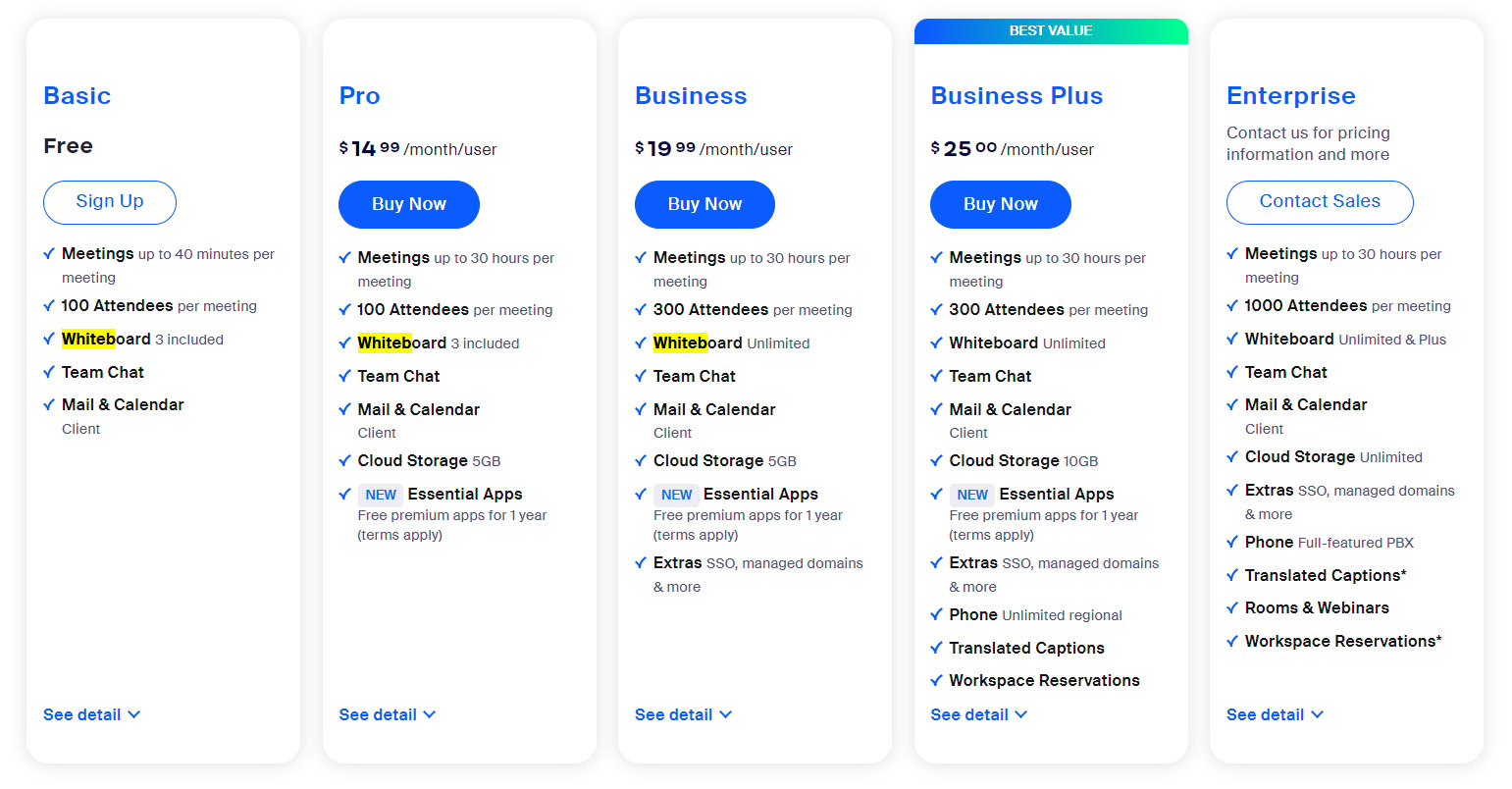
Zoom employs a tiered subscription model, meticulously designed to cater to a spectrum of users ranging from individuals to multinational corporations. Each tier represents a distinct financial commitment, unlocking a corresponding set of features and capabilities. Understanding these core plans is the first step in aligning your budget with your communication needs.
The Free Tier: Essential Communication for Zero Outlay
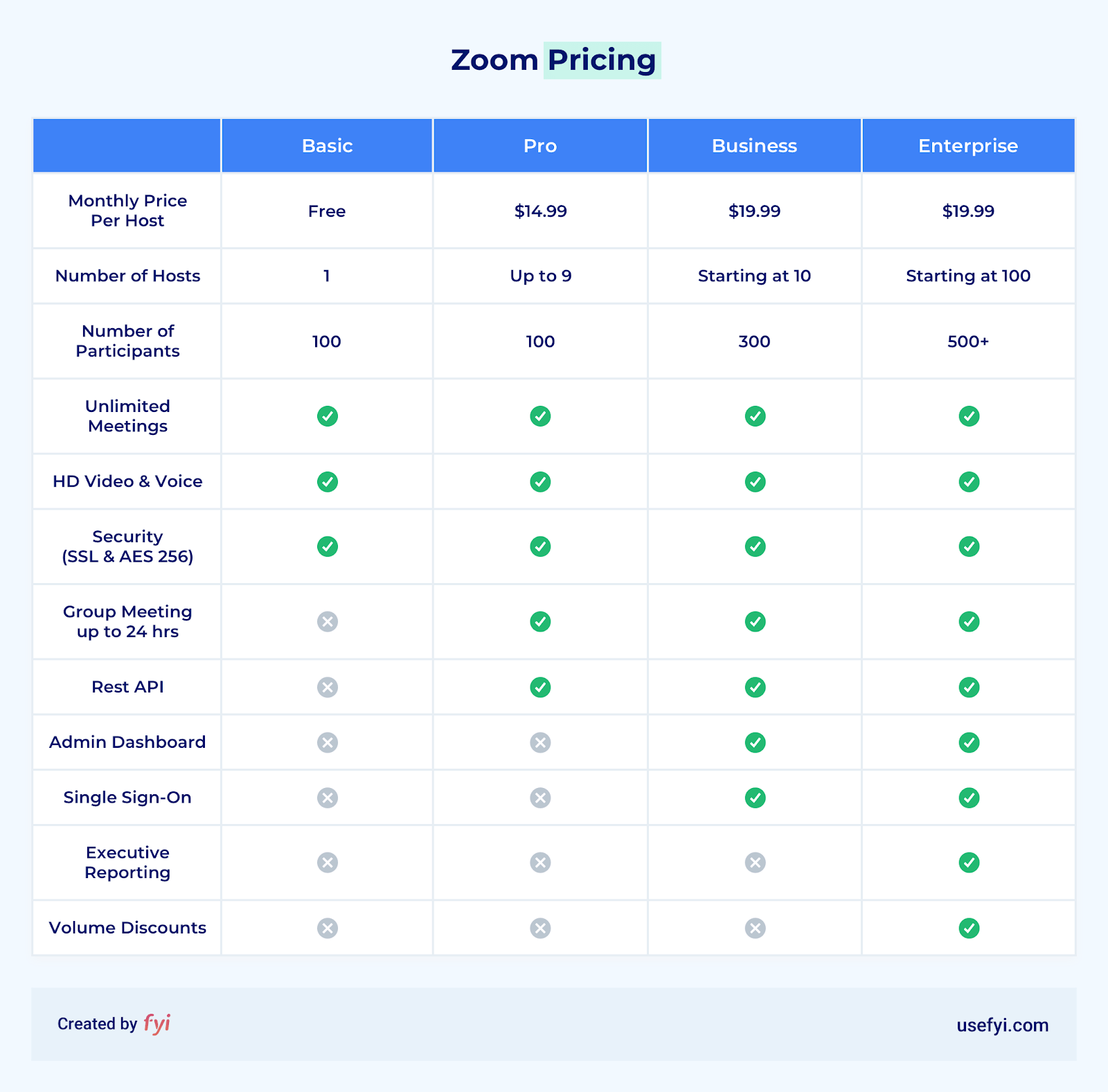
For many, Zoom’s allure begins with its free Basic plan – an immediate financial advantage. This tier offers video conferencing for up to 100 participants, albeit with a 40-minute time limit on group meetings. For one-on-one meetings, the duration is unlimited.
From a financial standpoint, the Free tier is an invaluable asset for personal use, casual meetups, and very small, short business discussions. It eliminates any direct monetary cost, making it an excellent entry point for those with minimal or infrequent virtual communication needs. However, the 40-minute cap frequently pushes users towards paid subscriptions once their usage patterns demand longer sessions, demonstrating Zoom’s strategic financial model of offering initial value to onboard users. While financially free, it presents an implicit cost in terms of time limits for groups, which can disrupt productivity if not managed carefully.
Zoom Pro: The Individual or Small Business Investment
The Zoom Pro plan is typically the first paid tier, positioned as the ideal solution for individuals and small businesses seeking enhanced capabilities beyond the basic offering. Priced around $14.99 per license per month (or $149.90 annually, offering a discount), it represents a moderate but significant financial step up.
This investment primarily removes the 40-minute meeting limit for group sessions, allowing meetings to extend up to 30 hours. Additionally, it provides 5GB of cloud recording, user management features, and basic administrative controls. For freelancers, consultants, educators, and small teams, the Pro plan offers a robust financial return by enabling uninterrupted client consultations, longer class sessions, and extended team collaborations without the anxiety of a looming time limit. The cost is justified by the increased flexibility, professionalism, and the removal of a significant productivity barrier present in the free tier. When budgeting, consider the number of host licenses required.
Zoom Business: Scaling Up Your Communication Budget
Tailored for small-to-medium-sized businesses (SMBs) that require more robust administrative controls and branding options, the Zoom Business plan commands a higher price point, typically around $19.99 per license per month (or $199.90 annually), with a minimum purchase of 10 licenses. This means a minimum monthly expenditure of approximately $199.90.
This increased financial commitment unlocks features crucial for professional operations, such as single sign-on (SSO), company branding (custom meeting IDs, vanity URLs), dedicated phone support, and enhanced administrative controls for IT management. For businesses, this investment translates into improved brand consistency, streamlined user management, and access to priority support – all of which contribute to operational efficiency and a more professional external image. The financial outlay here is justified by the need for scalability, centralized management, and the projected return in terms of enhanced corporate identity and reduced IT overhead for managing multiple individual accounts.
Zoom Enterprise: Custom Solutions for Large-Scale Financial Commitments
At the pinnacle of Zoom’s offerings lies the Enterprise plan, designed for large corporations and organizations with extensive communication needs. This tier does not have a fixed published price; instead, it operates on a custom quotation basis, reflecting the bespoke nature of its features and the significant financial commitment involved. It typically requires a minimum purchase of 50 or more licenses.
The Enterprise plan includes all Business features plus unlimited cloud storage, a dedicated customer success manager, executive business reviews, and bundled solutions like Zoom Rooms and Webinars. The financial decision to opt for Enterprise is a strategic one, often involving significant capital allocation. This level of investment is warranted by the need for unparalleled scale, advanced security, comprehensive analytics, and personalized support crucial for maintaining global operations. The ROI for Enterprise customers comes from integrating Zoom deeply into their corporate infrastructure, streamlining communication across thousands of employees, and ensuring consistent, high-performance virtual interactions that underpin core business functions. The “cost” here is a complex negotiation based on specific organizational requirements and projected usage.
Beyond Basic Subscriptions: Understanding Additional Financial Considerations
While the core subscription plans form the bulk of Zoom’s cost, a holistic financial evaluation must account for potential add-ons and indirect expenditures. These can significantly impact your overall budget and should be factored into any comprehensive financial planning for virtual communication.
Add-Ons and Their Impact on Your Bottom Line
Zoom offers a suite of powerful add-ons that can extend its functionality but come with additional costs. These include:
- Zoom Phone: A cloud phone system allowing voice calls across devices. Pricing varies by region and features, typically starting around $10-$20 per user per month for domestic calling plans. This is a significant additional investment, essentially replacing or supplementing traditional phone systems.
- Zoom Webinars: For large-scale broadcasts, this add-on enables events with thousands of attendees. Costs depend on the attendee capacity, ranging from hundreds to thousands of dollars annually. For instance, a webinar license for 500 participants might cost around $790 annually, while larger capacities can run into several thousands.
- Zoom Rooms: Dedicated conference room solutions for hybrid meetings. This requires a specific license, typically around $49 per room per month (or $499 annually), in addition to significant hardware investment.
- Large Meetings: Extends participant capacity beyond 100 for regular meetings, available in increments of 500 or 1000, with costs varying.
- Cloud Storage: While Pro plans offer 5GB, additional cloud recording storage can be purchased in increments for a monthly fee.
- Zoom Whiteboard: An enhanced digital canvas for collaboration, with free and paid tiers offering more features.
Each add-on represents a distinct financial decision, requiring careful assessment of its necessity versus its contribution to your organization’s financial objectives and communication strategy. These are not minor fees but substantial investments that can elevate Zoom’s overall cost profile considerably.
Bandwidth and Data: Indirect Financial Implications
While not a direct charge from Zoom, heavy usage of video conferencing can have an indirect financial impact through increased internet service provider (ISP) costs. High-definition video consumes significant bandwidth, potentially leading to:
- Higher Tier ISP Plans: Businesses and even power users might need to upgrade to faster, more expensive internet plans to ensure stable, high-quality video without buffering or drops.
- Data Overages: In regions or on mobile plans with data caps, extensive Zoom usage can quickly lead to costly data overage charges.
Though often overlooked, these indirect costs underscore the importance of reliable and sufficient internet infrastructure as part of your overall virtual communication budget.
Hardware Investment for an Optimal Experience
To truly leverage Zoom’s capabilities, especially in professional or dedicated meeting environments, an upfront hardware investment is often necessary. This can include:
- High-Quality Webcams: While many laptops have integrated cameras, external 4K webcams (costing $50-$200+) provide superior video quality.
- Microphones and Headsets: Clear audio is paramount. Professional microphones ($50-$300+) or noise-canceling headsets ($30-$150+) are valuable investments.
- Dedicated Meeting Room Equipment: For Zoom Rooms, this involves significant capital outlay for large displays, specialized cameras, audio systems, and control panels, easily running into thousands of dollars per room.
These hardware expenses are crucial for creating a professional and effective virtual communication environment, representing a tangible financial outlay beyond the subscription fees themselves.
Maximizing Your Zoom Investment: Strategic Cost Management
Effective cost management for Zoom involves more than just selecting a plan; it requires strategic planning and ongoing evaluation to ensure every dollar spent delivers maximum value.
Annual vs. Monthly Billing: Saving Money Through Commitment
A fundamental financial decision is choosing between annual and monthly billing. Zoom, like many SaaS providers, offers a discount for annual subscriptions, often equivalent to saving two months’ worth of fees over a year. For example, a Pro license at $14.99/month totals $179.88 annually, but the annual plan costs $149.90 – a saving of nearly $30.
For individuals and businesses with consistent, long-term needs, opting for annual billing is a straightforward financial strategy to reduce overall expenditure. This commitment upfront leads to immediate savings, demonstrating how financial planning can yield tangible benefits.
Right-Sizing Your Plan: Avoiding Unnecessary Expenditure
One of the most common pitfalls in SaaS subscriptions is overpaying for features that are never used. Regularly auditing your Zoom usage against your current plan can reveal opportunities for cost savings.
- Assess Meeting Durations: If your group meetings consistently stay under 40 minutes, the free tier might suffice, eliminating the need for a Pro subscription.
- Evaluate Participant Counts: If your typical meeting size rarely exceeds 100 participants, there’s no need to pay for Large Meeting add-ons or higher Business/Enterprise tiers unless other features are critical.
- Review Add-on Usage: Are you paying for Zoom Webinars but rarely hosting large events? Is Zoom Phone essential for every team member, or could a subset suffice?
By accurately assessing your actual needs, you can downgrade plans or remove unnecessary add-ons, directly impacting your bottom line by eliminating wasteful spending.
Leveraging Free Alternatives and Integrations: A Budgetary Approach
While Zoom is powerful, it’s not always the only answer. For certain scenarios, particularly for small businesses or individuals on tight budgets, leveraging free alternatives or existing integrations can reduce costs.
- Free Alternatives: For simple screen sharing or occasional video calls, Google Meet (with limitations) or Microsoft Teams (often bundled with Microsoft 365 subscriptions) can serve as cost-free alternatives, avoiding a separate Zoom subscription.
- Integrated Solutions: If your organization already pays for a comprehensive suite like Microsoft 365 or Google Workspace, their included communication tools might negate the need for a separate Zoom subscription for core meeting functionalities, especially if the team is already within that ecosystem. The financial benefit here is avoiding redundant spending on similar functionalities.
Monitoring Usage and Licenses: Preventing Wasteful Spending
For businesses, proactive license management is critical. Unused or underutilized licenses represent direct financial waste.
- Regular Audits: Conduct periodic reviews of assigned licenses. Are all assigned users actively hosting meetings? Have employees left the company, and their licenses not been reassigned or canceled?
- Dynamic Assignment: Consider assigning licenses dynamically based on roles or project needs rather than granting them universally, especially for higher-tier plans.
- Feature Adoption: Track which advanced features are actually being used. If a Business plan is in place but teams aren’t utilizing SSO or branding, it might indicate an opportunity to downscale.
Vigilant monitoring transforms Zoom from a fixed expense into a dynamically managed asset, ensuring financial efficiency.
Zoom as a Business Asset: Return on Investment and Financial Justification
For businesses, the cost of Zoom is not merely an expense; it’s an investment in communication infrastructure that can yield significant returns. Understanding the financial justification and quantifying the ROI is crucial for strategic budget allocation.
Quantifying the Value: Time Savings and Productivity Gains
Zoom’s primary financial benefit for businesses often lies in its ability to enhance productivity and save time.
- Reduced Meeting Setup Time: Instant virtual meetings eliminate the logistical complexities and time associated with physical meeting room bookings.
- Efficient Collaboration: Screen sharing, digital whiteboards, and instant messaging within meetings streamline collaborative efforts, accelerating project timelines.
- Faster Decision-Making: The ease of real-time communication allows for quicker discussions and resolutions, reducing bottlenecks.
While difficult to put an exact dollar figure on, the cumulative effect of these efficiencies translates into tangible financial benefits through increased output, faster project completion, and optimized resource allocation, ultimately contributing to the company’s bottom line.
Reduced Travel and Infrastructure Costs: Direct Financial Impact
One of the most direct and easily quantifiable financial benefits of Zoom is the reduction in travel expenses and physical infrastructure needs.
- Travel Budgets: Eliminating or significantly reducing the need for flights, hotels, and per diems for internal and external meetings saves immense sums, especially for geographically dispersed teams or international business.
- Office Space: A robust virtual communication strategy can reduce the necessity for large, dedicated physical meeting rooms, potentially leading to savings on real estate costs or allowing for a more flexible hybrid work model.
- Logistical Expenses: Avoiding the costs associated with catering, equipment setup, and venue rental for in-person events can also significantly reduce operational expenditures.
These direct cost avoidances make Zoom a financially attractive proposition for many modern enterprises, offering a clear ROI against its subscription fees.
Enhancing Client Relationships and Sales: Revenue-Generating Potential
Zoom’s role extends beyond internal efficiency; it can be a powerful tool for revenue generation and client retention.
- Improved Client Accessibility: Easily connecting with clients globally enhances relationships, reduces sales cycles, and opens new market opportunities without the overhead of physical presence.
- Effective Sales Presentations: High-quality video meetings allow for impactful product demonstrations and pitch delivery, directly contributing to sales conversion rates.
- Customer Support: Utilizing Zoom for virtual support sessions can personalize service, improve resolution times, and boost customer satisfaction, leading to repeat business and positive referrals.
While less direct than cost savings, the ability to foster stronger relationships and close more deals through seamless virtual interaction represents a significant, albeit indirect, financial return on the Zoom investment.
Tax Implications and Business Expense Classification
For businesses, Zoom subscriptions are typically categorized as an ordinary and necessary business expense.
- Tax Deductibility: In many jurisdictions, these costs are fully tax-deductible, reducing a company’s taxable income and effectively lowering the net cost of the service.
- Financial Reporting: Properly classifying Zoom expenses in financial statements is crucial for accurate accounting, budgeting, and demonstrating the legitimate operational costs of the business.
Consulting with a tax professional or accountant is always advisable to ensure proper categorization and maximum tax benefits, further enhancing the financial wisdom of the Zoom investment.
Conclusion
Understanding “how much Zoom costs” is far more nuanced than simply looking at a price tag. It involves a holistic financial evaluation of its tiered plans, potential add-ons, indirect expenditures, and its profound impact on business operations. From the free Basic tier for casual users to the custom Enterprise solutions for global corporations, each financial commitment unlocks specific capabilities designed to serve diverse communication needs.
For both individuals managing personal budgets and businesses making strategic financial allocations, an informed approach to Zoom’s pricing ensures optimal value. By strategically choosing the right plan, leveraging cost-saving measures, and recognizing the tangible and intangible returns on investment, users can transform Zoom from a mere expense into a powerful, financially justifiable asset that drives productivity, efficiency, and connectivity in our increasingly virtual world. Investing wisely in your communication platform is investing in the future of your interactions.
aViewFromTheCave is a participant in the Amazon Services LLC Associates Program, an affiliate advertising program designed to provide a means for sites to earn advertising fees by advertising and linking to Amazon.com. Amazon, the Amazon logo, AmazonSupply, and the AmazonSupply logo are trademarks of Amazon.com, Inc. or its affiliates. As an Amazon Associate we earn affiliate commissions from qualifying purchases.