
In the fast-paced world of digital communication, email remains a cornerstone for professional interaction. While we’ve become adept at navigating acronyms like “FYI” (For Your Information) and “ASAP” (As Soon As Possible), the digital lexicon is constantly evolving. One such acronym that might leave you scratching your head is “PFA.” Understanding its meaning and appropriate usage can significantly enhance your email etiquette and ensure your messages are received with the clarity they deserve.
This article delves into the meaning of “PFA” in the context of email communication, exploring its common interpretations, the nuances of its application, and how to use it effectively to foster clear and efficient dialogue. We will navigate the digital landscape of email shorthand, ensuring you’re equipped to decipher and deploy these common abbreviations with confidence.
Unpacking the Acronym: Common Meanings of PFA
The beauty and sometimes the confusion of acronyms lie in their potential for multiple interpretations. “PFA” is no exception. While context is always king, understanding the most prevalent meanings of “PFA” when encountered in emails will be your first step towards mastering this digital shorthand. We will explore these common interpretations, providing examples of how they are typically used in a professional setting.
“Please Find Attached”
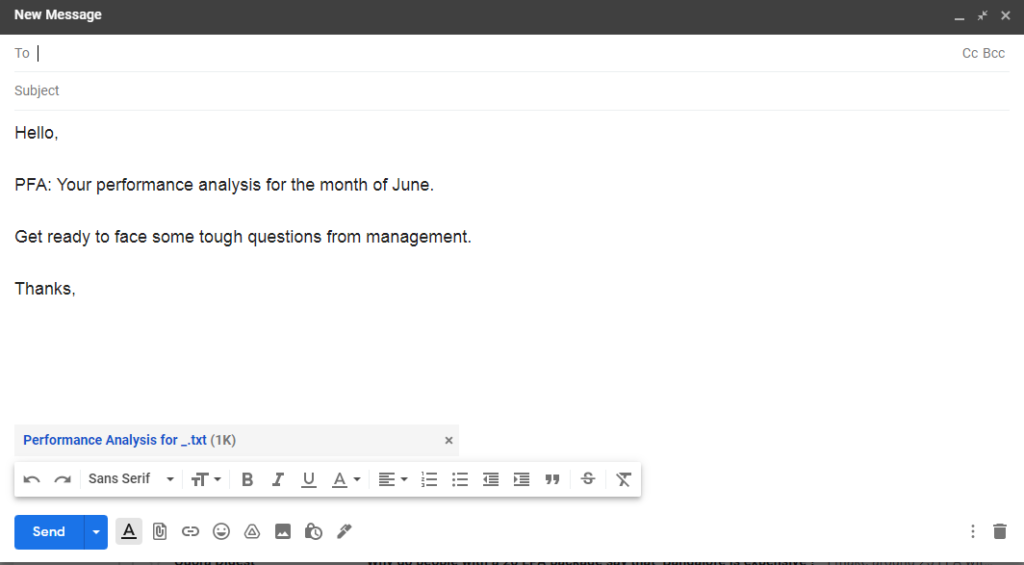
The most ubiquitous meaning of “PFA” in email correspondence is “Please Find Attached.” This abbreviation is a concise and widely understood way to direct the recipient’s attention to any files or documents that have been appended to the email. It’s a courtesy that saves the sender time and ensures the recipient doesn’t overlook crucial information.
When you see “PFA” followed by a brief description of the attachment, such as “PFA the project proposal” or “PFA the meeting minutes,” it’s a clear signal that you should look for the attached file. Similarly, when you are the sender, using “PFA” before listing your attachments is a standard professional practice.
Why it’s used:
- Brevity: In a world where every character can count in subject lines and the body of emails, “PFA” offers a quick way to convey a common instruction.
- Clarity: It leaves little room for misinterpretation regarding the sender’s intention to provide an attachment.
- Efficiency: It streamlines the communication process, particularly in busy professional environments where emails are exchanged rapidly.
Examples of Usage:
-
Sender: “Subject: Quarterly Report SubmissionnnHi [Recipient Name],nnPFA the final quarterly report for your review. Please let me know if you have any questions.nnBest regards,n[Your Name]”
-
Recipient: “Subject: Re: Invoice #12345nnThanks for sending this over. PFA the updated invoice as requested.”
Nuances and Best Practices:
While “PFA” is widely understood, its effectiveness can be amplified by adhering to certain best practices. Primarily, it’s best used when the attachment is the primary purpose of the email or a significant component of the message. If you have a lengthy email with multiple points and one small attachment, it might be more appropriate to simply state “I’ve attached the document” within the text.
Furthermore, always ensure the attachment is indeed present before sending. A “PFA” without an actual attachment can lead to frustration and a perception of carelessness. It’s also good practice to name your attachments descriptively (e.g., “Q3SalesReport.pdf” rather than “Document1.pdf”) to further enhance clarity, even when using “PFA.”
“Professional Field of Analysis” (Less Common in General Email)
While “Please Find Attached” is the dominant interpretation in general email communication, it’s worth acknowledging that acronyms can sometimes carry specialized meanings within specific industries or academic disciplines. In certain technical or academic contexts, “PFA” could potentially refer to “Professional Field of Analysis.” However, this usage is significantly less common in everyday professional emails and is typically confined to niche academic or research discussions.
Context is Crucial:
If you encounter “PFA” in an email that originates from a research institution, a specialized academic journal, or a highly technical professional setting, and the context doesn’t clearly point to an attachment, this alternative meaning might be a possibility. For instance, in a discussion about research methodologies, “PFA” might be used to refer to the specific area of study or analytical framework being employed.
Example Scenario (Highly Niche):
Imagine an email thread discussing a research paper: “The PFA for this study encompasses qualitative data analysis and its correlation with behavioral economics.” In such a context, it’s clear “PFA” doesn’t relate to an attachment.
When in Doubt, Ask:
If you encounter “PFA” and the context is ambiguous, the most straightforward approach is to politely ask for clarification. A simple follow-up question like, “Could you please clarify what PFA refers to in this email?” will prevent miscommunication and ensure you understand the sender’s intent. In most professional email scenarios, however, the assumption of “Please Find Attached” is a safe and practical one.
Navigating PFA in Different Communication Scenarios
The effectiveness and appropriateness of using “PFA” can vary depending on the specific communication scenario. Understanding these nuances will help you deploy this acronym strategically and avoid potential misunderstandings. We will explore its application in internal versus external communications, as well as its role in formal versus informal exchanges.
Internal vs. External Email Communication
The familiarity and established norms within an organization can influence how “PFA” is perceived and used.
Internal Communications: A Familiar Shorthand
Within teams and departments that frequently exchange documents, “PFA” is often a well-understood and efficient shorthand. Colleagues who work closely together are likely to be familiar with this acronym and its implications. Using “PFA” in internal emails can speed up communication, especially when dealing with a high volume of document sharing.
- Benefits: Saves time, increases efficiency, fosters a sense of internal shorthand that can be useful for quick exchanges.
- Considerations: Ensure new team members are onboarded with common internal acronyms. If there’s any doubt about a new colleague’s familiarity, it’s always better to be explicit.
Example:
“Subject: Updated Project TimelinennTeam, PFA the revised project timeline for review. Please submit any feedback by EOD Friday.nnThanks,n[Manager’s Name]”
External Communications: Clarity is Paramount
When communicating with external parties – clients, partners, vendors, or new contacts – it’s generally advisable to err on the side of clarity and explicitness. While “PFA” is widely known, relying on it exclusively in external emails might leave room for misinterpretation, especially if the recipient is not accustomed to this specific shorthand.
- Best Practice: In external communications, it is often more professional and safer to write out “Please find attached” or “I’ve attached” explicitly. This demonstrates a commitment to clear communication and reduces the risk of the recipient overlooking an important document.
- When it might be acceptable: If you have an established relationship with the external party and you know they are familiar with this shorthand, then “PFA” can be used judiciously. However, for initial communications or with new contacts, clarity should be prioritized.
Example (More Explicit):
“Subject: Proposal for [Project Name]nnDear [Client Name],nnFollowing up on our recent discussion, I have attached our proposal for the [Project Name]. Please review it at your convenience, and I look forward to discussing it further.nnSincerely,n[Your Name]”
Formal vs. Informal Email Exchanges
The formality of the email exchange also plays a role in determining whether “PFA” is an appropriate inclusion.
Formal Emails: Prioritize Professionalism and Completeness
In formal business communications, such as cover letters, official proposals, legal correspondence, or important client updates, it is almost always better to avoid abbreviations like “PFA.” Formal emails should be clear, precise, and leave no room for ambiguity. Using complete sentences and explicit phrasing reinforces professionalism and attention to detail.
- Recommendation: Always write out “Please find attached” or similar phrases in formal emails. This adheres to standard professional etiquette and ensures your message is taken seriously.
Example of what to avoid in formal emails:
“Subject: Application DocumentsnnDear Hiring Manager,nnPFA my resume and cover letter for the [Job Title] position.”
Example of formal and clear phrasing:
“Subject: Application for [Job Title] Position – [Your Name]nnDear Hiring Manager,nnI am writing to submit my application for the [Job Title] position, as advertised on [Platform]. Please find attached my resume and cover letter for your review.”
Informal Emails: Efficiency Through Familiarity
In more informal internal communications, such as quick updates to a close colleague or a brief note to a team member you communicate with regularly, “PFA” can be a perfectly acceptable and efficient way to indicate an attachment. This is especially true if you know the recipient is comfortable with such shorthand.
- Consideration: Even in informal settings, gauge the recipient’s familiarity with acronyms. If you are unsure, a brief, explicit statement is always a safe bet.
Example:
“Hey [Colleague’s Name],nnJust wanted to send over the draft for the presentation. PFA the slides. Let me know what you think!nnCheers,n[Your Name]”
Beyond the Acronym: Best Practices for Email Attachments
While understanding the meaning of “PFA” is crucial, effective email communication involving attachments goes beyond just using the right acronym. Ensuring your attachments are handled properly will enhance your professionalism and the recipient’s experience. This section will cover essential best practices for managing email attachments, from naming conventions to file size considerations.
Effective Attachment Management
The act of attaching a file to an email is straightforward, but the way it’s done can significantly impact its reception.
Naming Conventions: The Unsung Hero of Clarity
As briefly touched upon, the name you give your attached file is more important than you might realize. Descriptive file names eliminate guesswork for the recipient and help them locate the document later.
-
Good Practices:
- Be Specific: Instead of “Report.docx,” use “Q3SalesReport_2023.docx.”
- Include Dates: If relevant, add dates to the filename (e.g., “MeetingMinutes2024-03-15.pdf”).
- Use Underscores or Hyphens: Avoid spaces in filenames, as they can sometimes cause issues in different systems. Underscores (_) or hyphens (-) are generally preferred.
- Version Control: For documents that undergo revisions, include version numbers (e.g., “Proposal_v2.pdf”).
-
Bad Practices:
- Generic names like “Document,” “File,” or “Untitled.”
- Using special characters that might not be compatible with all operating systems.
File Size Considerations: Respecting Inboxes
Large email attachments can clog up inboxes, take a long time to download, and even bounce back if they exceed the recipient’s or the email server’s size limits.
- Typical Limits: Most email providers have attachment size limits, often ranging from 10MB to 25MB.
- Strategies for Large Files:
- Compression: Use file compression tools (like ZIP) to reduce file size.
- Cloud Storage: For very large files, utilize cloud storage services (e.g., Google Drive, Dropbox, OneDrive). Share a link to the file instead of attaching it directly to the email. This is often the most professional and efficient method for large or numerous files.
- Splitting Files: If possible, split large documents into smaller, manageable parts.
Double-Checking Before Sending
Perhaps the most critical step in the entire process is the pre-send check. A quick review can prevent embarrassing mistakes and ensure your communication is professional.
- Confirm Attachments: Always visually confirm that the correct files are attached to your email. It’s easy to get distracted and forget this crucial step.
- Recipient List: Verify that you have sent the email to the intended recipients.
- Content Review: Briefly re-read your email for typos, grammatical errors, and clarity. Ensure your message aligns with your intended tone and purpose.
- Subject Line Accuracy: Make sure the subject line accurately reflects the email’s content.
By incorporating these best practices into your email routine, you’ll not only master the use of acronyms like “PFA” but also ensure all your digital communications are clear, efficient, and professional. This attention to detail will undoubtedly enhance your professional image and foster smoother working relationships.
aViewFromTheCave is a participant in the Amazon Services LLC Associates Program, an affiliate advertising program designed to provide a means for sites to earn advertising fees by advertising and linking to Amazon.com. Amazon, the Amazon logo, AmazonSupply, and the AmazonSupply logo are trademarks of Amazon.com, Inc. or its affiliates. As an Amazon Associate we earn affiliate commissions from qualifying purchases.