
In an increasingly digital world, we constantly encounter terms like kilobytes, megabytes, gigabytes, and terabytes. These units of measurement are the fundamental language of digital information, quantifying everything from the size of a single email to the capacity of your smartphone and the speed of your internet connection. Yet, for many, the relationship between these terms, particularly the seemingly similar “kilobyte” (KB) and “megabyte” (MB), remains a common point of confusion. Which one is bigger, and by how much? More importantly, why does this distinction matter in your daily tech interactions?

This article aims to demystify these core digital units, providing a clear, insightful, and engaging understanding of their hierarchy, their underlying structure, and their practical implications in today’s technology landscape. We’ll delve into the very building blocks of digital data, scale up through the various measurement units, and explore why an informed grasp of these concepts is crucial for navigating everything from managing your device’s storage to understanding your internet data plan.
The Foundation of Digital Information: Bits and Bytes
Before we can grasp the difference between kilobytes and megabytes, it’s essential to start at the absolute beginning: the smallest units of digital information. Every piece of data your computer processes, every image it displays, every sound it plays, is ultimately broken down into these minuscule, fundamental components.
The Binary Language: 0s and 1s (Bits)
At the heart of all digital technology lies the bit. The word “bit” is a portmanteau of “binary digit.” A bit is the most basic unit of information in computing and telecommunications, representing one of two possible states, typically symbolized as 0 or 1. Think of it like a light switch that can be either “on” or “off.” These two states are fundamental because computers operate using binary logic, a system where all data is encoded using only these two symbols.
Individually, a single bit doesn’t convey much meaningful information beyond a simple “yes” or “no,” “true” or “false.” However, when bits are combined in sequences, they can represent complex data. For example, if you have two bits, you can have four possible combinations (00, 01, 10, 11). With three bits, you get eight combinations, and so on. The power of bits comes from their ability to be grouped, allowing for the representation of vast amounts of diverse information.
Grouping Bits: The Byte
While the bit is the smallest unit, computers typically process information in larger chunks. This leads us to the byte. A byte is a sequence of eight bits grouped together. The reason for the magic number eight dates back to early computing architectures, where eight bits became a standard for representing a single character of text, such as a letter, number, or symbol.
For example, using the ASCII encoding standard (American Standard Code for Information Interchange), the letter ‘A’ is represented by the binary code 01000001. This is exactly one byte. Similarly, the number ‘5’ might be 00110101. Because a byte can hold 256 different values (2 to the power of 8), it’s a very convenient unit for encoding a wide range of characters, colors, or small numerical values. Almost everything you see or interact with on your computer, from a single character in a document to a pixel on your screen, is ultimately built from bytes. Understanding the byte as the basic, addressable unit of data is crucial for appreciating the larger units built upon it.
Scaling Up: From Bytes to Kilobytes and Megabytes
Once we establish the byte as our foundational building block, we can begin to understand how larger units like kilobytes and megabytes are constructed. These units use standard prefixes, but with a crucial nuance in the world of computing.
The Kilobyte (KB): A Small Step Up
The next step up from a byte is the kilobyte (KB). In the decimal system, “kilo” typically means 1,000. For instance, a kilometer is 1,000 meters, and a kilogram is 1,000 grams. Following this logic, one might assume a kilobyte is exactly 1,000 bytes. And while this is often used as a simplification, especially in hard drive marketing, in computing, the reality is slightly different due to the binary nature of computers.
Traditionally, and more accurately in a technical computing context, 1 kilobyte (KB) is equal to 1,024 bytes. Why 1,024? Because computers work in powers of 2 (binary). 1,024 is 2 raised to the power of 10 (2^10). This power-of-2 system is more natural for the internal workings of a computer’s memory and processing.
What can fit into a kilobyte? Not a huge amount, but it’s still significant:
- A very short plain-text document (a few paragraphs without formatting).
- A small icon or thumbnail image.
- A few lines of computer code.
- The text of a typical email without attachments.
So, while often rounded to 1,000 for simplicity, always remember that 1 KB truly represents 1,024 bytes in most software and operating system contexts.
The Megabyte (MB): A More Significant Leap
After the kilobyte, we arrive at the megabyte (MB). Following the same binary logic, a megabyte is essentially a kilobyte of kilobytes. Specifically, 1 megabyte (MB) is equal to 1,024 kilobytes (KB).
If we break that down further into bytes:
1 MB = 1,024 KB
1 MB = 1,024 * 1,024 bytes
1 MB = 1,048,576 bytes
Comparing directly to the kilobyte, the answer to our initial question becomes clear: A megabyte (MB) is significantly larger than a kilobyte (KB). In fact, one megabyte is more than a thousand times larger than one kilobyte.
The megabyte is a much more commonly encountered unit in daily digital life, especially as file sizes have grown with higher quality media:
- A high-resolution photograph (from a smartphone or digital camera) typically ranges from 2 MB to 10 MB or more.
- A short song (MP3 format) might be between 3 MB and 5 MB.
- A simple, short video clip could be tens of megabytes.
- Most web pages, including images and scripts, often sum up to several megabytes.
The Crucial Distinction: Powers of 2 vs. Powers of 10
The confusion between 1,000 and 1,024 bytes for a kilobyte is a long-standing issue in computing, leading to slight discrepancies in reported storage sizes. This ambiguity stems from the clash between the decimal (base-10) system used in everyday life and the binary (base-2) system inherent to computers.
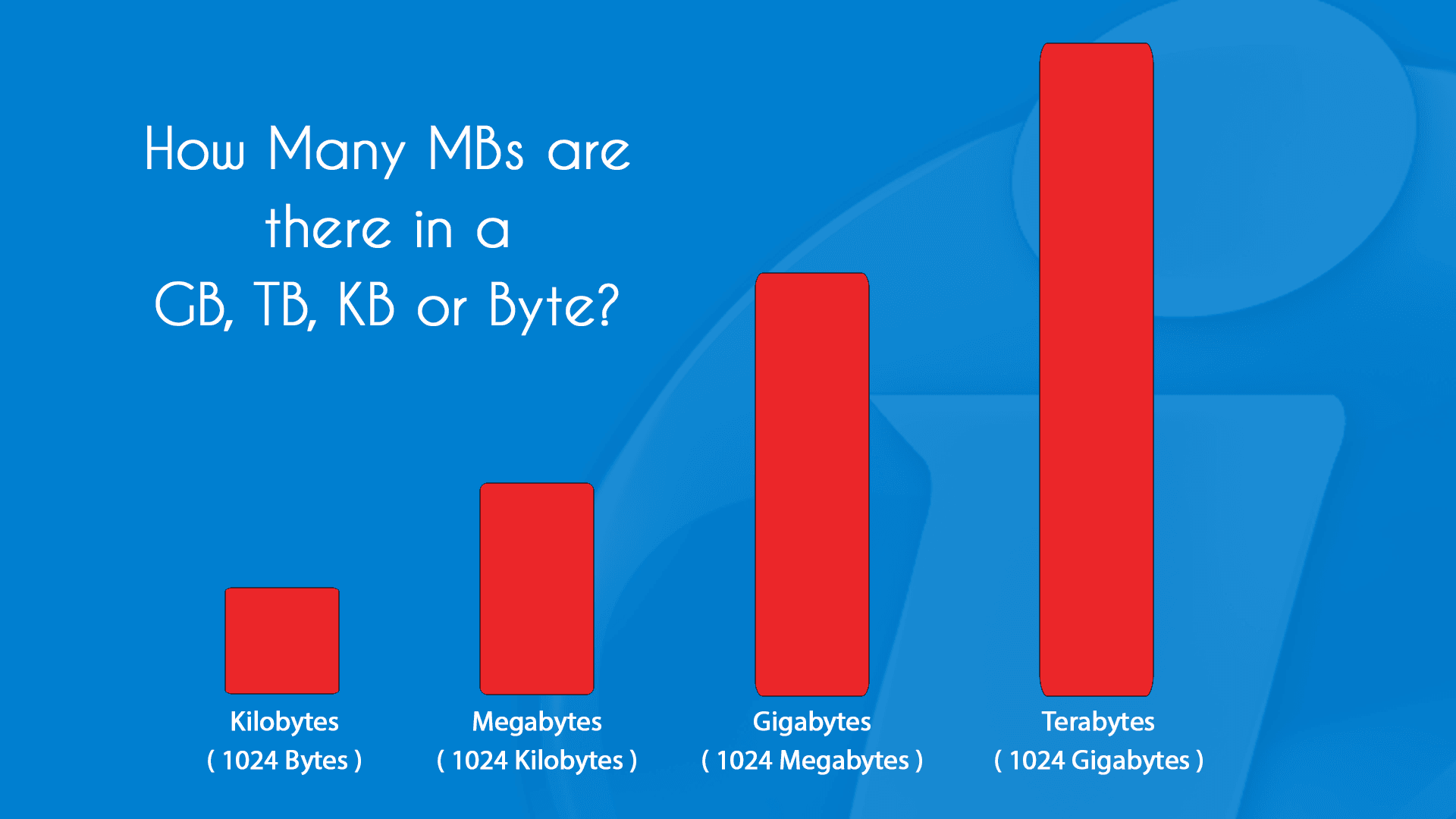
- Decimal Prefixes (SI Units): In the International System of Units (SI), prefixes like “kilo,” “mega,” “giga,” etc., are based on powers of 10.
- Kilo (k) = 10^3 = 1,000
- Mega (M) = 10^6 = 1,000,000
- Giga (G) = 10^9 = 1,000,000,000
- Binary Prefixes (IEC/JEDEC Units): Computers, however, operate using binary. For them, powers of 2 are natural.
- 2^10 = 1,024
- 2^20 = 1,048,576
- 2^30 = 1,073,741,824
To resolve this ambiguity, the International Electrotechnical Commission (IEC) introduced new binary prefixes in 1998:
- Kibibyte (KiB) = 1,024 bytes (from “kilo binary byte”)
- Mebibyte (MiB) = 1,024 KiB = 1,048,576 bytes
- Gibibyte (GiB) = 1,024 MiB
While these IEC prefixes (KiB, MiB, GiB) are technically precise for powers of 2, they haven’t been widely adopted in common parlance or marketing. Most operating systems (like Windows, macOS) and applications still commonly use KB, MB, GB to denote the binary (1024-based) values. However, hard drive manufacturers often use the decimal (1000-based) definitions to advertise larger capacities. This is why a “1 TB” hard drive, when formatted and shown by your operating system, might appear as 931 GB – because the manufacturer used 1,000,000,000,000 bytes for a TB, while your OS calculates 1,024 bytes per KB, 1,024 KBs per MB, and so on. Understanding this distinction helps clarify why your new storage device never seems to have its advertised capacity.
Why Understanding Data Units Matters in the Digital Age
Beyond mere academic interest, a solid understanding of digital data units – particularly KB and MB – is incredibly practical and empowers you to make more informed decisions about your technology.
Managing Storage Space: Files, Photos, and Applications
One of the most immediate applications of this knowledge is in managing your device’s storage. Whether it’s your smartphone, laptop, or an external hard drive, storage space is finite. Knowing the approximate size of different file types helps you:
- Gauge Remaining Space: Quickly estimate how many more photos, videos, or apps you can store before running out of space. If you know your phone has 10 GB free and your average photo is 4 MB, you can roughly store another 2,500 photos.
- Identify Storage Hogs: Understand why certain applications or media files consume disproportionately more space. A simple text document might be a few KBs, but a high-definition movie could be several GBs.
- Make Purchase Decisions: When buying a new device, recognizing that 64 GB of storage on a smartphone might quickly fill up if you take many videos, versus someone who primarily uses it for web browsing and emails, informs whether you need a 128 GB or 256 GB model.
Internet Data Usage: Downloads, Streaming, and Browsing
For anyone with a capped internet plan, whether mobile data or home broadband, understanding MBs and GBs is critical for managing usage and avoiding overage charges.
- Mobile Data Plans: Most mobile carriers offer plans in GBs. Streaming an HD video can consume hundreds of MBs per hour. Simply browsing web pages, while less data-intensive, still accumulates MBs. Downloading a large app or game could consume hundreds of MBs or even several GBs in one go. Knowing these figures allows you to monitor your data consumption and prevent unexpected charges.
- Home Broadband Caps: While less common now, some ISPs still impose data caps. Understanding how many MBs are consumed by activities like online gaming, video conferencing, or software updates can help you stay within your limit.
- Website Performance: The size of a webpage (measured in KBs or MBs) directly impacts how quickly it loads. Developers optimize websites to minimize MB sizes to improve user experience, especially on slower connections.
Device Specifications: RAM, Storage Drives, and Network Speeds
When purchasing or evaluating technology, these units are plastered across product specifications:
- RAM (Random Access Memory): Measured in GBs (e.g., 8 GB RAM, 16 GB RAM). More RAM allows your computer to handle more applications simultaneously and perform tasks faster.
- Storage Drives (SSD/HDD): Internal and external storage devices are measured in GBs and TBs (e.g., 256 GB SSD, 2 TB HDD). This indicates how much data they can permanently store.
- Network Speeds: Often measured in Mbps (megabits per second) or Gbps (gigabits per second). It’s crucial to distinguish these from MBps (megabytes per second). A common point of confusion arises because internet speeds are typically advertised in bits (e.g., “100 Mbps broadband”), whereas file sizes are in bytes. To convert, remember 1 Byte = 8 bits. So, a 100 Mbps connection translates to a theoretical maximum download speed of 12.5 MB per second (100 / 8 = 12.5). This distinction is vital for accurately estimating download times.
Beyond KB and MB: Navigating Larger Data Volumes
As digital information continues to proliferate, KB and MB, while important, are often just stepping stones to much larger units of measurement. Understanding the scale beyond them helps contextualize the vast amounts of data being generated and stored globally.
Gigabytes (GB): The Common Denominator
The gigabyte (GB) is arguably the most common unit of data measurement encountered in everyday tech.
- 1 Gigabyte (GB) = 1,024 Megabytes (MB)
- 1 GB = 1,048,576 Kilobytes (KB)
- 1 GB = 1,073,741,824 Bytes
Most modern devices measure their primary storage (SSD, eMMC) and RAM in gigabytes. Large files like movies, video game installations, and extensive software suites are almost always measured in GBs. Cloud storage plans typically offer capacities in GBs, and mobile data plans are universally measured in GBs. For most individual users, the gigabyte is the primary currency of digital space.
Terabytes (TB) and Beyond: Archiving the Digital Universe
As storage needs grow, particularly for professionals, enthusiasts, or those archiving large media collections, the terabyte (TB) becomes relevant.
- 1 Terabyte (TB) = 1,024 Gigabytes (GB)
- 1 TB = Approximately 1 Trillion Bytes (1,000,000,000,000 bytes using the decimal definition, or 1,099,511,627,776 bytes using the binary definition)
Terabyte-sized hard drives are standard for desktop computers, network-attached storage (NAS) devices, and external backup solutions. Cloud storage services often offer plans in terabytes. When you consider the vast amounts of data collected by businesses, scientific research, and social media platforms, even terabytes quickly become too small.
This is where units like Petabytes (PB), Exabytes (EB), and even Zettabytes (ZB) come into play.
- 1 Petabyte (PB) = 1,024 Terabytes (TB)
- 1 Exabyte (EB) = 1,024 Petabytes (PB)
- 1 Zettabyte (ZB) = 1,024 Exabytes (EB)
These colossal units are typically used to measure the capacity of massive data centers, global internet traffic, or the entire digital footprint of major corporations and governmental organizations. For instance, the entire internet’s daily traffic is often discussed in Exabytes.

The Future of Data Measurement: Petabytes, Exabytes, Zettabytes
The exponential growth of data is a defining characteristic of the 21st century. Every minute, billions of photos are shared, millions of videos are streamed, and countless pieces of information are generated across the globe. This “data explosion” means that our understanding of data units must continue to evolve. What was once considered a vast amount of data (a few GBs) is now commonplace, and what seems incomprehensibly large today (PBs, EBs) will become increasingly relevant for understanding not just enterprise computing, but potentially our personal digital footprints.
As technologies like Artificial Intelligence, Big Data analytics, and the Internet of Things (IoT) become more pervasive, the demand for storage and processing power that scales into these higher units will only intensify. Understanding the hierarchy of these units – from the humble bit to the gargantuan zettabyte – provides a crucial framework for comprehending the scale and scope of our digital universe.
In conclusion, the answer to “what’s bigger: KB or MB?” is unequivocally the megabyte (MB), by a factor of 1,024. This fundamental difference, along with the nuances of binary versus decimal measurement, underpins a vast array of digital interactions and decisions. Armed with this knowledge, you are better equipped to navigate the complexities of data storage, internet usage, and device specifications, transforming confusion into clarity in your tech-driven life.
aViewFromTheCave is a participant in the Amazon Services LLC Associates Program, an affiliate advertising program designed to provide a means for sites to earn advertising fees by advertising and linking to Amazon.com. Amazon, the Amazon logo, AmazonSupply, and the AmazonSupply logo are trademarks of Amazon.com, Inc. or its affiliates. As an Amazon Associate we earn affiliate commissions from qualifying purchases.