
In the evolving landscape of digital design and front-end development, the visual depth of an interface often relies on the sophisticated application of color transitions. Among the various types of gradients used in modern UI/UX—linear and radial being the most common—the angular gradient (frequently referred to in CSS as a conic-gradient) offers a unique geometric approach to color distribution. To master this tool, one must understand the fundamental building block of the effect: the gradient stop.
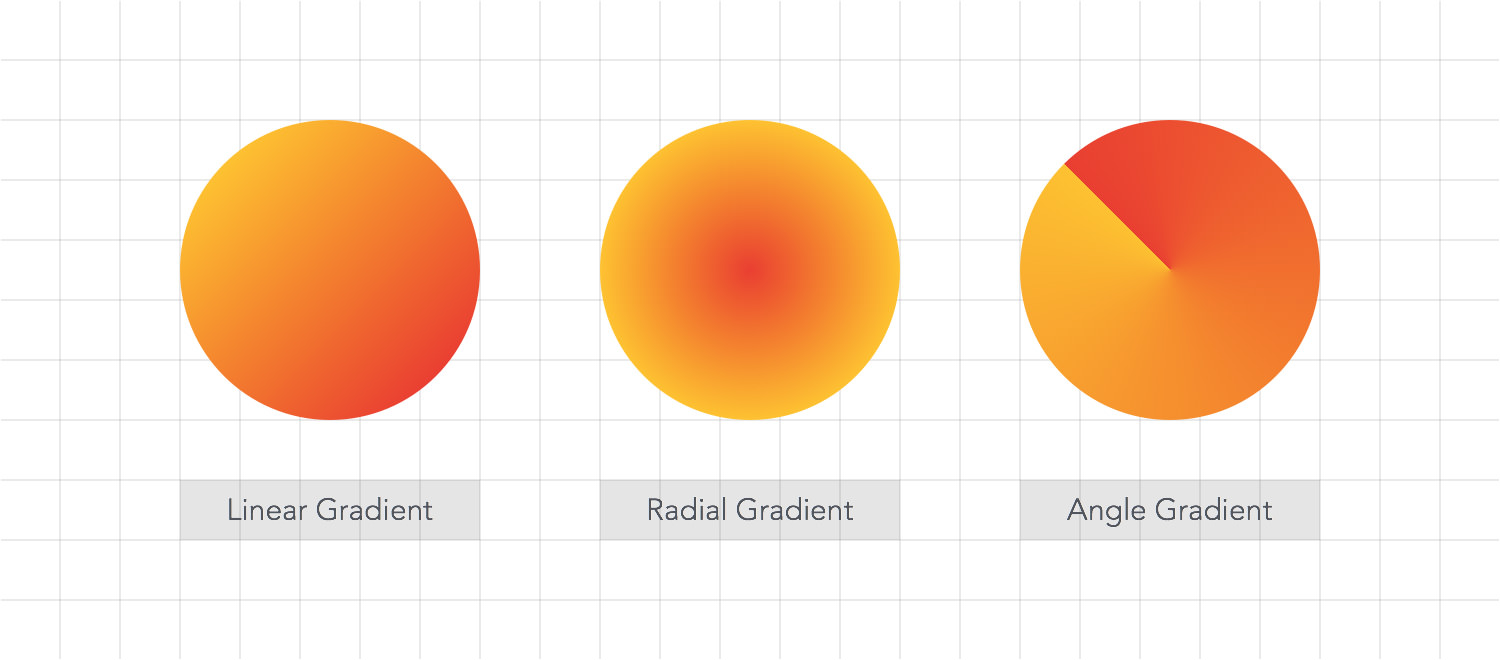
An angular gradient stop is a specific point along a circular arc where a designated color is positioned at its full opacity and purity before it begins to transition into the next color. While linear gradients move along a straight line and radial gradients emanate from a central point outward, angular gradients revolve around a center point, much like the hands of a clock. Understanding “stops” in this context is essential for any developer or designer looking to create complex data visualizations, sophisticated loading indicators, or high-end aesthetic backgrounds.
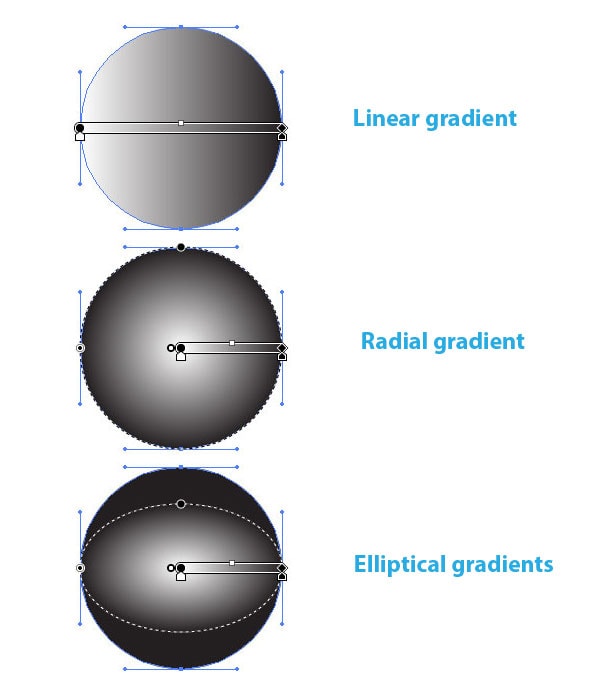
The Geometry and Logic of Angular Gradients
To understand what a “stop” means in an angular context, we must first visualize the coordinate system of the canvas. Unlike a linear gradient that uses an x-axis and y-axis to determine direction, an angular gradient operates on a polar coordinate system.
The 360-Degree Canvas
In an angular gradient, the “path” of the color transition is a circle. The gradient begins at a starting angle (usually 0 degrees, or 12:00 o’clock) and moves clockwise around a center point. A “stop” is a marker placed anywhere along this 360-degree journey. If you place a red stop at 0 degrees and a blue stop at 180 degrees, the software calculates a smooth interpolation of colors through the first half of the circle, reaching pure blue exactly at the 180-degree mark.
The Role of Percentages vs. Degrees
In technical implementation, particularly in CSS and design tools like Figma or Adobe XD, angular gradient stops can be defined using degrees (deg) or percentages (%). A stop at 25% is functionally identical to a stop at 90 degrees. Using percentages is often preferred in responsive design, as it relates the color position to the total circumference of the shape, whereas degrees provide more surgical precision for complex geometric patterns.
Deciphering the “Stop”: Color Positioning and Distribution
The word “stop” might sound like the color is ending, but in the world of computer graphics, it is actually an anchor point. It tells the rendering engine exactly where a specific color value must exist without any influence from its neighbors.
Defining Color Stops in Syntax
When writing code for a web application, an angular gradient stop is defined within the conic-gradient() function. For example, conic-gradient(red 0deg, blue 90deg, green 180deg). In this instance, the “stops” are 0, 90, and 180 degrees. Between 0 and 90, the tech engine creates a blend. However, exactly at 90 degrees, the pixels are rendered as the specific hex code or RGB value assigned to “blue.”
The “stop” acts as a boundary. Without multiple stops, a gradient cannot exist; you would simply have a solid fill. By adding more stops, you increase the complexity of the color transition, allowing for “multi-stop” gradients that can mimic metallic reflections or prismatic effects.
The Power of “Hard Stops”
One of the most powerful features of angular gradient stops is the “hard stop.” This occurs when two different colors are assigned to the exact same position (e.g., red 50%, blue 50%). Instead of a smooth blend, the technology renders a sharp, crisp line. In tech circles, this is the standard method for creating vector-based pie charts or segmented progress rings without needing multiple layered shapes. By manipulating these stops programmatically, developers can create dynamic UI elements that respond to user data in real-time.
Practical Applications in Modern Tech and UI/UX
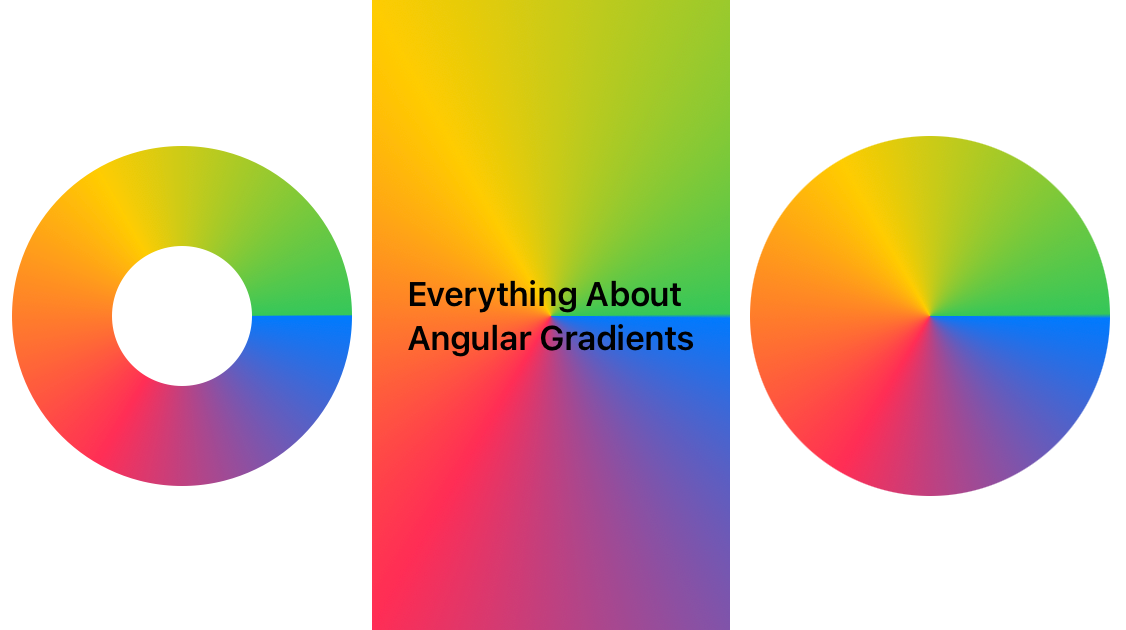
Angular gradient stops aren’t just an aesthetic choice; they serve functional purposes in software engineering and digital interface design. Because they map so perfectly to circular shapes, they are the go-to solution for specific technical components.
Creating Dynamic Progress Bars and Loaders
Think of the activity rings on a smartwatch or the loading spinner on a mobile app. These are often built using angular gradients. By strategically placing stops, developers can create the illusion of a “tail” on a spinning element. A gradient stop at 0% might be fully opaque, while a stop at 70% might be the same color but with 0% alpha (transparency). This creates a fading trail that follows the rotation, a staple in modern app motion design.
Data Visualization and Dashboard Gauges
In fintech and data-heavy enterprise software, angular gradients are used to build dashboard gauges. By using hard stops at specific intervals, a single CSS property can render a multi-colored gauge (e.g., green for “good,” yellow for “warning,” and red for “critical”). This is significantly more performant than loading high-resolution image assets or complex SVG paths, as the browser’s rendering engine calculates the stops mathematically on the GPU.
Technical Implementation: CSS Syntax and Design Tools
For developers, understanding the syntax of angular gradient stops is the difference between a buggy interface and a polished product. The implementation varies slightly between design software and production code, but the logic remains consistent.
Mastering the conic-gradient() Property
In web technology, the conic-gradient CSS function is the primary tool for implementing angular stops. The basic syntax allows for a “from” angle (starting point) and a “at” position (the center of the gradient).
- Syntax Example:
background: conic-gradient(from 45deg at 50% 50%, #fff 0%, #000 100%);
In this example, the stops are the 0% and 100% markers. The technology calculates the transition starting from a 45-degree tilt, centered perfectly in the element. Mastering this allows developers to create sophisticated backgrounds that were previously only possible through heavy image files.
Handling Browser Compatibility and Fallbacks
While modern browsers (Chrome, Edge, Safari, Firefox) have excellent support for angular gradients and their stops, legacy systems can struggle. In a professional tech environment, it is standard practice to provide a fallback color or a linear gradient. Understanding the “stop” logic is vital here because a developer must ensure that the fallback visual maintains the same color “weight” as the primary angular design. This ensures brand consistency across different devices and browser versions.
Optimizing Visual Performance and Accessibility
In high-end software development, the way gradient stops are calculated can impact performance and accessibility. Not all gradients are created equal, and poorly placed stops can lead to visual artifacts.
Avoiding Color Banding in Complex Gradients
A common technical issue with angular gradients is “banding,” where the transition between stops looks like distinct stripes rather than a smooth fade. This happens when the bit depth of the display or the mathematical spread between stops is insufficient. Tech-savvy designers solve this by adding “dither” or by placing intermediate stops with slightly varied shades to “bridge” the gap between two primary color stops. This ensures a premium, high-resolution look on OLED and Retina displays.
Ensuring Contrast for Inclusive Digital Experiences
Accessibility is a core pillar of modern technology. When using angular gradient stops to communicate information—such as in a pie chart or a status ring—designers must ensure that the transition between colors provides enough contrast. Using stops to create “hard edges” is often better for accessibility than soft glows, as users with visual impairments can more easily distinguish between segments. Furthermore, the positioning of stops should be tested against color-blindness simulators to ensure that the “data” being represented by the color stops remains legible to all users.
Conclusion
The “angular gradient stop” is a deceptively simple concept that serves as the foundation for some of the most sophisticated visual elements in the tech world. By defining exactly where a color lives on a 360-degree plane, these stops allow for the creation of everything from simple buttons to complex, data-driven visualizations. Whether you are a UI designer or a front-end developer, mastering the placement, math, and technical implementation of these stops is essential for building modern, performant, and accessible digital products. As web standards continue to evolve, the creative potential of the angular gradient will only grow, remaining a vital tool in the technologist’s creative arsenal.
aViewFromTheCave is a participant in the Amazon Services LLC Associates Program, an affiliate advertising program designed to provide a means for sites to earn advertising fees by advertising and linking to Amazon.com. Amazon, the Amazon logo, AmazonSupply, and the AmazonSupply logo are trademarks of Amazon.com, Inc. or its affiliates. As an Amazon Associate we earn affiliate commissions from qualifying purchases.