
The landscape of PC gaming has undergone a radical transformation over the last two decades. We have moved from physical discs and CD keys to centralized digital distribution platforms. At the forefront of this evolution is Steam, Valve’s ubiquitous storefront and library manager. As digital libraries grow to include hundreds, or even thousands, of titles, the question of ownership and accessibility becomes paramount. This is where Steam Family Sharing—now evolved into the “Steam Families” feature—comes into play.
In its simplest terms, Steam Family Sharing is a technical framework that allows users to share their digital game collection with close friends and family members without sharing account credentials. However, behind this simple concept lies a complex system of Digital Rights Management (DRM), account permissions, and technical prerequisites that every modern PC gamer should understand.

The Evolution of Steam Family Sharing into Steam Families
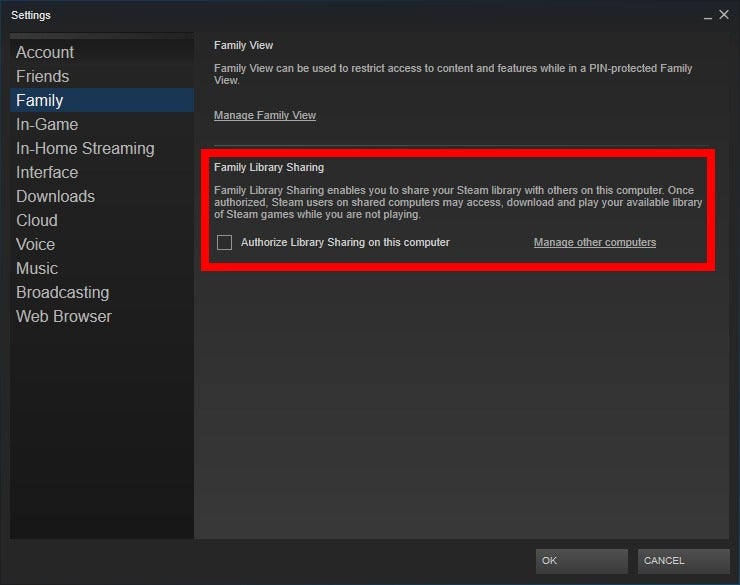
For years, the “Family Library Sharing” system was the standard for Valve. It allowed users to authorize specific computers and users to access their library. However, it was often criticized for its rigid technical limitations—most notably the “one library, one user” rule, which locked an entire collection if the owner was playing any game at all.
Recently, Valve introduced “Steam Families,” a significant technical overhaul that consolidates family sharing and parental controls into a single, more flexible interface. This new system represents a major shift in how the platform handles multi-user households and shared digital assets.
The Mechanics of the Shared License
Under the hood, Steam Family Sharing works by extending the usage rights of a software license from the primary account holder to a designated group. When you join a Steam Family, you automatically gain access to all shareable games owned by the other members. Conversely, they gain access to yours.
From a technical standpoint, this is managed through Steam’s centralized servers. When you launch a shared game, the Steam client checks the availability of the license. If a family member owns a copy of the game and no one else in the family is currently using that specific copy, the license is temporarily assigned to you, allowing the game to boot.
The Technical Distinction: Individual vs. Shared Access
It is crucial to understand that Steam Families does not “merge” accounts. Each user maintains their own cloud saves, earns their own Steam achievements, and has individual access to workshop files. The technical infrastructure ensures that your “PersonaData” and “AppID” progress remain isolated, preventing the common headache of a sibling overwriting your 100-hour RPG save file.
Setting Up Your Digital Household: A Step-by-Step Tutorial
Implementing Steam Family Sharing requires a few specific technical steps to ensure security and proper synchronization across the Steam network. Because this feature involves sharing access to potentially thousands of dollars of digital content, Valve has implemented several layers of verification.
Enabling Steam Guard and Security Protocols
Before you can participate in sharing, your account must meet certain security benchmarks. The most important of these is Steam Guard. Steam Guard is a two-factor authentication (2FA) system that provides an additional layer of security to your account.
- Navigate to Settings: Open your Steam client and go to the “Settings” menu.
- Security Tab: Ensure that Steam Guard is active, preferably through the Steam Mobile App. This technical requirement prevents unauthorized users from manipulating your family settings or gaining access to shared libraries through brute-force attacks.
- Beta Participation (Optional): Currently, the most advanced version of this feature is available through the Steam Families Beta. To access this, go to the “Interface” tab in Settings and select “Steam Families Beta” under Client Beta Participation.
Creating and Managing a Steam Family
Once your security is configured, you can create a “Steam Family” and invite up to five other members.
- Invitation Process: The family creator sends an invite to another user’s Steam ID. The recipient must accept this invite, and their account must be in the same region as the creator. This regional lock is a technical safeguard against the abuse of regional pricing and international license distribution laws.
- Member Roles: You can designate members as “Adults” or “Children.” Adults have the technical authority to manage invitations and set parental controls, while children are subject to the permissions granted by the adults.
- Device Authorization: Unlike the old system, which required you to manually log into each computer, the new Steam Families system recognizes the user across any device they log into, provided they remain part of the family group.
Technical Limitations and Security Considerations
While Steam Family Sharing is a powerful tool for maximizing the utility of your software library, it is not without its technical constraints. These limitations are primarily in place to satisfy the DRM requirements of third-party developers and to protect the integrity of the Steam platform.
Regional Restrictions and Game Compatibility
One of the most significant hurdles in Steam Family Sharing is that not every game is eligible for sharing. Developers and publishers have the technical “opt-out” right. Many high-profile titles that require an additional third-party launcher (such as Ubisoft Connect or the EA App) are technically incompatible with Steam Family Sharing. This is because the license is tied to a secondary account system that Steam cannot bypass.
Additionally, regional locks remain a major factor. If a user in the United States tries to share a library with a user in Germany, they will likely encounter technical blocks. Steam’s backend utilizes IP geofencing and billing address verification to ensure that “Families” are composed of actual households or close-knit groups within the same economic region.
The “One Copy” Constraint and Simultaneous Play
The most common technical question regarding Steam Families is: “Can two people play the same game at the same time?”
The answer is based on the number of licenses owned by the family. If the family owns one copy of Portal 2, only one person can play it at any given time. However, if another family member owns a second copy, two members can play simultaneously. The technical advantage of the new system is that the owner of a library is no longer kicked off their own games just because someone else is using a different game in their collection.
VAC Bans and Shared Responsibility
There is a significant technical risk involved in sharing your library: the shared responsibility of conduct. If a family member uses your shared copy of a game to cheat on a secured server, your account may also receive a Valve Anti-Cheat (VAC) ban. From a technical perspective, the ban is often applied to both the user who was cheating and the owner of the software license. This makes it imperative to only share your library with trusted individuals.
Maximizing the User Experience: Advanced Features
For the power user, Steam Family Sharing offers several technical layers that enhance the gaming experience beyond mere access.
Managing Save Data and Achievements
Because Steam treats each family member as an individual entity, the platform utilizes Steam Cloud to partition save data. When you launch a shared game, the Steam client pulls the save metadata associated with your specific UserID. This ensures that even though the “AppID” (the game) is shared, the “UserData” (your progress) is not. This isolation is handled automatically by the Steam API, making the experience seamless for the end-user.
Parental Controls and Technical Monitoring
The integrated parental controls within Steam Families allow for granular technical oversight. Adults can:
- Limit Playtime: Set specific hours or total duration for gaming sessions.
- Restrict Store Access: Disable the ability for sub-accounts to make purchases.
- Content Filtering: Use Steam’s “Family View” to hide games with specific age ratings or mature content from the library of younger users.
- Monitor Activity: View technical reports on which games are being played and for how long.

The Future of Digital Ownership in the Tech Ecosystem
Steam Family Sharing represents a middle ground in the ongoing technical debate over digital ownership. In a world where many digital storefronts treat games as “revocable licenses” rather than assets, Valve’s sharing model provides a more consumer-friendly technical architecture.
As cloud gaming and subscription models (like Xbox Game Pass) continue to grow, the technical evolution of Steam Families will likely focus on even deeper integration. We may see more robust solutions for handling “shared” DLC or more sophisticated ways to manage bandwidth and game updates across a local area network (LAN) for family members living under the same roof.
In conclusion, understanding “What is Family Sharing on Steam” requires more than a surface-level definition. It is a sophisticated suite of technical tools designed to mirror the way we used to share physical media in a digital-first world. By mastering the setup process, understanding the DRM constraints, and utilizing the security features, users can significantly expand the value of their digital software investments while maintaining the security and integrity of their personal accounts.
aViewFromTheCave is a participant in the Amazon Services LLC Associates Program, an affiliate advertising program designed to provide a means for sites to earn advertising fees by advertising and linking to Amazon.com. Amazon, the Amazon logo, AmazonSupply, and the AmazonSupply logo are trademarks of Amazon.com, Inc. or its affiliates. As an Amazon Associate we earn affiliate commissions from qualifying purchases.