
Since its inception, the Apple Watch has balanced two distinct identities: a sophisticated piece of jewelry and a powerful wearable computer. For years, the user interface leaned heavily on the “Honeycomb” app grid and various watch face complications to deliver information. However, with the release of watchOS 10, Apple introduced a fundamental shift in how users interact with their devices. This centerpiece feature is known as the Smart Stack.
The Smart Stack is not merely a cosmetic update; it represents a total reimagining of the Apple Watch’s software architecture. It moves away from the static nature of watch faces and pushes toward a dynamic, widget-based system that prioritizes context, timing, and utility. By leveraging machine learning and historical usage patterns, the Smart Stack attempts to predict exactly what information you need before you even realize you need it.
Understanding the Smart Stack: A Paradigm Shift in watchOS UI
To understand the Smart Stack, one must first understand the problem it was designed to solve. As the Apple Watch gained more features—from advanced heart rate monitoring to third-party app integrations—the interface became cluttered. Users often found themselves digging through the app grid or constantly switching watch faces to find specific data points.
From Glances to Widgets: A Brief History
In the earliest versions of watchOS, Apple utilized a feature called “Glances.” These were static snapshots of apps that users could swipe through. However, Glances were eventually phased out in favor of “Complications”—small data points embedded directly into the watch face. While Complications are efficient, they are limited by the physical real estate of the watch face.
The Smart Stack is the spiritual successor to Glances but powered by modern AI. It brings the widget-based logic of the iPhone’s Home Screen to the wrist. Instead of cramming every piece of data onto a single face, the Smart Stack allows the watch face to remain aesthetic and minimalist, while the heavy lifting of data delivery happens just one scroll away.
The Core Philosophy: Contextual Relevance
The “Smart” in Smart Stack refers to the software’s ability to use signals such as the time of day, your location, and your current activity to sort widgets. If you have an upcoming calendar appointment, that widget moves to the top. If you are playing music or a podcast, the Now Playing widget takes precedence. This contextual awareness ensures that the most relevant digital tools are always at the surface, reducing the “friction” of wearable computing.
How to Access and Navigate the Smart Stack
The introduction of the Smart Stack necessitated a change in the Apple Watch’s physical controls. Previously, swiping up from the bottom of the screen opened the Control Center. Now, that gesture—and the rotation of the Digital Crown—is dedicated to the Smart Stack.
The Digital Crown and Touch Gestures
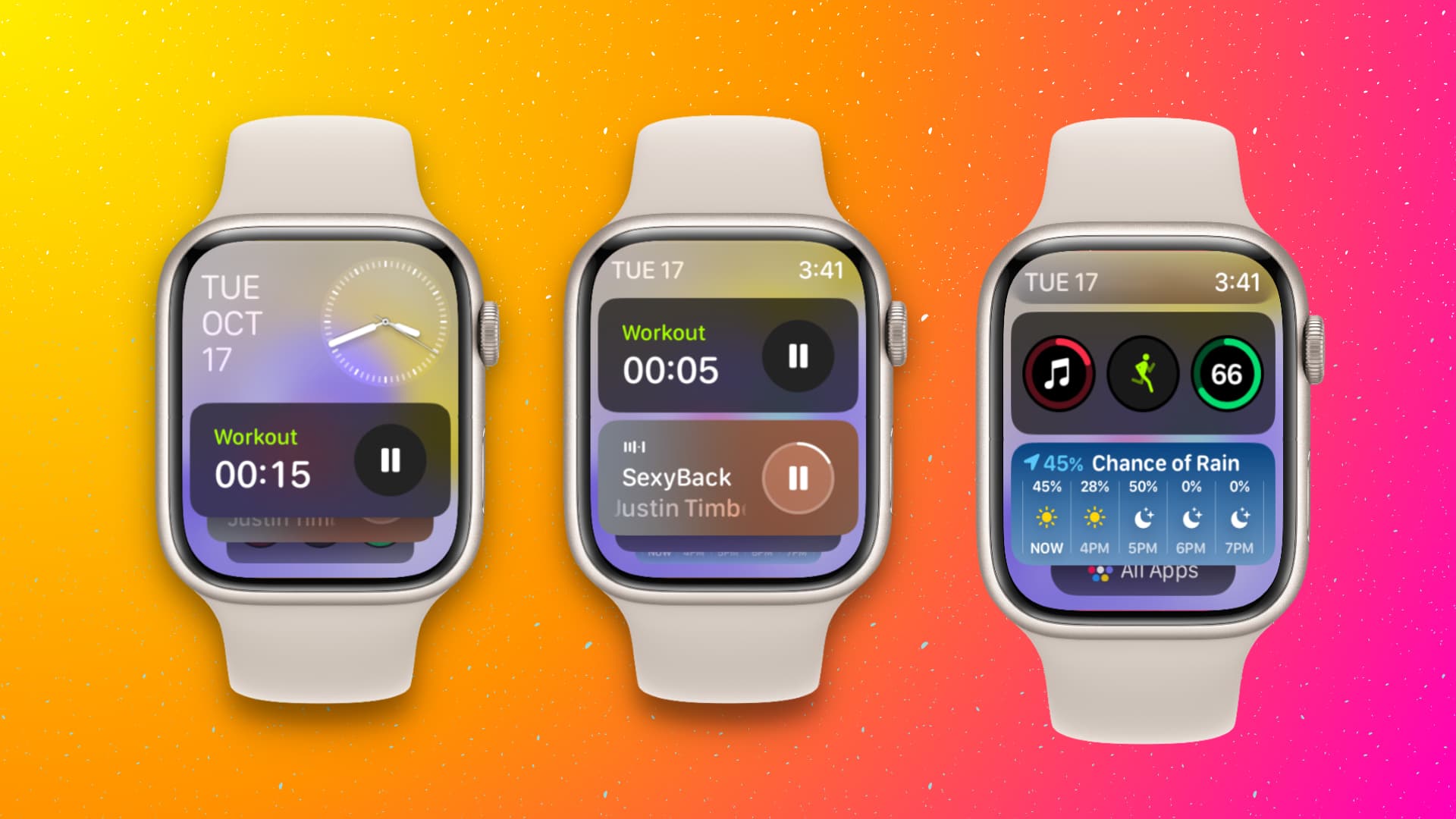
To access the Smart Stack, you simply turn the Digital Crown upward while viewing your watch face. Alternatively, you can swipe up from the bottom of the screen. This action smoothly transitions the watch face upward, revealing a stack of neatly organized widgets.
Navigating the stack is intuitive. You can scroll through the widgets using the Crown or your finger. Tapping on a widget launches the corresponding app, allowing for a deeper dive into the data. To return to the watch face, you can either scroll back down or press the Digital Crown once. This streamlined interaction model makes it possible to check weather, activity rings, and news headlines in a matter of seconds without ever touching the side button or the app grid.
Interacting with Live Activities
One of the most powerful technical aspects of the Smart Stack is its integration with Live Activities. Borrowed from iOS, Live Activities provide real-time updates for ongoing tasks. If you have a timer running, a workout in progress, or an Uber on the way, a special “session” widget appears at the top of your Smart Stack. This ensures that time-sensitive information is never buried under other widgets, providing a seamless “at-a-glance” experience that defines modern wearable tech.
Customizing Your Smart Stack for Maximum Productivity
While the Smart Stack uses machine learning to organize itself, Apple provides users with significant manual control. Customization is key to making the Smart Stack a personalized command center rather than just a generic list of apps.
Adding, Removing, and Pinning Widgets
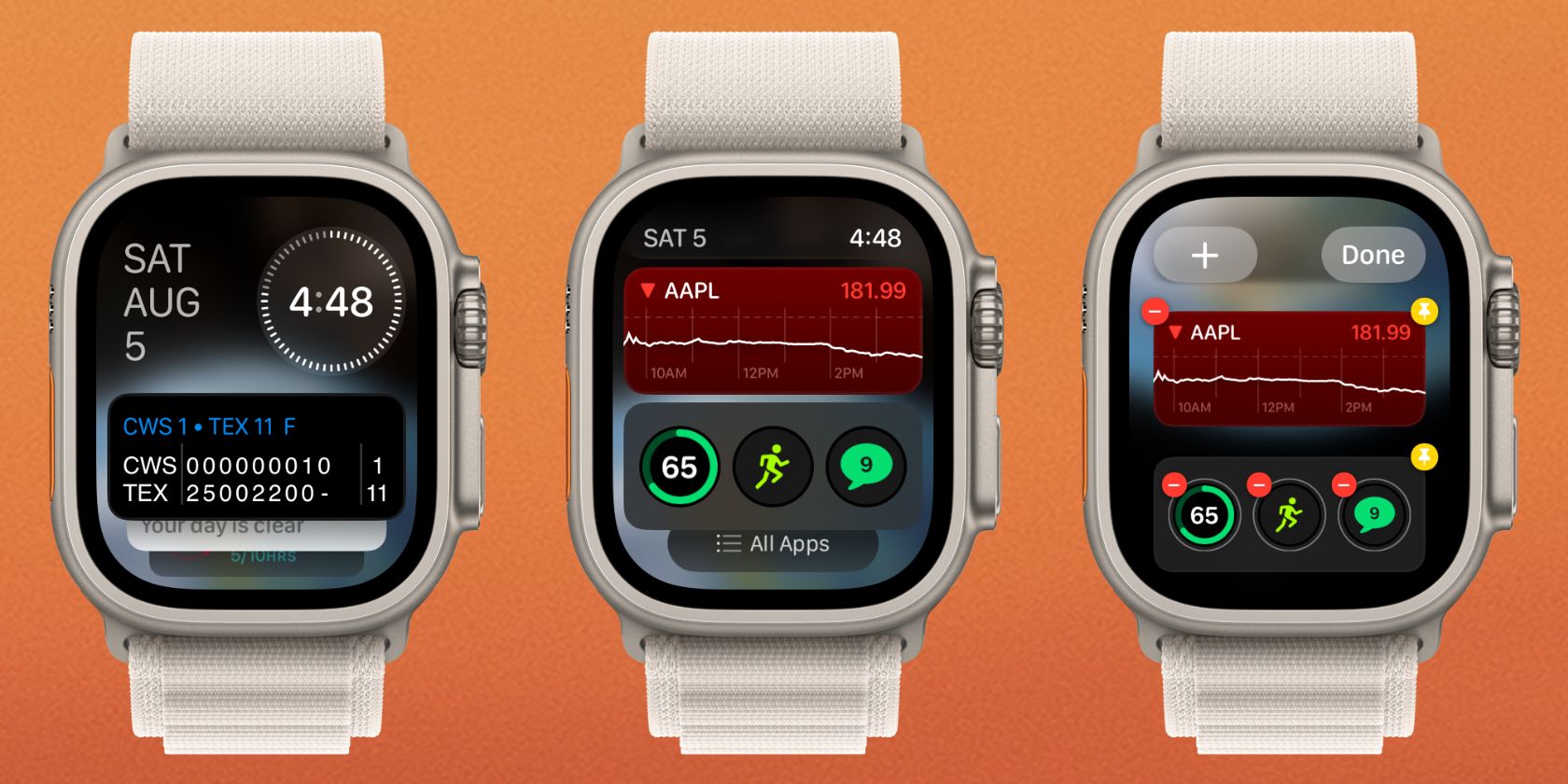
To enter “Edit Mode” within the Smart Stack, you simply long-press on any widget. From here, you can tap the plus (+) icon to add new widgets from a library of supported first-party and third-party apps. If a particular widget is no longer useful, the minus (-) icon removes it instantly.
The most critical feature for power users is the ability to “Pin” widgets. By tapping the yellow pin icon in Edit Mode, you tell the system that a specific widget should always remain at the top of the stack, regardless of the machine learning algorithm’s suggestions. For example, if you always want to see your “Reminders” list first, pinning it ensures it stays put. This creates a hybrid experience: the top of your stack is curated by you, while the rest remains dynamic and responsive to your environment.
Leveraging the Power of Third-Party Integrations
The Smart Stack isn’t limited to Apple’s native apps. Developers can create specific widget views for their apps, allowing users to see data from tools like Streaks, Carrot Weather, or Spotify directly in the stack. As more developers adopt the WidgetKit framework used on iOS and macOS, the Smart Stack becomes an increasingly powerful hub for the entire digital ecosystem, not just the Apple-specific one.
The Impact on Daily Workflows and User Experience
The Smart Stack fundamentally changes the “workflow” of wearing an Apple Watch. It transitions the device from a passive notification hub to a proactive assistant.
Health and Fitness Integration
For the fitness-focused user, the Smart Stack is a game-changer. Instead of having to dedicate a large portion of your watch face to the Activity Rings, you can keep a minimalist watch face and simply scroll up to see your progress. During a workout, the Smart Stack can display heart rate zones or elevation data, allowing you to monitor high-level metrics without disrupting your momentum. The integration of the “Vitals” app in the stack further allows users to check if their overnight health metrics are within their typical range with a single flick of the wrist.
Communication and Media Control
The Smart Stack also excels at managing “transient” information. When a text message arrives and is dismissed, a notification widget often remains in the stack for a short period if it requires action. Similarly, media controls are more accessible than ever. Whether you are controlling an Apple TV or listening to a spatial audio track on your AirPods, the media widget automatically appears at the top of the stack, providing play/pause and skip controls without requiring you to find the “Now Playing” app.
Future Implications and the Evolution of Wearable Computing
The Smart Stack is more than just a software feature; it is a signal of where Apple sees the future of human-computer interaction. It points toward a future where “apps” as we know them begin to fade into the background, replaced by “intelligent snippets” of information.
The Convergence of iOS and watchOS Design
Historically, the Apple Watch and iPhone felt like two very different platforms. The Smart Stack brings them into alignment. By using the same design language—rounded corners, modular layouts, and consistent typography—Apple is creating a unified experience across all its devices. This convergence makes it easier for users to switch between devices, as the logic of how to find information remains consistent.

AI and the Predictive Future of Widgets
As Apple continues to integrate more advanced on-device AI and “Apple Intelligence,” the Smart Stack will only get smarter. We are moving toward a reality where the watch understands your “intent.” If the watch detects you are at the airport, your boarding pass will automatically be the first thing in the Smart Stack. If it detects you are at the gym, your workout playlist and heart rate monitor will take center stage.
The Smart Stack represents the pinnacle of “glanceable technology.” It acknowledges that on a screen as small as a watch, the user’s most valuable asset is time. By automating the discovery of information, the Smart Stack allows users to get what they need and get back to the real world, fulfilling the original promise of the Apple Watch as a device that helps you stay connected without staying distracted.
aViewFromTheCave is a participant in the Amazon Services LLC Associates Program, an affiliate advertising program designed to provide a means for sites to earn advertising fees by advertising and linking to Amazon.com. Amazon, the Amazon logo, AmazonSupply, and the AmazonSupply logo are trademarks of Amazon.com, Inc. or its affiliates. As an Amazon Associate we earn affiliate commissions from qualifying purchases.