
In the modern digital landscape, Amazon stands as a titan of technological efficiency. From its sophisticated recommendation algorithms to its world-class logistics network, the company is built on the premise of automation. However, for the average user, this high-tech wall often creates a frustrating paradox: while it is incredibly easy to buy a product with a single click, it can feel nearly impossible to find a human being to speak with when a complex issue arises.
As Amazon continues to integrate advanced Artificial Intelligence (AI) and machine learning into its customer service stack, the “human element” has been moved deeper behind layers of software. This guide provides a technical deep-dive into navigating Amazon’s digital architecture to successfully bypass automated gatekeepers and connect with a live representative.
The Architecture of Amazon’s AI-Driven Support System
To understand how to reach a live person, one must first understand the software infrastructure Amazon employs. The company utilizes a multi-layered support model designed to resolve high-volume, low-complexity queries without human intervention. This saves the company billions in operational costs but requires the user to understand the logic of the interface to navigate it successfully.
The Role of the Amazon Assistant
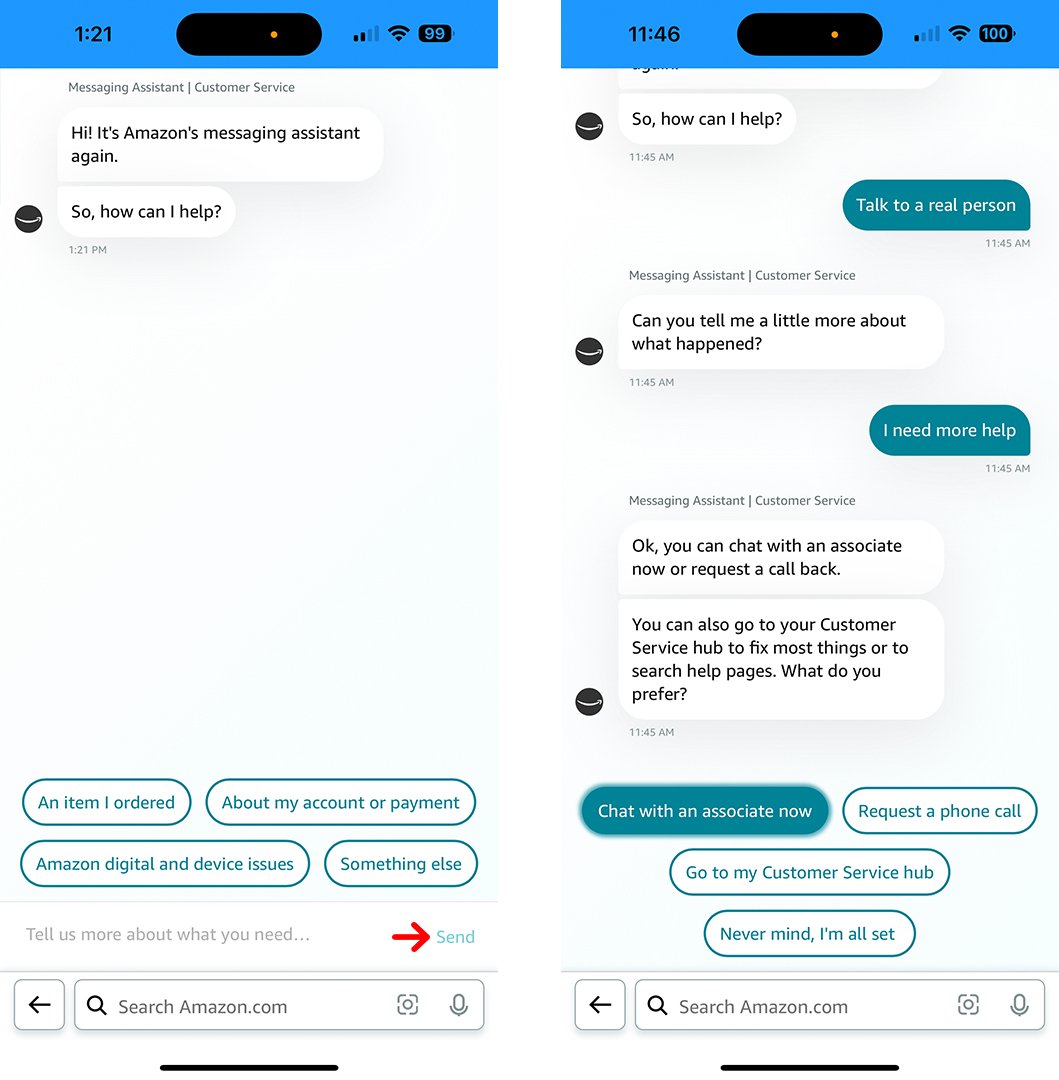
The frontline of Amazon’s support is the “Amazon Assistant,” a sophisticated chatbot powered by Natural Language Processing (NLP). This tool is designed to interpret user intent and match it with a database of automated solutions (e.g., tracking a package, initiating a return, or cancelling a subscription). For most users, the Assistant is a “loop” that can be difficult to exit if the specific problem doesn’t fit into a pre-defined category.
Automated Troubleshooting vs. Human Intervention
Amazon’s technical philosophy relies on “self-service” technology. The system is programmed to offer documentation or automated “buttons” as the primary solution. The pathway to a live human is strategically placed at the end of these automated flows. To trigger the option for human contact, the software must first register that the automated solutions have been exhausted.
Step-by-Step Technical Pathways to a Live Person
While the user interface (UI) changes periodically, the underlying logic of the support path remains consistent. Whether you are using the mobile application or a desktop browser, the goal is to navigate to the “Contact Us” node within the software tree.
Utilizing the Amazon Shopping App Interface
On mobile devices (iOS and Android), the path is hidden within the “hamburger” menu (the three horizontal lines).
- Access the Customer Service Module: Navigate to the menu and scroll down to “Customer Service.”
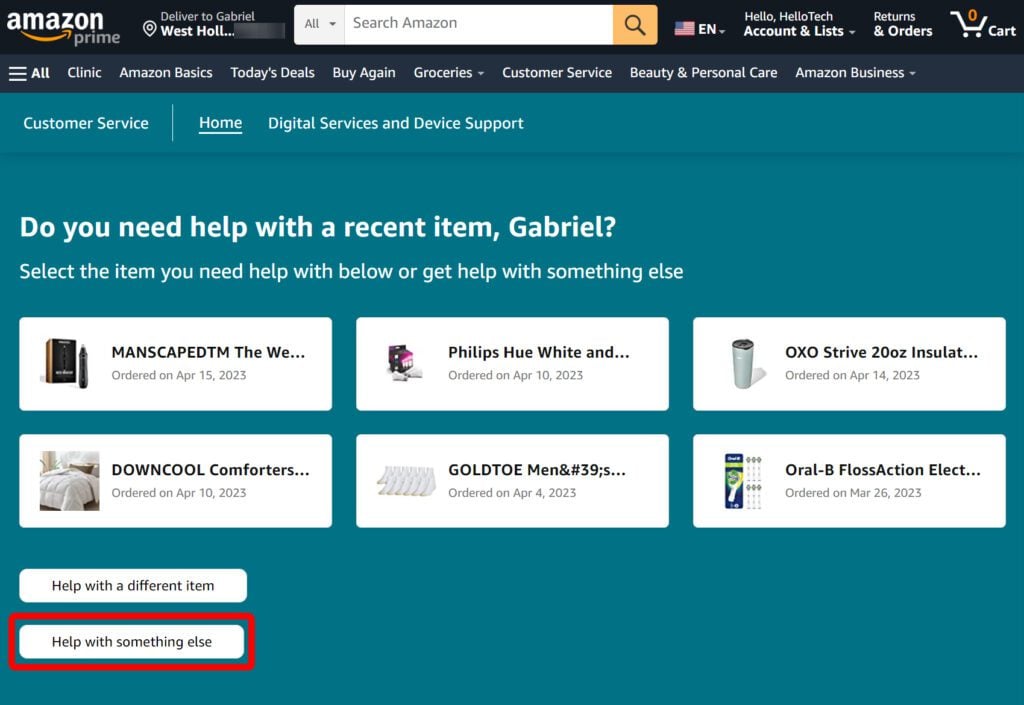
- Filter by Issue: You will be presented with recent orders. Selecting a specific item is the fastest way to narrow the software’s focus.
- Bypass the Categorization: Scroll to the bottom and select “I need more help” or “Something else.” This is a critical technical step; selecting a standard category like “Returns” will often simply loop you back to the automated return label generator.
- Initiate the Chat or Call: Once you bypass the initial categories, the UI will finally present the “Chat with us” or “Request a phone call” options.
The Desktop Web Portal Workflow
The desktop experience offers a more robust view of the support ecosystem.
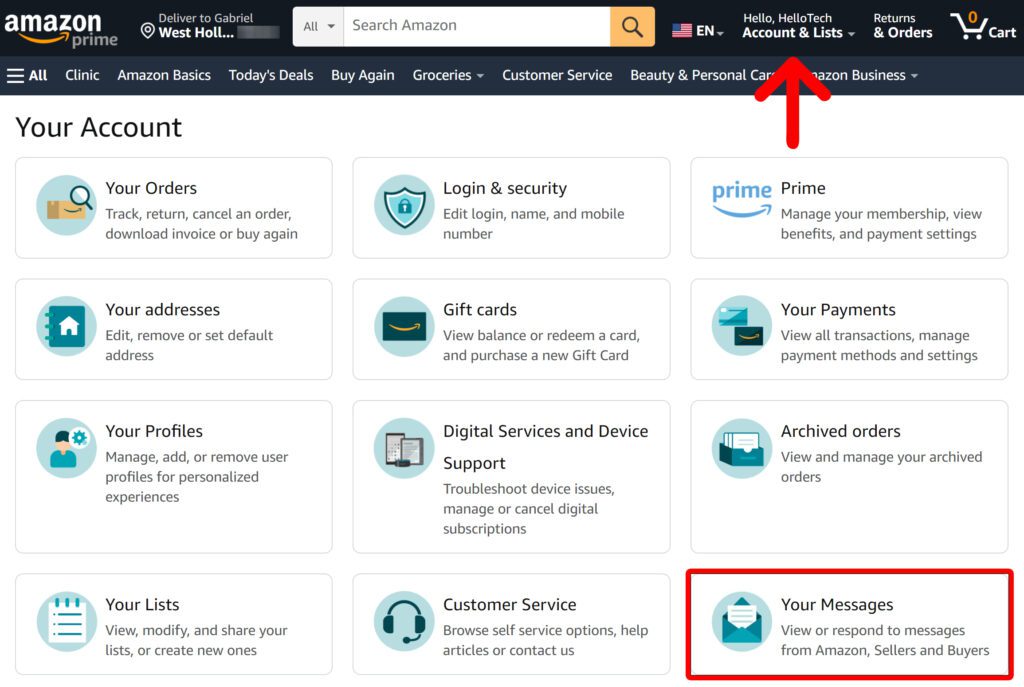
- The Help Link: Navigate to the footer of the Amazon homepage and click “Help.”
- Digital Services and Device Support: Often, clicking “A different issue” or “Other” is more effective than clicking on a specific order.
- The Hidden “Contact Us” Button: Amazon frequently updates the location of this button to prevent “bot” spam and manage call center load. Currently, it is often found under “Something else” > “I need more help.”
Phone Support and the “Call Me” Feature
Amazon rarely provides a direct inbound phone number that leads to an immediate human. Instead, they use a “Call Me” callback system. This allows their internal routing software to assign your case to an available agent with the correct permissions before the phone even rings. When you select “Request a phone call,” you are entering your data into a queuing algorithm that optimizes agent availability.
Advanced Tactics for Expedited Resolution
If the standard UI pathways fail, there are several “power user” tactics that can be used to signal the system that human intervention is required.
Leveraging the “Something Else” Pathway
When the chatbot asks for your issue, avoid using keywords that the AI is highly trained to handle, such as “refund” or “track package.” These keywords trigger automated scripts. Instead, use phrases like “agent,” “human,” or “talk to a specialist.” If the bot asks you to clarify, repeating “Talk to a representative” three times often triggers an override in the NLP logic, prompting the system to offer a live chat or call-back option.
Social Media and Public Tech Support Channels
For high-stakes issues where the standard software interface proves circular, users can leverage Amazon’s public-facing digital presence. The “Amazon Help” handle on X (formerly Twitter) is monitored by a specialized social media support team. By tagging the official account with a brief description of the technical roadblock, users can often bypass the standard chatbot layers, as brands are highly motivated to resolve public-facing complaints quickly to protect their digital sentiment metrics.
The Evolution of Customer Service Technology at Amazon
The difficulty in reaching a live person is not an accident; it is a reflection of the evolution of customer service technology. Amazon is at the forefront of moving from a reactive support model to a proactive, AI-driven one.
From Call Centers to Cloud-Based Support
Historically, customer service relied on massive physical call centers. Today, Amazon utilizes Amazon Connect—its own proprietary cloud-based contact center service. This technology uses AI to predict why a customer is calling before they even speak. If you have recently navigated to a specific “damaged item” page, the system maps that behavior to your user ID, so when you finally reach a human, the agent already has a “Context Card” populated with your likely issue.
The Future of Generative AI in Customer Interaction
We are currently entering the era of Generative AI. Amazon is working to integrate Large Language Models (LLMs) into their support bots. This will make the “Assistant” much more capable of handling nuance, which may further reduce the need for live humans. For the user, this means that in the near future, the distinction between a “live person” and a “highly advanced AI” may become indistinguishable, as the software becomes capable of granting refunds and solving logistics errors with human-like reasoning.
Best Practices for Digital Security During Support Interactions
When navigating these technical pathways, maintaining digital security is paramount. The desire to reach a human can sometimes lead users to unofficial and dangerous channels.
Identifying Official Communication Channels
A common “tech trap” involves searching Google for “Amazon Customer Service Number.” Many of the top results are fraudulent “phishing” sites that list fake numbers. When you call these numbers, scammers posing as Amazon technicians may ask for your password or remote access to your computer. Always initiate support requests from within the official Amazon app or the Amazon.com domain. Amazon will never ask for your full credit card number or account password over the phone.
Protecting Sensitive Account Data
When you finally connect with a live person via the official “Call Me” feature, the agent will already have your account verified through the app’s secure token. They may ask for a verification code sent to your email or phone via Two-Factor Authentication (2FA). This is a standard security protocol. However, be wary of any “representative” who asks you to install third-party software like AnyDesk or TeamViewer to “fix” an account issue—this is a hallmark of a technical support scam, not an official Amazon procedure.
Conclusion
Reaching a live person at Amazon is an exercise in navigating a highly optimized digital maze. By understanding the software’s intent—to deflect simple queries toward automated solutions—you can strategically use the “I need more help” and “Something else” pathways to reach a human representative. As Amazon’s tech stack continues to evolve with Generative AI, the methods for “breaking out” of the automated loop will change, but the core principle remains: the human element is a premium resource hidden behind a sophisticated technical gate. Navigating it successfully requires patience, a bit of technical savvy, and a strict adherence to official security channels.
aViewFromTheCave is a participant in the Amazon Services LLC Associates Program, an affiliate advertising program designed to provide a means for sites to earn advertising fees by advertising and linking to Amazon.com. Amazon, the Amazon logo, AmazonSupply, and the AmazonSupply logo are trademarks of Amazon.com, Inc. or its affiliates. As an Amazon Associate we earn affiliate commissions from qualifying purchases.