
In the modern digital ecosystem, our streaming accounts are more than just repositories for music; they are curated mirrors of our personalities, containing years of data, personalized algorithms, and sensitive payment information. Spotify, as the world’s leading audio streaming service, sits at the center of this digital lifestyle. However, with the convenience of seamless synchronization across devices comes the inevitable challenge of account management. Whether you have fallen victim to a momentary lapse in memory or are proactively securing your account following a data breach notification, knowing how to reset your Spotify password is an essential skill in digital literacy.
This guide provides an exhaustive walkthrough of the password recovery process, analyzes the technical infrastructure of account security, and offers strategic insights into maintaining a robust digital presence in an era of increasing cyber threats.
1. Navigating the Spotify Authentication Ecosystem
Before diving into the procedural steps of a password reset, it is vital to understand how Spotify handles user authentication. Unlike traditional software, Spotify utilizes a multi-channel login system that integrates with various third-party providers. This complexity requires a nuanced approach to account recovery.
The Difference Between Changing and Resetting a Password
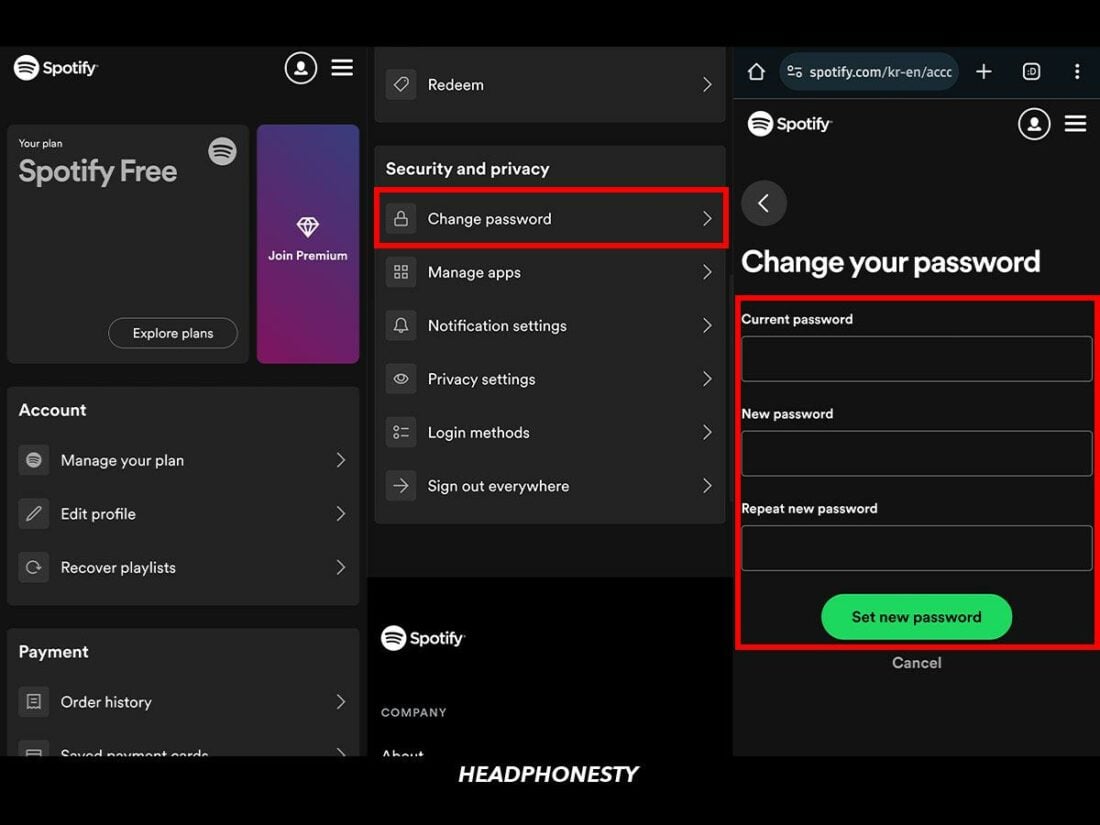
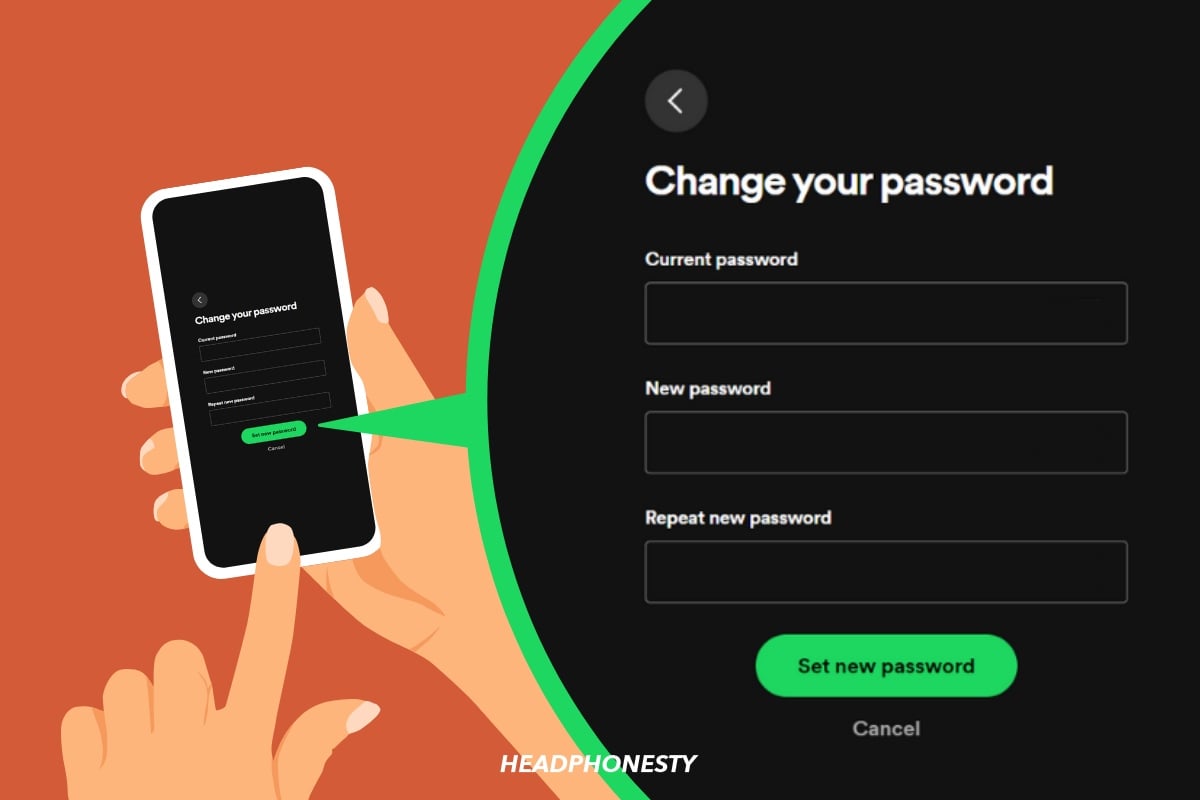
In technical terms, “changing” and “resetting” are distinct actions. Changing a password is a proactive security measure performed while you still have access to your account. It is a best practice recommended by cybersecurity experts to be done every six months. Conversely, “resetting” is a reactive measure used when access has been lost. This process involves a verification loop—usually via email—to prove identity without the original credentials.
Third-Party Integrations: Google, Facebook, and Apple
Many users do not have a “Spotify password” in the traditional sense because they utilize Single Sign-On (SSO) protocols. If you created your account using Facebook, Apple, or Google, your authentication is handled by those platforms. In these instances, resetting your password on Spotify’s website will not work. You must instead navigate to the security settings of the respective third-party provider. Understanding this distinction is the first step in troubleshooting login failures.
The Role of Cached Credentials
One common technical hurdle users face is the “cache loop.” Even after a successful password reset, the Spotify desktop or mobile app may still attempt to log in using “cached” (stored) credentials. This often results in an “incorrect password” error immediately after a reset. Understanding that your hardware stores old data helps in recognizing when a simple logout-and-login isn’t enough, and a full cache clearing may be required.
2. Step-by-Step Recovery: Resetting Your Credentials via Web and Mobile
The most reliable way to reset a Spotify password is through a web browser. While the mobile app provides an interface for music consumption, the core administrative functions of the account are best handled through the web portal to ensure a stable encrypted connection.
Initiating the Reset via the Password Recovery Portal
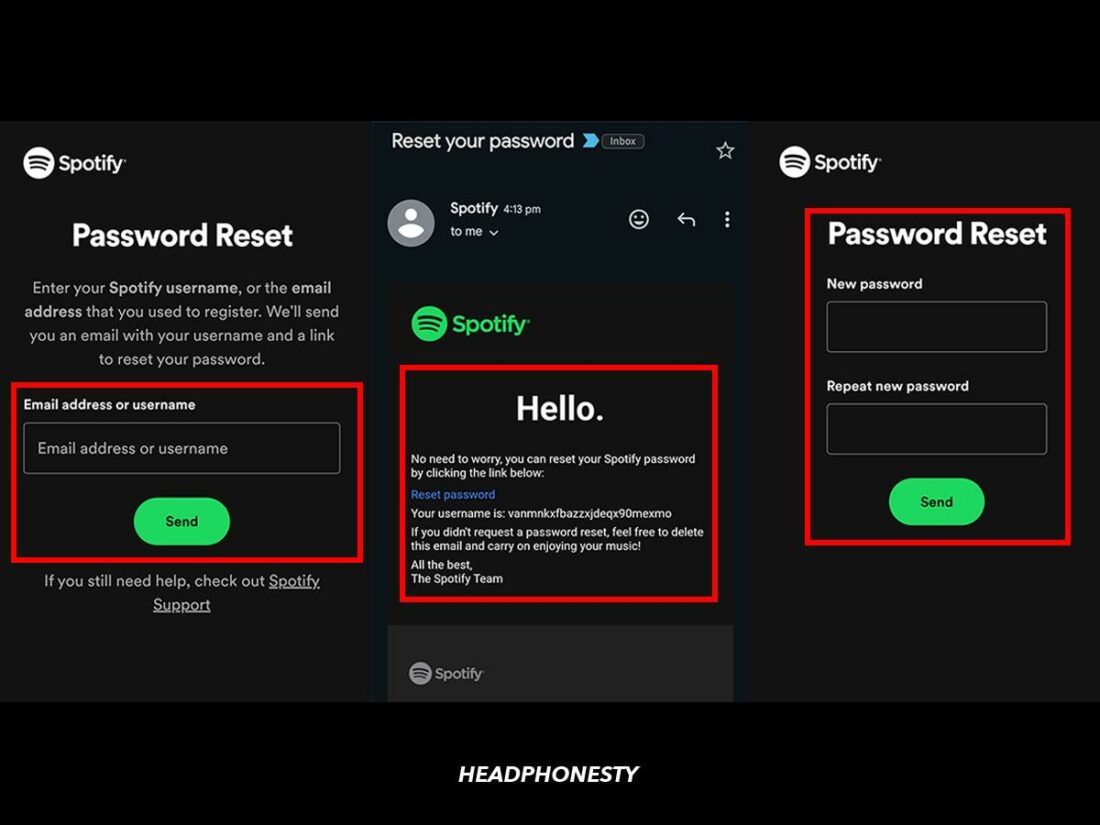
To begin the process, navigate to the official Spotify Password Rest page. You will be prompted to enter either your username or the email address associated with the account.
- Email Verification: Once you submit your details, Spotify’s automated system sends a “Password Reset” link to your inbox.
- The Time-Sensitive Link: It is crucial to act quickly. For security purposes, these links are typically valid for only a short window (usually 1 to 4 hours). If the link expires, you will need to re-initiate the request.
- Choosing a Strong Password: When the reset page opens, you will be asked to enter a new password. Technically, a strong password should be at least 12 characters long, including a mix of uppercase letters, numbers, and special symbols. Avoid using “dictionary words” or personal information like birthdays.
Resetting Password Without App Access
If you are logged out of the mobile app and cannot remember your password, the “Get help logging in” link on the login screen will redirect you to your device’s default mobile browser. Spotify does not process password resets within the app environment to prevent certain types of “man-in-the-middle” attacks and to ensure that the reset occurs over a standard HTTPS protocol managed by their primary web servers.
Managing Accounts Linked to Facebook
If your Spotify account is tethered to Facebook and you wish to move away from this setup or have forgotten your Facebook password, the process is slightly more complex. You cannot “reset” a Facebook-Spotify password through Spotify. You must first recover your Facebook account. Once access is restored, you can go into Spotify’s account settings to set a “device password,” which effectively creates a standalone login for Spotify while maintaining the link to your social profile for playlist sharing.
3. Troubleshooting Common Technical Hurdles in Account Recovery
Even with a streamlined process, technical glitches can occur. From “broken” links to “silent” emails, understanding the backend of how these systems communicate can help you resolve issues without needing to contact human support.
The “Email Never Arrived” Dilemma
The most frequent complaint during a password reset is the failure of the recovery email to arrive. This is rarely a failure of the Spotify server and more often an issue with email filtering.
- Spam and Junk Filters: Modern AI-driven spam filters sometimes misidentify automated recovery emails as “promotions” or “junk.”
- SMTP Delays: In some cases, there is a delay in the Simple Mail Transfer Protocol (SMTP) relay between Spotify’s outbound server and your email provider’s inbound server. Waiting 15 minutes is a standard technical recommendation before requesting a second link.
- Incorrect Alias: If you have multiple email addresses, ensure you are checking the one actually registered with the service. Even a slight typo during the original account creation can prevent you from receiving recovery instructions.
Dealing with “Invalid Link” Errors
If you receive the email but the link leads to an error page, the issue is likely related to your browser’s “cookies” or “cache.” When you click a reset link, Spotify attempts to place a temporary security token in your browser. If your browser is set to “Block All Cookies” or if there is a conflict with a previous session, the link will fail. Switching to an “Incognito” or “Private” window often bypasses these local technical conflicts, allowing the reset to proceed smoothly.
When You No Longer Have Access to the Registered Email
This is the “nuclear option” of account recovery. If the email address associated with your Spotify account is defunct (e.g., an old work email or a deleted service), a standard reset is impossible. In this scenario, you must provide Spotify’s support team with “Proof of Ownership.” This typically involves providing digital receipts from your subscription, the last four digits of the credit card on file, or specific details about your account creation date. This rigorous process is a security feature designed to prevent “social engineering” attacks where hackers try to hijack accounts by claiming they lost access to their email.
4. Strengthening Your Digital Presence: Beyond the Password Reset
A password reset should not be viewed as a one-time chore, but rather as an entry point into a broader strategy of digital hygiene. In the tech world, the “password” is increasingly seen as a weak link. As you re-establish access to your Spotify account, consider implementing these high-level security measures.
Implementing Password Managers
The primary reason people forget passwords is the cognitive load of trying to remember unique strings for dozens of different services. The solution is a dedicated Password Manager (such as Bitwarden, 1Password, or LastPass). These tools use “Zero-Knowledge Encryption” to store your passwords securely. By using a manager, you can set a 20-character randomized password for Spotify that you never have to “remember,” significantly reducing the likelihood of needing a reset in the future while drastically increasing your account’s resistance to “brute force” attacks.
The Evolution of Two-Factor Authentication (2FA)
While Spotify has been slower than other tech giants to implement comprehensive app-based Two-Factor Authentication (like TOTP codes), they do utilize email-based verification for new logins from unrecognized devices. When you reset your password, ensure that the email account you use for recovery is itself protected by 2FA (using an app like Google Authenticator or a hardware key like a YubiKey). Your Spotify account is only as secure as the email account that guards its “Reset” button.
Auditing Third-Party App Permissions
Once you have reset your password and logged back in, it is wise to visit the “Apps” section of your Spotify account dashboard. Over time, we often grant access to third-party tools—playlist organizers, “year-in-review” generators, or smart home integrations. If any of these third-party services suffer a data breach, your Spotify account could be at risk. Revoking access to apps you no longer use is a critical step in minimizing your digital “attack surface.”
The Future: Moving Toward Passkeys
In the broader tech landscape, we are moving toward a “passwordless” future. Technologies like “Passkeys” (backed by the FIDO Alliance) allow users to log in using biometric data (FaceID or fingerprints) or hardware security keys. While Spotify is still refining its implementation of these cutting-edge standards, staying informed about these trends allows you to transition to more secure authentication methods as soon as they become available for your account.
By following this guide, you have not only regained access to your music library but have also gained a deeper understanding of the technical infrastructure that keeps your digital life secure. Account management is a fundamental aspect of the modern tech experience; treating it with professional diligence ensures that your data—and your soundtracks—remain exclusively yours.
aViewFromTheCave is a participant in the Amazon Services LLC Associates Program, an affiliate advertising program designed to provide a means for sites to earn advertising fees by advertising and linking to Amazon.com. Amazon, the Amazon logo, AmazonSupply, and the AmazonSupply logo are trademarks of Amazon.com, Inc. or its affiliates. As an Amazon Associate we earn affiliate commissions from qualifying purchases.